
When people talk about databases in corporate environments, one name comes up more than any other: Microsoft SQL Server.
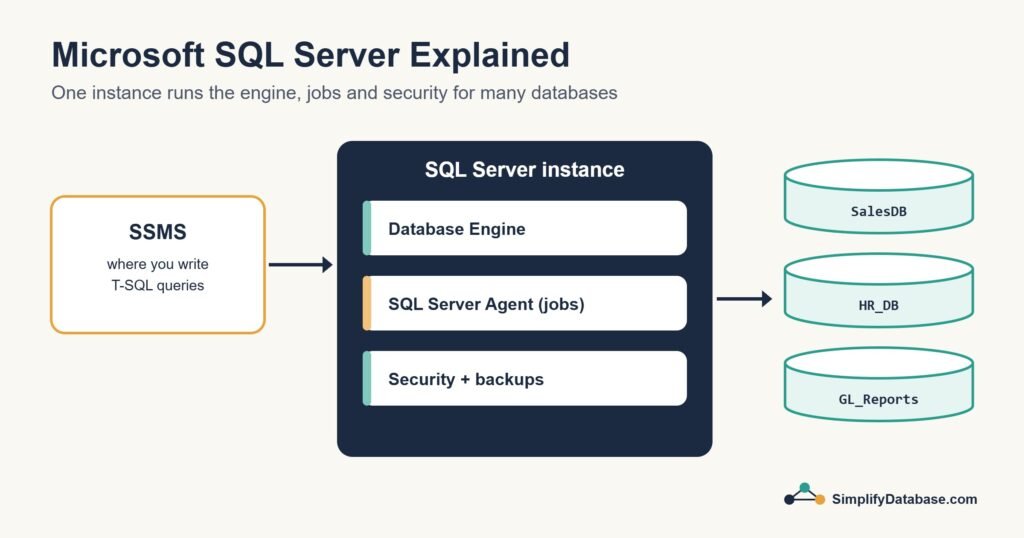
It runs payroll systems, hospital records, banking software, government databases, and enterprise applications around the world. If you work in a large company, there’s a good chance SQL Server is quietly running somewhere in the background.
But what exactly is it? How does it work? And how is it different from MySQL and PostgreSQL?
Let’s find out.
What is Microsoft SQL Server?
Microsoft SQL Server (often called just “SQL Server” or “MSSQL”) is a relational database management system built and sold by Microsoft.
Unlike MySQL and PostgreSQL which are open source and free, SQL Server is a commercial product — you pay for a license to use the full version. It was first released in 1989 and has been a cornerstone of enterprise software ever since.
SQL Server is tightly integrated with the Microsoft ecosystem — Windows, Azure, .NET, Visual Studio, and Power BI all work seamlessly with it. This makes it the natural choice for companies already using Microsoft products.
What is SQL Server Used For?
SQL Server is the database of choice for enterprise applications:
Corporate software — ERP systems (like SAP), HR software, accounting platforms, and internal business tools frequently use SQL Server as their database.
Healthcare — hospital management systems, patient records, and medical billing software often run on SQL Server.
Finance and banking — financial institutions use SQL Server for transaction processing, reporting, and risk management.
Government — government agencies and public sector organizations widely use SQL Server for their databases.
E-commerce at enterprise scale — large retail companies use SQL Server to manage inventory, orders, and customer data.
Business intelligence — SQL Server integrates directly with Microsoft’s BI tools (Power BI, SQL Server Reporting Services) for dashboards and reports.
T-SQL — SQL Server’s Dialect
All relational databases use SQL, but each has its own dialect — a version of SQL with extra features and slightly different syntax.
SQL Server uses T-SQL (Transact-SQL), Microsoft’s extended version of SQL.
Most standard SQL works the same in T-SQL. But T-SQL adds some useful features:
TOP instead of LIMIT:
-- MySQL / PostgreSQL
SELECT * FROM customers LIMIT 10;

-- SQL Server T-SQL
SELECT TOP 10 * FROM customers;
ISNULL function:
-- Replace NULL with a default value
SELECT name, ISNULL(phone, 'No phone') AS phone
FROM customers;
String concatenation:
-- Combine first and last name
SELECT first_name + ' ' + last_name AS full_name
FROM employees;
GETDATE() for current date/time:
SELECT order_id, GETDATE() AS order_time
FROM orders;
Variables:
DECLARE @total INT;
SELECT @total = COUNT(*) FROM orders;
PRINT @total;
T-SQL is powerful and adds procedural programming capabilities to SQL — loops, variables, conditional logic, stored procedures, and more.
SQL Server Key Features
Stored Procedures
Pre-written SQL code saved in the database that can be called by name:
CREATE PROCEDURE GetCustomerOrders @CustomerID INT
AS
BEGIN
  SELECT * FROM orders WHERE customer_id = @CustomerID;
END;

-- Call it:
EXEC GetCustomerOrders @CustomerID = 5;
Stored procedures improve performance and security — the app calls the procedure name instead of sending raw SQL.
Views
Virtual tables based on a query — great for simplifying complex data:
CREATE VIEW ActiveCustomers AS
SELECT id, name, email
FROM customers
WHERE is_active = 1;

-- Use it like a table
SELECT * FROM ActiveCustomers;
SQL Server Agent
A built-in job scheduler that runs tasks automatically — database backups every night, reports every Monday morning, data cleanup every week. No external tools needed.
SQL Server Integration Services (SSIS)
A tool for moving and transforming data between systems — importing from Excel, syncing with other databases, loading data from external sources.
SQL Server Reporting Services (SSRS)
Built-in reporting engine for creating dashboards, charts, and scheduled reports directly from SQL Server data.
Always On Availability Groups
Enterprise-grade high availability — multiple copies of your database across servers, automatic failover if one goes down. No data loss, no downtime.
SQL Server Editions and Pricing
SQL Server comes in several editions at very different price points:
| Edition | Price | Best for |
|---|---|---|
| Express | Free | Learning, small apps, development |
| Developer | Free | Development and testing only |
| Standard | ~$900/year | Small to medium businesses |
| Enterprise | ~$15,000+/year | Large enterprises, mission-critical |
SQL Server Express is the free version — limited to 10GB database size and uses only 1GB RAM, but perfectly adequate for learning and small applications.
SQL Server Developer is the full Enterprise edition available free for development and testing purposes only — not for production use. This is what most developers use to learn SQL Server.
For beginners learning SQL Server, Developer Edition is the one to install — it’s free and has every feature.
SQL Server vs MySQL vs PostgreSQL
| SQL Server | MySQL | PostgreSQL | |
|---|---|---|---|
| Price | Free (Express/Dev) to expensive | Free | Free |
| Operating system | Windows (primary), Linux (2017+) | Cross-platform | Cross-platform |
| Best for | Enterprise, Microsoft stack | Web apps, WordPress | Modern apps, complex queries |
| T-SQL dialect | Yes | No | No |
| BI tools integration | Excellent (Power BI) | Basic | Good |
| Cloud | Azure SQL (native), AWS, GCP | AWS RDS, GCP | Supabase, AWS, GCP |
| Learning curve | Moderate | Easy | Moderate |
| Community | Large (enterprise focus) | Very large | Large and growing |
How to Install SQL Server
Windows (Developer Edition — free):
- Go to microsoft.com/sql-server
- Download SQL Server Developer Edition
- Run the installer — Basic installation takes about 10 minutes
- Download SQL Server Management Studio (SSMS) — the free GUI tool
- Connect SSMS to your local SQL Server instance
Linux (Ubuntu):
curl https://packages.microsoft.com/keys/microsoft.asc | sudo apt-key add -
sudo add-apt-repository "deb [arch=amd64] https://packages.microsoft.com/ubuntu/20.04/mssql-server-2022 focal main"
sudo apt update
sudo apt install mssql-server
sudo /opt/mssql/bin/mssql-conf setup
Cloud — Azure SQL: Microsoft’s cloud SQL Server service. Fully managed, no server to maintain, scales automatically. Free tier available for learning.
SQL Server Management Studio (SSMS)
SSMS is the free official GUI for SQL Server — and it’s excellent. It gives you:
- A visual query editor with syntax highlighting and autocomplete
- Object Explorer to browse databases, tables, and stored procedures
- Query execution plans to understand and optimize performance
- Built-in import/export wizards
- Backup and restore tools
- A job scheduler interface for SQL Server Agent
For beginners on Windows, SSMS is the easiest way to interact with SQL Server.
Should You Learn SQL Server?
Yes, if:
- You work in or want to work in corporate IT, enterprise software, or finance
- Your company or employer uses the Microsoft tech stack
- You want to work with Microsoft Azure
- You’re interested in business intelligence and data reporting
MySQL or PostgreSQL might be better if:
- You’re building web applications
- You’re working on open-source projects
- You’re on a tight budget (SQL Server gets expensive for production)
- You’re using Linux or Mac as your primary development environment
For career purposes: SQL is SQL. Learning SQL Server makes you extremely marketable for corporate roles. Learning MySQL or PostgreSQL makes you marketable for web development and modern tech companies.
Summary
- SQL Server is Microsoft’s enterprise relational database — powerful, feature-rich, and widely used in corporate environments
- It uses T-SQL, a dialect of SQL with extra features like stored procedures, variables, and more
- Available for free (Express and Developer editions) — Developer edition has all Enterprise features
- Deep integration with Microsoft tools: Power BI, Azure, .NET, Visual Studio
- The go-to database for enterprise, healthcare, finance, and government applications
- SSMS is the free official GUI — excellent for beginners on Windows
What’s Next?
👉 Read next: How to Choose the Right Database Server for Your Project
Or compare the options:
👉 MySQL vs PostgreSQL — Which Should You Use?
Published on SimplifyDatabase.com — where databases are explained the easy way.