
MySQL and PostgreSQL are the two most popular open-source relational databases in the world.
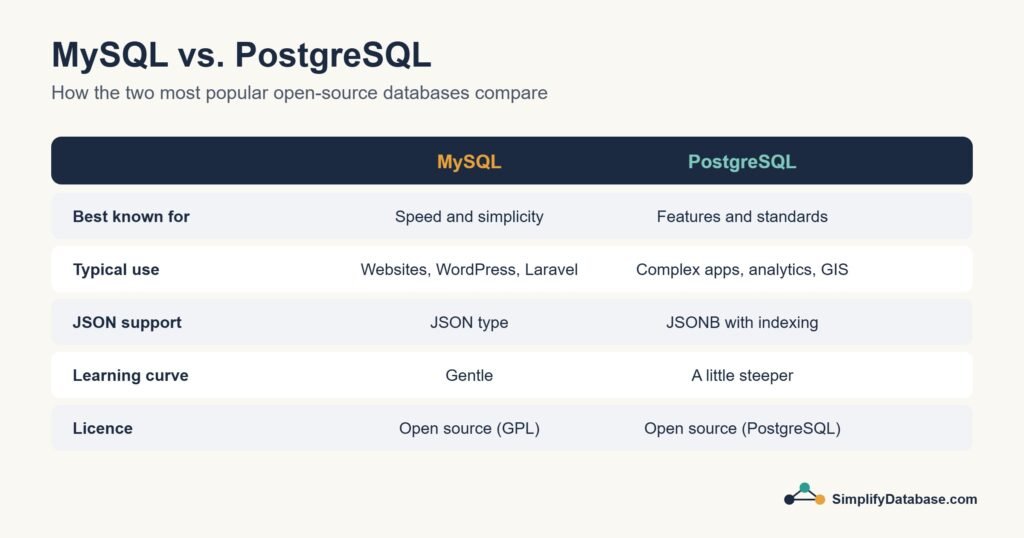
Both store data in tables. Both use SQL. Both are free. Both power some of the biggest websites on the planet.
So what’s actually different — and how do you choose?
This guide cuts through the confusion with a clear, honest comparison.
The One-Line Summary
MySQL is simpler, faster for basic operations, and has the widest hosting support.
PostgreSQL is more feature-rich, more standards-compliant, and better for complex or data-heavy applications.
Neither is objectively better. The right choice depends on what you’re building.
A Quick History
MySQL was created in 1995 and quickly became the database of the early web. Its simplicity and speed made it the default choice for PHP applications — the famous LAMP stack (Linux, Apache, MySQL, PHP) powered most of the early internet. MySQL was acquired by Oracle in 2010.
PostgreSQL was born in 1986 at UC Berkeley as an academic project. It grew slowly but steadily, building a reputation for correctness and advanced features. It’s entirely community-driven — no corporate owner — which many developers appreciate.
Today both are mature, battle-tested, and capable of handling serious workloads.
Feature Comparison
| Feature | MySQL | PostgreSQL |
|---|---|---|
| Price | Free (open source) | Free (open source) |
| Ease of setup | Very easy | Easy |
| SQL compliance | Partial | Very high |
| Performance (simple reads) | Slightly faster | Excellent |
| Performance (complex queries) | Good | Excellent |
| JSON support | Good (since v5.7) | Excellent (JSONB) |
| Full-text search | Basic | Advanced |
| Window functions | Yes (v8+) | Yes |
| Custom data types | Limited | Extensive |
| Geospatial support | Limited | Excellent (PostGIS) |
| Extensions | Limited | Rich ecosystem |
| Replication | Yes | Yes |
| Community size | Very large | Large and growing |
| Hosting support | Near-universal | Good, growing |
| Owned by | Oracle | Community |
Where They’re the Same
Before focusing on differences, it’s worth noting where MySQL and PostgreSQL are identical for most beginners:
- Both use standard SQL —
SELECT,WHERE,JOIN,GROUP BYwork the same in both - Both support transactions, foreign keys, and indexes
- Both have excellent GUIs (MySQL Workbench vs pgAdmin)
- Both have libraries for every major programming language
- Both handle millions of rows without breaking a sweat
- Both are completely free
If you’re just learning SQL, it truly doesn’t matter which one you start with. The SQL you learn in one transfers directly to the other.
Where They Differ — With Real Examples
1. Auto-Increment Syntax
Small but worth knowing:
MySQL:
id INT AUTO_INCREMENT PRIMARY KEY
PostgreSQL:
id SERIAL PRIMARY KEY
-- or in newer versions:
id INT GENERATED ALWAYS AS IDENTITY PRIMARY KEY
2. String Functions
MySQL and PostgreSQL sometimes use different function names for the same operation:
| Task | MySQL | PostgreSQL |
|---|---|---|
| Current date/time | NOW() | NOW() (same) |
| String length | LENGTH() | LENGTH() (same) |
| Substring | SUBSTRING() | SUBSTRING() (same) |
| Concatenate | CONCAT(a, b) | a || b or CONCAT(a, b) |
| Limit rows | LIMIT 10 | LIMIT 10 (same) |
Most common functions are identical. You’ll only notice differences in advanced operations.
3. JSON Handling
MySQL:
SELECT data->'$.name' FROM users;
PostgreSQL:
SELECT data->>'name' FROM users;
-- Also supports powerful JSONB indexing
CREATE INDEX idx_json ON users USING GIN(data);
PostgreSQL’s JSONB is significantly more powerful — it’s indexed, making JSON queries fast even on large tables.
4. Case Sensitivity
By default:
- MySQL — string comparisons are case-insensitive (
'Cairo' = 'cairo'is TRUE) - PostgreSQL — string comparisons are case-sensitive (
'Cairo' = 'cairo'is FALSE)
This catches beginners off guard when switching between the two. PostgreSQL’s behavior is technically more correct per SQL standards.
Performance — Which is Faster?
For simple read operations (SELECT with basic filters), MySQL is traditionally slightly faster.
For complex queries (multiple JOINs, subqueries, aggregations, window functions), PostgreSQL often performs better.
For write-heavy workloads, PostgreSQL’s MVCC (Multi-Version Concurrency Control) handles concurrent writes more elegantly.
In practice, for most applications — especially at beginner and intermediate scale — the performance difference is negligible. Both handle thousands of queries per second on modest hardware. You’ll scale to millions of users before database performance becomes your bottleneck.
Hosting — A Practical Consideration
This is where MySQL has a clear advantage for beginners:
MySQL is supported by virtually every web host on the planet. Shared hosting plans (including Hostinger), WordPress hosts, and budget VPS providers almost always include MySQL.
PostgreSQL has strong cloud support (Supabase, Railway, Neon, AWS RDS, Google Cloud SQL) but is less common on traditional shared hosting plans.
If you’re using Hostinger or another shared host, MySQL is likely already available and configured. PostgreSQL might require a VPS or cloud database service.
Which One Should You Learn First?
Learn MySQL first if:
- You’re using WordPress, Drupal, or any CMS
- You’re on shared hosting (Hostinger, Bluehost, SiteGround, etc.)
- You’re learning PHP development
- You want the largest library of beginner tutorials
- You’re building a simple website or blog
Learn PostgreSQL first if:
- You’re starting a new app with full control over your stack
- You’re learning Python, Node.js, or modern frameworks
- You want to use Supabase (which is built on PostgreSQL)
- You’re interested in data analysis
- You want to learn the most feature-complete SQL implementation
The honest truth: Learn either one and you’ll be 95% prepared for the other. The SQL knowledge transfers completely. You’ll only need to adjust a handful of syntax differences.
Which One Do the Pros Use?
According to the 2024 Stack Overflow Developer Survey:
- PostgreSQL — most used database among professional developers (49%)
- MySQL — second most used (40%)
PostgreSQL has overtaken MySQL in developer preference in recent years — partly due to its features, partly due to tools like Supabase making it very accessible.
But MySQL still powers an enormous portion of the web — particularly the WordPress ecosystem, which is 43% of all websites.
The Verdict
| You’re building… | Use |
|---|---|
| WordPress site | MySQL |
| Simple web app on shared hosting | MySQL |
| New app, full control over stack | PostgreSQL |
| Data analysis project | PostgreSQL |
| App with complex queries | PostgreSQL |
| Mobile app backend | Either |
| Just learning SQL | Either — start with MySQL if on Hostinger |
For SimplifyDatabase.com readers who are on Hostinger: MySQL is already available in your hosting panel. Start there, get comfortable with SQL, then explore PostgreSQL when you’re ready to go deeper.
Summary
- MySQL — simpler, universal hosting support, great for WordPress and web apps
- PostgreSQL — more features, better for complex queries and modern development
- Both are free, both use SQL, both are excellent choices
- SQL knowledge transfers between them — learn one and you know 95% of the other
- PostgreSQL is growing in developer popularity; MySQL still dominates the web
What’s Next?
👉 Read next: Microsoft SQL Server Explained for Beginners
Or learn how to install MySQL on your Hostinger account:
👉 How to Choose the Right Database Server for Your Project
Published on SimplifyDatabase.com — where databases are explained the easy way.