
If MySQL is the most popular database on the web, PostgreSQL is the one developers love most.
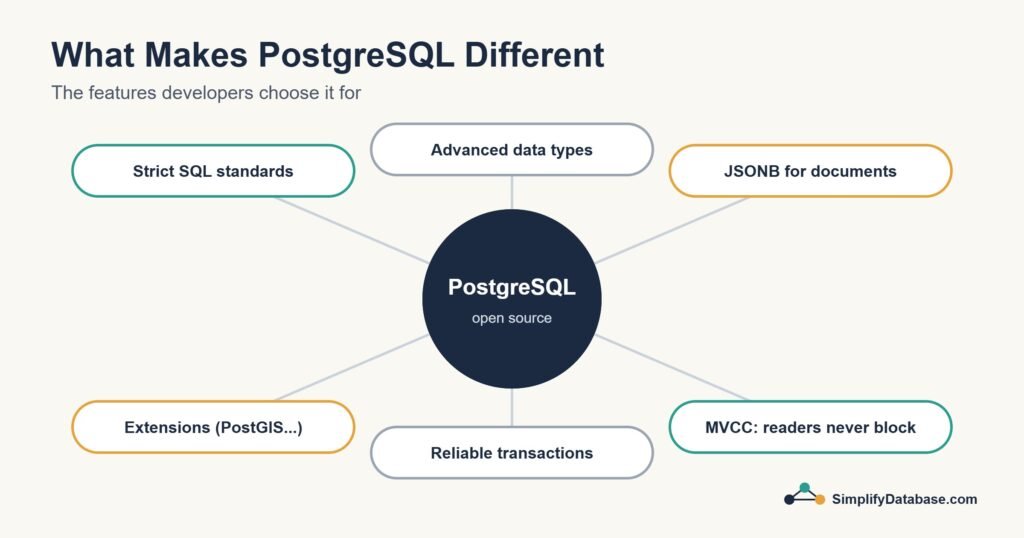
Year after year, PostgreSQL tops the Stack Overflow Developer Survey as the most admired and desired database. It’s used by Instagram, Spotify, Reddit, Twitch, and thousands of startups worldwide.
But what is it? How is it different from MySQL? And when should you use it?
Let’s find out.
What is PostgreSQL?
PostgreSQL (pronounced “post-GRES-Q-L” or just “Postgres”) is a free, open-source relational database management system.
It was born in 1986 at the University of California, Berkeley as a research project called POSTGRES. The name PostgreSQL reflects its SQL support added later. Unlike MySQL, PostgreSQL has never been owned by a corporation — it’s maintained entirely by a global community of volunteers and companies.
PostgreSQL’s motto tells you everything about its philosophy: “The world’s most advanced open-source relational database.”
Where MySQL prioritizes speed and simplicity, PostgreSQL prioritizes correctness, features, and standards compliance. It implements the SQL standard more fully than almost any other database, and adds powerful features that go far beyond basic SQL.
What is PostgreSQL Used For?
PostgreSQL shines in situations that demand reliability, complex queries, and advanced features:
Data-heavy applications — apps that store and query large amounts of structured data with complex relationships.
Data analysis and reporting — PostgreSQL’s advanced query features make it ideal for analysts running complex reports.
Geospatial applications — with the PostGIS extension, PostgreSQL becomes one of the world’s most powerful geographic databases. Used by mapping apps, logistics companies, and governments.
Financial systems — PostgreSQL’s strict data integrity and transaction support make it popular for fintech and banking.
Scientific research — universities and research institutions use PostgreSQL for large, complex datasets.
Modern web apps — startups increasingly choose PostgreSQL for new projects because of its flexibility and feature set.
PostgreSQL vs MySQL — The Key Differences
Both are excellent relational databases. Here’s what sets PostgreSQL apart:
| Feature | PostgreSQL | MySQL |
|---|---|---|
| SQL compliance | Very high | Moderate |
| JSON support | Excellent (JSONB) | Good |
| Full-text search | Built-in, powerful | Basic |
| Custom data types | Yes | Limited |
| Window functions | Full support | Full support (v8+) |
| Geospatial data | PostGIS extension | Limited |
| Performance (reads) | Excellent | Slightly faster for simple reads |
| Performance (writes) | Excellent | Good |
| Community | Volunteer-driven | Oracle-backed |
| License | Fully open source | Open source (with Oracle) |
The short version: PostgreSQL has more features and stricter standards. MySQL is slightly simpler to set up and has a larger hosting footprint.
PostgreSQL in Action — Real Examples
Creating a database and table:
CREATE DATABASE my_app;

CREATE TABLE users (
  id         SERIAL PRIMARY KEY,
  email      VARCHAR(255) UNIQUE NOT NULL,
  username   VARCHAR(50)  UNIQUE NOT NULL,
  created_at TIMESTAMP DEFAULT NOW(),
  is_active  BOOLEAN DEFAULT TRUE
);
Notice SERIAL — PostgreSQL’s way of auto-incrementing IDs (MySQL uses AUTO_INCREMENT). Also TIMESTAMP DEFAULT NOW() automatically stores when the row was created.
Inserting and querying:
INSERT INTO users (email, username)
VALUES ('sara@email.com', 'sara_ahmed');

SELECT username, created_at
FROM users
WHERE is_active = TRUE
ORDER BY created_at DESC;
A more advanced query — window functions:
SELECT
  username,
  created_at,
  RANK() OVER (ORDER BY created_at ASC) AS signup_rank
FROM users;
This ranks every user by when they signed up — something PostgreSQL handles elegantly. Window functions let you calculate rankings, running totals, and moving averages without complex subqueries.
PostgreSQL’s Standout Features
JSONB — Store Flexible Data in a Relational Database
One of PostgreSQL’s most powerful features is JSONB — a way to store JSON data directly in a column with full indexing and querying support.
CREATE TABLE products (
  id         SERIAL PRIMARY KEY,
  name       VARCHAR(200),
  attributes JSONB
);

INSERT INTO products (name, attributes)
VALUES ('Laptop', '{"brand": "Dell", "ram": 16, "storage": 512}');

-- Query inside the JSON
SELECT name, attributes->>'brand' AS brand
FROM products
WHERE attributes->>'ram' = '16';
This gives you the flexibility of a document database inside a relational database — the best of both worlds.
Full-Text Search
PostgreSQL has powerful built-in full-text search — finding documents that contain specific words, ranked by relevance:
SELECT title
FROM articles
WHERE to_tsvector('english', content) @@ to_tsquery('database & beginners');
Custom Data Types
PostgreSQL lets you create your own data types. It also comes with useful built-in types that MySQL lacks:
ARRAY— store a list of values in a single columnUUID— universally unique identifiersINET— store IP addressesINTERVAL— store time periods like “3 days” or “2 hours”
Table Inheritance
PostgreSQL supports table inheritance — a table can inherit columns from a parent table. Useful for complex data models.
Extensions
PostgreSQL’s extension system makes it extremely flexible. Popular extensions:
- PostGIS — geographic objects and spatial queries
- pg_trgm — fuzzy text matching (“did you mean…”)
- uuid-ossp — UUID generation
- timescaledb — time-series data optimization
How to Install PostgreSQL
On your computer: Download the installer from postgresql.org — available for Windows, Mac, and Linux. Comes with pgAdmin (a visual GUI) bundled in.
On Ubuntu/Linux:
sudo apt update
sudo apt install postgresql postgresql-contrib
sudo systemctl start postgresql
Cloud options:
- Supabase — free tier, PostgreSQL with a modern dashboard, very beginner-friendly
- Railway — simple PostgreSQL hosting, generous free tier
- Amazon RDS for PostgreSQL — managed PostgreSQL on AWS
- Neon — serverless PostgreSQL, great free tier
PostgreSQL Tools
pgAdmin — the official GUI for PostgreSQL. Comes with the installer. Visual interface for managing databases, running queries, and viewing data.
DBeaver — free universal database client, works excellently with PostgreSQL.
TablePlus — clean, fast GUI for Mac, Windows, and Linux. Paid but has a free tier.
psql — PostgreSQL’s command-line client. Once you’re comfortable, it’s the fastest way to work:
psql -U postgres -d my_database
When Should You Choose PostgreSQL Over MySQL?
Choose PostgreSQL when:
- You need advanced SQL features (window functions, CTEs, complex joins)
- You’re storing JSON data alongside relational data
- You need full-text search
- You’re building data-heavy or analytics applications
- You want the most SQL-standards-compliant database
- You’re using Supabase or other PostgreSQL-first platforms
Stick with MySQL when:
- You’re using WordPress or another CMS that requires MySQL
- Your hosting provider only supports MySQL (like most shared hosting)
- You’re building a simple website or blog
- You want the largest possible community and tutorial resources
For new projects where you have a choice, PostgreSQL is increasingly the recommended default among experienced developers.
Summary
- PostgreSQL is a free, open-source relational database with a 35+ year history
- It’s the most feature-rich and SQL-standards-compliant database available
- Key standout features: JSONB, full-text search, window functions, extensions, custom types
- Used by Instagram, Reddit, Spotify, and thousands of modern apps
- Ideal for complex applications, data analysis, and projects needing flexibility
- Slightly more complex to set up than MySQL but more powerful for serious work
What’s Next?
👉 Read next: MySQL vs PostgreSQL — Which Should You Use?
Or continue the server series:
👉 Microsoft SQL Server Explained for Beginners
Published on SimplifyDatabase.com — where databases are explained the easy way.