
If you’ve spent any time reading about databases, you’ve seen the name MySQL everywhere.
It powers WordPress. It runs Wikipedia. It’s used by Facebook, Twitter, Netflix, and millions of websites worldwide. MySQL is the most widely used open-source database in the world.
But what exactly is it? How does it work? And should you learn it?
Let’s break it down simply.
What is MySQL?
MySQL (pronounced “My S-Q-L” or “My Sequel”) is a relational database management system — software that stores and manages data in tables.
It was created in 1995 by a Swedish company called MySQL AB, then acquired by Sun Microsystems, and eventually by Oracle Corporation, which maintains it today. Despite being owned by Oracle, MySQL remains free and open source under the GPL license.
The name comes from the co-founder’s daughter, My, combined with SQL — the language used to interact with it.
MySQL does one job and does it extremely well: it stores your data in organized tables, lets you query it with SQL, and handles thousands of requests per second reliably and fast.
What is MySQL Used For?
MySQL is the backbone of the modern web. Here’s where it shows up:
Websites and blogs — WordPress, the platform that powers 43% of all websites, uses MySQL to store every post, page, user, and setting.
E-commerce — Online stores use MySQL to manage products, inventory, orders, and customer data.
Web applications — From simple contact forms to complex SaaS platforms, MySQL stores the data that makes apps work.
Content management systems — Drupal, Joomla, and most CMS platforms use MySQL by default.
Mobile app backends — Many mobile apps store their data in MySQL databases on a server.
The reason MySQL is so popular comes down to four things: it’s free, it’s fast, it’s reliable, and there’s an enormous amount of documentation and community support available.
How MySQL Works
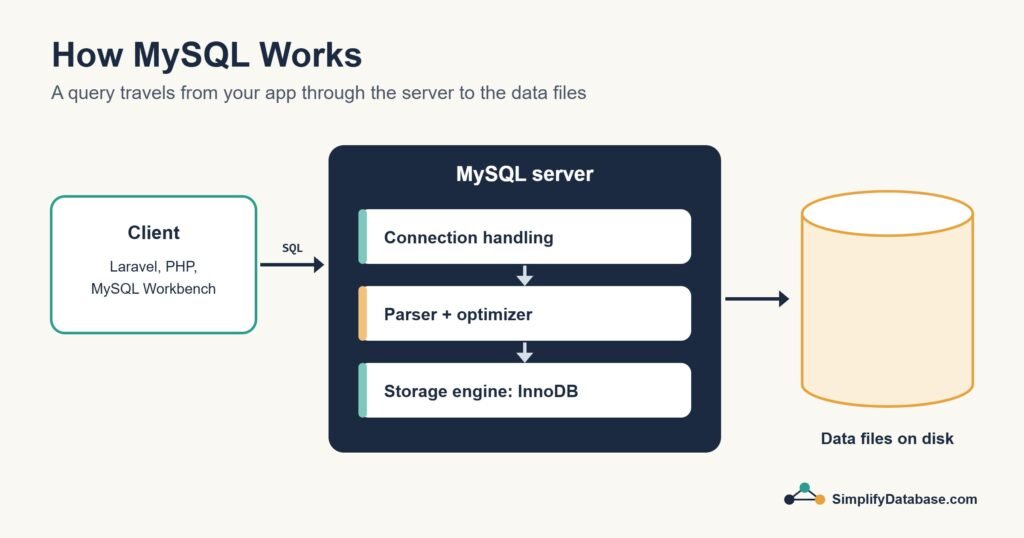
MySQL works as a client-server system.
The MySQL server runs in the background on a machine — your laptop, a VPS, or a cloud server. It listens for incoming connections on a specific port (default: 3306).
The MySQL client is what you use to connect to the server and send queries. This could be:
- A command-line tool (the MySQL shell)
- A visual GUI like MySQL Workbench or phpMyAdmin
- Your application code (using a library like PHP’s PDO, Python’s mysql-connector, or Node’s mysql2)
When a client sends a SQL query, the server processes it, finds the relevant data, and sends back the result.
MySQL in Action — Real Examples
Let’s see what working with MySQL actually looks like.
Creating a database:
CREATE DATABASE my_blog;
USE my_blog;
Creating a table:
CREATE TABLE posts (
  id        INT AUTO_INCREMENT PRIMARY KEY,
  title     VARCHAR(200) NOT NULL,
  content   TEXT,
  author    VARCHAR(100),
  published DATE,
  views     INT DEFAULT 0
);
Inserting data:
INSERT INTO posts (title, content, author, published)
VALUES ('My first post', 'Hello world!', 'Sara', '2024-01-15');
Reading data:
SELECT title, author, published
FROM posts
WHERE views > 100
ORDER BY published DESC;
Updating data:
UPDATE posts SET views = views + 1 WHERE id = 1;
This is standard SQL — the same commands work across MySQL, PostgreSQL, and other relational databases. Learning MySQL means learning SQL, which transfers everywhere.
MySQL Key Features
Auto Increment — MySQL can automatically assign a unique ID to each new row:
id INT AUTO_INCREMENT PRIMARY KEY
Every new row gets the next number automatically. No duplicates, no manual tracking.
Indexes — MySQL can create indexes on columns to make searches much faster:
CREATE INDEX idx_author ON posts(author);
Without an index, MySQL reads every row to find matches. With an index, it jumps directly to the right rows — like a book index vs reading every page.
Transactions — MySQL supports transactions, which group multiple operations so they either all succeed or all fail:
START TRANSACTION;
UPDATE accounts SET balance = balance - 100 WHERE id = 1;
UPDATE accounts SET balance = balance + 100 WHERE id = 2;
COMMIT;
If either update fails, the whole transaction rolls back. Critical for things like bank transfers where you can’t have money disappear.
Foreign Keys — MySQL can enforce relationships between tables:
CREATE TABLE orders (
  id          INT AUTO_INCREMENT PRIMARY KEY,
  customer_id INT,
  amount      DECIMAL(10,2),
  FOREIGN KEY (customer_id) REFERENCES customers(id)
);
This prevents orphaned data — you can’t create an order for a customer that doesn’t exist.
MySQL Storage Engines
One unique thing about MySQL is that it supports different storage engines — different ways of storing data on disk.
The two main ones are:
InnoDB — the default since MySQL 5.5. Supports transactions, foreign keys, and crash recovery. Use this for almost everything.
MyISAM — older engine, faster for read-heavy workloads but no transaction support. Rarely used today.
Unless you have a specific reason, always use InnoDB.
How to Install MySQL
On your computer (local development): The easiest way is to install XAMPP (Windows/Mac/Linux) or MAMP (Mac/Windows) — these bundle MySQL, PHP, and Apache together in one installer. Perfect for beginners.
Alternatively, download MySQL Community Server directly from mysql.com — it’s free.
On a server or VPS:
sudo apt update
sudo apt install mysql-server
sudo mysql_secure_installation
Cloud options:
- Amazon RDS for MySQL — managed MySQL on AWS
- PlanetScale — MySQL-compatible, developer-friendly
- Hostinger — MySQL databases included with most hosting plans (you already have this!)
MySQL Tools — What to Use
MySQL Workbench — official free GUI from Oracle. Visual query builder, schema designer, server administration. Good for beginners who prefer clicking over typing.
phpMyAdmin — web-based interface, often pre-installed on hosting providers including Hostinger. Access your MySQL databases through a browser.
DBeaver — free universal database client that works with MySQL and many other databases. Clean interface, good for beginners.
Command line — once you’re comfortable, the MySQL command line is the fastest way to work:
mysql -u root -p
MySQL Limitations
MySQL is excellent but not perfect:
Full SQL compliance — MySQL doesn’t support every SQL feature. Some advanced SQL (like certain window functions in older versions) isn’t available or behaves differently.
Read-heavy bias — MySQL was originally optimized for reads. For extremely write-heavy workloads, PostgreSQL can sometimes perform better.
JSON support — MySQL added JSON support in version 5.7, but PostgreSQL’s JSON support is more powerful.
Owned by Oracle — some developers are uncomfortable with Oracle’s ownership of MySQL. This is why MariaDB (a community fork of MySQL) exists as an alternative.
None of these are dealbreakers for most use cases. For websites, blogs, small to medium applications, and learning SQL — MySQL is an excellent choice.
Summary
- MySQL is a free, open-source relational database management system
- It’s the most widely used database on the web — powering WordPress, Wikipedia, and millions of apps
- It stores data in tables and uses SQL for all operations
- Key features include auto-increment IDs, indexes, transactions, and foreign keys
- It works as a client-server system — the server stores data, clients query it
- It’s available on your Hostinger account already — no extra setup needed
What’s Next?
👉 Read next: PostgreSQL Explained for Beginners — What Makes It Different?
Or compare them head to head:
👉 MySQL vs PostgreSQL — Which Should You Use?
Published on SimplifyDatabase.com — where databases are explained the easy way.