
You’ve learned how to fetch rows, filter them, and join tables together.
But what if you don’t want individual rows — you want summaries?
- How many orders did each customer place?
- What’s the total revenue per country?
- What’s the average salary by department?
- Which product category has the most items?
This is where GROUP BY and aggregate functions come in. They’re the tools that turn raw data into real insights — and they’re what data analysts use every single day.
Let’s break them down simply.
What Are Aggregate Functions?
An aggregate function takes a group of values and returns a single result.
Think of it like a calculator that works on an entire column at once instead of one cell at a time.
SQL has five core aggregate functions:
| Function | What it does | Example result |
|---|---|---|
COUNT() | Counts the number of rows | 142 orders |
SUM() | Adds up all values | $8,450 total revenue |
AVG() | Calculates the average | $59.50 average order |
MIN() | Finds the smallest value | $5.00 cheapest order |
MAX() | Finds the largest value | $299.00 most expensive order |
Let’s see each one in action.
The Data We’ll Use
Throughout this guide we’ll use a simple orders table from an online store:
| id | customer | country | product | amount |
|---|---|---|---|---|
| 1 | Sara | Egypt | SQL Handbook | 19 |
| 2 | John | UK | SQL Handbook | 19 |
| 3 | Sara | Egypt | DB Cheat Sheet | 9 |
| 4 | Mei | China | SQL Course | 49 |
| 5 | Carlos | Mexico | SQL Handbook | 19 |
| 6 | John | UK | SQL Course | 49 |
| 7 | Aisha | Egypt | DB Cheat Sheet | 9 |
| 8 | Mei | China | SQL Handbook | 19 |
COUNT — How Many Rows?
COUNT counts rows. It’s the most used aggregate function.
How many total orders do we have?
SELECT COUNT(*) FROM orders;
Result: 8
The * means “count all rows regardless of content.” You can also count a specific column — which skips NULL values:
SELECT COUNT(amount) FROM orders;
Count orders per country:
SELECT country, COUNT(*) AS total_orders
FROM orders
GROUP BY country;
Result:
| country | total_orders |
|---|---|
| Egypt | 3 |
| UK | 2 |
| China | 2 |
| Mexico | 1 |
This is the real power — COUNT alone gives you one number, but paired with GROUP BY it breaks that number down by category.
SUM — What’s the Total?
SUM adds up all values in a column.
What’s the total revenue across all orders?
SELECT SUM(amount) AS total_revenue FROM orders;
Result: 192
Total revenue per country:
SELECT country, SUM(amount) AS total_revenue
FROM orders
GROUP BY country
ORDER BY total_revenue DESC;
Result:
| country | total_revenue |
|---|---|
| China | 68 |
| Egypt | 37 |
| UK | 68 |
| Mexico | 19 |
AVG — What’s the Average?
AVG calculates the mean value of a column.
What’s the average order amount?
SELECT AVG(amount) AS avg_order FROM orders;
Result: 24.00
Average order amount per country:
SELECT country, AVG(amount) AS avg_order
FROM orders
GROUP BY country;
Result:
| country | avg_order |
|---|---|
| Egypt | 12.33 |
| UK | 34.00 |
| China | 34.00 |
| Mexico | 19.00 |
MIN and MAX — Smallest and Largest
MIN finds the lowest value. MAX finds the highest.
What’s the cheapest and most expensive order?
SELECT MIN(amount) AS cheapest, MAX(amount) AS most_expensive
FROM orders;
Result:
| cheapest | most_expensive |
|---|---|
| 9 | 49 |
Most expensive order per country:
SELECT country, MAX(amount) AS top_order
FROM orders
GROUP BY country;
Result:
| country | top_order |
|---|---|
| Egypt | 19 |
| UK | 49 |
| China | 49 |
| Mexico | 19 |
GROUP BY — The Engine Behind It All
You’ve been using GROUP BY throughout this article. Now let’s understand exactly what it does.
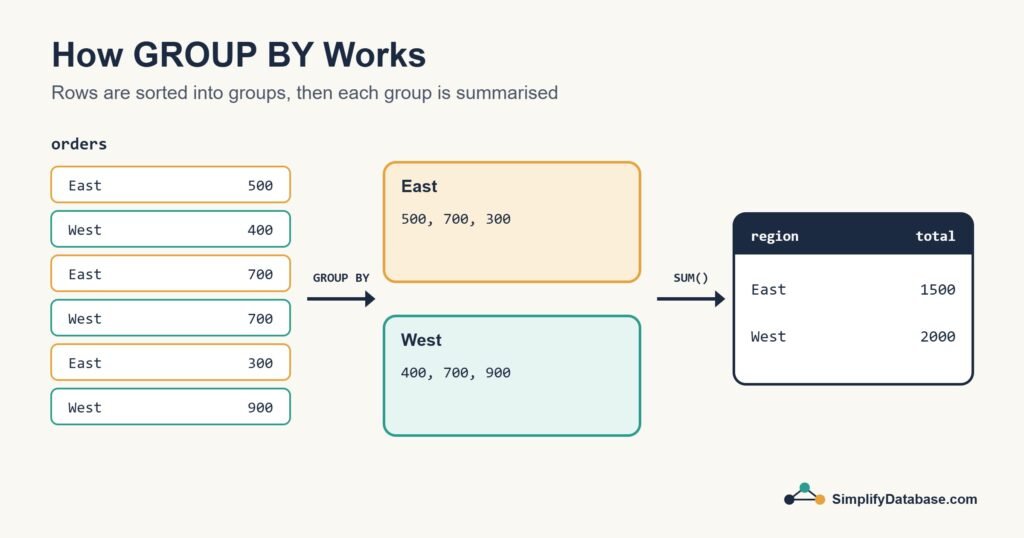
GROUP BY groups rows that share the same value in a column — then aggregate functions run on each group separately.
Without GROUP BY, SUM(amount) adds up everything into one number. With GROUP BY country, it adds up the amounts within each country separately.
The basic pattern is always:
SELECT group_column, AGGREGATE(value_column)
FROM table
GROUP BY group_column;
You can group by multiple columns too:
SELECT country, product, COUNT(*) AS times_sold
FROM orders
GROUP BY country, product
ORDER BY country;
Result:
| country | product | times_sold |
|---|---|---|
| China | SQL Course | 1 |
| China | SQL Handbook | 1 |
| Egypt | DB Cheat Sheet | 2 |
| Egypt | SQL Handbook | 1 |
| Mexico | SQL Handbook | 1 |
| UK | SQL Course | 1 |
| UK | SQL Handbook | 1 |
Now you can see exactly which product sells in which country.
Combining Multiple Aggregate Functions
You’re not limited to one aggregate function per query. Use as many as you need:
SELECT
  country,
  COUNT(*) AS total_orders,
  SUM(amount) AS total_revenue,
  AVG(amount) AS avg_order,
  MAX(amount) AS biggest_order
FROM orders
GROUP BY country
ORDER BY total_revenue DESC;
Result:
| country | total_orders | total_revenue | avg_order | biggest_order |
|---|---|---|---|---|
| China | 2 | 68 | 34.00 | 49 |
| UK | 2 | 68 | 34.00 | 49 |
| Egypt | 3 | 37 | 12.33 | 19 |
| Mexico | 1 | 19 | 19.00 | 19 |
One query. A complete business summary by country. This is exactly the kind of report that data analysts build every day.
HAVING — Filtering After Grouping
You already know WHERE — it filters rows before grouping.
But what if you want to filter after grouping? For example: show only countries with more than 1 order?
That’s what HAVING is for.
SELECT country, COUNT(*) AS total_orders
FROM orders
GROUP BY country
HAVING COUNT(*) > 1;
Result:
| country | total_orders |
|---|---|
| Egypt | 3 |
| UK | 2 |
| China | 2 |
Mexico disappears — it only has 1 order.
WHERE vs HAVING — the simple rule:
WHEREfilters individual rows before groupingHAVINGfilters groups after grouping
You can use both in the same query:
SELECT country, SUM(amount) AS total_revenue
FROM orders
WHERE product != 'DB Cheat Sheet'
GROUP BY country
HAVING SUM(amount) > 20
ORDER BY total_revenue DESC;
This query:
- Excludes “DB Cheat Sheet” orders (
WHERE) - Groups remaining orders by country (
GROUP BY) - Keeps only countries with revenue over $20 (
HAVING) - Sorts by revenue highest to lowest (
ORDER BY)
The ORDER of Clauses in SQL
One thing that trips up beginners: SQL clauses must appear in a specific order. Here’s the full sequence:
SELECT   -- what columns to show
FROM     -- which table
WHERE    -- filter rows (before grouping)
GROUP BY -- group the rows
HAVING   -- filter groups (after grouping)
ORDER BY -- sort the results
LIMIT    -- how many rows to return
You don’t need all of them every time — but when you use them, they must be in this order.
A Real-World Practice Exercise
Try this in SQLiteOnline.com (free, no signup):
Create this table and data:
CREATE TABLE sales (
  id INTEGER,
  salesperson TEXT,
  region TEXT,
  amount INTEGER
);

INSERT INTO sales VALUES
(1, 'Ahmed', 'North', 500),
(2, 'Sara', 'South', 300),
(3, 'Ahmed', 'North', 700),
(4, 'Mei', 'East', 450),
(5, 'Sara', 'South', 600),
(6, 'Mei', 'East', 800),
(7, 'Ahmed', 'North', 200),
(8, 'Sara', 'South', 400);
Then answer these questions using SQL:
- What is the total sales amount per salesperson?
- What is the average sale per region?
- Which salesperson has the highest total sales?
- Which regions have total sales above 1000?
Try writing each query before scrolling to check. The exercise will make GROUP BY stick permanently.
Summary
Here’s everything you learned in this guide:
| Concept | What it does |
|---|---|
COUNT() | Counts the number of rows |
SUM() | Adds up all values in a column |
AVG() | Returns the average value |
MIN() | Returns the smallest value |
MAX() | Returns the largest value |
GROUP BY | Groups rows by a column so aggregates run per group |
HAVING | Filters groups after GROUP BY (like WHERE but for groups) |
These tools transform raw data into real business intelligence. Once you’re comfortable with them, you can answer almost any “how many”, “how much”, and “what’s the average” question from any dataset.
What’s Next?
You’ve now covered the core of SQL. The next step is learning how to design tables that keep your data clean.
👉 Read next: Database Normalization Explained Simply: 1NF, 2NF and 3NF
Or revisit the previous lesson:
👉 SQL JOINs Explained Simply — Connecting Tables for Beginners
Published on SimplifyDatabase.com — where databases are explained the easy way.