
Not all databases are the same.
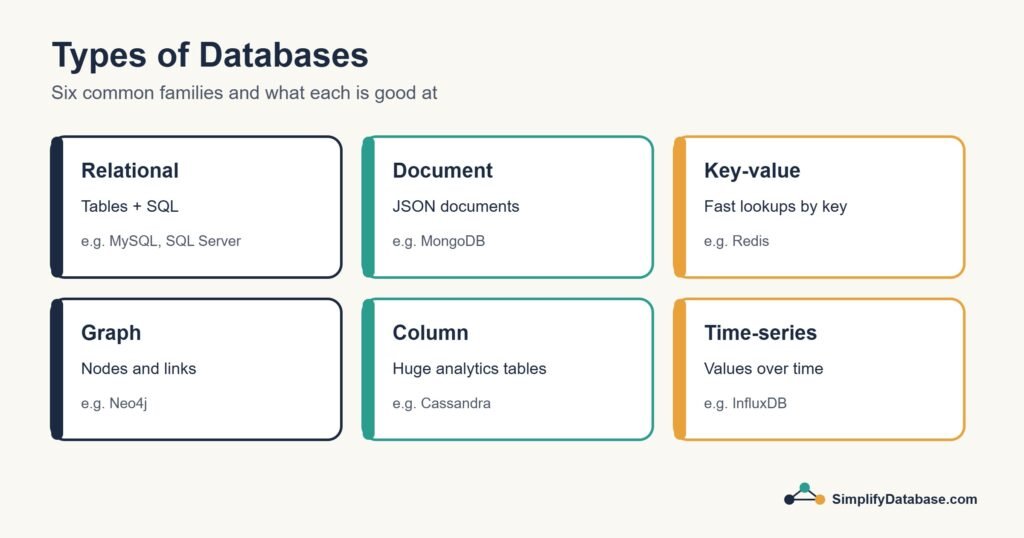
Just like there are different types of vehicles — cars, trucks, motorcycles, buses — there are different types of databases, each built for a specific purpose.
Choosing the wrong type of database for your project is like using a truck to deliver a single letter. It works, technically. But it’s the wrong tool.
In this guide, I’ll explain every major type of database in plain English, with real-world examples of where each one is used. By the end, you’ll understand what makes each type unique — and why it exists.
1. Relational Databases (SQL)
The most common type. Start here.
A relational database stores data in tables — rows and columns, just like a spreadsheet. What makes it “relational” is that tables can be connected to each other through shared columns.
For example, a customers table connects to an orders table through a customer_id column. This relationship lets you ask questions that span multiple tables in a single query.
You communicate with a relational database using SQL (Structured Query Language).
Real-world examples:
- A bank storing accounts, transactions, and customer details
- An online store managing products, orders, and customers
- A hospital tracking patients, doctors, and appointments
Popular relational databases:
- MySQL — the most widely used, powers millions of websites
- PostgreSQL — powerful and open source, loved by developers
- Microsoft SQL Server — common in large enterprises
- SQLite — lightweight, used in mobile apps and small projects
Best for: structured data with clear relationships, applications that need consistency and accuracy, anything where data integrity matters.
2. NoSQL Databases
Flexible databases for data that doesn’t fit neatly into tables.
NoSQL stands for “Not only SQL.” These databases don’t use tables and rows. Instead, they store data in more flexible formats — perfect for data that changes shape frequently or doesn’t have a fixed structure.
There are four main subtypes of NoSQL databases:
Document Databases
Store data as documents — similar to JSON files. Each document can have a different structure, which makes them very flexible.
Example: A user profile might have a name and email. Another profile might have a name, email, phone number, and three addresses. In a relational database this gets complicated. In a document database, each profile is just a flexible document.
Real-world use: Content management systems, user profiles, product catalogs Popular options: MongoDB, Couchbase, Firestore
Key-Value Databases
The simplest type of NoSQL. Data is stored as pairs — a unique key and its value. Think of it like a dictionary.
Example: "user_123_session" → "logged_in: true, last_seen: 5 mins ago"
Real-world use: Caching (storing temporary data for speed), session management, shopping carts Popular options: Redis, DynamoDB, Memcached
Column-Family Databases
Store data in columns rather than rows. Sounds similar to relational databases but works very differently — optimized for reading and writing massive amounts of data across many servers.
Real-world use: Analytics at huge scale, IoT sensor data, time-series data Popular options: Apache Cassandra, HBase
Graph Databases
Store data as nodes (things) and edges (relationships between things). Perfect when the relationships between data are just as important as the data itself.
Example: On Facebook, you are a node. Your friends are nodes. The friendship between you is an edge. Finding friends-of-friends or detecting social patterns is what graph databases do brilliantly.
Real-world use: Social networks, fraud detection, recommendation engines Popular options: Neo4j, Amazon Neptune
3. Cloud Databases
Databases that live on the internet instead of a physical server.
A cloud database is not a completely different type — it’s more about where the database lives. Instead of running on a server you own and manage, it runs on infrastructure provided by companies like Amazon, Google, or Microsoft.
Why this matters:
- No hardware to buy or maintain
- Scale up instantly when you need more capacity
- Pay only for what you use
- Access from anywhere in the world
- Automatic backups and security
Real-world examples:
- A startup that doesn’t want to manage its own servers
- An app that needs to handle traffic spikes (like a flash sale)
- A global team that needs the same database accessible from multiple countries
Popular cloud databases:
- Amazon RDS — managed relational database on AWS
- Google Cloud SQL — managed MySQL/PostgreSQL on Google Cloud
- Supabase — open source, developer-friendly cloud database
- PlanetScale — cloud MySQL built for massive scale
- Firebase — Google’s real-time cloud database, popular for mobile apps
4. In-Memory Databases
Databases that store data in RAM instead of on disk — blazing fast.
Traditional databases store data on a hard drive. Reading from a hard drive takes time. An in-memory database stores everything in RAM (your computer’s working memory), which is many times faster.
The tradeoff: RAM is expensive and data can be lost if the server restarts (though modern in-memory databases have ways to handle this).
Real-world use:
- Caching — storing the results of expensive queries so they load instantly next time
- Real-time leaderboards in games
- Live session data for millions of users
- Stock price feeds that update thousands of times per second
Popular options: Redis, Memcached, VoltDB
Real-world example: When you visit a popular website, it would be too slow to query the database for every single page load. So the site uses an in-memory database like Redis to cache common results — your feed loads in milliseconds because the data is already sitting in RAM waiting for you.
5. Time-Series Databases
Databases optimized for data that changes over time.
A time-series database is designed specifically for data that is recorded at regular time intervals — temperature readings every minute, server CPU usage every second, stock prices every millisecond.
Regular relational databases can technically store this data, but time-series databases are optimized to write and read it much faster, and they include built-in tools for time-based analysis.
Real-world use:
- IoT sensors (temperature, humidity, motion)
- Server and application monitoring
- Financial market data
- Fitness tracker data (heart rate, steps per hour)
Popular options: InfluxDB, TimescaleDB, Prometheus
6. Object-Oriented Databases
Databases that store data the same way programming languages do.
In object-oriented programming, data is organized into “objects” — a car object might have properties like color, model, and speed, plus actions like accelerate and brake.
Object-oriented databases store these objects directly, without translating them into tables first. This makes them a natural fit for complex applications written in object-oriented languages.
Real-world use: Engineering and design software, CAD systems, complex scientific applications Popular options: db4o, ObjectDB
In practice, most developers use relational or NoSQL databases and handle the translation in their code. Pure object-oriented databases are less common today.
SQL vs NoSQL — Which is Better?
This is the most common question when learning about database types. The honest answer: neither is better. They’re built for different things.
| SQL (Relational) | NoSQL | |
|---|---|---|
| Data structure | Fixed tables and columns | Flexible — documents, key-value, graphs |
| Best for | Structured, consistent data | Unstructured or rapidly changing data |
| Scaling | Vertical (bigger server) | Horizontal (more servers) |
| Consistency | Very strong | Varies by type |
| Learning curve | Moderate | Varies by type |
| Examples | MySQL, PostgreSQL | MongoDB, Redis, Cassandra |
Most real-world applications actually use both — a relational database for core business data and a NoSQL database (often Redis) for caching and speed.
Which Type Should a Beginner Learn?
Start with relational databases.
Here’s why:
- They’re the most widely used type in the world
- SQL is a transferable skill — learn it once, use it everywhere
- They’re the foundation of most web apps, business software, and data analysis
- Understanding relational databases makes every other type easier to learn
Once you’re comfortable with SQL and relational databases, exploring NoSQL becomes much easier because you already understand the problem they’re solving.
Recommended starting point: MySQL or PostgreSQL — both are free, widely documented, and used by millions of companies worldwide.
Summary
Here’s a quick reference for every database type covered:
| Type | Best For | Popular Options |
|---|---|---|
| Relational (SQL) | Structured data, business apps | MySQL, PostgreSQL, SQLite |
| Document (NoSQL) | Flexible data, content, profiles | MongoDB, Firestore |
| Key-Value (NoSQL) | Caching, sessions, speed | Redis, DynamoDB |
| Column-Family (NoSQL) | Massive scale analytics | Cassandra, HBase |
| Graph (NoSQL) | Relationships, social networks | Neo4j, Neptune |
| Cloud | Managed, scalable, no hardware | Supabase, Firebase, RDS |
| In-Memory | Real-time speed, caching | Redis, Memcached |
| Time-Series | Time-stamped data, IoT, monitoring | InfluxDB, TimescaleDB |
What’s Next?
Now that you understand the landscape of databases, it’s time to start working with one.
👉 Read next: SQL for Complete Beginners — Your First Queries Explained
Or go back to the foundation:
👉 What is a Database? Explained Simply
Published on SimplifyDatabase.com — where databases are explained the easy way.