
If you’ve ever worked with data, you’ve probably used Excel. It’s familiar, visual, and gets the job done for a lot of tasks.
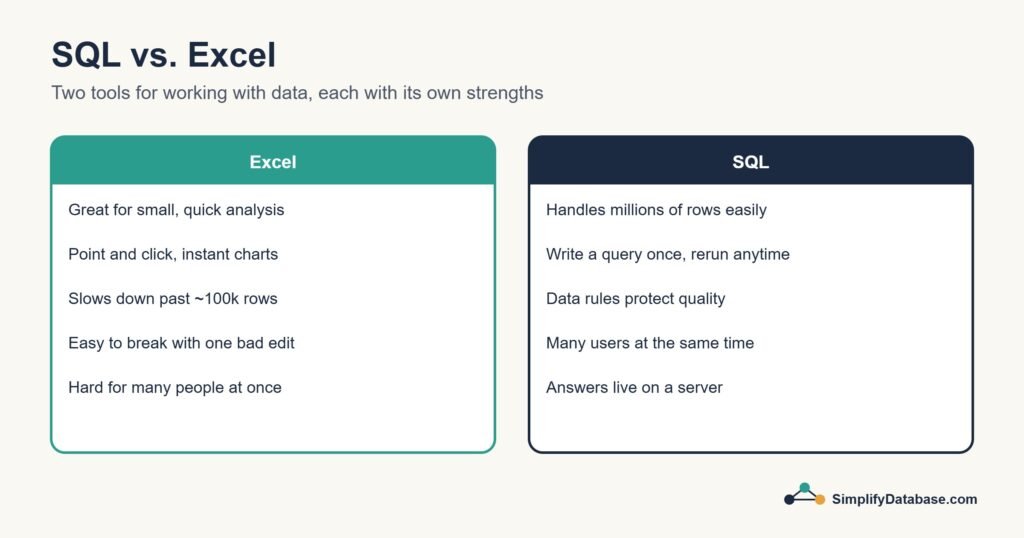
But then someone mentions SQL — and suddenly you wonder: do I need to learn this too? What does SQL do that Excel can’t? Are they even that different?
Great questions. And by the end of this article, you’ll know exactly what each tool is good for, where each one falls short, and which one makes sense for you to learn right now.
The Simple Answer First
Excel is a spreadsheet tool. You see your data, click on cells, drag formulas, and build charts manually. It’s designed for humans to interact with directly.
SQL is a language for talking to a database. You write instructions, and the database does the work — finding, filtering, and summarizing data at any scale.
They both work with data. But they solve very different problems.
What Excel is Great At
Let’s be fair — Excel is genuinely powerful for many things:
- Small to medium datasets — up to tens of thousands of rows, Excel is fast and easy
- Quick calculations — SUM, AVERAGE, IF formulas are instant to write
- Visual formatting — color-code cells, build charts, create dashboards with drag and drop
- One-off analysis — need a quick answer right now? Excel is faster to open and explore
- Sharing with non-technical people — almost everyone knows how to open a spreadsheet
- Pivot tables — summarizing data without writing a single line of code
If you’re a small business owner tracking monthly expenses, a teacher recording student grades, or a freelancer managing client invoices — Excel is probably all you need.
Where Excel Breaks Down
Excel starts struggling the moment your data gets serious:
Too many rows — Excel has a hard limit of 1,048,576 rows per sheet. Sounds like a lot until you’re working with website traffic logs, sales transactions, or customer records at scale. Databases handle billions of rows without breaking a sweat.
Speed — open an Excel file with 500,000 rows and try filtering it. You’ll wait. A SQL query on the same data? Done in milliseconds.
Multiple tables — connecting two Excel sheets together is painful. You end up copy-pasting, using VLOOKUP (which breaks constantly), or manually matching rows. SQL was literally designed to connect tables — it takes one line.
Collaboration — two people editing the same Excel file at the same time is a nightmare. Databases handle hundreds of simultaneous users with no conflict.
Automation — Excel requires a human to open it and run things. SQL queries run automatically, on a schedule, inside apps, without anyone clicking anything.
Data integrity — in Excel, anyone can accidentally delete a row, overwrite a formula, or paste data in the wrong column. Databases have rules that prevent bad data from being entered at all.
What SQL is Great At
SQL shines everywhere Excel struggles:
- Large datasets — millions or billions of rows, no problem
- Connecting multiple tables — join customer data with order data with product data in one query
- Consistency and accuracy — the same query always returns the same result
- Automation — queries run inside apps, on schedules, without human involvement
- Speed — filter, sort, and summarize massive datasets in seconds
- Teamwork — multiple people query the same database simultaneously without conflicts
Side-by-Side Comparison
| Excel | SQL | |
|---|---|---|
| Best for | Small data, manual analysis | Large data, automated systems |
| Row limit | ~1 million | Billions |
| Speed on large data | Slow | Very fast |
| Connecting tables | Difficult (VLOOKUP) | Built-in (JOIN) |
| Collaboration | Limited | Designed for it |
| Automation | Limited | Fully supported |
| Learning curve | Easy to start | Easy to start, deeper ceiling |
| Who uses it | Everyone | Developers, analysts, data teams |
| Works inside apps | No | Yes |
| Visual and clickable | Yes | No — text-based |
A Real Example: The Same Task in Both
Let’s say you have a list of 10,000 orders and you want to find the total revenue per country, sorted highest to lowest.
In Excel:
- Open the file (wait for it to load)
- Click Insert → PivotTable
- Drag “country” to rows, “amount” to values
- Change value setting to Sum
- Sort manually by the total column
That works — but it takes several steps, it’s manual, and you’d have to redo it every time the data updates.
In SQL:
SELECT country, SUM(amount) AS total_revenue
FROM orders
GROUP BY country
ORDER BY total_revenue DESC;
Four lines. Runs in milliseconds. Works on 10 rows or 10 million rows. Run it again tomorrow and it automatically includes new orders.
Do SQL and Excel Ever Work Together?
Yes — actually all the time. They’re not enemies. Many data professionals use both:
- They store and process data in a database using SQL
- They export the summarized results into Excel for charts, reports, or sharing with colleagues who don’t know SQL
SQL handles the heavy lifting. Excel handles the presentation.
Which One Should You Learn First?
It depends on what you’re trying to do:
Learn Excel first if:
- You’re in a non-technical role (HR, finance, marketing, operations)
- You work with small datasets that fit in a spreadsheet
- Your job already uses Excel heavily
- You need charts, visual reports, or formatted outputs
Learn SQL first if:
- You want to work in data analysis, data science, or software development
- You work with large datasets or databases at your job
- You want to build apps or automate data tasks
- You’re looking to switch careers into tech
Learn both if:
- You want to be a data analyst — SQL + Excel is the single most common skill combination on data job listings
The good news: if you already know Excel, SQL will feel familiar. You’re already thinking in rows, columns, and filters. SQL just gives you more power with less clicking.
How Long Does SQL Take to Learn?
This is where people are often surprised. The basics of SQL — the commands you’ll use every day — can be learned in a weekend. Seriously.
The five core commands (SELECT, WHERE, ORDER BY, GROUP BY, JOIN) cover the vast majority of real-world SQL work. Once those click, everything else builds naturally.
Excel took you time to learn too — you just forgot because it was years ago.
Summary
Here’s the honest bottom line:
Excel is the right tool for visual, manual, small-scale data work. It’s approachable, widely understood, and great for one-off analysis and reports.
SQL is the right tool when your data is large, lives in a database, needs to connect across multiple tables, or runs automatically inside an application.
They’re complementary, not competing. The most versatile data professionals know both — and knowing SQL on top of Excel makes you significantly more valuable in almost any industry.
What’s Next?
Now that you know the difference, why not see SQL in action?
👉 Read next: SQL for Complete Beginners — Your First Queries Explained
Or if you want to understand how databases are structured first:
👉 What is a Database? Explained Simply
Published on SimplifyDatabase.com — where databases are explained the easy way.