
For most people learning SQL, JOINs are the first real wall. Up to now everything happened in one table. Then suddenly the data you need is spread over two or three tables, and the queries start to look scary.
They don’t need to be. A JOIN does one simple thing: it puts matching rows from two tables side by side. In this guide we’ll build that idea up with three tiny tables, the real result of every query, and the mistakes I see beginners (and some experienced developers) make most often.
Quick answer: what is a SQL JOIN?
A JOIN combines rows from two tables using a column they share, such as orders.customer_id = customers.id.INNER JOIN keeps only rows that match in both tables.LEFT JOIN keeps every row from the first table, with empty (NULL) values where there’s no match.RIGHT JOIN and FULL JOIN are rarer variations of the same idea.
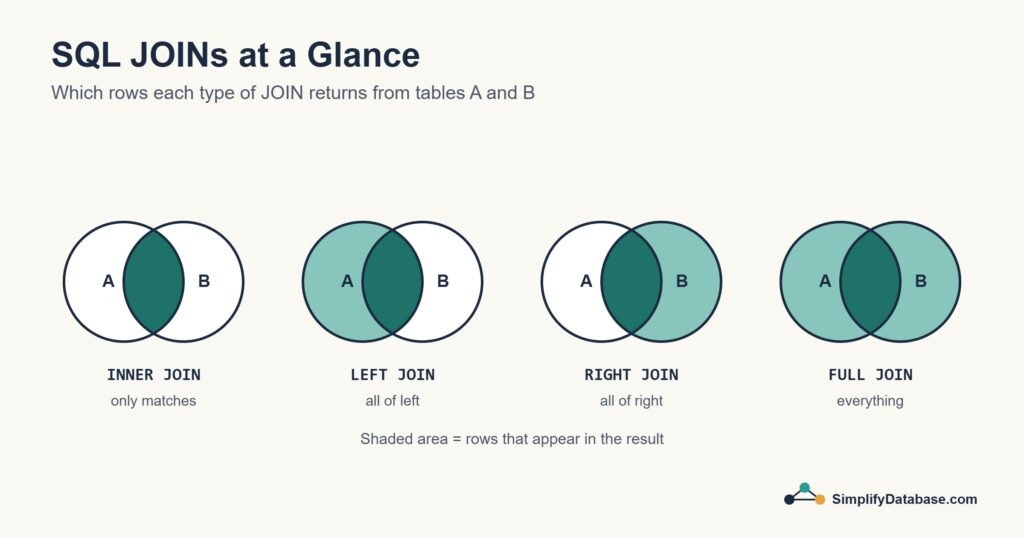
Table of Contents
Why Do We Need JOINs?
A well-designed database doesn’t keep everything in one huge table. It splits the data so each fact is stored once: customers in one table, products in another, orders in a third. (Database Normalization explains why.) Here’s a tiny online shop:
customers
| id | name | country |
|---|---|---|
| 1 | Sara Ahmed | Egypt |
| 2 | John Smith | UK |
| 3 | Mei Lin | China |
products
| id | product_name | category |
|---|---|---|
| 1 | SQL Handbook | Books |
| 2 | DB Cheat Sheet | Downloads |
| 3 | SQL Course | Courses |
orders
| id | customer_id | product_id | amount |
|---|---|---|---|
| 1 | 1 | 1 | 19.00 |
| 2 | 1 | 2 | 9.00 |
| 3 | 2 | 1 | 19.00 |
| 4 | NULL | 3 | 49.00 |
Look at the orders table. It doesn’t store the customer’s name, only customer_id, a number that points to a row in customers. Order 1 belongs to customer 1, Sara. That pointer is called a foreign key (Primary Keys vs Foreign Keys explains it properly).
Two details to notice, because they’ll matter later: Mei Lin hasn’t ordered anything yet, and order 4 was a guest checkout, so it has no customer at all.
Now the question: “show me each order with the customer’s name”. Neither table can answer it alone. We need to join them.
Set it up yourself
Run this once in SQL Server, MySQL or PostgreSQL, then type each example as you read:
CREATE TABLE customers (
    id      INT PRIMARY KEY,
    name    VARCHAR(100) NOT NULL,
    country VARCHAR(50)  NOT NULL
);

CREATE TABLE products (
    id           INT PRIMARY KEY,
    product_name VARCHAR(100) NOT NULL,
    category     VARCHAR(50)  NOT NULL
);

CREATE TABLE orders (
    id          INT PRIMARY KEY,
    customer_id INT,               -- empty for guest orders
    product_id  INT NOT NULL,
    amount      DECIMAL(10,2) NOT NULL,
    CONSTRAINT fk_orders_customers FOREIGN KEY (customer_id) REFERENCES customers (id),
    CONSTRAINT fk_orders_products  FOREIGN KEY (product_id)  REFERENCES products (id)
);

INSERT INTO customers (id, name, country) VALUES
    (1, 'Sara Ahmed', 'Egypt'),
    (2, 'John Smith', 'UK'),
    (3, 'Mei Lin',    'China');

INSERT INTO products (id, product_name, category) VALUES
    (1, 'SQL Handbook',   'Books'),
    (2, 'DB Cheat Sheet', 'Downloads'),
    (3, 'SQL Course',     'Courses');

INSERT INTO orders (id, customer_id, product_id, amount) VALUES
    (1, 1,    1, 19),
    (2, 1,    2,  9),
    (3, 2,    1, 19),
    (4, NULL, 3, 49);
How a JOIN Works
Every join has the same shape:
SELECT columns
FROM table1
JOIN table2 ON table1.some_column = table2.some_column;
The ON part is the heart of it. It tells the database how to match rows: “take each order, and find the customer whose id equals the order’s customer_id“. Think of it as the database looking up each order’s customer number in the customers list, the way you’d look up a name in a phone book.
INNER JOIN: Only the Rows That Match
INNER JOIN is the one you’ll use most. It returns a row only when a match exists in both tables:
SELECT orders.id, customers.name, orders.amount
FROM orders
INNER JOIN customers ON orders.customer_id = customers.id;| id | name | amount |
|---|---|---|
| 1 | Sara Ahmed | 19.00 |
| 2 | Sara Ahmed | 9.00 |
| 3 | John Smith | 19.00 |
Sara appears twice because she placed two orders. Two rows are missing, and both are missing for a reason:
- Mei Lin isn’t there, because no order points to her.
- Order 4 isn’t there, because it has no customer to match.
That’s the INNER JOIN rule: no match, no row. Writing just JOIN without a word in front means exactly the same thing.
LEFT JOIN: Keep Everything From the First Table
Often you don’t want rows to disappear. “Show all customers, with their orders if they have any” needs a LEFT JOIN. It keeps every row from the table on the left (the one after FROM), and fills in empty values when there’s no match:
SELECT customers.name, orders.id AS order_id, orders.amount
FROM customers
LEFT JOIN orders ON orders.customer_id = customers.id;| name | order_id | amount |
|---|---|---|
| Sara Ahmed | 1 | 19.00 |
| Sara Ahmed | 2 | 9.00 |
| John Smith | 3 | 19.00 |
| Mei Lin | NULL | NULL |
Now Mei Lin is in the list, with NULL (empty) where her order would be. That empty value is very useful, because it lets you find things that are missing:
-- Customers who have never ordered
SELECT c.name
FROM customers c
LEFT JOIN orders o ON o.customer_id = c.id
WHERE o.id IS NULL;
-- Mei Lin
This “LEFT JOIN, then look for NULL” pattern answers a whole family of business questions: customers who never ordered, products that never sold, employees with no tasks, invoices with no payment.
RIGHT JOIN and FULL JOIN
A RIGHT JOIN is a LEFT JOIN facing the other way: it keeps every row from the table on the right.
SELECT customers.name, orders.id AS order_id, orders.amount
FROM customers
RIGHT JOIN orders ON orders.customer_id = customers.id;| name | order_id | amount |
|---|---|---|
| Sara Ahmed | 1 | 19.00 |
| Sara Ahmed | 2 | 9.00 |
| John Smith | 3 | 19.00 |
| NULL | 4 | 49.00 |
All four orders are there, including the guest order with no name. In practice, most developers simply swap the table order and write a LEFT JOIN instead. It reads more naturally, and you’ll rarely see RIGHT JOIN in real code.
A FULL JOIN (or FULL OUTER JOIN) keeps everything from both sides:
SELECT customers.name, orders.id AS order_id, orders.amount
FROM customers
FULL JOIN orders ON orders.customer_id = customers.id;| name | order_id | amount |
|---|---|---|
| Sara Ahmed | 1 | 19.00 |
| Sara Ahmed | 2 | 9.00 |
| John Smith | 3 | 19.00 |
| NULL | 4 | 49.00 |
| Mei Lin | NULL | NULL |
Both the customer with no orders and the order with no customer appear. It’s handy for comparing two lists, for example matching bank statement lines against payments in your system. Note: MySQL doesn’t support FULL JOIN. There you combine a LEFT JOIN and a RIGHT JOIN with UNION (see UNION vs UNION ALL).
The Four JOINs at a Glance
| JOIN | Keeps | In our example |
|---|---|---|
INNER JOIN | Only rows that match in both tables | 3 orders with a known customer |
LEFT JOIN | Every row from the left table | All 3 customers, Mei with empty order |
RIGHT JOIN | Every row from the right table | All 4 orders, guest order with empty name |
FULL JOIN | Every row from both tables | Everything: 5 rows |
For most everyday work you’ll only need INNER JOIN and LEFT JOIN. Get comfortable with those two first.
Table Aliases: Shorter, Cleaner Joins
Writing customers.name and orders.amount again and again gets tiring. A table alias gives each table a short nickname right after its name:
SELECT c.name, o.amount
FROM customers c
INNER JOIN orders o ON o.customer_id = c.id;
c means customers and o means orders. The result is exactly the same. Once you join three or more tables, aliases stop being a nice extra and become essential. They also make it clear which table each column comes from, which avoids “ambiguous column name” errors when two tables both have an id.
Joining Three Tables
Real reports often need more than two tables. You just add one more JOIN for each table. Here’s every order with the customer’s name and the product’s name:
SELECT o.id, c.name, p.product_name, p.category, o.amount
FROM orders o
INNER JOIN customers c ON c.id = o.customer_id
INNER JOIN products p ON p.id = o.product_id;| id | name | product_name | category | amount |
|---|---|---|---|---|
| 1 | Sara Ahmed | SQL Handbook | Books | 19.00 |
| 2 | Sara Ahmed | DB Cheat Sheet | Downloads | 9.00 |
| 3 | John Smith | SQL Handbook | Books | 19.00 |
Read it from the top: start with the orders, look up each order’s customer, then look up each order’s product. The guest order is missing again, because the INNER JOIN to customers found no match for it. Change that join to a LEFT JOIN and it comes back.
JOIN and GROUP BY Together
Joins become really powerful when you combine them with GROUP BY. Here’s a small customer report: how many orders each customer placed and how much they spent, including customers who haven’t bought anything yet:
SELECT c.name,
       COUNT(o.id)                 AS orders,
       COALESCE(SUM(o.amount), 0)  AS total_spent
FROM customers c
LEFT JOIN orders o ON o.customer_id = c.id
GROUP BY c.id, c.name
ORDER BY c.id;| name | orders | total_spent |
|---|---|---|
| Sara Ahmed | 2 | 28.00 |
| John Smith | 1 | 19.00 |
| Mei Lin | 0 | 0 |
Two small things make this correct. COUNT(o.id) counts only real orders, so Mei gets 0 instead of 1 (COUNT(*) would count her empty row). And COALESCE(..., 0) turns her empty total into a 0.
Common JOIN Mistakes
1. A WHERE condition that quietly cancels your LEFT JOIN
This is the most common JOIN bug I see in real projects. You want all customers, and their orders over 10:
-- Looks right, but Mei Lin disappears
SELECT c.name, o.amount
FROM customers c
LEFT JOIN orders o ON o.customer_id = c.id
WHERE o.amount > 10;
Mei’s row has an empty amount, and “empty is greater than 10” isn’t true, so WHERE throws her out. Your LEFT JOIN has silently become an INNER JOIN. The fix is to put the condition on the joined table inside ON:
SELECT c.name, o.amount
FROM customers c
LEFT JOIN orders o ON o.customer_id = c.id
                  AND o.amount > 10;
-- Sara Ahmed 19.00, John Smith 19.00, Mei Lin (empty)
2. Joining on the wrong column
ON o.customer_id = c.id is right. ON o.id = c.id runs without any error, but it matches order 1 with customer 1 and order 2 with customer 2, which is nonsense. Always join a foreign key to the key it points to.
3. Totals that are suddenly too big
Joining a customer to their orders gives one row per order. If you also join a second list, like their payments, the rows multiply: 3 orders and 2 payments become 6 rows, and every SUM is wrong. When totals look too large after a join, count the rows first. The usual fix is to total each table separately (in a subquery or CTE) and then join the totals.
4. Using DISTINCT to hide duplicates
If a join returns duplicate rows you didn’t expect, adding DISTINCT makes them disappear, but the real problem (usually a missing join condition) is still there. Fix the join instead.
Practice: Students and Grades
Time to try it yourself. Create these two tables. Notice that Lina has no grades yet.
CREATE TABLE students (
    id   INT PRIMARY KEY,
    name VARCHAR(50) NOT NULL,
    city VARCHAR(50) NOT NULL
);

CREATE TABLE grades (
    id         INT PRIMARY KEY,
    student_id INT NOT NULL,
    subject    VARCHAR(50) NOT NULL,
    score      INT NOT NULL,
    CONSTRAINT fk_grades_students FOREIGN KEY (student_id) REFERENCES students (id)
);

INSERT INTO students (id, name, city) VALUES
    (1, 'Ali',    'Manama'),
    (2, 'Noor',   'Riffa'),
    (3, 'Hassan', 'Muharraq'),
    (4, 'Lina',   'Manama');

INSERT INTO grades (id, student_id, subject, score) VALUES
    (1, 1, 'Math',    85),
    (2, 1, 'English', 78),
    (3, 2, 'Math',    92),
    (4, 3, 'English', 64),
(5, 3, 'Science', 71);- Show each student’s name with their subjects and scores (only students who have grades).
- Show all students, including those with no grades.
- Which students have no grades at all?
- What is each student’s average score?
- How many grades does each student have? Lina should show 0.
Answers
-- 1. 5 rows: Ali (English 78, Math 85), Hassan (English 64, Science 71), Noor (Math 92)
SELECT s.name, g.subject, g.score
FROM students s
INNER JOIN grades g ON g.student_id = s.id
ORDER BY s.name, g.subject;

-- 2. The same 5 rows, plus Lina with empty subject and score
SELECT s.name, g.subject, g.score
FROM students s
LEFT JOIN grades g ON g.student_id = s.id
ORDER BY s.name, g.subject;

-- 3. Lina
SELECT s.name
FROM students s
LEFT JOIN grades g ON g.student_id = s.id
WHERE g.id IS NULL;

-- 4. Ali 81.5, Noor 92.0, Hassan 67.5
SELECT s.name, ROUND(AVG(g.score * 1.0), 1) AS avg_score
FROM students s
INNER JOIN grades g ON g.student_id = s.id
GROUP BY s.id, s.name
ORDER BY s.id;

-- 5. Ali 2, Noor 1, Hassan 2, Lina 0
SELECT s.name, COUNT(g.id) AS number_of_grades
FROM students s
LEFT JOIN grades g ON g.student_id = s.id
GROUP BY s.id, s.name
ORDER BY s.id;
In question 4, score * 1.0 stops SQL Server from rounding the average to a whole number, because score is an INT. In question 5, try COUNT(*) instead of COUNT(g.id) and see what happens to Lina. Understanding why she gets 1 is a big step.
Quick Recap
| You want | Use |
|---|---|
| Only rows that match in both tables | INNER JOIN |
| Everything from the first table, matched or not | LEFT JOIN |
| Rows in A that have no match in B | LEFT JOIN + WHERE b.id IS NULL |
| Everything from both tables | FULL JOIN (not in MySQL) |
| Data from three tables | One extra JOIN ... ON per table |
| A filter on the right table that keeps all left rows | Put it in ON, not WHERE |
Frequently Asked Questions
Is JOIN the same as INNER JOIN?
Yes. If you write JOIN on its own, the database treats it as INNER JOIN. Many people write INNER anyway, because it makes the intention clear.
What is the difference between LEFT JOIN and LEFT OUTER JOIN?
There is none. OUTER is an optional word. LEFT JOIN and LEFT OUTER JOIN do exactly the same thing, and the same goes for RIGHT and FULL.
Can I join a table to itself?
Yes. It’s called a self join, and it’s useful when a table points to itself, like employees and their managers. SQL SELF JOIN Explained Simply shows how.
Do JOINs make queries slow?
Not when the join columns are indexed. Primary keys are indexed automatically. Foreign key columns usually need an index added by you (MySQL does it for you, SQL Server and PostgreSQL don’t). SQL Indexes Explained Simply explains how.
What to Learn Next
- GROUP BY and aggregate functions: summarise the joined data into reports.
- Subqueries vs CTEs: build bigger queries in clear steps.
- EXISTS vs IN vs JOIN: three ways to filter by another table, and when to use each.
- The Learn SQL Roadmap: the full path, in order.
Related articles
- Primary Keys vs Foreign Keys: how tables point to each other.
- UNION vs UNION ALL: stacking the results of two queries.
- NULL in SQL Explained Simply: IS NULL, COALESCE and the common traps.
- SQL for Complete Beginners: the basics, if you need a refresher.