
An ERP system is mostly the same thing repeated many times: a screen to enter data, a grid to search it, a report to print it, and rules that keep the numbers correct. Customers, items, invoices, journal entries, fixed assets, payroll: hundreds of screens, all talking to the same database.
So the best tool for an ERP isn’t the newest or the most fashionable. It’s the one that lets you build those screens quickly, connect them to the database safely, and keep them running for many years. That is exactly where Delphi is strong.
This article starts a new series, Delphi for ERP. It explains why Delphi fits business software so well, where it doesn’t, and what you’ll build in the next nine parts. If you’ve never used Delphi, start with What Is Delphi? Install Delphi Community Edition and Build Your First App.
What an ERP App Needs From Its Tools
Before comparing languages, it helps to list what business software actually needs:
| Need | Why it matters in an ERP |
|---|---|
| Fast form building | An ERP has hundreds of data entry screens |
| Strong database access | Every screen reads and writes SQL tables |
| Correct numbers | Debits must equal credits; stock can’t go negative |
| Printing and reports | Invoices, statements, ledgers, payslips |
| Easy deployment | The app runs on many office PCs |
| A long life | ERP systems are used for 10 to 20 years |
Now let’s see how Delphi handles each one.
1. You Build Screens Visually, and They Work Right Away
In Delphi you design a form by dropping components on it: labels, edit boxes, a grid, buttons. This is called RAD (Rapid Application Development). What you see in the designer is what the user gets.
The big time saver for ERP work is data-aware controls. A TDBEdit or TDBGrid is connected to a dataset through a TDataSource, and it reads and writes the database field by itself:
TDBGridshows the rows of a query and lets the user edit them.TDBEdit,TDBMemoandTDBCheckBoxedit one field of the current row.TDBLookupComboBoxlets the user pick a customer or an account from a list, but saves only the ID.TDBNavigatorgives First, Prior, Next, Last, Insert, Delete, Post and Cancel buttons with no code.
A simple customer maintenance screen (search, add, edit, delete) can be built in well under an hour, and most of it with zero lines of code. Part 3 of this series does exactly that.
2. Database Access Is Built In
Delphi ships with FireDAC, a data access library that talks to SQL Server, MySQL, PostgreSQL, Oracle, SQLite, Firebird and others. It also includes ADO (dbGo) for SQL Server. You don’t hunt for drivers or ORMs before you can start: you drop a TFDConnection and a TFDQuery and write SQL.
That suits ERP work well, because ERP logic is very SQL-heavy: reports, balances, aging, month-end totals. With Delphi you keep full control of the SQL you send. You can use parameterised queries, call stored procedures, and wrap related changes in a transaction.
Edition note: in the Community and Professional editions, FireDAC covers local and embedded databases. FireDAC access to SQL Server and other client/server databases needs the Enterprise edition or higher. ADO works with SQL Server in every edition, so every example in this series also shows the ADO way where it differs.
3. Native, Fast and Easy to Deploy
A Delphi VCL app compiles to a native Windows EXE. There’s no runtime to install and no browser in the middle. That gives you:
- Speed. Screens open instantly and grids with thousands of rows scroll smoothly, even on older office PCs.
- Simple deployment. Often you copy one EXE (plus the database driver) to a shared folder or the user’s PC, and that’s it.
- Desktop features ERP users love. Keyboard-only data entry, function keys, printing straight to the default printer, reading barcode scanners, and opening Excel.
4. ERP Systems Live for Decades, and So Does Delphi Code
An ERP is not a mobile game that is rewritten every two years. Accounting rules, customers and history stay, and so does the code. Delphi is known for keeping old code working: projects written many years ago usually open and compile in a current version with only small changes.
Delphi itself keeps moving too. The current version is Delphi 13 Florence, and a free Community Edition based on it was released in 2026. New versions add 64-bit tools, new Windows features and better database support, while existing forms and units keep working.
5. Object Pascal Is Easy to Read
Delphi’s language, Object Pascal, was designed for teaching, and it shows. Here is a small piece of business logic:
function InvoiceTotal(const Qty: Integer; const Price, DiscountPct: Currency): Currency;
begin
  Result := Qty * Price;
  if DiscountPct > 0 then
    Result := Result - (Result * DiscountPct / 100);
end;
Even without knowing Delphi, you can read it. The language is strongly typed, so the compiler catches many mistakes (a string passed where a number is expected, a misspelled variable) before the user ever sees them. It also has a Currency type, a fixed-point number with 4 decimal places, which avoids the rounding problems you get when you store money in floating-point numbers.
If you want to learn the language step by step, see Delphi Basics: Variables, Data Types, If, Case and Loops.
6. Reports and Printing Are Part of the Package
Invoices, statements and ledgers must print correctly. The Professional edition and higher include FastReport (the Embarcadero edition), a visual report designer that can preview, print, and export to PDF. Part 8 of this series builds a printed invoice with it.
The Honest Downsides
No tool is perfect. Before you choose Delphi, know these:
| Downside | What it means in practice |
|---|---|
| Licence cost | The free Community Edition is only for individuals and startups with revenue under US$5,000 a year. Commercial work needs a paid edition. |
| SQL Server with FireDAC needs Enterprise | Professional users can use ADO instead, or buy a higher edition. |
| Smaller job market | There are fewer Delphi jobs than C# or Java jobs, though the ones that exist are often in long-running business systems. |
| Windows desktop first | VCL apps run on Windows. Browser access needs a different approach, such as a REST server with a web front-end. |
| Fewer beginner tutorials | Much Delphi knowledge is in forums and older books. That’s one reason for this series. |
When Delphi Is the Right Choice (and When It Isn’t)
Delphi is a great fit when:
- Users work at office PCs all day doing heavy data entry.
- The database is SQL Server (or another SQL database) and you want full control of the SQL.
- The system must run for many years with a small team.
- You’re maintaining or extending an existing Delphi system, which is very common in accounting and ERP.
Consider something else when:
- The main users are customers on phones or browsers.
- Your company has standardised on .NET or a web stack and has the people for it.
- You need many developers quickly from the job market.
Many companies use both: a Delphi desktop app for the back office, and a small web portal for customers or managers, both using the same SQL Server database.
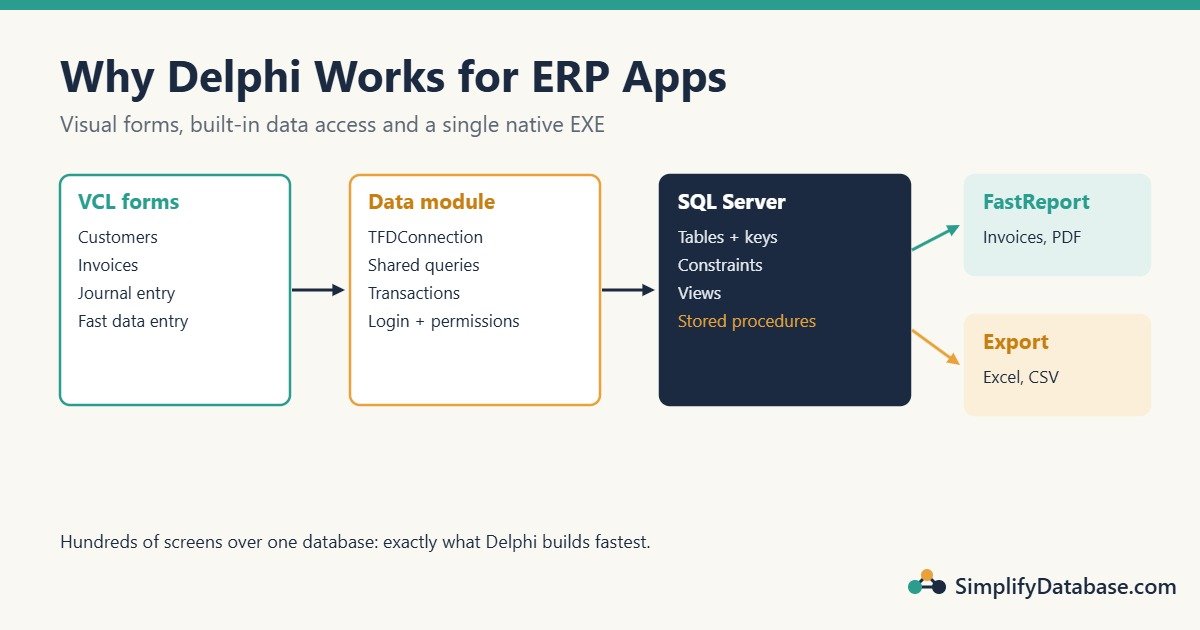
What a Delphi ERP App Looks Like
A typical layout, which this series follows:
- Forms (VCL): one form per screen: Customers, Items, Invoice, Journal Entry.
- A data module: a non-visual unit that holds the
TFDConnection(orTADOConnection) and shared queries, so every form uses the same connection. - SQL Server: tables with keys and constraints, views for reports, stored procedures for heavy or critical logic.
- Reports: FastReport templates for invoices and statements.
- Security: a login screen and permissions per user role.
The Delphi for ERP Series
Here’s the plan for the series, two parts a week:
- Why Delphi is still a great choice for ERP (this article)
- Delphi vs C# vs web apps for business software
- Build a customer screen in Delphi in 30 minutes
- Lookup combo boxes: choose a customer or an account from a list
- Master-detail forms: invoice header and invoice lines
- Transactions with FireDAC: save a balanced journal entry
- Call SQL Server stored procedures from Delphi
- Print invoices and reports with FastReport
- Export data to Excel, CSV and PDF
- User login and permissions in a Delphi ERP app
You’ll find each part in the Delphi category as it’s published.
Frequently Asked Questions
Is Delphi dead?
No. Embarcadero still releases new versions (Delphi 13 Florence is current), and many banks, accounting firms, factories and government offices run large Delphi systems every day. It’s a smaller community than C#, but it’s active.
Is Delphi hard to learn?
It’s one of the easier languages to read. If you know any programming language, you can write useful Delphi code within a few days. The visual designer makes your first working screens even faster.
Can Delphi build web apps?
Delphi’s main strength is desktop apps (VCL for Windows, FireMonkey for Windows, macOS, iOS and Android). It can also build REST servers that a web or mobile front-end calls. For a browser-based ERP, many teams pair a Delphi back office with a separate web front-end.
Which edition do I need for an ERP?
To learn, the free Community Edition is enough (with ADO for SQL Server). For commercial work you need a paid edition: Professional for most desktop work (FastReport included), and Enterprise if you want FireDAC to talk to SQL Server directly.
Summary
- An ERP is hundreds of data screens over one database, and Delphi’s visual forms and data-aware controls build those screens quickly.
- FireDAC and ADO give direct, controllable SQL access; stored procedures and transactions fit naturally.
- Native EXEs are fast and easy to deploy on office PCs.
- Delphi code lasts for many years, which matches the long life of an ERP.
- The downsides are licence cost, a smaller job market and a Windows-desktop focus.
Next in the series: Delphi vs C# vs web apps for business software, compared side by side.
Related articles
- What Is Delphi? Install Delphi Community Edition and Build Your First App: set up Delphi and build your first program.
- How to Connect Delphi to SQL Server with FireDAC: the connection every ERP screen needs.
- How to Show SQL Server Data in a Delphi DBGrid: your first data-aware grid.
- How to Fix Query Timeout and Performance Issues in Delphi Apps: keep a growing ERP fast.