
Your query worked perfectly when the table had 500 rows. Six months later the table has two million rows, and the same query takes 40 seconds. Nothing in the code changed. What happened?
Most of the time, the answer is a missing index. Indexes are the single biggest performance tool you have in a relational database, and the basic idea is simple enough to learn in one sitting.
The Book Index Analogy
Picture a 600-page book about cooking, and you want every page that mentions “saffron”. You have two choices:
- Start at page 1 and read every page until the end.
- Flip to the index at the back, find “saffron”, and go straight to pages 112, 340 and 518.
The first option always works, but it’s slow. The second is fast because someone already did the work of sorting the words and noting where they appear.
A database index is exactly that. It’s a separate, sorted structure that stores the values of one or more columns along with pointers to the rows that hold them.
What the Database Does Without an Index
Take this query on a big orders table:
SELECT order_id, amount
FROM orders
WHERE customer_id = 8;
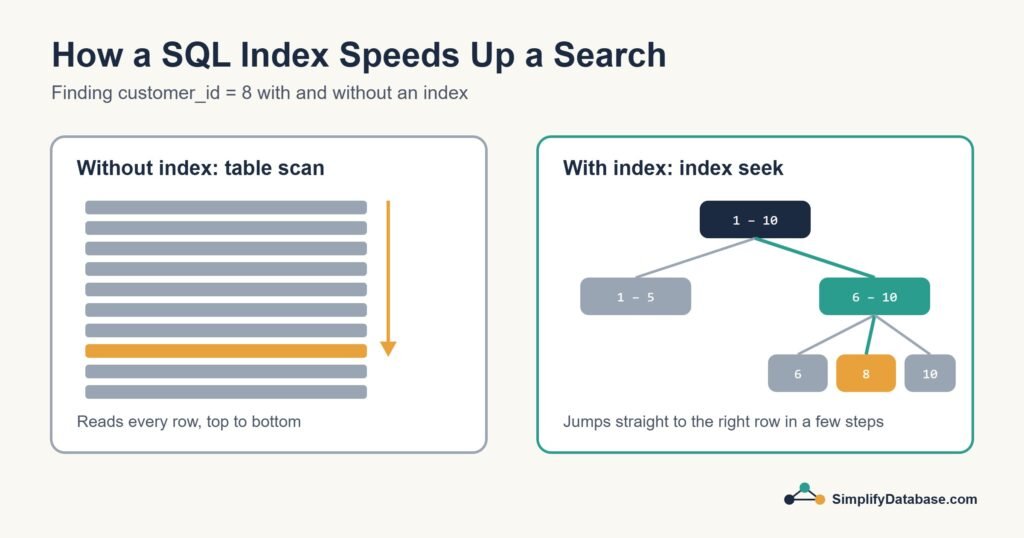
With no index on customer_id, the database has no way of knowing where customer 8’s orders are. It reads every row and checks each one. That’s called a table scan (or a full scan). On a small table nobody notices. On a table with millions of rows, it’s the reason your screen freezes.
Creating an Index
The syntax is short and nearly identical in MySQL, PostgreSQL and SQL Server:
CREATE INDEX ix_orders_customer_id
ON orders (customer_id);
Now the database keeps a sorted list of customer_id values. Most databases store it as a B-tree, which works a bit like a decision tree: “is it below 5,000 or above?”, then “below 7,500 or above?”, and so on. Even with millions of rows, it reaches the right value in just a handful of steps. That’s an index seek.
| Table scan | Index seek | |
|---|---|---|
| How it works | Reads every row | Follows the sorted index to the matching rows |
| Speed on 10 rows | Fast | Fast |
| Speed on 10 million rows | Slow, gets worse as the table grows | Still fast |
| Needs an index? | No | Yes |
Clustered vs. Non-Clustered Indexes
You’ll see these two terms often, especially in SQL Server:
- Clustered index: the table’s rows are physically stored in this order. A table can have only one, because rows can only be sorted one way. In SQL Server and MySQL’s InnoDB, the primary key is clustered by default.
- Non-clustered index: a separate structure that points back to the rows. A table can have many of these.
Think of a phone book. The book itself is sorted by surname (clustered). A separate list at the back sorted by street name, telling you which page to turn to, would be non-clustered.
Which Columns Should You Index?
A good starting list:
- Primary keys. These are indexed automatically, so there’s nothing to do. (More on keys in Primary Keys vs. Foreign Keys.)
- Foreign keys. Columns you join on, like
orders.customer_id. Some databases don’t index these automatically, and it’s one of the most common causes of slow joins. - Columns you filter on often in
WHEREclauses, likestatus,order_dateoremail. (See WHERE, ORDER BY and LIMIT.) - Columns you sort by often with
ORDER BY, because an index is already sorted.
Indexes on more than one column
If you regularly filter on two columns together, a composite index can cover both:
CREATE INDEX ix_orders_customer_date
ON orders (customer_id, order_date);
Column order matters here. This index helps queries that filter by customer_id, or by customer_id and order_date together. It does very little for a query that only filters by order_date, the same way a phone book sorted by surname then first name doesn’t help you find everyone called “Ahmed”.
The Cost of Indexes
If indexes are so good, why not index every column? Because they aren’t free:
- Slower writes. Every
INSERT,UPDATEandDELETEhas to update the indexes as well as the table. - More storage. Each index is extra data on disk and in memory.
- Not always used. On small tables, or when a query returns most of the rows anyway, the database may decide a scan is cheaper and ignore your index.
A table that’s read all day and rarely written can handle quite a few indexes. A table that receives thousands of inserts a minute, like a log table, should have as few as possible.
When an Index Won’t Help
A few patterns stop the database from using an index even when one exists:
| Pattern | Why it hurts | Better option |
|---|---|---|
WHERE YEAR(order_date) = 2026 | Wrapping the column in a function hides it from the index | WHERE order_date >= '2026-01-01' AND order_date < '2027-01-01' |
WHERE name LIKE '%ali%' | A leading wildcard means it can’t use the sorted order | LIKE 'ali%' if that fits, or full-text search |
WHERE phone = 33001111 on a text column | Type conversion can force a scan | Match the type: phone = '33001111' |
How to Check Whether Your Index Is Used
Every major database can show you its plan for a query:
- MySQL and PostgreSQL: put
EXPLAINin front of the query. - SQL Server: turn on “Include Actual Execution Plan” in SQL Server Management Studio (Ctrl+M) and run the query.
Look for words like “scan” versus “seek” (or “Seq Scan” versus “Index Scan” in PostgreSQL). If you work with Delphi and SQL Server like I do, missing indexes are one of the first things I check when an app starts timing out. I wrote more about that in How to Fix Query Timeout and Performance Issues in Delphi Applications.
In SQL Server, one plan operator is a strong hint that an index is missing: Index Spool (Eager Spool). It means SQL Server is building a temporary index on every run because the real one doesn’t exist. I walk through a real example and the fix in Eager Index Spool in SQL Server: What It Means and How to Fix It.
Conclusion
An index is a sorted shortcut that lets the database jump to the rows you want instead of reading the whole table. Index your keys and the columns you filter, join and sort on most often, keep an eye on write-heavy tables, and check the execution plan when something feels slow.
Start small. Pick your slowest query, look at its WHERE clause, and see whether the right index exists. Fixing that one query is often enough to make the whole application feel faster.
Related articles
- Index Seek vs Index Scan: why SQL Server sometimes ignores your index.
- How to Read a SQL Server Execution Plan: see where a slow query spends its time.
- Missing Indexes in SQL Server: how to find them, and when not to add them.
- SQL Data Types Explained Simply: choosing the right type for each column.