
You run a query that returns only a couple of dozen rows. It feels fast. Then you open the execution plan in SSMS and see an operator you don’t recognise taking more than half the cost: Index Spool (Eager Spool).
Is that a problem? Usually, yes. This article explains what an eager index spool is, why SQL Server adds one, and how one index made it disappear from a real query I was working on.
The problem: a small query with an expensive plan
I was looking up the lines of one journal transaction in an accounting system. For each line I also wanted the cash account from a second table of cash vouchers. I used a scalar subquery in the SELECT list. (Table and column names here are changed and the data is made up, but the plan is the real one I saw.)
SELECT
    (SELECT CashAccount
     FROM CashVouchers
     WHERE CashVouchers.DocNo   = JournalLines.DocNo
       AND CashVouchers.DocType = JournalLines.DocType),
    *
FROM JournalLines
WHERE TransNo = 419
  AND JournalCode = '03'
  AND LineType = 1;
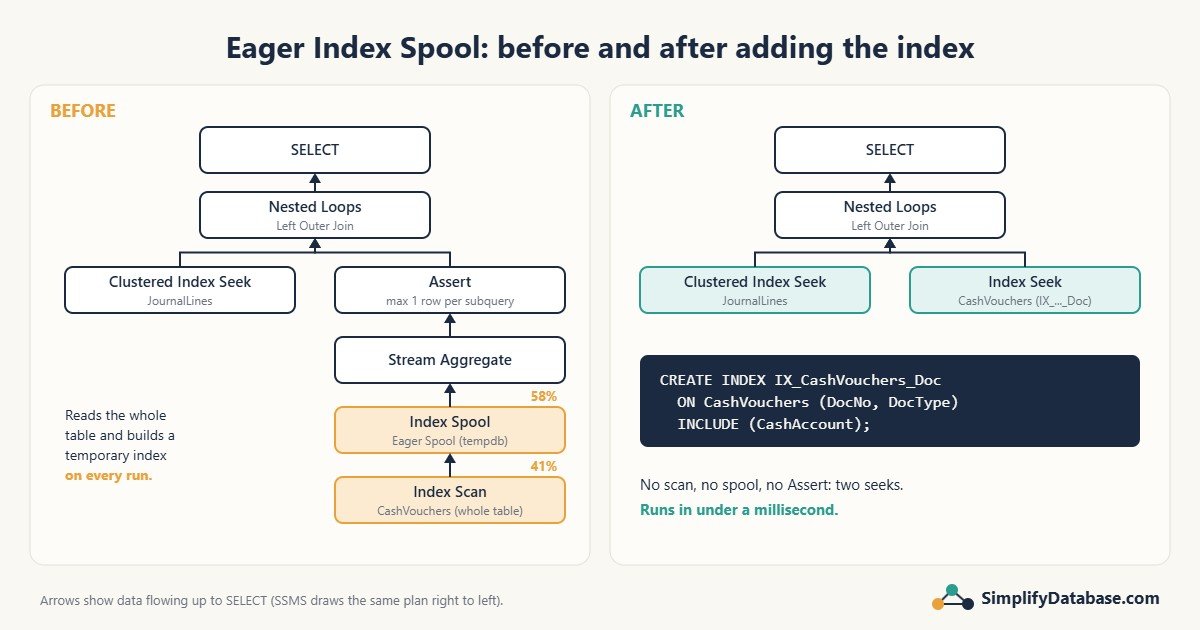
The query returned 24 rows. The execution plan looked like this (SSMS draws it right to left):
- Clustered Index Seek on JournalLines. Good: it jumps straight to transaction 419.
- Index Scan on CashVouchers: 41% of the cost.
- Index Spool (Eager Spool): 58% of the cost.
- A Stream Aggregate and an Assert on top of the spool.
- A Nested Loops (Left Outer Join) joining the two sides.
Why it happens
For every journal line, the subquery has to find the matching voucher by DocNo and DocType. SQL Server looked for an index on CashVouchers that starts with those columns and didn’t find one.
Without an index, it could scan the whole CashVouchers table once per journal line. That would be very slow. So the optimizer did something clever: it scanned CashVouchers once, built a temporary index on (DocNo, DocType) in tempdb, and then seeked into that temporary index for each line. That temporary index is the eager index spool.
It sounds smart, and it is better than repeated scans. But there are two catches:
- The temporary index is thrown away when the query ends. It is rebuilt from scratch every time the query runs.
- It always reads the whole CashVouchers table, even if you only need 24 rows from it. As that table grows, this query gets slower, even though you’re still asking for one transaction.
In plain words: an eager index spool is SQL Server telling you about an index you should have created yourself. Don’t rely on SSMS to warn you. A green “Missing Index” hint often does not appear for spools, so you have to spot the operator yourself.
What are the Assert and Stream Aggregate doing?
A scalar subquery in the SELECT list must return at most one value. SQL Server doesn’t know that (DocNo, DocType) is unique in CashVouchers, so it adds a Stream Aggregate to count the matches and an Assert to raise the error “Subquery returned more than 1 value” if there are two or more. They’re cheap, but they’re a sign that SQL Server isn’t sure about your data.
The fix, step by step
Step 1: Check whether the lookup columns are unique
Before you create the index, find out if any document appears twice:
SELECT DocNo, DocType, COUNT(*) AS Copies
FROM CashVouchers
GROUP BY DocNo, DocType
HAVING COUNT(*) > 1;
No rows means each document appears only once, so you can make the index UNIQUE.
Step 2: Create the index SQL Server was building for you
CREATE INDEX IX_CashVouchers_Doc
ON CashVouchers (DocNo, DocType)
INCLUDE (CashAccount);- The key columns
(DocNo, DocType)are exactly the columns in the subquery’sWHERE. INCLUDE (CashAccount)stores the column we return inside the index, so SQL Server never has to go back to the table (no Key Lookup).- If Step 1 returned no rows, write
CREATE UNIQUE INDEXinstead. Now SQL Server knows there can only be one match, and the Stream Aggregate and Assert go away too.
Step 3: Tidy up the query
While I was there, I rewrote the subquery as a LEFT JOIN, gave the column a name (instead of SSMS showing “(No column name)”), and listed only the columns I needed instead of SELECT *:
SELECT
    h.CashAccount,
    d.JournalCode, d.TransNo, d.LineNum, d.AccountNo,
    d.Debit, d.Credit
FROM JournalLines AS d
LEFT JOIN CashVouchers AS h
       ON h.DocNo   = d.DocNo
      AND h.DocType = d.DocType
WHERE d.TransNo = 419
  AND d.JournalCode = '03'
  AND d.LineType = 1;
Be careful: the LEFT JOIN returns the same result as the subquery only if (DocNo, DocType) is unique. If a document appears twice, the subquery throws an error, but the join quietly returns the journal line twice, and your totals will be wrong. That’s why Step 1 comes first.
Before and after
| Before | After | |
|---|---|---|
| CashVouchers access | Index Scan (whole table) | Index Seek |
| Temporary index in tempdb | Built on every run (58% of cost) | None |
| Assert / Stream Aggregate | Yes | No |
| Grows slower as CashVouchers grows? | Yes | No |
| Elapsed time | Fast today, but slows as data grows | 0.000s in the plan |
The new plan is the ideal shape for a query that returns a handful of rows: a Clustered Index Seek on JournalLines and an Index Seek on CashVouchers, joined by Nested Loops. Don’t worry that the seek on CashVouchers now shows 92% of the cost. Cost percentages are always relative, and 92% of almost nothing is still almost nothing.
To prove the improvement with numbers rather than percentages, run the query before and after with:
SET STATISTICS IO ON;Then compare the logical reads on CashVouchers in the Messages tab. With the index, they drop to a handful of pages.
Two things to check in the new plan
- A yellow warning triangle on SELECT. Hover over it. If it says
CONVERT_IMPLICIT, two columns you’re comparing have different data types (for exampleDocNoisintin one table andvarcharin the other, or you compare avarcharcolumn to the number419). Fix the types, because an implicit conversion can turn a seek back into a scan. - “24 of 1116 (2%)” under an operator. SQL Server estimated 1,116 rows but got 24. On a small query that’s harmless. If you see big gaps like this on large queries, refresh the statistics with
UPDATE STATISTICS JournalLines;.
When NOT to add the index
- The lookup table is tiny (a few hundred rows) and will stay tiny. The spool costs almost nothing.
- It’s a one-off query you run once a year. Every index slows down every
INSERT,UPDATEandDELETEon that table and uses disk space. Don’t pay that price forever for a query you rarely run. - A similar index already exists. If there’s an index on
(DocNo)alone, it may be better to widen that one than to add a second, almost identical index. - The table takes heavy writes. On a table with thousands of inserts per minute, test the write cost before you add anything.
Quick checklist
- See Index Spool (Eager Spool) in a plan? Look at the operator feeding it. That’s the table that needs an index.
- Find the columns in the
WHEREorONclause of that subquery or join. Those become the index key. - Add the returned columns with
INCLUDE. - Check for duplicates. If there are none, make the index
UNIQUE. - Re-run with
SET STATISTICS IO ONand compare logical reads. - Check the new plan for warning triangles and big estimate gaps.
Part of a series: this article is one step in my SQL Server Performance Troubleshooting: A Practical Step-by-Step Guide, which walks through the whole process of finding and fixing a slow query.
Related articles
- SQL Indexes Explained Simply: what clustered and nonclustered indexes are, if this article went too fast.
- SQL Subqueries vs. CTEs Explained Simply: more on writing subqueries like the one in this example.
- SQL Data Types Explained Simply: why mismatched types cause implicit conversions.
- Missing Indexes in SQL Server: How to Find Them, and When Not to Add Them: why SQL Server sometimes never suggests the index you need.