
Have you ever wondered how Facebook remembers your friends, how Amazon knows your order history, or how your bank keeps track of every transaction?
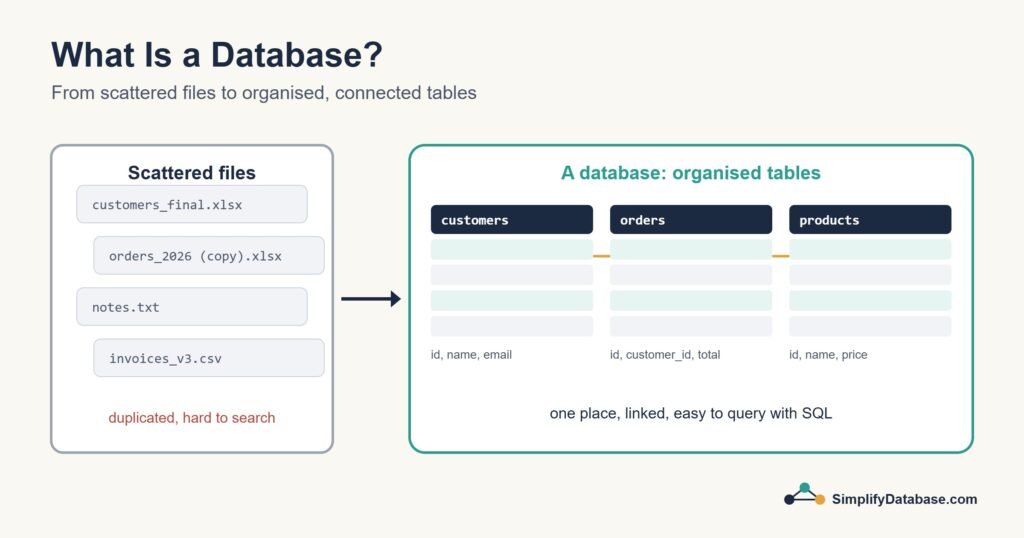
The answer is simple: databases.
But what exactly is a database — and why does everyone in tech keep talking about it?
In this guide, I’ll explain databases in plain English, with real-life examples you already understand. No coding background needed.
What is a Database?
A database is an organized collection of information stored so it can be easily found, updated, and used.
Think of it like a super-powered filing cabinet.
A regular filing cabinet holds papers. A database holds digital information — and instead of spending 10 minutes digging through folders, you can find exactly what you need in less than a second.
Real-life example:
Your phone’s contacts list is a tiny database. It stores names, phone numbers, and emails in an organized way so you can search for “Ahmed” and instantly find his number — even if you have 500 contacts.
Why Do We Need Databases?
Imagine a hospital trying to manage 50,000 patients using paper files. Finding one patient’s history would take hours. Updating a record risks losing it. Sharing it with another doctor? Nearly impossible.
A database solves all of this:
- Speed — find any record in milliseconds
- Organization — everything stored in a structured, logical way
- Safety — data is backed up and protected
- Sharing — multiple people can access data at the same time
- Accuracy — updates happen in one place, everywhere at once
This is why every app, website, and business in the world uses databases. From small blogs to Netflix — databases are the backbone of the digital world.
How Does a Database Actually Work?
Most databases organize data into tables — just like a spreadsheet.
Each table has:
- Columns — the type of information (Name, Age, Email)
- Rows — individual records (one row = one person, one product, one order)
Here’s an example of a simple Customers table:
| ID | Name | City | |
|---|---|---|---|
| 1 | Sara Ahmed | sara@email.com | Cairo |
| 2 | John Smith | john@email.com | London |
| 3 | Mei Lin | mei@email.com | Shanghai |
Simple, right? It looks exactly like a spreadsheet — because the concept is the same. The difference is that a database can hold millions of rows, connect multiple tables together, and answer complex questions in milliseconds.
Database vs. Spreadsheet — What’s the Difference?
This is one of the most common questions beginners ask. Here’s the honest answer:
A spreadsheet (like Excel or Google Sheets) is great for small amounts of data that one or two people manage manually.
A database is built for large amounts of data, multiple users, and automatic processing.
| Spreadsheet | Database | |
|---|---|---|
| Best for | Small data, manual work | Large data, apps, websites |
| Speed | Slow with big data | Fast with millions of records |
| Multiple users | Difficult | Built for it |
| Automation | Limited | Fully automated |
| Connecting data | Copy-paste | Automatic relationships |
If you’re tracking your personal expenses — a spreadsheet is fine. If you’re running an online store with 10,000 products and 500 daily orders — you need a database.
What are the Main Types of Databases?
Not all databases are the same. Here are the main types you’ll come across:
1. Relational Databases (SQL)
The most common type. Data is stored in tables that are connected to each other through relationships.
Example: A store database has a Customers table and an Orders table. They’re connected — so you can instantly see all orders placed by one customer.
Popular examples: MySQL, PostgreSQL, Microsoft SQL Server
2. Non-Relational Databases (NoSQL)
Instead of tables, data is stored in flexible formats like documents or key-value pairs. Great for data that doesn’t fit neatly into rows and columns.
Popular examples: MongoDB, Firebase, Redis
3. Cloud Databases
Databases hosted online rather than on a physical server. Easy to set up, scale, and access from anywhere.
Popular examples: Amazon RDS, Google Cloud SQL, Supabase
For beginners, relational databases are the best place to start — they’re the most widely used and the foundation of most apps and websites.
What is SQL?
Once you understand what a database is, the next natural question is: how do you actually talk to it?
The answer is SQL — which stands for Structured Query Language (pronounced “sequel”).
SQL is the language you use to ask the database questions and give it instructions. For example:
SELECT name, email FROM customers WHERE city = 'Cairo';
This tells the database: “Show me the name and email of every customer from Cairo.”
SQL looks intimidating at first, but it’s actually very close to plain English. Most beginners can write their first useful query within an hour of learning.
Real-World Examples of Databases
Still wondering where databases show up in real life? Here are some examples you use every day:
- Spotify — stores millions of songs, your playlists, your listening history
- Instagram — stores every photo, comment, like, and follower relationship
- Your bank — stores every account, balance, and transaction
- Google — stores indexed copies of billions of web pages
- Online stores — store products, prices, inventory, customer orders
- Hospitals — store patient records, appointments, prescriptions
Anywhere data needs to be stored, searched, or updated — there’s a database behind it.
How Do You Learn Databases?
The good news: you don’t need a computer science degree to learn databases. Millions of people learn SQL and database basics on their own.
Here’s the path that works best for beginners:
- Understand the concepts — tables, rows, columns, relationships (you just did this!)
- Learn basic SQL — SELECT, WHERE, ORDER BY, JOIN
- Practice with real examples — build a simple database for something you care about
- Go deeper — database design, indexes, performance
On this site, every lesson is written in plain English with real examples — no jargon, no assumptions. Whether you’re a student, a professional wanting to work with data, or just curious — you’re in the right place.
Summary
Let’s recap what you learned today:
- A database is an organized collection of digital information
- Data is stored in tables made of rows and columns
- Databases are faster, safer, and more powerful than spreadsheets
- The most common type is a relational database, which uses SQL
- Databases power almost every app and website you use daily
What’s Next?
Now that you know what a database is, the next step is learning how to actually use one.
👉 Read next: SQL for Complete Beginners — Your First Query Explained
Or see the different kinds of databases you’ll come across:
👉 Types of Databases Explained for Beginners
Published on SimplifyDatabase.com — where databases are explained the easy way.