
You’ve heard the word SQL everywhere — in job descriptions, in tech articles, maybe even from a friend who works with data.
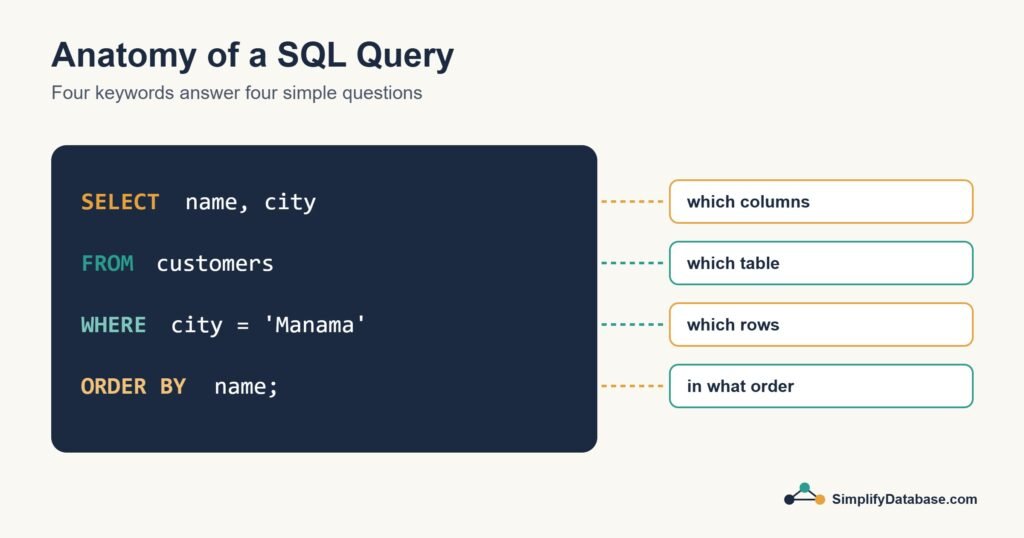
But what actually is SQL? And can a complete beginner really learn it?
Yes — and faster than you think.
In this guide, you’ll learn the most important SQL commands with plain-English explanations and real examples. By the end, you’ll be able to write your first real queries from scratch.
Let’s start from zero.
What is SQL?
SQL stands for Structured Query Language — pronounced “sequel.”
It’s the language you use to communicate with a database. Think of it like this: a database is a huge library, and SQL is how you ask the librarian for what you need.
With SQL you can:
- Find specific data (“show me all customers from Egypt”)
- Add new data (“add this new product to the store”)
- Update existing data (“change Sara’s email address”)
- Delete data (“remove orders older than 5 years”)
SQL is used by developers, data analysts, business owners, marketers, and anyone who works with data. It’s one of the most in-demand skills in the job market — and one of the easiest to get started with.
What Does a Database Look Like?
Before writing any SQL, you need to understand what you’re working with.
A database stores data in tables — just like a spreadsheet. Each table has columns (types of data) and rows (individual records).
Here’s a simple Customers table we’ll use throughout this guide:
| id | name | country | |
|---|---|---|---|
| 1 | Sara Ahmed | sara@email.com | Egypt |
| 2 | John Smith | john@email.com | UK |
| 3 | Mei Lin | mei@email.com | China |
| 4 | Carlos Rivera | carlos@email.com | Mexico |
| 5 | Aisha Noor | aisha@email.com | Egypt |
Simple, right? Now let’s learn how to ask questions about this data using SQL.
The 5 Most Important SQL Commands
You don’t need to memorize 50 commands to be useful with SQL. These 5 cover 80% of everything you’ll ever do.
1. SELECT — Read Data from a Table
SELECT is the most used SQL command. It retrieves data from a table.
Basic syntax:
SELECT column1, column2 FROM table_name;
Example — get all customer names and emails:
SELECT name, email FROM customers;
Result:
| name | |
|---|---|
| Sara Ahmed | sara@email.com |
| John Smith | john@email.com |
| Mei Lin | mei@email.com |
| Carlos Rivera | carlos@email.com |
| Aisha Noor | aisha@email.com |
Want to get every column at once? Use * (which means “everything”):
SELECT * FROM customers;
2. WHERE — Filter Your Results
WHERE lets you add a condition — so you only get the rows you actually want.
Example — get only customers from Egypt:
SELECT * FROM customers WHERE country = 'Egypt';
Result:
| id | name | country | |
|---|---|---|---|
| 1 | Sara Ahmed | sara@email.com | Egypt |
| 5 | Aisha Noor | aisha@email.com | Egypt |
You can use different conditions with WHERE:
| Operator | Meaning | Example |
|---|---|---|
= | equals | WHERE country = 'Egypt' |
!= | not equal | WHERE country != 'UK' |
> | greater than | WHERE id > 3 |
< | less than | WHERE id < 3 |
LIKE | contains text | WHERE name LIKE 'S%' |
The LIKE operator is especially useful. The % symbol means “anything”:
SELECT * FROM customers WHERE name LIKE 'S%';
This returns every customer whose name starts with S — so Sara Ahmed.
3. ORDER BY — Sort Your Results
ORDER BY sorts your results by a column — either A to Z (ASC) or Z to A (DESC).
Example — sort customers alphabetically by name:
SELECT * FROM customers ORDER BY name ASC;
Example — sort by ID from highest to lowest:
SELECT * FROM customers ORDER BY id DESC;
You can combine it with WHERE:
SELECT * FROM customers WHERE country = 'Egypt' ORDER BY name ASC;
4. COUNT — Count Your Records
COUNT tells you how many rows match your query. Extremely useful for reports.
Example — how many customers do we have in total?
SELECT COUNT(*) FROM customers;
Result: 5
Example — how many customers are from Egypt?
SELECT COUNT(*) FROM customers WHERE country = 'Egypt';
Result: 2
5. GROUP BY — Group and Summarize Data
GROUP BY groups rows that share a value — perfect for summaries and reports.
Example — how many customers from each country?
SELECT country, COUNT(*) FROM customers GROUP BY country;
Result:
| country | COUNT(*) |
|---|---|
| Egypt | 2 |
| UK | 1 |
| China | 1 |
| Mexico | 1 |
This is incredibly powerful. Imagine doing this on a table with 100,000 customers — SQL handles it in milliseconds.
Putting It All Together
Now let’s combine what you’ve learned into one real query.
Scenario: You run an online store. You want to see the top countries by number of customers, sorted from highest to lowest.
SELECT country, COUNT(*) AS total_customers
FROM customers
GROUP BY country
ORDER BY total_customers DESC;
Result:
| country | total_customers |
|---|---|
| Egypt | 2 |
| UK | 1 |
| China | 1 |
| Mexico | 1 |
Notice AS total_customers — this renames the column in your result to something readable. It’s called an alias and it makes your output much cleaner.
How to Practice SQL Right Now (Free)
Reading about SQL is good. Actually writing it is how you really learn. Here are three free ways to practice without installing anything:
1. SQLiteOnline.com — run SQL directly in your browser. No signup needed. Create a table, add some data, and start querying.
2. W3Schools SQL Tryit Editor — every SQL example has a “Try it yourself” button. Great for experimenting.
3. Mode SQL Tutorial — free interactive exercises with real datasets.
The best way to learn SQL is to pick something you care about — your favorite sports team’s stats, a list of movies, your expense tracker — and build a tiny database around it. Then query it.
Common Beginner Mistakes to Avoid
Forgetting the semicolon — SQL queries end with ;. Most tools still run without it, but it’s good practice.
Using the wrong quotes — text values go in single quotes 'Egypt', not double quotes. Column names don’t need quotes at all.
Selecting everything with * always — SELECT * is convenient but slow on large tables. Get in the habit of selecting only the columns you need.
Confusing WHERE and HAVING — WHERE filters rows before grouping. HAVING filters after a GROUP BY. You’ll rarely need HAVING as a beginner, but don’t mix them up.
What to Learn After This
You now know the core of SQL. Here’s what comes next:
- JOINs — connecting two tables together (the most powerful SQL concept)
- INSERT, UPDATE, DELETE — adding and changing data
- Subqueries — using one query inside another
- Indexes — making queries run faster on large databases
Don’t rush. Master SELECT, WHERE, ORDER BY, COUNT, and GROUP BY first. Use them on real data. Once those feel natural, JOINs will make sense immediately.
Summary
Here’s everything you learned in this guide:
| Command | What it does |
|---|---|
SELECT | Reads data from a table |
WHERE | Filters rows by a condition |
ORDER BY | Sorts results A→Z or Z→A |
COUNT | Counts matching rows |
GROUP BY | Groups rows and summarizes data |
SQL is one of those skills that pays off immediately. Even knowing just these five commands, you can answer real business questions — how many users signed up this month, which product sells most, which country has the most customers.
What’s Next?
Ready to go deeper? Here’s your next step:
👉 Read next: SQL JOINs Explained Simply — Connecting Tables for Beginners
Or go back to the foundation:
👉 What is a Database? Explained Simply
Published on SimplifyDatabase.com — where databases are explained the easy way.