
Every business database does two very different jobs. During the day it runs the business: saving invoices, taking payments, updating stock, one small change at a time. At the end of the month someone wants to understand the business: total sales by region, the best-selling products this year, how this quarter compares with last year.
The first job is called OLTP (Online Transaction Processing). The second is OLAP (Online Analytical Processing). They need such different designs that most companies end up with two separate systems. This guide explains both in plain English, with SQL examples, and shows how data moves from one to the other.
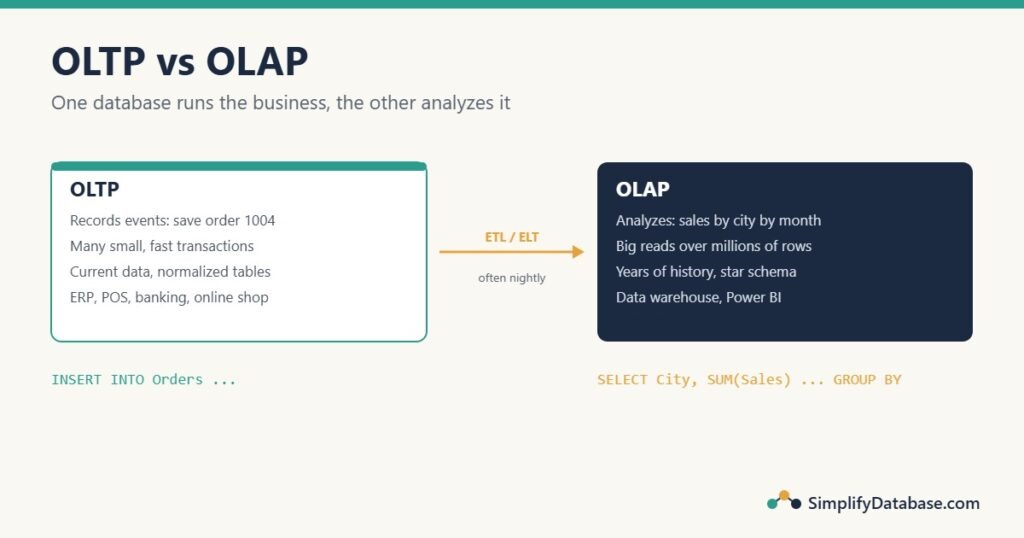
OLTP: the database that runs the business
An OLTP system records business events as they happen. Every time a cashier scans an item, a customer pays online, or an accountant posts a journal entry, an OLTP database saves it. ERP systems, point-of-sale systems, banking systems and booking websites all run on OLTP databases.
A typical OLTP operation is small and precise. Saving a new order touches a handful of rows, and it must be all-or-nothing:
BEGIN TRANSACTION;

INSERT INTO Orders (OrderID, CustomerID, OrderDate)
VALUES (1004, 2, '2026-10-19');

INSERT INTO OrderLines (OrderID, LineNo, ProductID, Quantity, UnitPrice)
VALUES (1004, 1, 30, 4, 10.00);

COMMIT;
Reading is just as targeted: “show order 1004”, “what does customer 2 owe?”. These queries find a few rows through an index, usually in milliseconds.
What an OLTP system needs:
- Speed for many small operations, often thousands per second from many users at once.
- Correct, consistent data. Transactions make sure an order is never half-saved (see SQL Transactions and ACID Explained Simply).
- A normalized design: customers, orders, order lines and products in separate tables, so each fact is stored once and an update happens in one place (see Database Normalization Explained Simply).
- Current data. The customer’s address is the address now, not the one from three years ago.
OLAP: the database that analyzes the business
An OLAP system answers questions about large amounts of historical data. Its typical query reads millions of rows, groups them, and returns a small summary:
SELECT YEAR(o.OrderDate)  AS Year,
       MONTH(o.OrderDate) AS Month,
       c.City,
       SUM(l.Quantity * l.UnitPrice) AS Sales
FROM Orders      AS o
JOIN OrderLines  AS l ON l.OrderID    = o.OrderID
JOIN Customers   AS c ON c.CustomerID = o.CustomerID
GROUP BY YEAR(o.OrderDate), MONTH(o.OrderDate), c.City
ORDER BY Year, Month, c.City;| Year | Month | City | Sales |
|---|---|---|---|
| 2026 | 9 | Manama | 950.00 |
| 2026 | 9 | Muharraq | 650.00 |
| 2026 | 10 | Manama | 1350.00 |
| 2026 | 10 | Muharraq | 40.00 |
On four orders this is instant. On five years of orders in a busy company, it scans tens of millions of rows. OLAP systems are built for exactly that: data warehouses, BI tools like Power BI, and “cubes” that pre-calculate totals.
What an OLAP system needs:
- Speed for big reads: scanning, joining and summarizing huge tables.
- History. Sales from five years ago, and what the customer’s city was at the time of each sale.
- A design that’s easy to summarize, usually a star schema: one big fact table of numbers surrounded by descriptive dimension tables (see Star Schema vs Snowflake Schema).
- Data from many sources combined in one place: sales, accounting, stock and the website.
OLTP vs OLAP side by side
| OLTP | OLAP | |
|---|---|---|
| Main job | Record business events | Analyze them |
| Typical users | Cashiers, accountants, customers, apps | Managers, analysts, report writers |
| Typical operation | Insert or update a few rows | Read and summarize millions of rows |
| Query example | “Save order 1004” | “Sales by city by month for 5 years” |
| Speed measured by | Transactions per second | Seconds per report |
| Design | Normalized, many tables | Denormalized, star schema |
| Data | Current | Historical, often years |
| Sources | One application | Many systems combined |
| Examples | ERP, POS, banking, online shop | Data warehouse, Power BI, cubes |
Why not just run reports on the OLTP database?
In small companies, that’s exactly what happens, and at first it works. Problems start as data grows:
- Reports slow down the business. A big report reads millions of rows and takes locks. Meanwhile cashiers and accountants wait. “The system freezes every morning at 9” is often the daily sales report running on the live database.
- Reports are slow too. A normalized design needs many joins for every summary, and the indexes are tuned for finding single rows, not scanning years.
- History is lost. An OLTP system usually overwrites old values. When a customer moves from Manama to Muharraq, last year’s sales suddenly “move” with them.
- Data is spread out. Sales live in one system, accounts in another, stock in a third. Combining them in every report is slow and error-prone.
How data gets from OLTP to OLAP
The usual answer is a separate data warehouse. A scheduled process (often every night) copies new and changed data out of the OLTP systems, cleans it, reshapes it into a star schema, and loads it into the warehouse. That process is called ETL (or ELT, depending on where the cleaning happens), and it’s explained in ETL vs ELT Explained Simply.
OLTP systems (ERP, POS, website)
        │   ETL / ELT, e.g. nightly
        ▼
Data warehouse (star schema)
        │
        ▼
Reports and dashboards (Power BI, Excel, SQL)
The trade-off: reports are usually a little behind (yesterday’s data, not this minute’s), but the live system stays fast and the reports become much simpler.
Middle-ground options for smaller systems
You don’t need a full data warehouse on day one. Some common steps in between:
- A reporting copy of the database. Restore last night’s backup to another server, or use a read-only replica, and point reports at it. Reports no longer slow down the live system.
- Reporting views or summary tables. Pre-calculate monthly totals overnight into a small table, so reports read thousands of rows instead of millions. SQL Views Explained Simply shows the basics.
- Columnstore indexes in SQL Server. A columnstore index stores data by column and compresses it heavily, which makes large summaries much faster. You can add a nonclustered columnstore index to an OLTP table so analytical queries can run on live data.
- Run heavy reports outside business hours, if the business can wait for them.
Systems that try to do both jobs well in one database are sometimes called HTAP (Hybrid Transactional/Analytical Processing). They’re useful, but for most companies the simple rule still holds: keep the live database for running the business, and give reporting its own place.
Summary
- OLTP records business events: many small, fast, safe transactions on current data, in a normalized design.
- OLAP analyzes them: big reads and summaries over historical data from many sources, usually in a star schema.
- Running heavy reports on the OLTP database causes slow screens, slow reports and lost history as data grows.
- Data moves from OLTP to OLAP through ETL or ELT, usually into a data warehouse.
- In between, a reporting copy, summary tables or columnstore indexes can go a long way.
Related articles
- Star Schema vs Snowflake Schema: how OLAP tables are designed.
- ETL vs ELT Explained Simply: how data moves from OLTP into the warehouse.
- Data Lakes vs Data Warehouses vs Data Lakehouses: the main places analytical data lives.
- Big Data vs Data Science vs Data Analytics: who uses the data once it’s there.