
Duplicate rows creep into every database. A customer signs up twice. An import job runs twice. A web form gets double-clicked. Then reports count the same customer twice, emails go out twice, and nobody knows which record is the real one.
This guide shows how to find duplicates, how to see the full rows behind them, how to delete the extras safely while keeping one copy, and how to stop them coming back. Every query works on SQL Server, and the MySQL versions are included where the syntax differs.
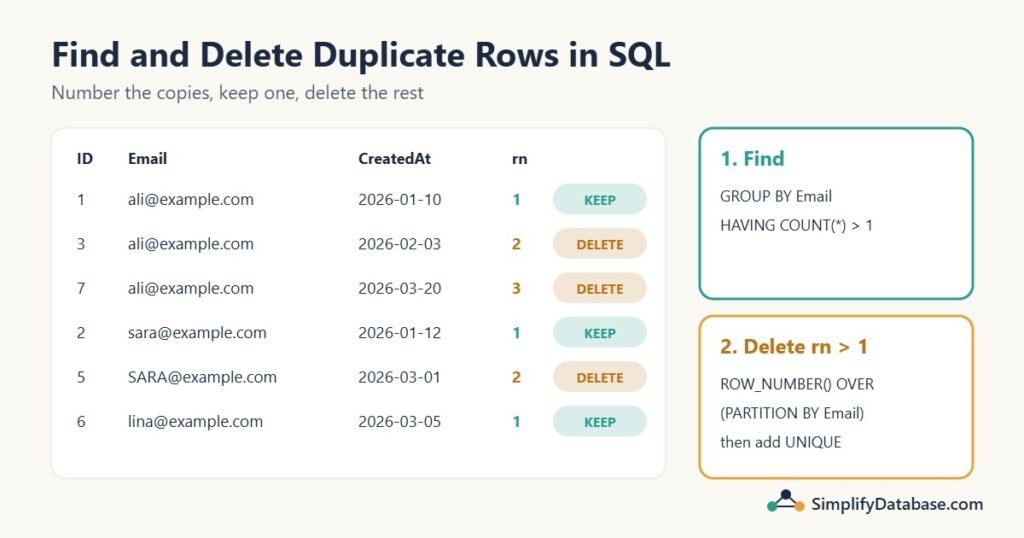
Table of Contents
The sample table
A Customers table where some people were entered more than once:
CREATE TABLE Customers (
    CustomerID INT IDENTITY(1,1) PRIMARY KEY,   -- MySQL: INT AUTO_INCREMENT PRIMARY KEY
    Name       VARCHAR(50),
    Email      VARCHAR(100),
    City       VARCHAR(50),
    CreatedAt  DATE
);

INSERT INTO Customers (Name, Email, City, CreatedAt) VALUES
('Ali Hassan',  'ali@example.com',   'Manama',   '2026-01-10'),
('Sara Ahmed',  'sara@example.com',  'Riffa',    '2026-01-12'),
('Ali Hassan',  'ali@example.com',   'Manama',   '2026-02-03'),
('Omar Khalid', 'omar@example.com',  'Muharraq', '2026-02-15'),
('Sara Ahmed',  'SARA@example.com ', 'Riffa',    '2026-03-01'),
('Lina Saleh',  'lina@example.com',  'Manama',   '2026-03-05'),
('Ali Hassan',  'ali@example.com',   'Manama',   '2026-03-20'),
('Omar Khalid', 'omar@example.com',  'Isa Town', '2026-04-02');
Ali is in there three times. Sara twice, once in capitals with a trailing space. Omar twice, with two different cities (did he move, or is one of them a typo?). Lina only once.
Notice that the rows are not completely identical: each one has its own CustomerID and CreatedAt. That’s normal. “Duplicate” almost always means “the same real-world thing”, not “every column equal”. So the first job is to decide which columns define a duplicate. Here, it’s the email address.
Step 1: Find the duplicates with GROUP BY and HAVING
Group by the columns that define “the same”, and keep the groups with more than one row:
SELECT Email, COUNT(*) AS Copies
FROM Customers
GROUP BY Email
HAVING COUNT(*) > 1;| Copies | |
|---|---|
| ali@example.com | 3 |
| omar@example.com | 2 |
| sara@example.com | 2 |
HAVING filters groups after they’re counted, which WHERE can’t do. See HAVING vs WHERE in SQL if that’s new.
The choice of columns changes the answer. Group by Name, Email, City instead and Omar disappears, because his two rows have different cities:
| Name | City | Copies | |
|---|---|---|---|
| Ali Hassan | ali@example.com | Manama | 3 |
| Sara Ahmed | sara@example.com | Riffa | 2 |
Neither answer is wrong. It depends on what “duplicate” means for your data.
What about Sara’s capital letters and trailing space?
Whether 'SARA@example.com ' counts as the same as 'sara@example.com' depends on the database’s collation:
- SQL Server’s usual default is case-insensitive and ignores trailing spaces, so the query above already treats them as the same.
- MySQL 8’s default ignores case but not trailing spaces, so Sara would show up as two different emails.
- PostgreSQL compares text exactly, so they’re different there too.
Don’t rely on that. Clean the value in the query:
SELECT LOWER(TRIM(Email)) AS CleanEmail, COUNT(*) AS Copies
FROM Customers
GROUP BY LOWER(TRIM(Email))
HAVING COUNT(*) > 1;
Now the result is the same on every database. (In SQL Server before 2017, use LTRIM(RTRIM(Email)) instead of TRIM.) Spaces, capitals and other near-duplicates are covered in more depth in Data Cleaning in SQL.
Step 2: See the full rows behind each duplicate
GROUP BY tells you which emails are duplicated, but not which rows. To decide what to keep, you need to see them all. A window function adds the count to every row without collapsing them:
SELECT *
FROM (
    SELECT c.*,
           COUNT(*) OVER (PARTITION BY LOWER(TRIM(Email))) AS Copies
    FROM Customers AS c
) AS x
WHERE Copies > 1
ORDER BY LOWER(TRIM(Email)), CustomerID;| CustomerID | Name | City | CreatedAt | Copies | |
|---|---|---|---|---|---|
| 1 | Ali Hassan | ali@example.com | Manama | 2026-01-10 | 3 |
| 3 | Ali Hassan | ali@example.com | Manama | 2026-02-03 | 3 |
| 7 | Ali Hassan | ali@example.com | Manama | 2026-03-20 | 3 |
| 4 | Omar Khalid | omar@example.com | Muharraq | 2026-02-15 | 2 |
| 8 | Omar Khalid | omar@example.com | Isa Town | 2026-04-02 | 2 |
| 2 | Sara Ahmed | sara@example.com | Riffa | 2026-01-12 | 2 |
| 5 | Sara Ahmed | SARA@example.com | Riffa | 2026-03-01 | 2 |
This is the list to show the person who owns the data before you delete anything. Omar’s two cities are exactly the kind of thing someone should check.
Step 3: Number the copies and decide which one to keep
ROW_NUMBER() numbers the rows inside each group. The ORDER BY inside it decides which row gets number 1, the one you keep:
SELECT CustomerID, Name, Email, CreatedAt,
       ROW_NUMBER() OVER (PARTITION BY LOWER(TRIM(Email))
                          ORDER BY CreatedAt, CustomerID) AS rn
FROM Customers;| CustomerID | Name | CreatedAt | rn | |
|---|---|---|---|---|
| 1 | Ali Hassan | ali@example.com | 2026-01-10 | 1 |
| 3 | Ali Hassan | ali@example.com | 2026-02-03 | 2 |
| 7 | Ali Hassan | ali@example.com | 2026-03-20 | 3 |
| 6 | Lina Saleh | lina@example.com | 2026-03-05 | 1 |
| 4 | Omar Khalid | omar@example.com | 2026-02-15 | 1 |
| 8 | Omar Khalid | omar@example.com | 2026-04-02 | 2 |
| 2 | Sara Ahmed | sara@example.com | 2026-01-12 | 1 |
| 5 | Sara Ahmed | SARA@example.com | 2026-03-01 | 2 |
Every row with rn = 1 stays; every row with rn > 1 is an extra copy. The rule here is “keep the oldest“. To keep the newest instead, flip the order: ORDER BY CreatedAt DESC, CustomerID DESC. Then Ali’s row 7, Sara’s row 5 and Omar’s row 8 would be kept.
Always add a unique column (like CustomerID) at the end of the ORDER BY. If two copies have the same CreatedAt, it makes the choice predictable instead of random. More on this pattern in Top N per Group in SQL Server.
Step 4: Delete the extra copies
In SQL Server: delete through a CTE
SQL Server lets you delete rows through a CTE, which makes this neat:
BEGIN TRANSACTION;

WITH Numbered AS (
    SELECT CustomerID,
           ROW_NUMBER() OVER (PARTITION BY LOWER(TRIM(Email))
                              ORDER BY CreatedAt, CustomerID) AS rn
    FROM dbo.Customers
)
DELETE FROM Numbered
WHERE rn > 1;           -- 4 rows affected

SELECT * FROM dbo.Customers;   -- check the result

-- COMMIT;     if it looks right
-- ROLLBACK;   if it doesn't
Deleting from the CTE deletes the matching rows from the real table. With the sample data, 4 rows go (Ali’s 3 and 7, Omar’s 8, Sara’s 5) and 4 remain:
| CustomerID | Name | City | CreatedAt | |
|---|---|---|---|---|
| 1 | Ali Hassan | ali@example.com | Manama | 2026-01-10 |
| 2 | Sara Ahmed | sara@example.com | Riffa | 2026-01-12 |
| 4 | Omar Khalid | omar@example.com | Muharraq | 2026-02-15 |
| 6 | Lina Saleh | lina@example.com | Manama | 2026-03-05 |
In MySQL 8: delete with a JOIN
MySQL can’t delete through a CTE, so join the table to the list of IDs to remove:
START TRANSACTION;

DELETE c
FROM Customers AS c
JOIN (
    SELECT CustomerID
    FROM (
        SELECT CustomerID,
               ROW_NUMBER() OVER (PARTITION BY LOWER(TRIM(Email))
                                  ORDER BY CreatedAt, CustomerID) AS rn
        FROM Customers
    ) AS r
    WHERE rn > 1
) AS d ON d.CustomerID = c.CustomerID;     -- 4 rows affected

-- COMMIT;  or  ROLLBACK;
The extra level of subquery is there because MySQL doesn’t allow you to delete from a table and select from the same table directly in a subquery; wrapping it in a derived table gets around that.
The older self-join way
Before window functions, people deleted duplicates by joining the table to itself: delete any row for which an older row with the same email exists.
-- MySQL syntax
DELETE c1
FROM Customers AS c1
JOIN Customers AS c2
  ON c2.Email = c1.Email
 AND c2.CustomerID < c1.CustomerID;

-- SQL Server syntax
DELETE c1
FROM dbo.Customers AS c1
WHERE EXISTS (SELECT 1 FROM dbo.Customers AS c2
              WHERE c2.Email = c1.Email
                AND c2.CustomerID < c1.CustomerID);
It works and you’ll see it in older code, but ROW_NUMBER() is easier to read and lets you choose which row to keep by any rule you like, not just the lowest ID. The self-join idea is explained in SQL SELF JOIN Explained Simply.
When rows are 100% identical (no ID column)
If a table has no primary key and the duplicate rows really are identical in every column, you can’t tell them apart with a WHERE. The ROW_NUMBER() CTE still works in SQL Server, because it numbers the physical rows:
WITH Numbered AS (
    SELECT ROW_NUMBER() OVER (PARTITION BY Name, Email, City, CreatedAt
                              ORDER BY (SELECT NULL)) AS rn
    FROM dbo.ImportedRows
)
DELETE FROM Numbered WHERE rn > 1;
ORDER BY (SELECT NULL) means “any order is fine”, since the copies are identical anyway. In MySQL, the simplest way is to copy the distinct rows to a new table and swap: CREATE TABLE ImportedRows_clean AS SELECT DISTINCT * FROM ImportedRows;. And then add a primary key, so it doesn’t happen again.
Before you delete: four safety rules
- Run the
SELECTfirst. Look at exactly which rows havern > 1before you turn it into aDELETE. - Use a transaction, check the result, then
COMMITorROLLBACK. See SQL Transactions and ACID Explained Simply. - Check related tables. If orders point to customer 3, deleting customer 3 either fails (a foreign key stops it) or leaves orphan orders (no foreign key). Move the related rows to the kept customer first:
UPDATE Orders SET CustomerID = 1 WHERE CustomerID IN (3, 7);. - Keep a backup of what you delete, for example
SELECT ... INTO Customers_Removed(SQL Server) orCREATE TABLE Customers_Removed AS SELECT ...(MySQL) with the samern > 1filter.
Step 5: Stop duplicates coming back
Deleting duplicates is cleaning up after the problem. A unique constraint fixes the cause: the database will refuse a second row with the same email.
ALTER TABLE Customers
ADD CONSTRAINT UQ_Customers_Email UNIQUE (Email);
If you try this before removing the duplicates, it fails with a duplicate key error. That’s a handy test: when the constraint is accepted, the duplicates are gone. Clean the values first too (UPDATE Customers SET Email = LOWER(TRIM(Email));), otherwise 'SARA@example.com ' may still slip past on a database that compares text exactly. More in SQL Constraints Explained Simply.
Once the constraint is there, your application should handle the error gracefully (“this email is already registered”), or use an insert-or-update so that a repeated import updates the row instead of adding a new one.
Common mistakes
- Using
DISTINCTto hide duplicates in a report instead of fixing the data. The duplicates are still there for the next query. - Grouping by every column, including the ID or a timestamp. Then no two rows are ever “the same”.
- Forgetting about case and spaces. Normalize with
LOWER(TRIM(...)). - No tie-breaker in
ROW_NUMBER()‘sORDER BY. The kept row can change from one run to the next. - Deleting without checking related tables and breaking orders, invoices or logins that pointed to the deleted rows.
- Not adding a unique constraint afterwards, so the cleanup has to be repeated every month.
Practice exercises
Exercise 1. Find all names that appear more than once in Customers, with how many times each appears.
Exercise 2. Write a SELECT that shows the rows that would be deleted if you keep the newest row per email.
Exercise 3. An Orders table has CustomerID values 3 and 7, which are duplicates of customer 1. What should you do before deleting customers 3 and 7?
Answers
Answer 1.
SELECT Name, COUNT(*) AS Copies
FROM Customers
GROUP BY Name
HAVING COUNT(*) > 1;
Ali Hassan 3, Omar Khalid 2, Sara Ahmed 2.
Answer 2. Order by CreatedAt DESC so the newest row gets 1, then show the rest:
SELECT *
FROM (
    SELECT c.*,
           ROW_NUMBER() OVER (PARTITION BY LOWER(TRIM(Email))
                              ORDER BY CreatedAt DESC, CustomerID DESC) AS rn
    FROM Customers AS c
) AS x
WHERE rn > 1;
It returns customers 1, 2, 3 and 4 (the older copies). Customers 5, 6, 7 and 8 would be kept.
Answer 3. Point the orders at the customer you’re keeping, inside the same transaction as the delete: UPDATE Orders SET CustomerID = 1 WHERE CustomerID IN (3, 7);. Otherwise a foreign key will block the delete, or, without one, the orders will point to customers that no longer exist.
Summary
- First decide which columns make two rows “the same”.
- Find duplicates with
GROUP BY ... HAVING COUNT(*) > 1; see the full rows withCOUNT(*) OVER (PARTITION BY ...). - Choose the row to keep with
ROW_NUMBER()and a clearORDER BYwith a tie-breaker. - Delete
rn > 1through a CTE in SQL Server, or with aJOINin MySQL, inside a transaction. - Fix related rows first, keep a backup, and add a unique constraint so duplicates can’t come back.
Related articles
- Data Cleaning in SQL: spaces, capitals and messy values that create near-duplicates.
- SQL DISTINCT and Column Aliases Explained Simply: why DISTINCT is not a fix for duplicate data.
- SQL Window Functions Explained Simply: ROW_NUMBER, RANK and COUNT OVER.
- SQL Constraints Explained Simply: UNIQUE, NOT NULL and friends.