
You’ve probably seen CROSS APPLY in someone else’s SQL Server query (or in a script that reads the plan cache) and wondered what it does that a JOIN can’t. The short answer: APPLY runs a small query once for every row of the table on its left, and that small query can use values from that row. A normal JOIN can’t do that.
That one ability solves several everyday problems neatly: “the latest 2 orders for each customer”, calling a table-valued function per row, splitting a comma-separated column, and avoiding repeated calculations. This guide explains CROSS APPLY and OUTER APPLY with simple examples, and shows the MySQL and PostgreSQL equivalent, LATERAL.
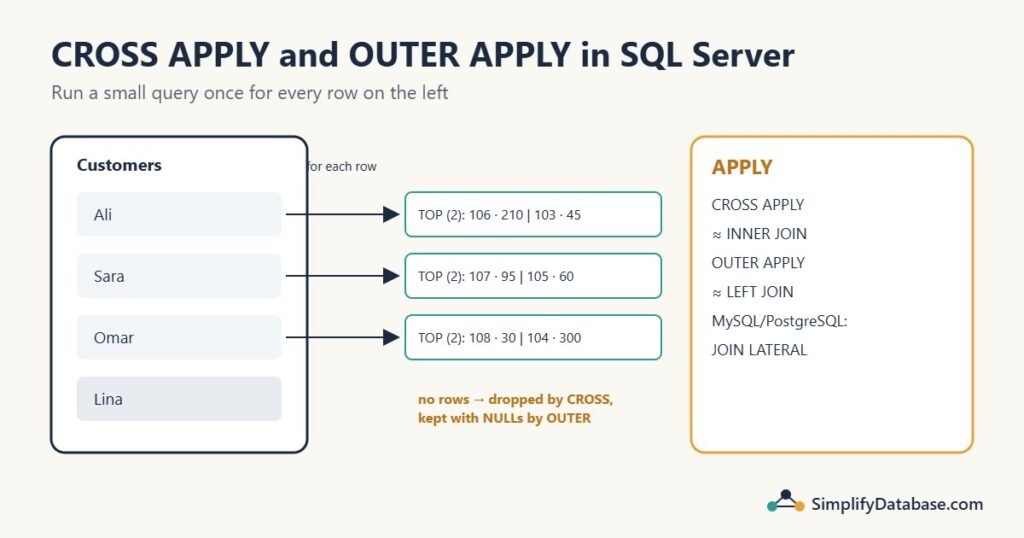
Table of Contents
The sample data
Four customers (Lina has no orders) and eight orders:
CREATE TABLE Customers (CustomerID INT PRIMARY KEY, Name VARCHAR(20));
INSERT INTO Customers VALUES (1, 'Ali'), (2, 'Sara'), (3, 'Omar'), (4, 'Lina');

CREATE TABLE Orders (
    OrderID    INT PRIMARY KEY,
    CustomerID INT,
    OrderDate  DATE,
    Amount     DECIMAL(10,2)
);
INSERT INTO Orders VALUES
(101, 1, '2026-10-02', 120), (102, 2, '2026-10-03',  80),
(103, 1, '2026-10-09',  45), (104, 3, '2026-10-10', 300),
(105, 2, '2026-10-15',  60), (106, 1, '2026-10-20', 210),
(107, 2, '2026-10-21',  95), (108, 3, '2026-10-22',  30);
Why a JOIN isn’t enough
Say you want each customer’s two most recent orders. The natural thought is “for each customer, run SELECT TOP (2) ... ORDER BY OrderDate DESC“. But you can’t write that as a join:
-- Doesn't work: the subquery can't see c.CustomerID
SELECT c.Name, x.OrderID
FROM Customers AS c
JOIN (SELECT TOP (2) * FROM Orders WHERE CustomerID = c.CustomerID
      ORDER BY OrderDate DESC) AS x ON 1 = 1;
A derived table in a JOIN is evaluated on its own; it can’t refer to columns of the other table. SQL Server responds with “The multi-part identifier c.CustomerID could not be bound.”
APPLY is exactly the fix: it lets the right-hand side refer to the current row on the left.
CROSS APPLY: like INNER JOIN, but per row
SELECT c.Name, x.OrderID, x.OrderDate, x.Amount
FROM Customers AS c
CROSS APPLY (
    SELECT TOP (2) o.OrderID, o.OrderDate, o.Amount
    FROM Orders AS o
    WHERE o.CustomerID = c.CustomerID
    ORDER BY o.OrderDate DESC, o.OrderID DESC
) AS x
ORDER BY c.CustomerID, x.OrderDate DESC;| Name | OrderID | OrderDate | Amount |
|---|---|---|---|
| Ali | 106 | 2026-10-20 | 210.00 |
| Ali | 103 | 2026-10-09 | 45.00 |
| Sara | 107 | 2026-10-21 | 95.00 |
| Sara | 105 | 2026-10-15 | 60.00 |
| Omar | 108 | 2026-10-22 | 30.00 |
| Omar | 104 | 2026-10-10 | 300.00 |
Read it as: for each customer c, run the inner query with that customer’s ID, and attach whatever rows it returns. The inner query is free to use TOP, ORDER BY, aggregates, anything.
Lina is missing. Her inner query returns no rows, and CROSS APPLY, like an inner join, drops rows on the left that get nothing back from the right.
OUTER APPLY: like LEFT JOIN, but per row
To keep customers with no orders, use OUTER APPLY. Here’s each customer’s single latest order:
SELECT c.Name, x.OrderID, x.OrderDate, x.Amount
FROM Customers AS c
OUTER APPLY (
    SELECT TOP (1) o.OrderID, o.OrderDate, o.Amount
    FROM Orders AS o
    WHERE o.CustomerID = c.CustomerID
    ORDER BY o.OrderDate DESC, o.OrderID DESC
) AS x
ORDER BY c.CustomerID;| Name | OrderID | OrderDate | Amount |
|---|---|---|---|
| Ali | 106 | 2026-10-20 | 210.00 |
| Sara | 107 | 2026-10-21 | 95.00 |
| Omar | 108 | 2026-10-22 | 30.00 |
| Lina | NULL | NULL | NULL |
Lina stays, with NULLs, just like a LEFT JOIN row with no match.
The rule is easy to remember:
| Keeps left rows with no result? | Similar to | |
|---|---|---|
CROSS APPLY | No | INNER JOIN |
OUTER APPLY | Yes (with NULLs) | LEFT JOIN |
APPLY vs ROW_NUMBER for “top N per group”
You can get the same “latest N per customer” result with ROW_NUMBER(), as shown in Top N per Group in SQL Server. Which is better?
ROW_NUMBER()numbers every order for every customer, then filters. It’s usually best when you want results for most or all of the groups.APPLYwithTOPruns a small, targeted query per outer row. With an index on(CustomerID, OrderDate DESC), each run is a quick seek that reads only N rows. It shines when the outer list is short (say, the 20 customers on the screen) and each customer has many orders.
CREATE INDEX IX_Orders_Customer_Date
    ON Orders (CustomerID, OrderDate DESC) INCLUDE (Amount);
Try both on your data and compare logical reads with SET STATISTICS IO ON. If you’re not sure how to read the result, see How to Read a SQL Server Execution Plan.
Other everyday uses of APPLY
1. Calling a table-valued function for each row
An inline table-valued function returns a table and takes parameters:
CREATE FUNCTION dbo.RecentOrders (@CustomerID INT, @Top INT)
RETURNS TABLE
AS RETURN
    SELECT TOP (@Top) OrderID, OrderDate, Amount
    FROM dbo.Orders
    WHERE CustomerID = @CustomerID
    ORDER BY OrderDate DESC, OrderID DESC;
You can’t join to it with a per-row parameter, but you can apply it:
SELECT c.Name, r.OrderID, r.Amount
FROM dbo.Customers AS c
CROSS APPLY dbo.RecentOrders(c.CustomerID, 2) AS r;
This returns the same six rows as the first CROSS APPLY example, with the logic packaged in a reusable function. Inline functions (a single RETURN SELECT) are expanded into the main query like a view, so they perform well. Multi-statement functions (with BEGIN ... END and a table variable) don’t, and are a common cause of slow procedures.
2. Splitting a comma-separated column
If a Products table stores tags as 'usb,wireless,office' (not ideal design, but common), STRING_SPLIT turns one value into rows, and APPLY runs it for each product:
SELECT p.Name, t.value AS Tag
FROM dbo.Products AS p
CROSS APPLY STRING_SPLIT(p.Tags, ',') AS t;
A keyboard tagged usb,wireless,office becomes three rows: Keyboard/usb, Keyboard/wireless, Keyboard/office. A product with NULL tags returns nothing from STRING_SPLIT, so CROSS APPLY drops it; use OUTER APPLY to keep it. STRING_SPLIT needs SQL Server 2016 or later. See also SQL String Functions Explained Simply.
3. Naming a calculation once and reusing it
Without APPLY, a calculation gets repeated in the SELECT, the WHERE and the ORDER BY:
SELECT OrderID, Amount, Amount * 0.10 AS VAT, Amount * 1.10 AS Total
FROM Orders
WHERE Amount * 1.10 > 100
ORDER BY Amount * 1.10 DESC;
With CROSS APPLY (VALUES ...), you define it once and use the name everywhere, including WHERE (where a normal column alias isn’t allowed):
SELECT o.OrderID, o.Amount, calc.VAT, calc.Total
FROM Orders AS o
CROSS APPLY (VALUES (o.Amount * 0.10, o.Amount * 1.10)) AS calc (VAT, Total)
WHERE calc.Total > 100
ORDER BY calc.Total DESC;| OrderID | Amount | VAT | Total |
|---|---|---|---|
| 104 | 300.00 | 30.00 | 330.00 |
| 106 | 210.00 | 21.00 | 231.00 |
| 101 | 120.00 | 12.00 | 132.00 |
| 107 | 95.00 | 9.50 | 104.50 |
(Bahrain’s VAT rate is 10%, hence the numbers.) You can chain several: a second CROSS APPLY can use the columns of the first. It’s purely for readability; SQL Server calculates it the same way. The logical query order explains why aliases don’t normally work in WHERE.
4. Unpivoting columns into rows
CROSS APPLY with a VALUES list turns columns into rows, and unlike the UNPIVOT operator it keeps NULLs:
SELECT b.Region, v.BudgetMonth, v.Amount
FROM dbo.Budget AS b
CROSS APPLY (VALUES ('Jan', b.Jan), ('Feb', b.Feb), ('Mar', b.Mar)) AS v (BudgetMonth, Amount);
The full example is in PIVOT and UNPIVOT in SQL Server.
5. Reading SQL Server’s own views
If you’ve followed the performance articles on this site, you’ve already used APPLY:
SELECT r.session_id, r.wait_type, t.text
FROM sys.dm_exec_requests AS r
CROSS APPLY sys.dm_exec_sql_text(r.sql_handle) AS t;
sys.dm_exec_sql_text is a table-valued function that takes a handle and returns the SQL text. APPLY calls it for every running request.
MySQL and PostgreSQL: LATERAL
The SQL standard calls this a lateral join, and that’s what MySQL (8.0.14 and later) and PostgreSQL support:
-- MySQL 8.0.14+ / PostgreSQL: the CROSS APPLY example
SELECT c.Name, x.OrderID, x.OrderDate, x.Amount
FROM Customers AS c
JOIN LATERAL (
    SELECT o.OrderID, o.OrderDate, o.Amount
    FROM Orders AS o
    WHERE o.CustomerID = c.CustomerID
    ORDER BY o.OrderDate DESC, o.OrderID DESC
    LIMIT 2
) AS x ON TRUE;

-- The OUTER APPLY equivalent
... LEFT JOIN LATERAL ( ... LIMIT 1 ) AS x ON TRUE;
JOIN LATERAL ... ON TRUE behaves like CROSS APPLY, and LEFT JOIN LATERAL ... ON TRUE like OUTER APPLY. MariaDB doesn’t support LATERAL yet; use the ROW_NUMBER() approach there. (The results in this article were cross-checked that way.)
Common mistakes
- Using
CROSS APPLYwhen you needOUTER APPLY, and silently losing rows with no match (customers without orders, products without tags). TOPwithoutORDER BYinside the applied query. “Top 2” then means “any 2”.- No tie-breaker in the
ORDER BYwhen two orders share a date. - Applying a multi-statement table-valued function to thousands of rows. Rewrite it as an inline function.
- No supporting index for the inner query, so each outer row causes a scan instead of a seek.
Practice exercises
Exercise 1. Return each customer’s largest order (by amount), keeping customers with no orders.
Exercise 2. Using CROSS APPLY (VALUES ...), return each order’s amount and a Discount column (5% of the amount), but only for orders where the amount after discount is over 100.
Exercise 3. Rewrite the first CROSS APPLY example (two latest orders per customer) for MySQL 8.
Answers
Answer 1.
SELECT c.Name, x.OrderID, x.Amount
FROM Customers AS c
OUTER APPLY (
    SELECT TOP (1) o.OrderID, o.Amount
    FROM Orders AS o
    WHERE o.CustomerID = c.CustomerID
    ORDER BY o.Amount DESC, o.OrderID DESC
) AS x;
Ali 106 (210.00), Sara 107 (95.00), Omar 104 (300.00), Lina NULL.
Answer 2.
SELECT o.OrderID, o.Amount, d.Discount
FROM Orders AS o
CROSS APPLY (VALUES (o.Amount * 0.05)) AS d (Discount)
WHERE o.Amount - d.Discount > 100;
Orders 101 (discount 6.00), 104 (15.00) and 106 (10.50) qualify. Order 107 doesn’t: 95 minus 4.75 is 90.25.
Answer 3.
SELECT c.Name, x.OrderID, x.OrderDate, x.Amount
FROM Customers AS c
JOIN LATERAL (
    SELECT o.OrderID, o.OrderDate, o.Amount
    FROM Orders AS o
    WHERE o.CustomerID = c.CustomerID
    ORDER BY o.OrderDate DESC, o.OrderID DESC
    LIMIT 2
) AS x ON TRUE
ORDER BY c.CustomerID, x.OrderDate DESC;
Summary
- APPLY runs a table expression once per row of the left table, and that expression can use the row’s columns. A normal join can’t.
CROSS APPLYdrops left rows with no result (likeINNER JOIN);OUTER APPLYkeeps them withNULLs (likeLEFT JOIN).- Great for top N per row, table-valued functions,
STRING_SPLIT, reusable calculations withVALUES, and unpivoting. - With a good index, APPLY +
TOPis very fast for short outer lists;ROW_NUMBER()often wins when processing every group. - In MySQL 8.0.14+ and PostgreSQL, use
JOIN LATERAL/LEFT JOIN LATERAL ... ON TRUE.
Related articles
- Top N per Group in SQL Server: ROW_NUMBER vs APPLY for the latest record per group.
- SQL JOINs Explained Simply: the INNER and LEFT JOIN behaviour APPLY builds on.
- PIVOT and UNPIVOT in SQL Server: unpivoting with CROSS APPLY and VALUES.
- SQL Subqueries vs CTEs Explained Simply: other ways to build a query in steps.