
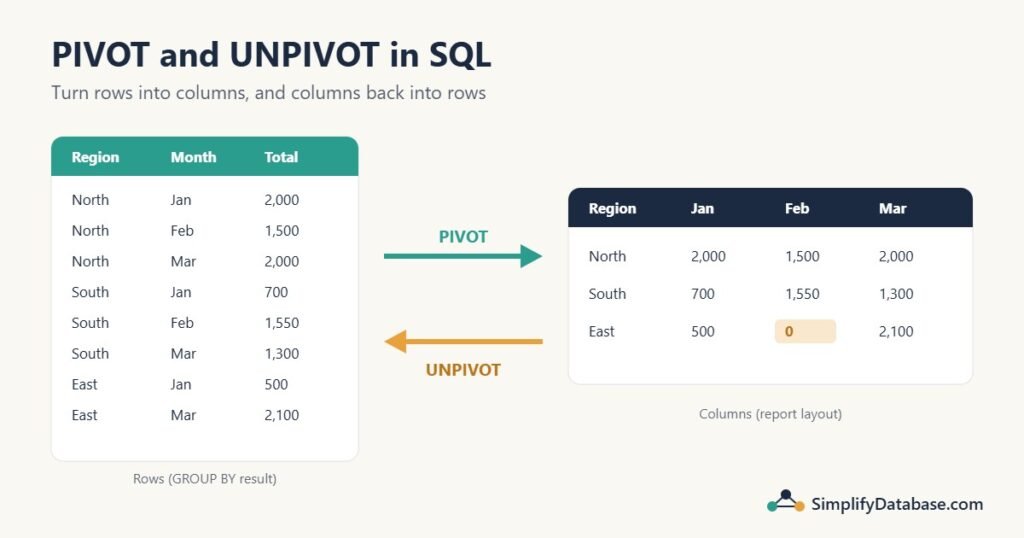
Your manager doesn’t want this:
| Region | Month | Total |
|---|---|---|
| North | 1 | 2,000 |
| North | 2 | 1,500 |
| North | 3 | 2,000 |
They want this, the way it looks in Excel:
| Region | Jan | Feb | Mar |
|---|---|---|---|
| North | 2,000 | 1,500 | 2,000 |
Turning rows into columns is called a pivot. Turning columns back into rows is an unpivot. Both come up all the time in reports: sales per month, invoices per status, budget vs actual.
This guide shows three ways to pivot in SQL (conditional aggregation, the SQL Server PIVOT operator, and dynamic pivot for columns you don’t know in advance), then two ways to unpivot. Every example uses the same small table, so you can compare the results.
The sample data
A Sales table with 12 sales across 3 regions in the first quarter of 2026. Notice that East has no sales in February. That gap matters later.
CREATE TABLE Sales (
    SaleID   INT PRIMARY KEY,
    Region   VARCHAR(20),
    SaleDate DATE,
    Amount   DECIMAL(10,2)
);

INSERT INTO Sales VALUES
(1, 'North', '2026-01-05', 1200), (2, 'North', '2026-01-20',  800),
(3, 'North', '2026-02-11', 1500), (4, 'North', '2026-03-03',  900),
(5, 'North', '2026-03-25', 1100), (6, 'South', '2026-01-14',  700),
(7, 'South', '2026-02-02',  650), (8, 'South', '2026-02-27',  900),
(9, 'South', '2026-03-18', 1300), (10, 'East', '2026-01-09',  500),
(11, 'East', '2026-03-07', 1700), (12, 'East', '2026-03-29',  400);
First, the normal grouped query. One row per region per month:
SELECT Region, MONTH(SaleDate) AS SaleMonth, SUM(Amount) AS Total
FROM Sales
GROUP BY Region, MONTH(SaleDate)
ORDER BY Region, SaleMonth;| Region | SaleMonth | Total |
|---|---|---|
| East | 1 | 500.00 |
| East | 3 | 2100.00 |
| North | 1 | 2000.00 |
| North | 2 | 1500.00 |
| North | 3 | 2000.00 |
| South | 1 | 700.00 |
| South | 2 | 1550.00 |
| South | 3 | 1300.00 |
That’s 8 rows, and East’s missing February simply isn’t there. Now let’s turn the months into columns.
Method 1: Conditional aggregation (works in every database)
The idea is simple. Group by the thing you want as rows (Region). Then, for each column you want, add a SUM that only counts the rows for that column, using a CASE expression:
SELECT Region,
       SUM(CASE WHEN MONTH(SaleDate) = 1 THEN Amount END) AS Jan,
       SUM(CASE WHEN MONTH(SaleDate) = 2 THEN Amount END) AS Feb,
       SUM(CASE WHEN MONTH(SaleDate) = 3 THEN Amount END) AS Mar
FROM Sales
GROUP BY Region
ORDER BY Region;| Region | Jan | Feb | Mar |
|---|---|---|---|
| East | 500.00 | NULL | 2100.00 |
| North | 2000.00 | 1500.00 | 2000.00 |
| South | 700.00 | 1550.00 | 1300.00 |
How to read it: for a January row, the first CASE returns Amount, and the other two return NULL. SUM ignores NULLs, so each column only adds up its own month.
East’s February is NULL because there were no rows to add up. In a report you usually want a 0 instead. Add ELSE 0, and while you’re at it, a total column:
SELECT Region,
       SUM(CASE WHEN MONTH(SaleDate) = 1 THEN Amount ELSE 0 END) AS Jan,
       SUM(CASE WHEN MONTH(SaleDate) = 2 THEN Amount ELSE 0 END) AS Feb,
       SUM(CASE WHEN MONTH(SaleDate) = 3 THEN Amount ELSE 0 END) AS Mar,
       SUM(Amount) AS Total
FROM Sales
GROUP BY Region
ORDER BY Region;| Region | Jan | Feb | Mar | Total |
|---|---|---|---|---|
| East | 500.00 | 0.00 | 2100.00 | 2600.00 |
| North | 2000.00 | 1500.00 | 2000.00 | 5500.00 |
| South | 700.00 | 1550.00 | 1300.00 | 3550.00 |
Adding a total row
To add a grand total row at the bottom, use ROLLUP. In SQL Server it’s GROUP BY ROLLUP (Region); in MySQL and MariaDB it’s GROUP BY Region WITH ROLLUP. The total row has NULL in the Region column, so give it a label:
-- SQL Server
SELECT CASE WHEN GROUPING(Region) = 1 THEN 'Total' ELSE Region END AS Region,
       SUM(CASE WHEN MONTH(SaleDate) = 1 THEN Amount ELSE 0 END) AS Jan,
       SUM(CASE WHEN MONTH(SaleDate) = 2 THEN Amount ELSE 0 END) AS Feb,
       SUM(CASE WHEN MONTH(SaleDate) = 3 THEN Amount ELSE 0 END) AS Mar,
       SUM(Amount) AS Total
FROM Sales
GROUP BY ROLLUP (Region)
ORDER BY GROUPING(Region), Region;| Region | Jan | Feb | Mar | Total |
|---|---|---|---|---|
| East | 500.00 | 0.00 | 2100.00 | 2600.00 |
| North | 2000.00 | 1500.00 | 2000.00 | 5500.00 |
| South | 700.00 | 1550.00 | 1300.00 | 3550.00 |
| Total | 3200.00 | 3050.00 | 5400.00 | 11650.00 |
That’s a complete pivot report: rows, columns, row totals and column totals. The aging report uses exactly this pattern for 0-30, 31-60 and 61-90 day buckets.
Conditional aggregation also works with other functions. COUNT(CASE WHEN MONTH(SaleDate) = 1 THEN 1 END) counts sales per month, and AVG(CASE ...) gives an average. You can mix them in one query, which the PIVOT operator can’t do.
Method 2: The PIVOT operator (SQL Server)
SQL Server has a dedicated PIVOT operator that produces the same result with less repetition:
SELECT Region, [1] AS Jan, [2] AS Feb, [3] AS Mar
FROM (
    SELECT Region, MONTH(SaleDate) AS SaleMonth, Amount
    FROM dbo.Sales
) AS src
PIVOT (
    SUM(Amount) FOR SaleMonth IN ([1], [2], [3])
) AS p
ORDER BY Region;
The result is the same as the first conditional aggregation query, including the NULL for East in February.
Read it in three parts:
- The source query (
src) returns only the columns the pivot needs: the row label (Region), the column that becomes the new column headers (SaleMonth), and the value to aggregate (Amount). SUM(Amount)is the aggregate for each cell.FOR SaleMonth IN ([1], [2], [3])lists the values that become columns. They’re written as column names in square brackets, because that’s what they become. In theSELECT,[1] AS Jangives them friendly names.
Every column in the source that isn’t the aggregated value or the FOR column becomes a grouping column automatically. That leads to the most common PIVOT mistake.
The classic PIVOT mistake: too many columns in the source
Try pivoting straight from the table, without the derived table:
-- Wrong: SaleID and SaleDate become grouping columns
SELECT *
FROM dbo.Sales
PIVOT (SUM(Amount) FOR Region IN ([North], [South], [East])) AS p;
There’s no error. But because SaleID and SaleDate are still in the source, SQL Server groups by them too, and you get one row per sale with mostly NULL cells instead of a summary. The fix is always the same: wrap the table in a derived table (or CTE) that selects only the three columns the pivot needs.
Replacing NULL with 0
PIVOT has no ELSE 0. Wrap each column in ISNULL (or COALESCE) in the outer SELECT:
SELECT Region,
       ISNULL([1], 0) AS Jan,
       ISNULL([2], 0) AS Feb,
       ISNULL([3], 0) AS Mar
FROM (
    SELECT Region, MONTH(SaleDate) AS SaleMonth, Amount
    FROM dbo.Sales
) AS src
PIVOT (SUM(Amount) FOR SaleMonth IN ([1], [2], [3])) AS p
ORDER BY Region;
Method 3: Dynamic PIVOT (when you don’t know the columns)
Both methods above need the column list written in the query. That’s fine for 12 months or 4 statuses. But what if the columns come from the data, like one column per year-month for however many months exist?
SQL doesn’t allow a variable column list, so you build the query as text and run it with sp_executesql. This version needs SQL Server 2017 or later (for STRING_AGG):
DECLARE @cols NVARCHAR(MAX), @sql NVARCHAR(MAX);

-- 1. Build the column list: [2026-01], [2026-02], [2026-03]
SELECT @cols = STRING_AGG(QUOTENAME(SaleMonth), ', ')
               WITHIN GROUP (ORDER BY SaleMonth)
FROM (
    SELECT DISTINCT CONVERT(char(7), SaleDate, 120) AS SaleMonth
    FROM dbo.Sales
) AS m;

-- 2. Put it into the PIVOT query
SET @sql = N'
SELECT Region, ' + @cols + N'
FROM (
    SELECT Region, CONVERT(char(7), SaleDate, 120) AS SaleMonth, Amount
    FROM dbo.Sales
) AS src
PIVOT (SUM(Amount) FOR SaleMonth IN (' + @cols + N')) AS p
ORDER BY Region;';

-- 3. Run it
EXEC sys.sp_executesql @sql;
CONVERT(char(7), SaleDate, 120) turns a date into yyyy-mm text, like 2026-01. When April’s sales arrive, a [2026-04] column appears without changing the query.
Two safety rules for dynamic SQL:
- Always wrap the values in
QUOTENAME. It adds the square brackets and escapes any]inside the value. Without it, a strange value in your data could break the query or, in the worst case, inject code. See SQL Injection Explained Simply for why this matters. - Never build the column list from user input such as a search box. Build it from your own table, as above.
On SQL Server 2016 or older, build @cols with the FOR XML PATH('') and STUFF trick instead of STRING_AGG. The rest is the same.
What about MySQL and PostgreSQL?
- MySQL and MariaDB have no
PIVOToperator. Use conditional aggregation (Method 1). Every result in this article from Method 1 was run on MariaDB. - PostgreSQL also has no
PIVOT, but it has a neat shortcut for conditional aggregation:SUM(Amount) FILTER (WHERE EXTRACT(MONTH FROM SaleDate) = 1) AS Jan. There’s also acrosstabfunction in thetablefuncextension, but conditional aggregation is easier to read.
UNPIVOT: turning columns back into rows
Now the opposite problem. Someone gives you the budget as a spreadsheet-style table, with one column per month:
CREATE TABLE Budget (
    Region VARCHAR(20) PRIMARY KEY,
    Jan    DECIMAL(10,2),
    Feb    DECIMAL(10,2),
    Mar    DECIMAL(10,2)
);

INSERT INTO Budget VALUES
('North', 1800, 1500, 2500),
('South', 1500, 1500, NULL),   -- March budget not set yet
('East',  1000,  800, 1500);
This is easy to read, but hard to query. To compare budget with actual sales per month, or to add a fourth month, you want one row per region per month. That’s an unpivot.
The UNPIVOT operator (SQL Server)
SELECT Region, BudgetMonth, Amount
FROM dbo.Budget
UNPIVOT (
    Amount FOR BudgetMonth IN (Jan, Feb, Mar)
) AS u;| Region | BudgetMonth | Amount |
|---|---|---|
| East | Jan | 1000.00 |
| East | Feb | 800.00 |
| East | Mar | 1500.00 |
| North | Jan | 1800.00 |
| North | Feb | 1500.00 |
| North | Mar | 2500.00 |
| South | Jan | 1500.00 |
| South | Feb | 1500.00 |
Look closely: that’s 8 rows, not 9. UNPIVOT silently drops NULL values, so South’s March row disappeared. Sometimes that’s what you want. In a budget report it usually isn’t, because “no budget set” is important information.
Two more UNPIVOT rules: all the columns in the IN list must have exactly the same data type (otherwise you get a type conflict error), and the new column names (Amount, BudgetMonth) must not already exist in the table.
CROSS APPLY with VALUES (keeps NULLs)
The better way to unpivot in SQL Server is CROSS APPLY with a VALUES list:
SELECT b.Region, v.BudgetMonth, v.Amount
FROM dbo.Budget AS b
CROSS APPLY (VALUES
    ('Jan', b.Jan),
    ('Feb', b.Feb),
    ('Mar', b.Mar)
) AS v (BudgetMonth, Amount);
For every row of Budget, the VALUES list makes three rows: one per month. This returns all 9 rows, including South’s March with a NULL amount. It’s also more flexible: you can unpivot several groups of columns at once, for example ('Jan', b.JanBudget, b.JanForecast).
Unpivot in MySQL and other databases: UNION ALL
Where there’s no UNPIVOT or CROSS APPLY, stack one SELECT per column with UNION ALL:
SELECT Region, 'Jan' AS BudgetMonth, Jan AS Amount FROM Budget
UNION ALL
SELECT Region, 'Feb', Feb FROM Budget
UNION ALL
SELECT Region, 'Mar', Mar FROM Budget
ORDER BY Region;
This returns all 9 rows, NULL included. It reads the table once per column, so it’s slower on big tables, but for a budget table with a few hundred rows it doesn’t matter.
Why unpivot? Budget vs actual
Once the budget is in rows, comparing it with real sales is an ordinary join. Here month numbers are used on both sides:
WITH b AS (
    SELECT Region, 1 AS SaleMonth, Jan AS Budget FROM Budget
    UNION ALL SELECT Region, 2, Feb FROM Budget
    UNION ALL SELECT Region, 3, Mar FROM Budget
),
a AS (
    SELECT Region, MONTH(SaleDate) AS SaleMonth, SUM(Amount) AS Actual
    FROM Sales
    GROUP BY Region, MONTH(SaleDate)
)
SELECT b.Region, b.SaleMonth, b.Budget,
       COALESCE(a.Actual, 0)            AS Actual,
       COALESCE(a.Actual, 0) - b.Budget AS Diff
FROM b
LEFT JOIN a ON a.Region = b.Region AND a.SaleMonth = b.SaleMonth
ORDER BY b.Region, b.SaleMonth;| Region | SaleMonth | Budget | Actual | Diff |
|---|---|---|---|---|
| East | 1 | 1000.00 | 500.00 | -500.00 |
| East | 2 | 800.00 | 0.00 | -800.00 |
| East | 3 | 1500.00 | 2100.00 | 600.00 |
| North | 1 | 1800.00 | 2000.00 | 200.00 |
| North | 2 | 1500.00 | 1500.00 | 0.00 |
| North | 3 | 2500.00 | 2000.00 | -500.00 |
| South | 1 | 1500.00 | 700.00 | -800.00 |
| South | 2 | 1500.00 | 1550.00 | 50.00 |
| South | 3 | NULL | 1300.00 | NULL |
The LEFT JOIN keeps East’s February even though there were no sales, and COALESCE turns the missing actual into 0. You could now pivot this result back into columns for the final report. Unpivot to calculate, pivot to present: that’s the usual pattern.
Which method should you use?
| You need | Use |
|---|---|
| A pivot that works in any database | Conditional aggregation |
| Different functions per column (SUM, COUNT, AVG together) | Conditional aggregation |
| Short pivot syntax in SQL Server with a fixed column list | PIVOT |
| Columns that depend on the data | Dynamic PIVOT (or dynamic conditional aggregation) |
| Unpivot in SQL Server, keeping NULLs | CROSS APPLY (VALUES ...) |
| Unpivot in MySQL or PostgreSQL | UNION ALL (PostgreSQL also has LATERAL (VALUES ...)) |
Performance is usually the same for PIVOT and conditional aggregation, since SQL Server turns both into a similar grouped plan. Pick the one that’s easier to read for the next person.
Common mistakes
- Leaving extra columns in the PIVOT source. Every leftover column becomes a grouping column and breaks the summary. Select only the row label, the column header and the value.
- Forgetting that cells can be NULL. A region with no sales in a month shows
NULL, not 0. UseELSE 0orISNULL. - Pivoting in SQL when the tool can do it. Excel, Power BI and most reporting tools have a pivot feature. If the columns change every month, sometimes the cleanest answer is to return rows and let the tool pivot.
- Using UNPIVOT and losing NULL rows without noticing. Use
CROSS APPLY (VALUES ...)if missing values matter. - Building a dynamic pivot without
QUOTENAME. It works until a value contains a bracket or something worse. - Filtering on months with a function in
WHEREon a big table, likeWHERE MONTH(SaleDate) = 1. Inside theCASEit’s fine, but inWHEREuse a date range (SaleDate >= '2026-01-01' AND SaleDate < '2026-04-01') so an index can be used.
Practice exercises
Exercise 1. Using the Sales table, write a pivot that shows the number of sales (not the amount) per region for Jan, Feb and Mar. East should show 0 for February.
Exercise 2. The UNPIVOT query above returned 8 rows. Rewrite it so South’s March row with a NULL amount is included, in SQL Server.
Exercise 3. Write one query that returns a single row with the total sales for each month: three columns, Jan, Feb and Mar.
Answers
Answer 1. COUNT ignores NULLs, so a CASE with no ELSE works and empty months give 0:
SELECT Region,
       COUNT(CASE WHEN MONTH(SaleDate) = 1 THEN 1 END) AS Jan,
       COUNT(CASE WHEN MONTH(SaleDate) = 2 THEN 1 END) AS Feb,
       COUNT(CASE WHEN MONTH(SaleDate) = 3 THEN 1 END) AS Mar
FROM Sales
GROUP BY Region
ORDER BY Region;| Region | Jan | Feb | Mar |
|---|---|---|---|
| East | 1 | 0 | 2 |
| North | 2 | 1 | 2 |
| South | 1 | 2 | 1 |
Answer 2. Use CROSS APPLY with VALUES, which keeps NULLs:
SELECT b.Region, v.BudgetMonth, v.Amount
FROM dbo.Budget AS b
CROSS APPLY (VALUES ('Jan', b.Jan), ('Feb', b.Feb), ('Mar', b.Mar))
     AS v (BudgetMonth, Amount);
Answer 3. Conditional aggregation with no GROUP BY at all treats the whole table as one group:
SELECT SUM(CASE WHEN MONTH(SaleDate) = 1 THEN Amount ELSE 0 END) AS Jan,
       SUM(CASE WHEN MONTH(SaleDate) = 2 THEN Amount ELSE 0 END) AS Feb,
       SUM(CASE WHEN MONTH(SaleDate) = 3 THEN Amount ELSE 0 END) AS Mar
FROM Sales;| Jan | Feb | Mar |
|---|---|---|
| 3200.00 | 3050.00 | 5400.00 |
Summary
- A pivot turns row values into columns; an unpivot turns columns into rows.
- Conditional aggregation (
SUM(CASE WHEN ... THEN Amount END)) works in every database and lets you mix functions. - SQL Server’s
PIVOTis shorter, but feed it a derived table with only the columns it needs, and wrap cells inISNULLfor zeros. - For columns that come from the data, build a dynamic pivot with
STRING_AGG,QUOTENAMEandsp_executesql. UNPIVOTdrops NULLs;CROSS APPLY (VALUES ...)in SQL Server, orUNION ALLelsewhere, keeps them.- Unpivot to calculate, pivot to present.
Next in the reporting series: month-over-month and year-over-year comparisons.
Related articles
- Aging Report in SQL Server: the same conditional aggregation pattern, used for 0-30, 31-60 and 61-90 day buckets.
- Running Totals in SQL Server: cumulative sums and running balances for reports.
- Top N per Group in SQL Server: the latest record for each customer or product.
- SQL GROUP BY and Aggregate Functions Explained Simply: the basics behind every pivot.