
Sooner or later every report needs a little logic. Show “Paid” instead of the status code 1. Label orders as small, medium or large. Count how many customers are from each city in one row. Sort by a custom order that isn’t alphabetical. All of that comes down to one tool: the CASE expression.
If you know IF ... THEN ... ELSE from Excel or any programming language, you already understand the idea. CASE is SQL’s version, and it works almost everywhere in a query.
The Sample Data
| order_id | customer | amount | status |
|---|---|---|---|
| 1 | Sara | 650 | 1 |
| 2 | Omar | 120 | 2 |
| 3 | Lina | 45 | 1 |
| 4 | Ali | 300 | 3 |
| 5 | Huda | 80 | 1 |
Status codes: 1 = Paid, 2 = Pending, 3 = Cancelled.
Searched CASE: Conditions in Order
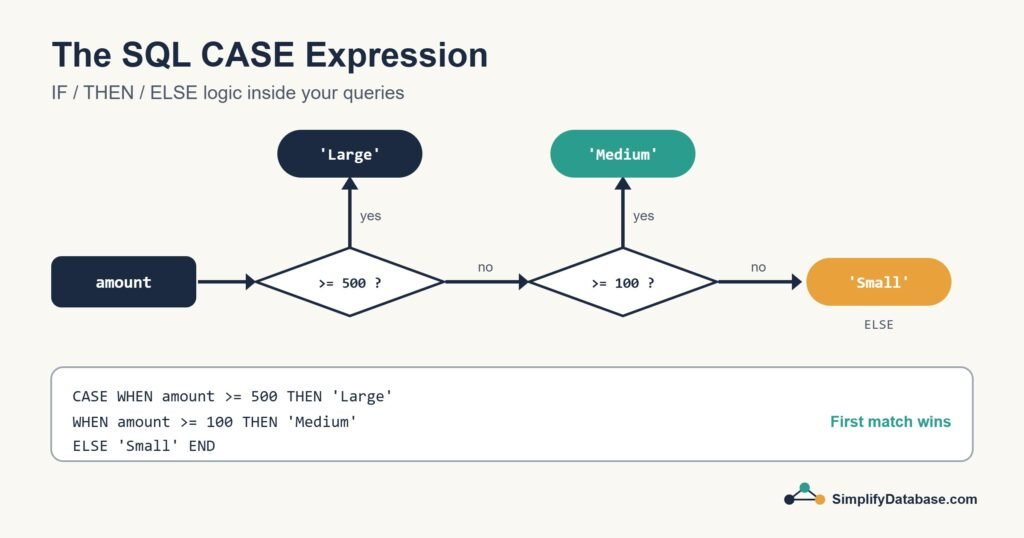
This is the form you’ll use most. Each WHEN has its own condition:
SELECT order_id, customer, amount,
       CASE
           WHEN amount >= 500 THEN 'Large'
           WHEN amount >= 100 THEN 'Medium'
           ELSE 'Small'
       END AS order_size
FROM orders;| order_id | customer | amount | order_size |
|---|---|---|---|
| 1 | Sara | 650 | Large |
| 2 | Omar | 120 | Medium |
| 3 | Lina | 45 | Small |
| 4 | Ali | 300 | Medium |
| 5 | Huda | 80 | Small |
The key rule: SQL checks the WHEN lines from top to bottom and stops at the first one that’s true. Sara’s 650 is also greater than 100, but she’s already been labelled “Large” by then. That’s why you put the strictest condition first.
If no condition matches and there’s no ELSE, the result is NULL. I almost always include an ELSE, even if it’s just ELSE 'Unknown', so gaps in my logic are easy to spot.
Simple CASE: Matching One Value
When you’re comparing a single column to a list of exact values, there’s a shorter form:
SELECT order_id, customer,
       CASE status
           WHEN 1 THEN 'Paid'
           WHEN 2 THEN 'Pending'
           WHEN 3 THEN 'Cancelled'
           ELSE 'Unknown'
       END AS status_name
FROM orders;
It reads nicely, but it can only test equality. For ranges, NULL checks or several columns, use the searched form.
A tip from real projects: if you find yourself writing the same status CASE in many queries, the codes probably deserve their own lookup table that you can JOIN to. CASE is best for logic that’s specific to one report.
CASE Inside Aggregates (Conditional Counting)
This trick is one of the most useful things in SQL. Put a CASE inside SUM or COUNT to count different things in one pass:
SELECT
    COUNT(*)                                          AS total_orders,
    SUM(CASE WHEN status = 1 THEN 1 ELSE 0 END)       AS paid_orders,
    SUM(CASE WHEN status = 2 THEN 1 ELSE 0 END)       AS pending_orders,
    SUM(CASE WHEN status = 1 THEN amount ELSE 0 END)  AS paid_amount
FROM orders;| total_orders | paid_orders | pending_orders | paid_amount |
|---|---|---|---|
| 5 | 3 | 1 | 775 |
Paid orders are Sara (650), Lina (45) and Huda (80), so the paid amount is 775. Combine this with GROUP BY and you get a pivot-style report, like one row per month with a column per status, without any special pivot syntax.
CASE in ORDER BY: Custom Sorting
Want pending orders at the top, then paid, then cancelled? Alphabetical won’t do it, but CASE can:
SELECT order_id, customer, status
FROM orders
ORDER BY CASE status
             WHEN 2 THEN 1   -- Pending first
             WHEN 1 THEN 2   -- then Paid
             WHEN 3 THEN 3   -- Cancelled last
         END,
         order_id;
CASE in WHERE and UPDATE
You can use CASE anywhere an expression is allowed. A common one is an update that applies different rules to different rows:
-- Different price increases by category
UPDATE products
SET price = price * CASE category
                        WHEN 'Books'      THEN 1.05
                        WHEN 'Stationery' THEN 1.10
                        ELSE 1.00
                    END;
In a WHERE clause, plain AND/OR logic is usually clearer than CASE, and it lets the database use indexes more easily. Keep CASE for the SELECT list, aggregates and sorting.
Watch Out for NULL
A condition like WHEN discount = NULL is never true. Test for null with IS NULL:
CASE
    WHEN discount IS NULL THEN 'No discount'
    WHEN discount >= 20   THEN 'Big discount'
    ELSE 'Small discount'
END
Nulls catch everyone at least once. There’s a whole article on them: NULL in SQL Explained Simply.
Two Forms Side by Side
| Simple CASE | Searched CASE | |
|---|---|---|
| Syntax | CASE col WHEN value THEN ... | CASE WHEN condition THEN ... |
| Can test | Equality with one column | Any condition: ranges, several columns, IS NULL |
| Best for | Translating codes into labels | Grouping, bands and business rules |
Common Mistakes
- Putting conditions in the wrong order, so a broad
WHENcatches rows meant for a later one. - Forgetting
END. EveryCASEneeds one. - Returning different data types from different branches, like a number in one and text in another. Keep them all the same type.
- Leaving out
ELSEand then being surprised byNULLresults.
Conclusion
CASE brings if/then/else logic into SQL. Use the searched form for conditions, the simple form for mapping codes to labels, and remember that the first matching WHEN wins. Inside SUM and COUNT it becomes a reporting superpower.
Take one of your existing reports and see whether a few CASE expressions could replace several separate queries. They usually can.
Related articles
- SQL WHERE, ORDER BY and LIMIT: filter, sort and limit your results.
- SQL Window Functions: ROW_NUMBER, RANK, LAG and running totals.
- HAVING vs WHERE in SQL: filtering rows versus filtering groups.
- SQL Date Functions Explained Simply: GETDATE, DATEADD, DATEDIFF and more.