
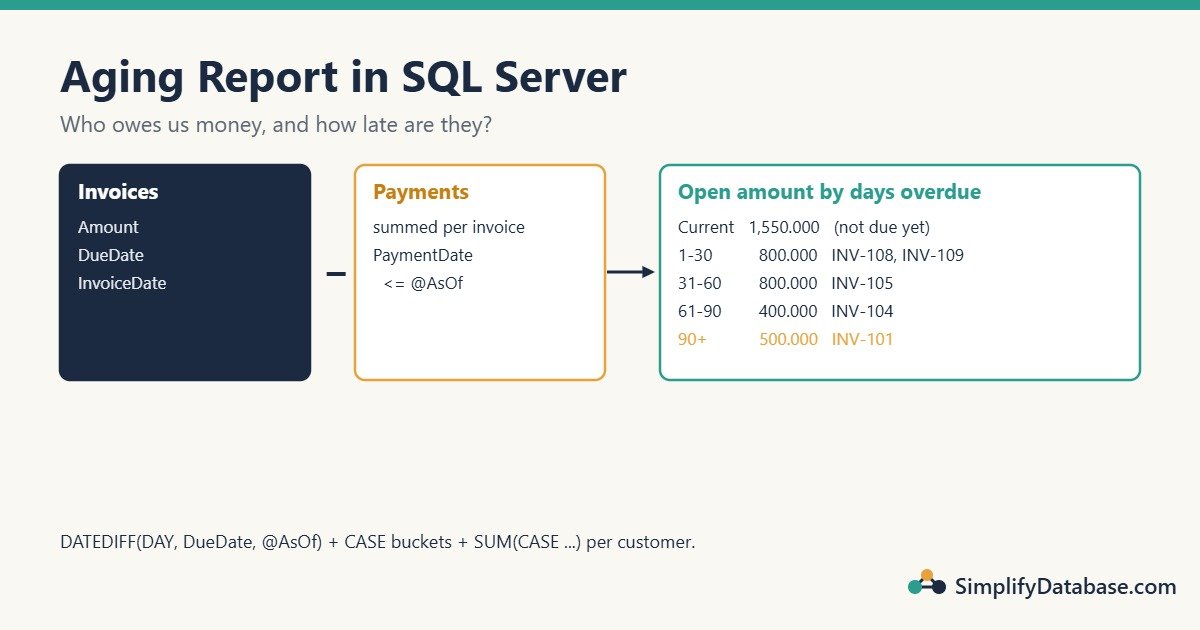
Every finance team asks the same question at month-end: “Who owes us money, and how late are they?” The answer is an aging report: each customer’s unpaid balance split by how many days it is overdue.
| Customer | Current | 1-30 | 31-60 | 61-90 | 90+ | Total |
|---|---|---|---|---|---|---|
| Al Noor Trading | 0.000 | 500.000 | 0.000 | 0.000 | 500.000 | 1,000.000 |
It looks simple, but it’s easy to get wrong: double-counted payments, invoices in the wrong bucket, or a report that changes when you run it again next week. This article builds it step by step in SQL Server, and every number shown comes from running the queries.
It’s part 3 of the SQL Server reporting queries series, after Running Totals and Top N per Group.
The Sample Data
Three tables: customers, invoices (with a due date), and payments against invoices.
CREATE TABLE dbo.Customers (
    CustomerID   INT           NOT NULL PRIMARY KEY,
    CustomerName NVARCHAR(100) NOT NULL
);

CREATE TABLE dbo.Invoices (
    InvoiceID   INT           NOT NULL PRIMARY KEY,
    CustomerID  INT           NOT NULL REFERENCES dbo.Customers (CustomerID),
    InvoiceNo   VARCHAR(20)   NOT NULL,
    InvoiceDate DATE          NOT NULL,
    DueDate     DATE          NOT NULL,
    Amount      DECIMAL(14,3) NOT NULL
);

CREATE TABLE dbo.Payments (
    PaymentID   INT           NOT NULL PRIMARY KEY,
    InvoiceID   INT           NOT NULL REFERENCES dbo.Invoices (InvoiceID),
    PaymentDate DATE          NOT NULL,
    Amount      DECIMAL(14,3) NOT NULL
);

INSERT INTO dbo.Customers VALUES
(1, N'Al Noor Trading'), (2, N'Gulf Office Supply'),
(3, N'Sara Electronics'), (4, N'Omar Contracting');

INSERT INTO dbo.Invoices VALUES
(1, 1, 'INV-101', '2026-06-15', '2026-07-15', 1200.000),
(2, 1, 'INV-108', '2026-09-10', '2026-10-10',  800.000),
(3, 2, 'INV-102', '2026-07-20', '2026-08-19', 1500.000),
(4, 2, 'INV-110', '2026-10-05', '2026-11-04',  650.000),
(5, 3, 'INV-104', '2026-08-01', '2026-08-31',  400.000),
(6, 3, 'INV-109', '2026-09-01', '2026-10-01',  300.000),
(7, 4, 'INV-105', '2026-08-20', '2026-09-19', 2000.000),
(8, 4, 'INV-111', '2026-10-20', '2026-11-19',  900.000);

INSERT INTO dbo.Payments VALUES
(1, 1, '2026-08-01',  500.000),   -- INV-101, first part
(6, 1, '2026-09-20',  200.000),   -- INV-101, second part
(2, 3, '2026-09-15', 1500.000),   -- INV-102 paid in full
(3, 7, '2026-10-15', 1200.000),   -- INV-105, part
(5, 2, '2026-10-20',  300.000),   -- INV-108, part
(4, 5, '2026-11-03',  400.000);   -- INV-104, paid AFTER our report date
We’ll run the report as of 31 October 2026.
Step 1: The Open Amount of Each Invoice
An invoice’s open amount is its amount minus everything paid against it up to the report date. Add up payments per invoice first, then join:
DECLARE @AsOf DATE = '2026-10-31';

WITH Paid AS (
    SELECT InvoiceID, SUM(Amount) AS PaidAmount
    FROM dbo.Payments
    WHERE PaymentDate <= @AsOf
    GROUP BY InvoiceID
)
SELECT i.InvoiceNo, i.DueDate, i.Amount,
       COALESCE(p.PaidAmount, 0)            AS Paid,
       i.Amount - COALESCE(p.PaidAmount, 0) AS OpenAmount,
       DATEDIFF(DAY, i.DueDate, @AsOf)      AS DaysOverdue
FROM dbo.Invoices AS i
LEFT JOIN Paid AS p ON p.InvoiceID = i.InvoiceID
WHERE i.InvoiceDate <= @AsOf
ORDER BY i.InvoiceNo;| InvoiceNo | DueDate | Amount | Paid | OpenAmount | DaysOverdue |
|---|---|---|---|---|---|
| INV-101 | 2026-07-15 | 1200.000 | 700.000 | 500.000 | 108 |
| INV-102 | 2026-08-19 | 1500.000 | 1500.000 | 0.000 | 73 |
| INV-104 | 2026-08-31 | 400.000 | 0.000 | 400.000 | 61 |
| INV-105 | 2026-09-19 | 2000.000 | 1200.000 | 800.000 | 42 |
| INV-108 | 2026-10-10 | 800.000 | 300.000 | 500.000 | 21 |
| INV-109 | 2026-10-01 | 300.000 | 0.000 | 300.000 | 30 |
| INV-110 | 2026-11-04 | 650.000 | 0.000 | 650.000 | -4 |
| INV-111 | 2026-11-19 | 900.000 | 0.000 | 900.000 | -19 |
What each part does:
LEFT JOINkeeps invoices with no payments at all. TheirPaidAmountisNULL, soCOALESCE(..., 0)turns it into 0. (See NULL in SQL Explained Simply.)PaymentDate <= @AsOfignores payments made after the report date. INV-104 was paid on 3 November, but on 31 October it was still open, so it stays at 400.000. That makes the report repeatable: run it for 31 October next year and you get the same answer.InvoiceDate <= @AsOfignores invoices created after the report date, for the same reason.DATEDIFF(DAY, DueDate, @AsOf)counts the days from the due date to the report date. A negative number means the invoice isn’t due yet. (More in SQL Date Functions Explained Simply.)
The #1 Aging Mistake: Joining Payments Directly
It’s tempting to join invoices to payments and add everything up in one go:
-- WRONG: invoices with two payments are counted twice
SELECT c.CustomerName, SUM(i.Amount) AS Invoiced, SUM(COALESCE(p.Amount, 0)) AS Paid
FROM dbo.Customers AS c
JOIN dbo.Invoices AS i ON i.CustomerID = c.CustomerID
LEFT JOIN dbo.Payments AS p ON p.InvoiceID = i.InvoiceID
GROUP BY c.CustomerName;
For Al Noor Trading this returns Invoiced = 3,200.000, but the real total is 2,000.000 (1,200 + 800). INV-101 has two payments, so the join produces two rows for it, and its 1,200 is added twice.
The fix is what Step 1 does: aggregate the payments per invoice first, then join one row per invoice. Whenever you sum columns from both sides of a one-to-many join, stop and check this.
Step 2: Put Each Invoice in a Bucket
A CASE expression turns days overdue into a bucket name. The conditions are checked from top to bottom, and the first match wins:
DECLARE @AsOf DATE = '2026-10-31';

WITH Paid AS (
    SELECT InvoiceID, SUM(Amount) AS PaidAmount
    FROM dbo.Payments
    WHERE PaymentDate <= @AsOf
    GROUP BY InvoiceID
),
OpenInvoices AS (
    SELECT i.CustomerID, i.InvoiceNo,
           i.Amount - COALESCE(p.PaidAmount, 0) AS OpenAmount,
           DATEDIFF(DAY, i.DueDate, @AsOf)      AS DaysOverdue
    FROM dbo.Invoices AS i
    LEFT JOIN Paid AS p ON p.InvoiceID = i.InvoiceID
    WHERE i.InvoiceDate <= @AsOf
)
SELECT CustomerID, InvoiceNo, OpenAmount, DaysOverdue,
       CASE
           WHEN DaysOverdue <= 0  THEN 'Current'
           WHEN DaysOverdue <= 30 THEN '1-30'
           WHEN DaysOverdue <= 60 THEN '31-60'
           WHEN DaysOverdue <= 90 THEN '61-90'
           ELSE '90+'
       END AS Bucket
FROM OpenInvoices
WHERE OpenAmount > 0
ORDER BY CustomerID, InvoiceNo;| CustomerID | InvoiceNo | OpenAmount | DaysOverdue | Bucket |
|---|---|---|---|---|
| 1 | INV-101 | 500.000 | 108 | 90+ |
| 1 | INV-108 | 500.000 | 21 | 1-30 |
| 2 | INV-110 | 650.000 | -4 | Current |
| 3 | INV-104 | 400.000 | 61 | 61-90 |
| 3 | INV-109 | 300.000 | 30 | 1-30 |
| 4 | INV-105 | 800.000 | 42 | 31-60 |
| 4 | INV-111 | 900.000 | -19 | Current |
Look at the edges: INV-109 is exactly 30 days overdue and lands in 1-30; INV-104 is 61 days and lands in 61-90. Decide with your finance team whether day 30 belongs to “1-30” or “31-60”, write it down, and test an invoice on each boundary. WHERE OpenAmount > 0 drops fully paid invoices like INV-102. (Refresher: The SQL CASE Expression Explained Simply.)
Step 3: One Row per Customer, One Column per Bucket
The classic aging layout has a column per bucket. Use SUM(CASE ...) (sometimes called conditional aggregation) and group by customer. ROLLUP adds a grand total row:
DECLARE @AsOf DATE = '2026-10-31';

WITH Paid AS (
    SELECT InvoiceID, SUM(Amount) AS PaidAmount
    FROM dbo.Payments
    WHERE PaymentDate <= @AsOf
    GROUP BY InvoiceID
),
OpenInvoices AS (
    SELECT i.CustomerID,
           i.Amount - COALESCE(p.PaidAmount, 0) AS OpenAmount,
           DATEDIFF(DAY, i.DueDate, @AsOf)      AS DaysOverdue
    FROM dbo.Invoices AS i
    LEFT JOIN Paid AS p ON p.InvoiceID = i.InvoiceID
    WHERE i.InvoiceDate <= @AsOf
)
SELECT
    CASE WHEN GROUPING(c.CustomerName) = 1 THEN N'Total' ELSE c.CustomerName END AS Customer,
    SUM(CASE WHEN o.DaysOverdue <= 0              THEN o.OpenAmount ELSE 0 END) AS [Current],
    SUM(CASE WHEN o.DaysOverdue BETWEEN 1  AND 30 THEN o.OpenAmount ELSE 0 END) AS [1-30],
    SUM(CASE WHEN o.DaysOverdue BETWEEN 31 AND 60 THEN o.OpenAmount ELSE 0 END) AS [31-60],
    SUM(CASE WHEN o.DaysOverdue BETWEEN 61 AND 90 THEN o.OpenAmount ELSE 0 END) AS [61-90],
    SUM(CASE WHEN o.DaysOverdue > 90              THEN o.OpenAmount ELSE 0 END) AS [90+],
    SUM(o.OpenAmount) AS Total
FROM OpenInvoices AS o
JOIN dbo.Customers AS c ON c.CustomerID = o.CustomerID
WHERE o.OpenAmount > 0
GROUP BY ROLLUP (c.CustomerName)
ORDER BY GROUPING(c.CustomerName), c.CustomerName;| Customer | Current | 1-30 | 31-60 | 61-90 | 90+ | Total |
|---|---|---|---|---|---|---|
| Al Noor Trading | 0.000 | 500.000 | 0.000 | 0.000 | 500.000 | 1000.000 |
| Gulf Office Supply | 650.000 | 0.000 | 0.000 | 0.000 | 0.000 | 650.000 |
| Omar Contracting | 900.000 | 0.000 | 800.000 | 0.000 | 0.000 | 1700.000 |
| Sara Electronics | 0.000 | 300.000 | 0.000 | 400.000 | 0.000 | 700.000 |
| Total | 1550.000 | 800.000 | 800.000 | 400.000 | 500.000 | 4050.000 |
Always check one thing: the bucket columns must add up to the Total column on every row. If they don’t, an invoice fell through a gap in your conditions (for example, a BETWEEN 1 AND 30 next to a BETWEEN 32 AND 60).
GROUPING(c.CustomerName) returns 1 on the total row, which lets us label it “Total” and sort it last. (More on grouping in SQL GROUP BY and Aggregate Functions.)
Make It a Stored Procedure
Finance will want this for any date, not just 31 October. Wrap the Step 3 query in a procedure with the date as a parameter:
CREATE OR ALTER PROCEDURE dbo.GetAgingReport
    @AsOf DATE
AS
BEGIN
    SET NOCOUNT ON;
    -- the Step 3 query goes here, without the DECLARE line
END;
EXEC dbo.GetAgingReport @AsOf = '2026-09-30';As of 30 September, the same data gives a very different picture: INV-105 is still fully open (2,000.000) and only 11 days late, because the 15 October payment hadn’t happened yet. That’s exactly what an auditor checking September’s figures needs to see.
Due Date or Invoice Date?
There are two common ways to age:
| Aging by | Days counted from | Answers |
|---|---|---|
| Due date (used above) | The date payment was due | “How late is the customer?” Used for collections. |
| Invoice date | The date of the invoice | “How old is this debt?” Some companies use it for provisions or simple reports. |
To age by invoice date, change one line: DATEDIFF(DAY, i.InvoiceDate, @AsOf). When aging by invoice date there’s no “Current” bucket for not-yet-due invoices; the first bucket is usually 0-30. Agree on one method with finance, and print it in the report title.
The Same Report in MySQL
The query is almost identical. Two differences:
- MySQL’s
DATEDIFFtakes two arguments in the opposite order:DATEDIFF(@AsOf, i.DueDate)(later date first, result in days). - Quote bucket column names with backticks instead of square brackets, and use
GROUP BY c.CustomerName WITH ROLLUP; the total row’s customer name isNULL.
We ran the MySQL version on MariaDB with the data above, and every number in this article matches it.
Make It Fast on Big Tables
On a few thousand invoices any version is instant. On millions of rows, two indexes help:
CREATE INDEX IX_Payments_Invoice ON dbo.Payments (InvoiceID, PaymentDate) INCLUDE (Amount);
CREATE INDEX IX_Invoices_Date    ON dbo.Invoices (InvoiceDate) INCLUDE (CustomerID, DueDate, Amount);
Many ERPs also keep a PaidAmount or IsClosed column on the invoice so fully paid invoices can be skipped quickly. If you do that, the as-of logic for past dates still needs the payments table. (See SQL Indexes Explained Simply and Missing Indexes in SQL Server.)
Common Mistakes
- Joining invoices to payments and summing both. Invoices with several payments are counted several times. Aggregate payments first.
- Using
GETDATE()instead of a report date. The report changes every day and can’t be reproduced for month-end. Use an@AsOfparameter. - Counting payments made after the report date. Filter
PaymentDate <= @AsOf. - Gaps or overlaps between buckets. Check that the buckets add up to the total.
- Forgetting unpaid invoices. An inner join to payments drops invoices with no payment, which are usually the ones you care about most.
- Ignoring credit notes and unapplied payments. If your system has them, subtract them too, or the report shows customers owing more than they do.
Practice Exercises
- Add a column showing the oldest days overdue for each customer.
- Show only customers who have anything in the 61-90 or 90+ buckets.
- Change the report to age by invoice date with buckets 0-30, 31-60, 61-90 and 90+.
Answers
1. Add MAX(o.DaysOverdue) AS OldestDays to the Step 3 SELECT. For the sample data it gives 108 for Al Noor Trading and 61 for Sara Electronics.
2. Add a HAVING clause after the GROUP BY (and drop ROLLUP so the total row doesn’t interfere):
HAVING SUM(CASE WHEN o.DaysOverdue > 60 THEN o.OpenAmount ELSE 0 END) > 0For the sample data that leaves Al Noor Trading and Sara Electronics.
3. Calculate the age from the invoice date in the OpenInvoices CTE, and use 0 as the start of the first bucket:
DATEDIFF(DAY, i.InvoiceDate, @AsOf) AS AgeDays
-- ...
SUM(CASE WHEN o.AgeDays BETWEEN 0  AND 30 THEN o.OpenAmount ELSE 0 END) AS [0-30],
SUM(CASE WHEN o.AgeDays BETWEEN 31 AND 60 THEN o.OpenAmount ELSE 0 END) AS [31-60],
SUM(CASE WHEN o.AgeDays BETWEEN 61 AND 90 THEN o.OpenAmount ELSE 0 END) AS [61-90],
SUM(CASE WHEN o.AgeDays > 90              THEN o.OpenAmount ELSE 0 END) AS [90+]
Summary
- An aging report shows each customer’s open balance split by how overdue it is.
- Calculate the open amount per invoice first: amount minus payments up to the report date, with payments aggregated before the join.
DATEDIFF(DAY, DueDate, @AsOf)gives days overdue;CASEassigns the bucket.SUM(CASE ...)withGROUP BY ROLLUPbuilds the classic one-row-per-customer layout with a total.- Use a report date parameter so month-end figures can be reproduced.
Next in the reporting series: PIVOT and UNPIVOT in SQL Server.
Related articles
- Running Totals in SQL Server: running balances for customer statements.
- Top N per Group in SQL Server: the latest invoice or payment per customer.
- SQL Subqueries vs CTEs Explained Simply: the WITH blocks used throughout this report.
- The SQL CASE Expression Explained Simply: the logic behind the buckets.