
Here’s a query that confused me badly when I started:
SELECT * FROM customers WHERE phone = NULL;No error, no warning, and no rows, even though I could see customers with no phone number. The problem wasn’t the data. It was NULL, the one value in SQL that doesn’t follow the normal rules.
Once you understand what NULL really means, all its “strange” behaviour makes sense. This guide covers the rules, the traps and the functions you need.
What NULL Actually Means
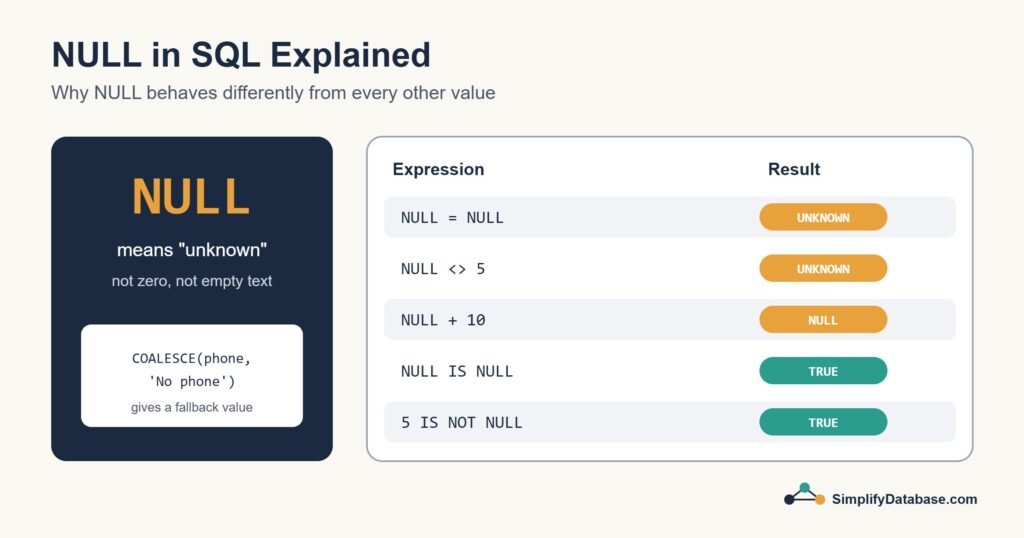
NULL means unknown or missing. It isn’t zero, it isn’t an empty string '', and it isn’t a space. It’s the absence of a value.
Think of a form where someone left the phone field blank. Their phone number isn’t “nothing”. You just don’t know it. That’s why SQL refuses to say that one unknown equals another unknown. Two people who didn’t give their phone number don’t necessarily have the same number.
The Sample Data
| customer_id | name | phone | discount |
|---|---|---|---|
| 1 | Sara | 3300 1111 | 10 |
| 2 | Omar | NULL | NULL |
| 3 | Lina | 3300 2222 | 0 |
| 4 | Ali | NULL | 5 |
Rule 1: Use IS NULL, Never = NULL
Any comparison with NULL using =, <>, > and so on gives unknown, not true or false. WHERE only keeps rows where the condition is true, so unknown rows disappear.
-- Wrong: returns nothing
SELECT name FROM customers WHERE phone = NULL;

-- Right: returns Omar and Ali
SELECT name FROM customers WHERE phone IS NULL;

-- Customers who do have a phone
SELECT name FROM customers WHERE phone IS NOT NULL;
Rule 2: SQL Has Three Answers, Not Two
Because of NULL, conditions in SQL can be true, false or unknown. This is called three-valued logic, and it explains one of the most common bugs:
-- Customers whose discount isn't 10
SELECT name FROM customers WHERE discount <> 10;
-- Returns Lina and Ali, but NOT Omar
Omar’s discount is unknown, so “is it different from 10?” is also unknown, and he’s left out. If you want him included, say so:
SELECT name FROM customers
WHERE discount <> 10 OR discount IS NULL;
Rule 3: NULL Spreads Through Calculations
Almost any calculation that involves NULL returns NULL:
SELECT 100 + NULL;           -- NULL
SELECT 'Hello ' + NULL;      -- NULL in SQL Server
SELECT CONCAT('Hello ', NULL); -- 'Hello ' in SQL Server and PostgreSQL, but NULL in MySQL
So a price calculation like price - discount gives NULL for Omar instead of the full price. That’s where the next functions come in.
COALESCE: Replace NULL With a Fallback
COALESCE returns the first value in its list that isn’t NULL. It works in every major database:
SELECT name,
       COALESCE(phone, 'No phone') AS phone_display,
       COALESCE(discount, 0)       AS discount
FROM customers;| name | phone_display | discount |
|---|---|---|
| Sara | 3300 1111 | 10 |
| Omar | No phone | 0 |
| Lina | 3300 2222 | 0 |
| Ali | No phone | 5 |
You can give it several options. COALESCE(mobile, home_phone, work_phone, 'No phone') picks the first number that exists.
| Function | Database | Notes |
|---|---|---|
COALESCE(a, b, ...) | All | Standard SQL, any number of arguments. My default choice |
ISNULL(a, b) | SQL Server | Two arguments only |
IFNULL(a, b) | MySQL, SQLite | Two arguments only |
NULLIF(a, b) | All | The opposite: returns NULL if a equals b |
NULLIF to avoid dividing by zero
-- Returns NULL instead of an error when quantity is 0
SELECT total_amount / NULLIF(quantity, 0) AS unit_price
FROM order_lines;
Rule 4: Aggregates Skip NULL
Functions like COUNT, SUM and AVG ignore nulls, with one exception, COUNT(*), which counts rows. (More on these in GROUP BY & Aggregate Functions.)
SELECT COUNT(*)        AS all_customers,   -- 4
       COUNT(phone)    AS with_phone,      -- 2
       AVG(discount)   AS avg_discount      -- 5, not 3.75
FROM customers;
Look at that average. It’s (10 + 0 + 5) / 3 = 5, because Omar is skipped entirely. If an unknown discount should count as zero, you have to say so: AVG(COALESCE(discount, 0)) gives 3.75. Neither answer is “wrong”. They answer different questions, and you need to choose on purpose.
The NOT IN Trap
This one has caught experienced developers too. Suppose a blocked table lists customer ids, and one of those ids is NULL:
SELECT name FROM customers
WHERE customer_id NOT IN (SELECT customer_id FROM blocked);
-- If blocked contains a NULL, this returns NO rows at all!
NOT IN asks “is this id different from every value in the list?”, and “different from unknown” is unknown. The safer pattern is NOT EXISTS, which handles nulls the way you’d expect:
SELECT c.name FROM customers c
WHERE NOT EXISTS (
    SELECT 1 FROM blocked b WHERE b.customer_id = c.customer_id
);
NULL in Sorting, Joins and Grouping
- Sorting: SQL Server and MySQL put nulls first in ascending order. PostgreSQL and Oracle put them last. PostgreSQL lets you choose with
NULLS FIRSTorNULLS LAST. - Joins: rows with
NULLin the join column never match anything, becauseNULL = NULLisn’t true. LEFT JOIN results also fill missing columns withNULL. - Grouping:
GROUP BYputs all nulls into one group, which is one of the few places SQL treats nulls as equal.
Should a Column Allow NULL?
Decide this when you design the table. Allow NULL only when “unknown” is a real, meaningful state, like an optional middle name or a delivery date that hasn’t happened yet. For everything else, use NOT NULL, and a DEFAULT if there’s a sensible starting value. Fewer nulls means fewer of the surprises in this article.
Quick Reference
| You want to… | Write |
|---|---|
| Find missing values | WHERE col IS NULL |
| Find filled-in values | WHERE col IS NOT NULL |
| Show a fallback | COALESCE(col, 'default') |
| Treat zero as missing | NULLIF(col, 0) |
| Count only filled-in values | COUNT(col) |
| Exclude ids safely | NOT EXISTS instead of NOT IN |
Conclusion
NULL means unknown, and almost every rule about it follows from that. Comparisons with it are unknown, calculations with it become NULL, and aggregates skip it. Use IS NULL to find it, COALESCE to replace it, and design your tables so it only appears where it truly means something.
Go back to one of your recent queries and ask: what happens to the rows where this column is NULL? You may be surprised by the answer.
Related articles
- The SQL CASE Expression: if/then logic inside a query.
- SQL WHERE, ORDER BY and LIMIT: filter, sort and limit your results.
- SQL Data Types Explained Simply: choosing the right type for each column.
- SQL String Functions Explained Simply: the NULL trap in
CONCATand how to avoid it. - SQL LIKE, IN and BETWEEN Explained Simply: why
NOT INwith a NULL returns nothing.