
Imagine your manager asks: “Can we keep a history of every price change, who made it and when?” You could change every screen and every script that updates prices to also write a history row. Or you could tell the database: whenever a price changes, write the history row yourself.
That second option is a trigger. Triggers are powerful, a little bit hidden, and easy to misuse. Here’s how they work and when they’re a good idea.
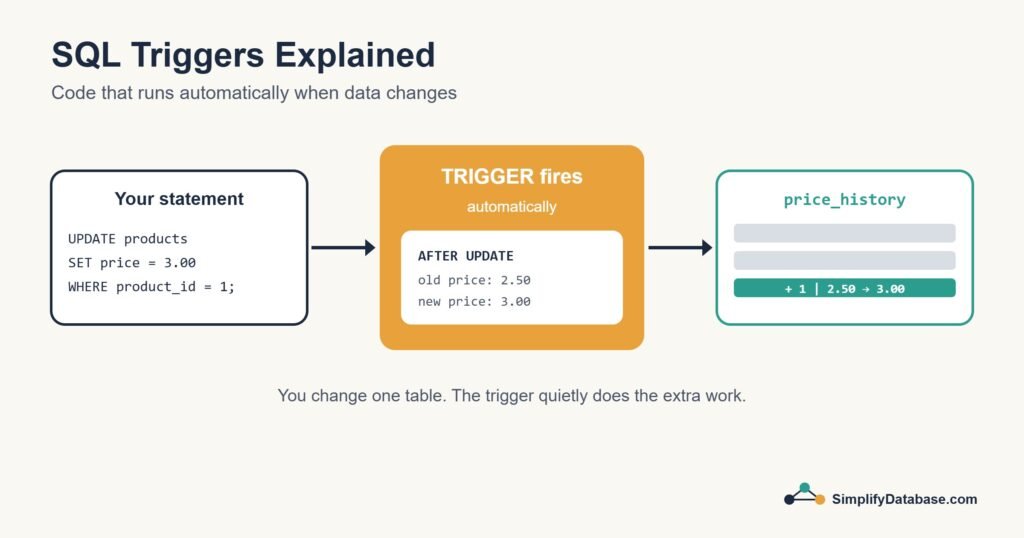
Table of Contents
What Is a Trigger?
A trigger is a piece of SQL code attached to a table that runs automatically when a certain event happens on that table, usually an INSERT, UPDATE or DELETE. You never call a trigger directly. The database fires it for you.
| Part | Options |
|---|---|
| Event | INSERT, UPDATE, DELETE |
| Timing | BEFORE or AFTER the change (SQL Server also has INSTEAD OF) |
| Level | Once per row, or once per statement (depends on the database) |
The Example: A Price History Table
CREATE TABLE price_history (
    history_id INT PRIMARY KEY,   -- make this auto-numbering in your database
    product_id INT NOT NULL,
    old_price  DECIMAL(10,2),
    new_price  DECIMAL(10,2),
    changed_at DATETIME NOT NULL
);
We want a row added here every time a product’s price changes. The trigger looks different in each database, so here are all three.
SQL Server
CREATE TRIGGER trg_products_price_history
ON products
AFTER UPDATE
AS
BEGIN
    SET NOCOUNT ON;

    INSERT INTO price_history (product_id, old_price, new_price, changed_at)
    SELECT d.product_id, d.price, i.price, SYSDATETIME()
    FROM inserted i
    JOIN deleted  d ON d.product_id = i.product_id
    WHERE i.price <> d.price;
END;
SQL Server gives triggers two special tables: deleted holds the rows as they were before the change, and inserted holds them as they are after. Joining them lets you compare old and new values.
MySQL
DELIMITER //

CREATE TRIGGER trg_products_price_history
AFTER UPDATE ON products
FOR EACH ROW
BEGIN
    IF NEW.price <> OLD.price THEN
        INSERT INTO price_history (product_id, old_price, new_price, changed_at)
        VALUES (OLD.product_id, OLD.price, NEW.price, NOW());
    END IF;
END //

DELIMITER ;
MySQL triggers run once for each row, and you reach the values through OLD and NEW.
PostgreSQL
CREATE FUNCTION log_price_change()
RETURNS trigger
LANGUAGE plpgsql
AS $$
BEGIN
    IF NEW.price <> OLD.price THEN
        INSERT INTO price_history (product_id, old_price, new_price, changed_at)
        VALUES (OLD.product_id, OLD.price, NEW.price, now());
    END IF;
    RETURN NEW;
END;
$$;

CREATE TRIGGER trg_products_price_history
AFTER UPDATE ON products
FOR EACH ROW
EXECUTE FUNCTION log_price_change();
In PostgreSQL the logic lives in a trigger function, and the trigger itself just connects that function to the table.
Now any update, from any application, script or person, is logged:
UPDATE products SET price = 3.00 WHERE product_id = 1;
-- price_history gets a new row: product 1, 2.50 -> 3.00
The Classic SQL Server Mistake
In SQL Server, a trigger fires once per statement, not once per row. If someone updates 500 products in one statement, the trigger runs once and inserted contains 500 rows.
I’ve seen triggers written like this:
-- Wrong: only handles one row
DECLARE @id INT, @newPrice DECIMAL(10,2);
SELECT @id = product_id, @newPrice = price FROM inserted;
That quietly ignores all but one of the rows. Always write SQL Server triggers as set-based queries over inserted and deleted, like the example above.
The Hidden NULL Bug in Change Checks
All three triggers above compare old and new values with <>. That misses one case: if the old price was NULL (not set yet) and someone sets it to 3.00, NULL <> 3.00 is not true, it’s “unknown”, so no history row is written. The same happens when a value is cleared back to NULL. For columns that allow NULL, use a NULL-safe comparison:
| Database | “Value changed” test that handles NULL |
|---|---|
| SQL Server 2022+, PostgreSQL | i.price IS DISTINCT FROM d.price / NEW.price IS DISTINCT FROM OLD.price |
| Older SQL Server | i.price <> d.price OR (i.price IS NULL AND d.price IS NOT NULL) OR (i.price IS NOT NULL AND d.price IS NULL) |
| MySQL / MariaDB | NOT (NEW.price <=> OLD.price) (<=> is MySQL’s NULL-safe equals) |
If the column is declared NOT NULL, the plain <> is fine. For more on how NULL behaves in comparisons, see NULL in SQL Explained Simply.
BEFORE Triggers: Fixing Data on the Way In
In MySQL and PostgreSQL, BEFORE triggers can change the incoming row before it’s saved. For example, keeping emails in lower case:
-- MySQL
CREATE TRIGGER trg_customers_lower_email
BEFORE INSERT ON customers
FOR EACH ROW
SET NEW.email = LOWER(NEW.email);
SQL Server doesn’t have BEFORE triggers. It has INSTEAD OF triggers, which replace the original statement entirely and are mostly used on views.
Triggers in a Real Business Database
Price history is a good first example. In sales and accounting systems, three more patterns come up again and again.
1. Record which application user made the change
A trigger can log SUSER_SNAME() (SQL Server) or CURRENT_USER() (MySQL), but many business applications connect with one shared database login. Every change then shows the same name, which doesn’t answer “who changed this price?”. The fix is to have the application tell the database who the real user is, right after it connects, and let the trigger read it:
-- SQL Server 2016+: the application runs this after connecting
EXEC sp_set_session_context @key = N'app_user', @value = N'sara.ahmed';

-- Inside the trigger
INSERT INTO price_history (product_id, old_price, new_price, changed_by, changed_at)
SELECT d.product_id, d.price, i.price,
       COALESCE(CAST(SESSION_CONTEXT(N'app_user') AS nvarchar(50)), SUSER_SNAME()),
       SYSDATETIME()
FROM inserted i
JOIN deleted  d ON d.product_id = i.product_id
WHERE i.price <> d.price;
In MySQL, the application can run SET @app_user = 'sara.ahmed'; and the trigger uses COALESCE(@app_user, CURRENT_USER()). In PostgreSQL, use SELECT set_config('app.user', 'sara.ahmed', false); and read it with NULLIF(current_setting('app.user', true), ''). The fallback to the database login means scripts run by a DBA are still logged with a name. If your application uses a connection pool, set the value each time a connection is taken from the pool, so one user’s name never sticks to another user’s changes.
2. Stop changes to posted documents
Once an invoice or journal is posted, accounting rules say it must not be edited or deleted; mistakes are corrected with a credit note or a reversing entry. The application should enforce this, but a trigger catches every other route too: a script, an import, a quick fix in SSMS.
-- SQL Server
CREATE TRIGGER trg_invoices_block_posted
ON invoices
AFTER UPDATE, DELETE
AS
BEGIN
    SET NOCOUNT ON;
    IF EXISTS (SELECT 1 FROM deleted WHERE status = 'posted')
        THROW 50001, 'Posted invoices cannot be changed. Use a credit note.', 1;
END;

-- MySQL / MariaDB (create a second, similar trigger for BEFORE DELETE)
DELIMITER //
CREATE TRIGGER trg_invoices_block_posted
BEFORE UPDATE ON invoices
FOR EACH ROW
BEGIN
    IF OLD.status = 'posted' THEN
        SIGNAL SQLSTATE '45000'
            SET MESSAGE_TEXT = 'Posted invoices cannot be changed. Use a credit note.';
    END IF;
END //
DELIMITER ;
In SQL Server, THROW inside a trigger ends the statement and rolls back the change. In MySQL, SIGNAL does the same, and the user sees the message text, so make it clear and helpful. Checking deleted (the old values) means a draft can still be changed to “posted”, but nothing can be changed after that.
In PostgreSQL the same rule is a BEFORE UPDATE OR DELETE trigger that runs RAISE EXCEPTION. One trap there: a BEFORE trigger function must return the row, and for a DELETE, NEW is NULL. If the function ends with RETURN NEW;, every delete is silently skipped, drafts included. End it with RETURN COALESCE(NEW, OLD); instead.
3. Keep a “last modified” column up to date
Many tables have an updated_at column that should change on every update. Each database has a different best way:
-- MySQL / MariaDB: no trigger needed, it's a column option
updated_at TIMESTAMP NOT NULL
    DEFAULT CURRENT_TIMESTAMP ON UPDATE CURRENT_TIMESTAMP

-- PostgreSQL: a BEFORE trigger changes the row before it's saved
CREATE FUNCTION set_updated_at() RETURNS trigger
LANGUAGE plpgsql AS $$
BEGIN
    NEW.updated_at := now();
    RETURN NEW;
END; $$;

CREATE TRIGGER trg_products_updated_at
BEFORE UPDATE ON products
FOR EACH ROW EXECUTE FUNCTION set_updated_at();

-- SQL Server: no BEFORE triggers, so update the changed rows afterwards
CREATE TRIGGER trg_products_updated_at
ON products
AFTER UPDATE
AS
BEGIN
    SET NOCOUNT ON;
    UPDATE p
    SET    updated_at = SYSDATETIME()
    FROM   products AS p
    JOIN   inserted AS i ON i.product_id = p.product_id;
END;
The SQL Server version updates the same table it’s attached to. That doesn’t loop forever because the database option RECURSIVE_TRIGGERS is off by default; leave it off.
Good Uses for Triggers
- Audit trails: recording who changed what and when, like our price history.
- Keeping a “last modified” column up to date automatically.
- Enforcing complex rules that a CHECK constraint can’t express, such as rules that look at other tables.
- Keeping summary values in sync in special cases, though this needs care.
Why You Should Use Them Sparingly
Triggers have a reputation, and it’s partly earned:
- They’re invisible. Someone reading the application code has no idea a trigger is doing extra work. When something odd happens, triggers are often the last place people look.
- They slow down writes. Every insert, update or delete on the table now does more work, and big batch updates feel it most.
- They can chain. A trigger that updates another table can fire that table’s triggers, and debugging a chain like that is no fun.
- They run inside the same transaction. If the trigger fails, the original change is rolled back too. That’s usually what you want, but it can be surprising. (More on this in Transactions and ACID.)
My own rule: use triggers for auditing and simple housekeeping, and keep business processes in stored procedures or application code where people can see them. And document every trigger you create.
Alternatives to Triggers
Before writing a trigger, check whether the database already has a built-in feature for the job. Built-in features are visible, documented and usually faster.
| You want | Consider first |
|---|---|
| A full history of every row change | System-versioned temporal tables (SQL Server 2016+, MariaDB 10.3+): the database keeps old row versions for you |
| A list of changed rows for syncing to another system | Change Tracking or Change Data Capture (SQL Server) |
| “Last modified” timestamp | ON UPDATE CURRENT_TIMESTAMP in MySQL; otherwise a trigger |
| Simple rules on one row | CHECK constraints (see SQL Constraints Explained Simply) |
| A value calculated from other columns | A computed / generated column |
| Business steps such as “post invoice” | A stored procedure the application calls (see SQL Stored Procedures Explained Simply) |
Managing Triggers
| Task | SQL Server | MySQL | PostgreSQL |
|---|---|---|---|
| List triggers | SELECT * FROM sys.triggers; | SHOW TRIGGERS; | SELECT * FROM pg_trigger; |
| Disable | DISABLE TRIGGER name ON table; | Not supported (drop and recreate) | ALTER TABLE t DISABLE TRIGGER name; |
| Remove | DROP TRIGGER name; | DROP TRIGGER name; | DROP TRIGGER name ON table; |
Frequently Asked Questions
Do triggers fire on TRUNCATE TABLE?
Not in SQL Server or MySQL: TRUNCATE removes all rows without firing DELETE triggers, which is one reason it’s so fast. PostgreSQL lets you create a separate statement-level TRUNCATE trigger if you need one.
Do triggers fire during bulk loads?
In SQL Server, BULK INSERT and bcp skip triggers unless you add the FIRE_TRIGGERS option. In MySQL, LOAD DATA does fire insert triggers. Check this before a large import, because an audit trigger can either slow the load down or be skipped without you noticing.
Can a trigger call a stored procedure?
Yes: EXEC in SQL Server, CALL in MySQL, and any function in PostgreSQL. Keep it short, though. Everything a trigger does runs inside the user’s transaction and adds to the time of every insert, update or delete on that table.
What’s the difference between a trigger and a stored procedure?
A stored procedure runs only when someone calls it. A trigger runs automatically whenever its event happens on its table, and can’t be called directly. Use procedures for business actions, and triggers for things that must happen on every change, whoever makes it.
Conclusion
A trigger is code the database runs automatically when data in a table changes. It’s ideal for audit logs and small automatic tasks, because it catches every change no matter where it comes from. Just keep triggers small, set-based and well documented, so they help your team instead of surprising it.
Related articles
- SQL Views Explained Simply: save a query and use it like a table.
- SQL INSERT, UPDATE and DELETE: add, change and remove rows safely.
- Database Backup and Restore Explained: protect your data before something goes wrong.