
Nobody thinks about backups until the day they need one. A disk fails, someone runs a DELETE without a WHERE, ransomware encrypts the server, or an update script goes wrong. In that moment the only question that matters is: can we get the data back, and how much did we lose?
I’ve been on the receiving end of that phone call, and I can tell you the difference between a bad day and a disaster is almost always the backup plan. This guide explains how database backups work, the commands for the major databases, and the habits that make backups actually useful.
Two Questions to Answer First
Before choosing any backup type, agree on two numbers with whoever owns the data:
| Term | The question | Example answer |
|---|---|---|
| RPO (Recovery Point Objective) | How much data can we afford to lose? | “No more than 15 minutes of orders” |
| RTO (Recovery Time Objective) | How long can we be down while restoring? | “Back online within 2 hours” |
A personal blog might be fine with yesterday’s backup. An accounting system usually isn’t. These two answers decide everything that follows.
The Three Main Backup Types
| Type | What it contains | Size and speed | How often |
|---|---|---|---|
| Full | The whole database | Largest, slowest | Daily or weekly |
| Differential | Everything changed since the last full backup | Grows during the week | Daily |
| Transaction log / incremental | Every change since the last log backup | Small and fast | Every 5 to 60 minutes |
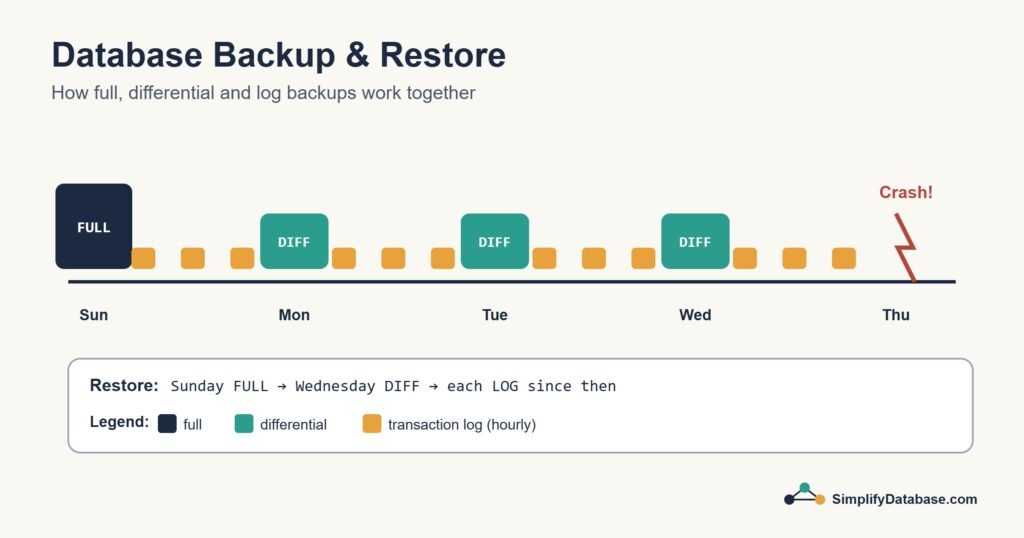
A typical schedule: a full backup on Sunday night, a differential every other night, and a log backup every 15 minutes. If the server dies on Thursday at 10:20, you restore Sunday’s full, Wednesday’s differential, then every log backup since Wednesday night. You lose at most 15 minutes.
SQL Server
Recovery models
Every SQL Server database has a recovery model, and it decides which backups are possible:
- Simple: no log backups. You can only restore to the time of your last full or differential backup.
- Full: log backups allowed, so you can restore to almost any point in time. You must run log backups, or the log file keeps growing.
- Bulk-logged: a special case for large bulk loads. Most people don’t need it.
Taking backups
-- Full backup
BACKUP DATABASE SalesDB
TO DISK = 'D:\Backups\SalesDB_full.bak'
WITH CHECKSUM, COMPRESSION;

-- Differential backup
BACKUP DATABASE SalesDB
TO DISK = 'D:\Backups\SalesDB_diff.bak'
WITH DIFFERENTIAL, CHECKSUM, COMPRESSION;

-- Transaction log backup (Full recovery model only)
BACKUP LOG SalesDB
TO DISK = 'D:\Backups\SalesDB_log_1015.trn'
WITH CHECKSUM;
Backup compression isn’t available in SQL Server Express. Leave out COMPRESSION there.
Restoring to a point in time
RESTORE DATABASE SalesDB
FROM DISK = 'D:\Backups\SalesDB_full.bak'
WITH NORECOVERY, REPLACE;

RESTORE DATABASE SalesDB
FROM DISK = 'D:\Backups\SalesDB_diff.bak'
WITH NORECOVERY;

RESTORE LOG SalesDB
FROM DISK = 'D:\Backups\SalesDB_log_1015.trn'
WITH STOPAT = '2026-10-05 10:14:00', RECOVERY;
NORECOVERY means “more backups are coming, don’t open the database yet”. The last step uses RECOVERY to bring it online. STOPAT lets you stop just before the moment someone ran that bad DELETE.
In practice, most teams schedule these with SQL Server Agent jobs or a maintenance solution rather than typing them by hand.
MySQL
The simplest MySQL backup is a logical dump with mysqldump, run from the command line:
# Back up one database (including procedures and triggers)
mysqldump -u root -p --single-transaction --routines --triggers salesdb > salesdb_2026-10-05.sql

# Restore it
mysql -u root -p salesdb < salesdb_2026-10-05.sql
--single-transaction gives a consistent snapshot of InnoDB tables without locking them. For point-in-time recovery, you also need the binary log turned on, which records every change after the dump. For large databases, physical backup tools such as Percona XtraBackup are much faster than dumps.
PostgreSQL
# Back up one database in PostgreSQL's compressed custom format
pg_dump -U postgres -F c -f salesdb_2026-10-05.dump salesdb

# Restore it into an existing empty database
pg_restore -U postgres -d salesdb salesdb_2026-10-05.dump
pg_dump takes a consistent snapshot while people keep working. For point-in-time recovery, PostgreSQL uses continuous archiving of its write-ahead log (WAL) together with a base backup from pg_basebackup, or a tool such as pgBackRest.
Quick Comparison
| SQL Server | MySQL | PostgreSQL | |
|---|---|---|---|
| Full backup | BACKUP DATABASE | mysqldump or XtraBackup | pg_dump / pg_basebackup |
| Point-in-time recovery | Log backups (Full recovery model) | Binary log | WAL archiving |
| Restore | RESTORE DATABASE / RESTORE LOG | mysql < file.sql | pg_restore / WAL replay |
The 3-2-1 Rule
A backup sitting on the same server as the database isn’t really a backup. If the server dies or gets encrypted, the backup goes with it. Follow the 3-2-1 rule:
- 3 copies of your data (the live database plus two backups)
- 2 different types of storage (for example a local disk and cloud storage)
- 1 copy off-site, ideally one that can’t be changed or deleted from the server itself
A Backup You Haven’t Restored Is Only a Hope
This is the most important line in the article. Many teams find out their backups were broken, incomplete or missing the one database that mattered on the day they try to restore. Protect yourself:
- Test restores regularly, at least monthly, onto a separate server. Time how long they take. That’s your real RTO.
- Use checksums (
WITH CHECKSUMin SQL Server) and verify files withRESTORE VERIFYONLY. - Monitor the jobs. A backup job that silently stopped three weeks ago is a very common story.
- Write down the restore steps so anyone on the team can follow them under pressure.
- Protect the files. Backups contain all your data, so encrypt them and limit who can read them.
Conclusion
Decide how much data you can lose and how long you can be down, then build a schedule of full, differential and log backups to match. Keep copies off the server, follow the 3-2-1 rule, and above all, practise restoring. When the bad day comes, you’ll be ready.
And while backups are your safety net, it’s better not to fall at all. Read our guides to transactions and safe INSERT, UPDATE and DELETE habits.
Related articles
- Microsoft SQL Server Explained for Beginners: editions, tools and T-SQL.
- SQL Injection Explained Simply: how attacks work and how to stop them.
- What Is a Database Server?: the software that stores and serves your data.
- SQL Stored Procedures Explained Simply: reusable SQL with parameters.