
A view lets you save a single query. But what if the job takes several steps? Check a balance, start a transaction, update two tables, write a log entry, return a message. You don’t want every application repeating all that logic. You want to save it once, in the database, and call it by name.
That’s what a stored procedure is. I’ve used them for years in business systems, and when they’re used well they make applications simpler, safer and easier to maintain.
What Is a Stored Procedure?
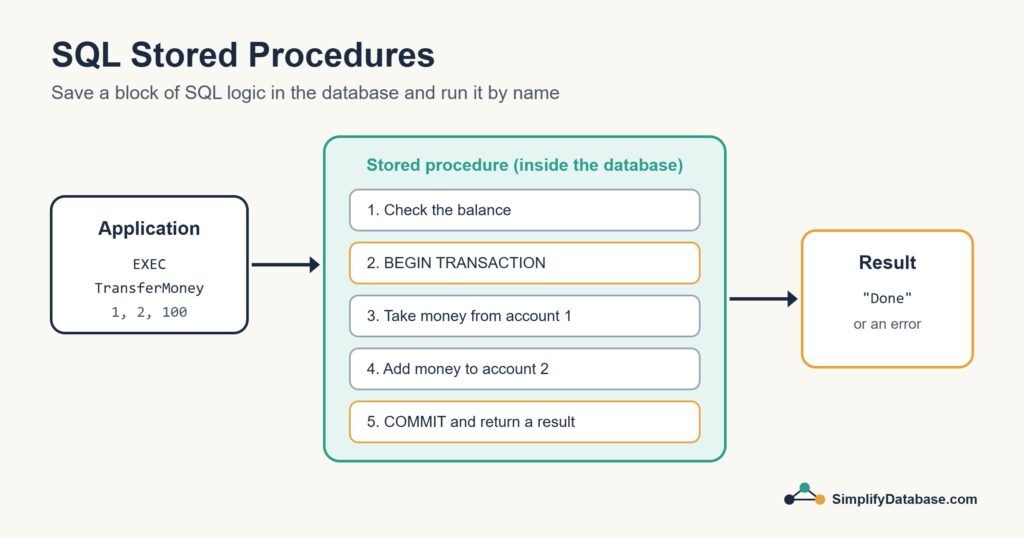
A stored procedure is a named block of SQL code saved inside the database. It can take input parameters, run as many statements as it needs (queries, inserts, updates, IF logic, loops, transactions) and return results or values. Applications run it with a single call instead of sending all those statements themselves.
Your First Stored Procedure
The syntax differs between databases more than most SQL does, so here are the big three. Each example creates a procedure that returns a customer’s orders.
SQL Server
CREATE PROCEDURE GetCustomerOrders
    @CustomerId INT
AS
BEGIN
    SET NOCOUNT ON;

    SELECT order_id, order_date, amount
    FROM orders
    WHERE customer_id = @CustomerId
    ORDER BY order_date DESC;
END;
Run it with EXEC:
EXEC GetCustomerOrders @CustomerId = 1;SET NOCOUNT ON stops SQL Server sending “rows affected” messages for every statement. It’s a small habit that keeps things tidy, especially when the procedure is called from an application.
MySQL
DELIMITER //

CREATE PROCEDURE GetCustomerOrders(IN p_customer_id INT)
BEGIN
    SELECT order_id, order_date, amount
    FROM orders
    WHERE customer_id = p_customer_id
    ORDER BY order_date DESC;
END //

DELIMITER ;

CALL GetCustomerOrders(1);
The DELIMITER lines are there because the procedure body contains semicolons. They tell the MySQL client not to stop at the first ;.
PostgreSQL
PostgreSQL has CREATE PROCEDURE, but for returning rows people usually write a function instead:
CREATE FUNCTION get_customer_orders(p_customer_id INT)
RETURNS TABLE (order_id INT, order_date DATE, amount NUMERIC)
LANGUAGE sql
AS $$
    SELECT o.order_id, o.order_date, o.amount
    FROM orders o
    WHERE o.customer_id = p_customer_id
    ORDER BY o.order_date DESC;
$$;

SELECT * FROM get_customer_orders(1);
In PostgreSQL, procedures (called with CALL) are mainly used for jobs that change data and need to control transactions.
A More Realistic Example
Procedures really shine when there are several steps. Here’s a SQL Server money transfer that combines parameters, a check, and the transaction pattern:
CREATE PROCEDURE TransferMoney
    @FromAccount INT,
    @ToAccount   INT,
    @Amount      DECIMAL(12,2)
AS
BEGIN
    SET NOCOUNT ON;

    IF @Amount <= 0
        THROW 50001, 'Amount must be greater than zero.', 1;

    IF (SELECT balance FROM accounts WHERE account_id = @FromAccount) < @Amount
        THROW 50002, 'Not enough balance.', 1;

    BEGIN TRY
        BEGIN TRANSACTION;

        UPDATE accounts SET balance = balance - @Amount WHERE account_id = @FromAccount;
        UPDATE accounts SET balance = balance + @Amount WHERE account_id = @ToAccount;

        INSERT INTO transfer_log (from_account, to_account, amount, created_at)
        VALUES (@FromAccount, @ToAccount, @Amount, SYSDATETIME());

        COMMIT;
    END TRY
    BEGIN CATCH
        IF @@TRANCOUNT > 0 ROLLBACK;
        THROW;
    END CATCH;
END;
The application only needs one line:
EXEC TransferMoney @FromAccount = 1, @ToAccount = 2, @Amount = 100;All the rules live in one place. A web app, a desktop app and a nightly job can all call the same procedure and get exactly the same behaviour.
Output Parameters
Besides returning rows, a procedure can hand back single values through output parameters. In SQL Server:
CREATE PROCEDURE GetCustomerTotal
    @CustomerId INT,
    @Total      DECIMAL(12,2) OUTPUT
AS
BEGIN
    SELECT @Total = SUM(amount)
    FROM orders
    WHERE customer_id = @CustomerId;
END;

-- Calling it
DECLARE @t DECIMAL(12,2);
EXEC GetCustomerTotal @CustomerId = 1, @Total = @t OUTPUT;
SELECT @t AS customer_total;
Why Use Stored Procedures?
| Benefit | What it means in practice |
|---|---|
| Reusable logic | Write the business rule once, call it from every application |
| Security | Users can run the procedure without having direct access to the tables |
| Fewer round trips | One call runs many statements on the server instead of sending each one over the network |
| Protection from SQL injection | Parameters are passed as values, not glued into SQL text |
| Easier changes | Fix a bug in the procedure and every app that calls it is fixed |
The Downsides
Stored procedures aren’t perfect, and it’s worth being honest about that:
- Harder to version and test than normal application code, unless you keep the scripts in source control (you should).
- Less portable. Procedure code written for SQL Server won’t run on MySQL or PostgreSQL without rewriting.
- Business logic gets split between the application and the database if you’re not disciplined about what goes where.
- Debugging is clumsier than in a modern code editor.
My rule of thumb: put data-heavy logic that must stay consistent (transfers, postings, stock movements, big data clean-ups) in procedures, and keep user interface and presentation logic in the application.
Stored Procedures vs. Views vs. Functions
| View | Stored procedure | Function | |
|---|---|---|---|
| What it is | A saved SELECT | A saved block of statements | A saved calculation that returns a value or table |
| Takes parameters? | No | Yes | Yes |
| Can change data? | Usually not | Yes | Usually not |
| Used inside a SELECT? | Yes, like a table | No, you run it with EXEC or CALL | Yes |
| Best for | Simplifying and securing reads | Multi-step jobs and business rules | Reusable calculations |
Tips for Writing Good Procedures
- Use clear names that say what the procedure does, like
TransferMoneyorGetCustomerOrders. - Validate parameters at the top and fail early with a clear error message.
- Always handle errors and roll back open transactions.
- Keep them focused. One procedure, one job.
- Look at the execution plan if a procedure gets slow. Parameter sniffing in SQL Server is a classic cause, which I cover in this guide to query timeouts.
Conclusion
A stored procedure is a named, reusable block of SQL that lives in the database. It takes parameters, can run many steps and transactions, and gives every application the same trusted logic with a single call.
Start with something small, like a procedure that returns a customer’s orders, and build from there. Once you’ve used one in a real project, you’ll find plenty of places for them.
Related articles
- SQL Triggers Explained Simply: code that runs automatically when data changes.
- SQL Views Explained Simply: saved queries you can use like tables.
- SQL Transactions and ACID Explained Simply: keep multi-step changes safe.