
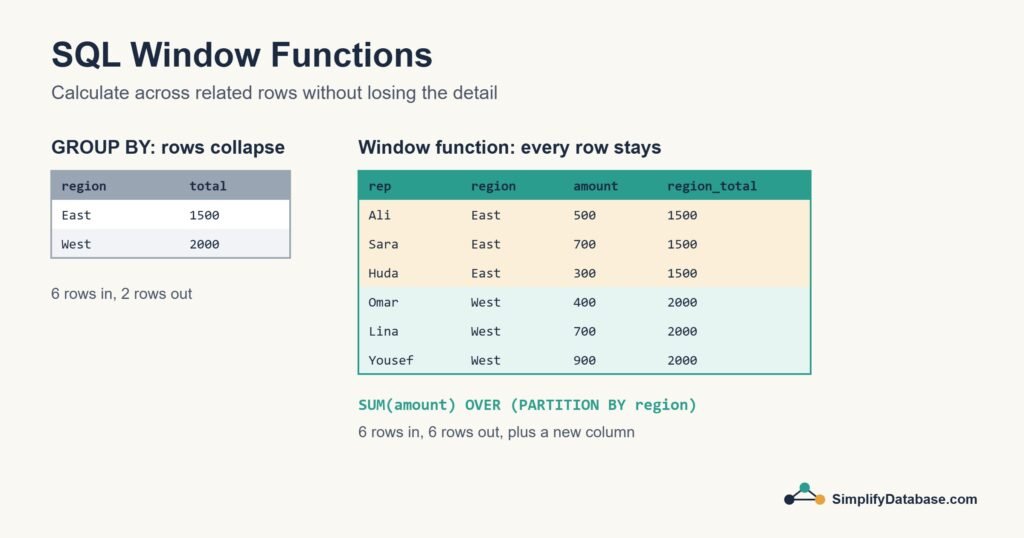
If you’ve learned GROUP BY, you know how to get totals, averages and counts. But GROUP BY has one annoying side effect: it squashes your rows. Ask for the total per region and you lose the individual sales. What if you want to see each sale and its region’s total on the same line? Or number the rows, or keep a running total?
That’s what window functions are for. They’re the feature that made me feel I’d moved from “knows some SQL” to “actually good at SQL”, and they’re easier than they look.
The Sample Data
We’ll use a small sales table:
| sale_id | rep | region | amount |
|---|---|---|---|
| 1 | Ali | East | 500 |
| 2 | Sara | East | 700 |
| 3 | Omar | West | 400 |
| 4 | Lina | West | 700 |
| 5 | Huda | East | 300 |
| 6 | Yousef | West | 900 |
The Basic Idea: OVER()
A window function performs a calculation across a set of rows related to the current row (the “window”), but unlike GROUP BY, every row stays in the result. You recognise a window function by the OVER keyword.
SELECT rep, region, amount,
       SUM(amount) OVER () AS grand_total
FROM sales;
OVER () with empty brackets means “the window is the whole result”. Every row gets grand_total = 3500, while the individual sales stay visible.
PARTITION BY: Windows per Group
PARTITION BY splits the rows into groups, a bit like GROUP BY, but without collapsing them:
SELECT rep, region, amount,
       SUM(amount) OVER (PARTITION BY region) AS region_total
FROM sales;| rep | region | amount | region_total |
|---|---|---|---|
| Ali | East | 500 | 1500 |
| Sara | East | 700 | 1500 |
| Huda | East | 300 | 1500 |
| Omar | West | 400 | 2000 |
| Lina | West | 700 | 2000 |
| Yousef | West | 900 | 2000 |
Now you can do things that were awkward before, like show each sale as a percentage of its region:
SELECT rep, region, amount,
       ROUND(100.0 * amount / SUM(amount) OVER (PARTITION BY region), 1) AS pct_of_region
FROM sales;
Sara’s 700 is 46.7% of the East region’s 1500.
Ranking: ROW_NUMBER, RANK and DENSE_RANK
Window functions can number rows in a chosen order. The three ranking functions differ only in how they handle ties:
SELECT rep, amount,
       ROW_NUMBER() OVER (ORDER BY amount DESC) AS row_num,
       RANK()       OVER (ORDER BY amount DESC) AS rnk,
       DENSE_RANK() OVER (ORDER BY amount DESC) AS dense_rnk
FROM sales;| rep | amount | row_num | rnk | dense_rnk |
|---|---|---|---|---|
| Yousef | 900 | 1 | 1 | 1 |
| Sara | 700 | 2 | 2 | 2 |
| Lina | 700 | 3 | 2 | 2 |
| Ali | 500 | 4 | 4 | 3 |
| Omar | 400 | 5 | 5 | 4 |
| Huda | 300 | 6 | 6 | 5 |
ROW_NUMBERalways gives unique numbers. With a tie (Sara and Lina) the order between them is arbitrary unless you add another column to theORDER BY.RANKgives ties the same number and then skips (2, 2, then 4), like a sports results table.DENSE_RANKgives ties the same number without skipping (2, 2, then 3).
Classic use: the top row in each group
“Who is the best seller in each region?” is a question that’s surprisingly hard without window functions. With them, combine PARTITION BY and a CTE:
WITH ranked AS (
    SELECT rep, region, amount,
           ROW_NUMBER() OVER (PARTITION BY region ORDER BY amount DESC) AS rn
    FROM sales
)
SELECT rep, region, amount
FROM ranked
WHERE rn = 1;
Result: Sara (East, 700) and Yousef (West, 900). You can’t filter on a window function directly in WHERE, because window functions are calculated after WHERE runs. That’s why the CTE is there.
Running Totals and Moving Calculations
Window functions get really useful with data over time. Here’s a monthly_sales table:
| month | amount |
|---|---|
| 2026-01 | 1200 |
| 2026-02 | 900 |
| 2026-03 | 1500 |
| 2026-04 | 1100 |
Adding ORDER BY inside OVER turns SUM into a running total:
SELECT month, amount,
       SUM(amount) OVER (ORDER BY month) AS running_total
FROM monthly_sales;| month | amount | running_total |
|---|---|---|
| 2026-01 | 1200 | 1200 |
| 2026-02 | 900 | 2100 |
| 2026-03 | 1500 | 3600 |
| 2026-04 | 1100 | 4700 |
You can also control exactly which rows are included with a frame. For example, a three-month moving average:
SELECT month, amount,
       AVG(amount) OVER (
           ORDER BY month
           ROWS BETWEEN 2 PRECEDING AND CURRENT ROW
       ) AS moving_avg_3m
FROM monthly_sales;
LAG and LEAD: Comparing With the Previous Row
LAG looks back at an earlier row and LEAD looks ahead. They’re perfect for “how much did this change since last month?”:
SELECT month, amount,
       LAG(amount) OVER (ORDER BY month)          AS prev_month,
       amount - LAG(amount) OVER (ORDER BY month) AS change
FROM monthly_sales;| month | amount | prev_month | change |
|---|---|---|---|
| 2026-01 | 1200 | NULL | NULL |
| 2026-02 | 900 | 1200 | -300 |
| 2026-03 | 1500 | 900 | 600 |
| 2026-04 | 1100 | 1500 | -400 |
January has no previous month, so it gets NULL. You can give a default instead, like LAG(amount, 1, 0).
Window Functions at a Glance
| Function | What it does |
|---|---|
SUM, AVG, COUNT, MIN, MAX + OVER | Totals and averages without collapsing rows |
ROW_NUMBER() | Unique row number in the chosen order |
RANK() / DENSE_RANK() | Ranking with ties, with or without gaps |
NTILE(n) | Splits rows into n roughly equal buckets (quartiles, for example) |
LAG() / LEAD() | Value from a previous or next row |
FIRST_VALUE() / LAST_VALUE() | First or last value in the window |
Where Are They Supported?
All the major databases support window functions: SQL Server, PostgreSQL, Oracle, SQLite (3.25 and later) and MySQL from version 8.0. If you’re on MySQL 5.7 or older, they won’t work, which is one more good reason to upgrade.
Common Mistakes
- Trying to use a window function in
WHERE. Wrap the query in a CTE or subquery and filter outside. - Forgetting
ORDER BYinsideOVERfor running totals,LAGand ranking. Without it the order is undefined. - Expecting
ROW_NUMBERto be stable when there are ties. Add a tie-breaker column. - Being surprised by
LAST_VALUE. With the default frame it only looks up to the current row. AddROWS BETWEEN UNBOUNDED PRECEDING AND UNBOUNDED FOLLOWINGwhen you want the true last value.
Conclusion
Window functions let you calculate across groups of rows while keeping every row in your result. OVER defines the window, PARTITION BY splits it into groups, and ORDER BY inside it unlocks ranking, running totals and row-to-row comparisons.
Take any report where you’ve had to join a table to its own totals, and try rewriting it with a window function. It’s usually shorter and clearer. If you want to go further, several books in our list of the best SQL books cover window functions in depth.
Related articles
- HAVING vs WHERE in SQL: filtering rows versus filtering groups.
- The SQL CASE Expression: if/then logic inside a query.
- SQL Date Functions Explained Simply: GETDATE, DATEADD, DATEDIFF and more.
- UNION vs UNION ALL: stacking the results of two queries.
- Running Totals in SQL Server: cumulative sums and running balances with
SUM() OVER. - Top N per Group in SQL Server: use
ROW_NUMBERto get the latest record for each customer. - Basic Statistics in SQL: medians and percentiles with PERCENTILE_CONT and window functions.