
“How did we do compared to last month?” and “Are we up or down on last year?” are probably the two most common questions any report has to answer. In SQL, both come down to the same trick: put the earlier period’s number on the same row as the current one, then subtract.
This guide shows how to do that with LAG for month-over-month (MoM), how to do year-over-year (YoY) correctly, how to compare year-to-date totals, and the gap-in-the-data mistake that quietly gives wrong answers in a lot of real reports.
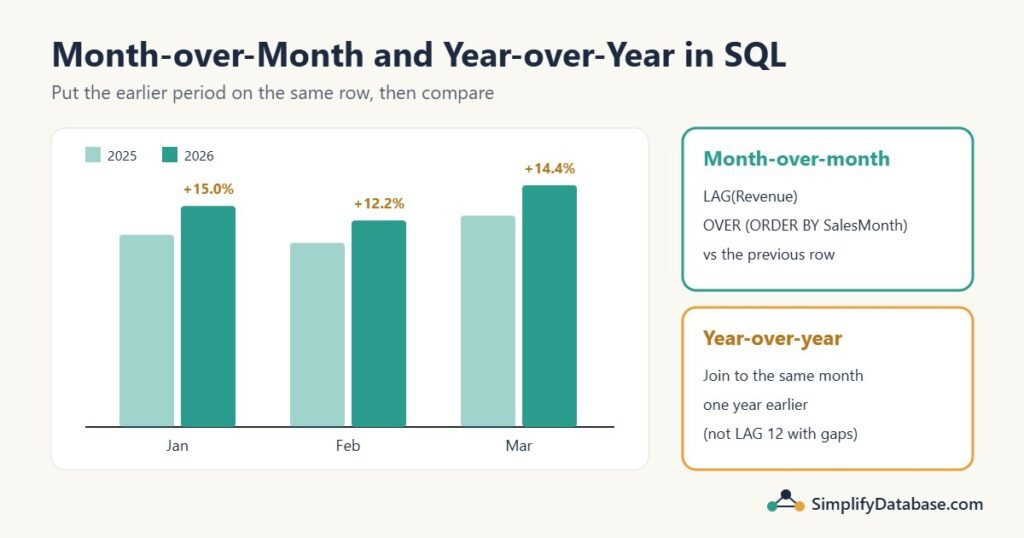
Table of Contents
Step 1: Get one row per month
Comparisons work on totals per period, so start by grouping orders by month. Turn every date into the first day of its month, then group:
-- SQL Server 2022 and later
SELECT DATETRUNC(month, OrderDate) AS SalesMonth,
       SUM(Amount)                 AS Revenue
FROM dbo.Orders
GROUP BY DATETRUNC(month, OrderDate)
ORDER BY SalesMonth;

-- Older SQL Server: DATEFROMPARTS(YEAR(OrderDate), MONTH(OrderDate), 1)
-- MySQL:            DATE_FORMAT(OrderDate, '%Y-%m-01')
-- PostgreSQL:       DATE_TRUNC('month', OrderDate)
To keep the examples short, here are the results already saved in a MonthlySales table: 15 months from January 2025 to March 2026. Notice there’s no row for August 2025 (say the shop was closed for renovation). Keep an eye on that gap.
CREATE TABLE MonthlySales (
    SalesMonth DATE PRIMARY KEY,
    Revenue    DECIMAL(12,2)
);

INSERT INTO MonthlySales VALUES
('2025-01-01', 12000), ('2025-02-01', 11500), ('2025-03-01', 13200),
('2025-04-01', 12800), ('2025-05-01', 14100), ('2025-06-01', 13900),
('2025-07-01', 15200),                        ('2025-09-01', 14800),
('2025-10-01', 15600), ('2025-11-01', 16900), ('2025-12-01', 18200),
('2026-01-01', 13800), ('2026-02-01', 12900), ('2026-03-01', 15100);
Step 2: Month-over-month with LAG
LAG(column) is a window function that returns the value from the previous row, in the order you specify. That’s exactly “last month”:
SELECT SalesMonth,
       Revenue,
       LAG(Revenue) OVER (ORDER BY SalesMonth) AS PrevMonth
FROM MonthlySales
ORDER BY SalesMonth;
Now add the change and the percentage. The percentage formula is (this month − last month) ÷ last month × 100:
WITH m AS (
    SELECT SalesMonth,
           Revenue,
           LAG(Revenue) OVER (ORDER BY SalesMonth) AS PrevMonth
    FROM MonthlySales
)
SELECT SalesMonth,
       Revenue,
       PrevMonth,
       Revenue - PrevMonth AS ChangeAmt,
       ROUND((Revenue - PrevMonth) * 100.0 / NULLIF(PrevMonth, 0), 1) AS ChangePct
FROM m
ORDER BY SalesMonth;
Here are the last nine rows:
| SalesMonth | Revenue | PrevMonth | ChangeAmt | ChangePct |
|---|---|---|---|---|
| 2025-07-01 | 15200.00 | 13900.00 | 1300.00 | 9.4 |
| 2025-09-01 | 14800.00 | 15200.00 | -400.00 | -2.6 |
| 2025-10-01 | 15600.00 | 14800.00 | 800.00 | 5.4 |
| 2025-11-01 | 16900.00 | 15600.00 | 1300.00 | 8.3 |
| 2025-12-01 | 18200.00 | 16900.00 | 1300.00 | 7.7 |
| 2026-01-01 | 13800.00 | 18200.00 | -4400.00 | -24.2 |
| 2026-02-01 | 12900.00 | 13800.00 | -900.00 | -6.5 |
| 2026-03-01 | 15100.00 | 12900.00 | 2200.00 | 17.1 |
Three small details in that query matter:
- The CTE computes
LAGonce and gives it a name, so you don’t repeatLAG(Revenue) OVER (ORDER BY SalesMonth)three times. NULLIF(PrevMonth, 0)turns a zero intoNULL, so a month after a zero month givesNULLinstead of a divide-by-zero error.100.0, not100. If both columns were integers (order counts, for example),100would give integer division and round everything to whole numbers, often to 0. Multiplying by100.0forces a decimal result.
Did you spot the problem in the table, though? September is compared with July, because there’s no August row. “Previous row” isn’t always “previous month”. We’ll fix that in Step 4.
The WHERE-before-LAG mistake
Say you only want the report from June 2025 onwards, so you add a WHERE:
-- Wrong: the filter runs before LAG
SELECT SalesMonth, Revenue,
       LAG(Revenue) OVER (ORDER BY SalesMonth) AS PrevMonth
FROM MonthlySales
WHERE SalesMonth >= '2025-06-01';
June’s PrevMonth comes back NULL, even though May exists. WHERE removes the rows before window functions run, so May is gone by the time LAG looks for it. Calculate first, filter afterwards: put the LAG in a CTE or subquery, and the WHERE on the outer query. Then June correctly shows 14,100 as its previous month.
Step 3: Year-over-year
Year-over-year compares each month with the same month last year: March 2026 against March 2025. It’s the better comparison for seasonal businesses, because December is always bigger than January. Comparing them month-over-month (−24.2% in January!) tells you about the season, not about the business.
The tempting shortcut is LAG(Revenue, 12): “go back 12 rows”. Here’s what it gives:
| SalesMonth | Revenue | LAG(Revenue, 12) |
|---|---|---|
| 2026-01-01 | 13800.00 | NULL |
| 2026-02-01 | 12900.00 | 12000.00 |
| 2026-03-01 | 15100.00 | 11500.00 |
All three are wrong. Because August 2025 is missing, 12 rows back from March 2026 lands on February 2025 (11,500), not March (13,200). And January 2026 gets nothing at all. No error, no warning, just wrong numbers in the report.
The safe way is to join each month to the row exactly one year earlier:
SELECT cur.SalesMonth,
       cur.Revenue,
       prev.Revenue                AS LastYear,
       cur.Revenue - prev.Revenue  AS ChangeAmt,
       ROUND((cur.Revenue - prev.Revenue) * 100.0 / NULLIF(prev.Revenue, 0), 1) AS ChangePct
FROM MonthlySales AS cur
LEFT JOIN MonthlySales AS prev
       ON prev.SalesMonth = DATEADD(year, -1, cur.SalesMonth)
WHERE cur.SalesMonth >= '2026-01-01'
ORDER BY cur.SalesMonth;

-- MySQL: ON prev.SalesMonth = cur.SalesMonth - INTERVAL 1 YEAR| SalesMonth | Revenue | LastYear | ChangeAmt | ChangePct |
|---|---|---|---|---|
| 2026-01-01 | 13800.00 | 12000.00 | 1800.00 | 15.0 |
| 2026-02-01 | 12900.00 | 11500.00 | 1400.00 | 12.2 |
| 2026-03-01 | 15100.00 | 13200.00 | 1900.00 | 14.4 |
Now the story is clear: every month of 2026 is up 12-15% on last year. The month-over-month view made January look like a disaster.
The join matches on the date, not the position, so gaps can’t shift it. The LEFT JOIN keeps months that have no match a year earlier (they show NULL for LastYear). And here the WHERE is fine, because the join, not a window function, finds last year’s row.
This is a self join: the same table joined to itself under two aliases, cur and prev.
Step 4: Fill the gaps with a calendar
The cleanest fix for missing months is to make sure every month exists. Generate a list of months, then LEFT JOIN the sales to it, so a month with no sales gets a row with 0:
WITH Months AS (
    SELECT CAST('2025-01-01' AS date) AS SalesMonth
    UNION ALL
    SELECT DATEADD(month, 1, SalesMonth)
    FROM Months
    WHERE SalesMonth < '2026-03-01'
)
SELECT m.SalesMonth,
       COALESCE(s.Revenue, 0) AS Revenue,
       LAG(COALESCE(s.Revenue, 0), 12) OVER (ORDER BY m.SalesMonth) AS LastYear
FROM Months AS m
LEFT JOIN MonthlySales AS s ON s.SalesMonth = m.SalesMonth
ORDER BY m.SalesMonth;

-- MySQL 8: WITH RECURSIVE Months AS (SELECT DATE '2025-01-01' ... UNION ALL
--          SELECT SalesMonth + INTERVAL 1 MONTH ...)
Now August 2025 appears with revenue 0, there are exactly 12 rows per year, and LAG(..., 12) points to the right month: March 2026 shows 13,200 as LastYear. Month-over-month is honest too: September is compared with August’s 0, and NULLIF turns that percentage into NULL instead of an error.
A recursive CTE is fine for a few years of months (SQL Server stops at 100 levels by default; add OPTION (MAXRECURSION 0) for longer ranges). Many reporting databases keep a permanent calendar table with one row per day or month instead, which also holds things like fiscal periods and holidays. The date dimension in a star schema is exactly that.
Step 5: Year-to-date vs last year-to-date
Managers also ask: “How are we doing so far this year compared to the same point last year?” First, a running year-to-date total, using SUM() OVER with PARTITION BY the year so it restarts every January:
SELECT SalesMonth,
       Revenue,
       SUM(Revenue) OVER (PARTITION BY YEAR(SalesMonth)
                          ORDER BY SalesMonth
                          ROWS UNBOUNDED PRECEDING) AS YTD
FROM MonthlySales
ORDER BY SalesMonth;
In March 2026 the YTD column shows 41,800 (13,800 + 12,900 + 15,100). More on this pattern in Running Totals in SQL Server.
To compare the same period in both years, sum each range with conditional aggregation:
SELECT SUM(CASE WHEN SalesMonth >= '2026-01-01' AND SalesMonth < '2026-04-01'
                THEN Revenue END) AS YTD2026,
       SUM(CASE WHEN SalesMonth >= '2025-01-01' AND SalesMonth < '2025-04-01'
                THEN Revenue END) AS YTD2025
FROM MonthlySales;| YTD2026 | YTD2025 |
|---|---|
| 41800.00 | 36700.00 |
That’s up 5,100, or 13.9%. Always compare the same number of months. Comparing January-March 2026 with all of 2025 is a classic mistake in dashboards.
In a real report you’d calculate the dates instead of typing them, for example DATEFROMPARTS(YEAR(GETDATE()), 1, 1) for the start of this year and DATEADD(year, -1, ...) for the same dates last year.
Comparing per region, product or customer
Everything above works per group too. Add PARTITION BY to the window function, so LAG only looks at earlier rows of the same region:
SELECT Region,
       SalesMonth,
       Revenue,
       LAG(Revenue) OVER (PARTITION BY Region ORDER BY SalesMonth) AS PrevMonth
FROM RegionMonthlySales;
For year-over-year with a join, add the group to the join condition: ON prev.Region = cur.Region AND prev.SalesMonth = DATEADD(year, -1, cur.SalesMonth).
And if you want the report the way Excel users like it, with one column per year, pivot the result. See PIVOT and UNPIVOT in SQL Server.
Common mistakes
- Using
LAG(x, 12)when months can be missing. Join on the date, or fill the gaps with a calendar first. - Filtering with
WHEREbeforeLAG. The earlier rows disappear. Calculate in a CTE, filter outside. - Integer division in percentages. Multiply by
100.0. - Dividing by zero. Wrap the divisor in
NULLIF(..., 0). - Comparing a partial month with a full month. On October 15, “October so far” vs “all of September” always looks bad. Compare the first 15 days of each, or wait for the month to end.
- Comparing different period lengths in year-to-date reports.
- Treating a big MoM change as news in a seasonal business. Check YoY before raising the alarm.
Practice exercises
Exercise 1. Using MonthlySales, write a query that returns only the months where revenue dropped compared with the previous row.
Exercise 2. Write a year-over-year query for December 2025 that would still work if there were gaps in the data.
Exercise 3. An orders table has OrderCount INT per month. A colleague writes (OrderCount - PrevCount) * 100 / PrevCount and gets 0% for almost every month. What’s wrong, and how do you fix it?
Answers
Answer 1. Calculate LAG in a CTE, then filter:
WITH m AS (
    SELECT SalesMonth, Revenue,
           LAG(Revenue) OVER (ORDER BY SalesMonth) AS PrevMonth
    FROM MonthlySales
)
SELECT SalesMonth, Revenue, PrevMonth
FROM m
WHERE Revenue < PrevMonth
ORDER BY SalesMonth;
With the sample data that returns February 2025, April 2025, June 2025, September 2025 (compared with July), January 2026 and February 2026.
Answer 2. Join on the date one year earlier:
SELECT cur.SalesMonth, cur.Revenue, prev.Revenue AS LastYear
FROM MonthlySales AS cur
LEFT JOIN MonthlySales AS prev
       ON prev.SalesMonth = DATEADD(year, -1, cur.SalesMonth)
WHERE cur.SalesMonth = '2025-12-01';
It returns NULL for LastYear here, because the sample has no December 2024. That’s the honest answer: there’s nothing to compare with.
Answer 3. Both columns are integers, so SQL Server does integer division and throws away the decimals. A 4% rise becomes 0. Use 100.0 (and NULLIF for safety): (OrderCount - PrevCount) * 100.0 / NULLIF(PrevCount, 0).
Summary
- Get one row per period first (
DATETRUNC,DATEFROMPARTSorDATE_FORMAT). - Month-over-month:
LAG(Revenue) OVER (ORDER BY SalesMonth), then subtract and divide, using100.0andNULLIF. - Year-over-year: join each month to the row exactly one year earlier, or fill gaps with a calendar before using
LAG(..., 12). - Year-to-date:
SUM() OVER (PARTITION BY year ORDER BY month), and always compare the same number of months. - Calculate window functions first, filter afterwards.
Related articles
- Running Totals in SQL Server:
SUM() OVERfor cumulative totals and balances. - PIVOT and UNPIVOT in SQL Server: show the comparison with one column per year or month.
- SQL Date Functions Explained Simply:
DATEADD,DATEDIFFand friends. - Aging Report in SQL Server: another classic report built from dates and buckets.