
If you’ve ever looked at a database diagram and wondered why every table has an id column, and why some tables have extra columns like customer_id sitting in them, this article is for you. Those columns are keys, and they’re what turn a pile of separate tables into a proper relational database.
There are two kinds you need to know as a beginner: primary keys and foreign keys. They sound technical, but the idea behind them is something you already use every day.
An Everyday Way to Think About Keys
Think about your national ID card or your passport number. No two people share the same number, so it identifies you and only you. That’s a primary key.
Now think about a hospital appointment form. It doesn’t copy your whole life story onto the form. It just writes down your ID number, and anyone who needs your details can look you up. That ID number written on someone else’s form is a foreign key.
That’s really all there is to it. The rest is just learning how databases enforce those two ideas.
What Is a Primary Key?
A primary key is a column (or a group of columns) that uniquely identifies each row in a table. It has two strict rules:
- It must be unique. No two rows can have the same value.
- It can’t be empty. Every row must have a value, so
NULLisn’t allowed.
Each table can have only one primary key. Here’s a simple customers table:
CREATE TABLE customers (
    customer_id INT PRIMARY KEY,
    name        VARCHAR(100) NOT NULL,
    email       VARCHAR(150)
);
If you try to insert two customers with customer_id = 1, the database refuses the second one. That’s the point. It protects you from duplicate records that would make your reports wrong.
Natural keys vs. surrogate keys
You’ll hear these two terms a lot:
| Type | What it is | Example | Good and bad |
|---|---|---|---|
| Natural key | A value that already exists in the real world | Email address, national ID, ISBN | Meaningful, but real-world values change (people change emails) |
| Surrogate key | A made-up number with no meaning outside the database | customer_id 1, 2, 3… | Never changes and is fast, but means nothing on its own |
Most developers, me included, use surrogate keys for almost everything. Let the database generate the number for you with AUTO_INCREMENT in MySQL, IDENTITY in SQL Server, or GENERATED ALWAYS AS IDENTITY in PostgreSQL:
-- SQL Server
CREATE TABLE customers (
    customer_id INT IDENTITY(1,1) PRIMARY KEY,
    name        NVARCHAR(100) NOT NULL
);
What Is a Foreign Key?
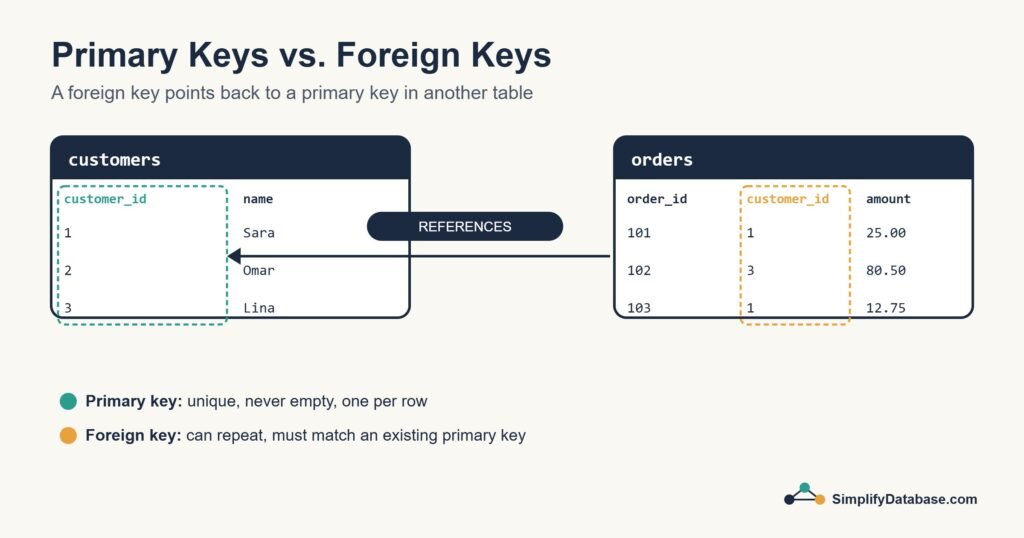
A foreign key is a column in one table that points to the primary key of another table. It’s how tables refer to each other.
Let’s add an orders table. Each order belongs to a customer, so instead of storing the customer’s name and email again in every order, we store their customer_id:
CREATE TABLE orders (
    order_id    INT PRIMARY KEY,
    customer_id INT NOT NULL,
    amount      DECIMAL(10,2),
    FOREIGN KEY (customer_id) REFERENCES customers(customer_id)
);
The last line is the important one. It tells the database: “every value in orders.customer_id must already exist in customers.customer_id.”
| order_id | customer_id | amount |
|---|---|---|
| 101 | 1 | 25.00 |
| 102 | 3 | 80.50 |
| 103 | 1 | 12.75 |
Notice that customer 1 appears twice. That’s fine. Unlike a primary key, a foreign key can repeat, because one customer can place many orders.
Primary Key vs. Foreign Key: Side by Side
| Primary key | Foreign key | |
|---|---|---|
| Job | Identifies each row in its own table | Links a row to a row in another table |
| Unique? | Yes, always | No, values can repeat |
| Can be NULL? | Never | Yes, unless you add NOT NULL |
| How many per table? | Exactly one | As many as you need |
| Example | customers.customer_id | orders.customer_id |
Why Bother? What Keys Protect You From
You could build tables without any keys and the database would happily store your data. The trouble shows up later. Keys give you something called referential integrity, which is a fancy way of saying “the links between tables always make sense”. In practice that means:
- You can’t create an order for customer 99 if customer 99 doesn’t exist.
- You can’t delete a customer who still has orders, unless you decide what should happen to those orders.
- You never end up with “orphan” rows that point to nothing.
I’ve worked on older systems where the foreign keys were never created “to keep things simple”. Years later, the tables were full of orders pointing at deleted customers, and every report needed extra filters to hide the mess. Adding keys from day one is much cheaper than cleaning up afterwards.
What happens when you delete a parent row?
You get to choose. These options go on the foreign key:
| Option | What it does |
|---|---|
ON DELETE NO ACTION / RESTRICT | Blocks the delete if child rows exist (the default in most databases) |
ON DELETE CASCADE | Deletes the child rows too |
ON DELETE SET NULL | Keeps the child rows but clears the foreign key value |
Be careful with CASCADE. It’s convenient, but one delete can quietly remove hundreds of related rows.
How Keys Make JOINs Work
Keys and JOINs go hand in hand. When you want to see each order with the customer’s name, you join on the key columns:
SELECT o.order_id, c.name, o.amount
FROM orders o
JOIN customers c ON c.customer_id = o.customer_id;
The primary key on one side and the foreign key on the other are what make this join reliable. If you want a refresher on how joins work, see SQL JOINs Explained Simply.
Composite Keys (A Quick Mention)
Sometimes no single column is unique on its own, but a combination is. Picture a table that records which students are enrolled in which courses. A student appears many times and so does a course, but the pair (student, course) should only appear once:
CREATE TABLE enrollments (
    student_id INT,
    course_id  INT,
    PRIMARY KEY (student_id, course_id)
);
That’s a composite primary key. Both columns are usually also foreign keys pointing at students and courses.
Beginner Tips
- Give every table a primary key. No exceptions.
- Name keys clearly:
customer_idin both tables is much easier to follow thanidin one andcustin the other. - Make sure the foreign key column has the same data type as the primary key it points to.
- Add an index on foreign key columns. Some databases do this for you and some (like SQL Server and PostgreSQL) don’t, and joins get slow without it.
Conclusion
A primary key answers “which row is this?” and a foreign key answers “which row does this belong to?”. Together they keep your data consistent and make it possible to connect tables with confidence.
Next time you design a table, start by deciding its primary key, then ask which other tables it needs to point to. If you’re still getting comfortable with querying, our guide to WHERE, ORDER BY and LIMIT is a good next read.
Related articles
- SQL Constraints Explained Simply: NOT NULL, UNIQUE, CHECK and DEFAULT.
- Database Normalization: 1NF, 2NF and 3NF: remove duplicate data step by step.
- SQL Indexes Explained Simply: what indexes are and when to add one.
- SQL Data Types Explained Simply: choosing the right type for each column.