
“Show me the sales for each day, and the total so far.” “Show every transaction on the account, with the balance after each one.” These are two of the most common requests in any reporting system, and both need a running total (also called a cumulative sum).
In older versions of SQL Server, running totals were slow and awkward. Since SQL Server 2012 they’re one line of SQL. This guide shows that line, how to reset it per month or per account, and the two mistakes that give wrong numbers or slow reports. The same syntax works in MySQL 8 and PostgreSQL.
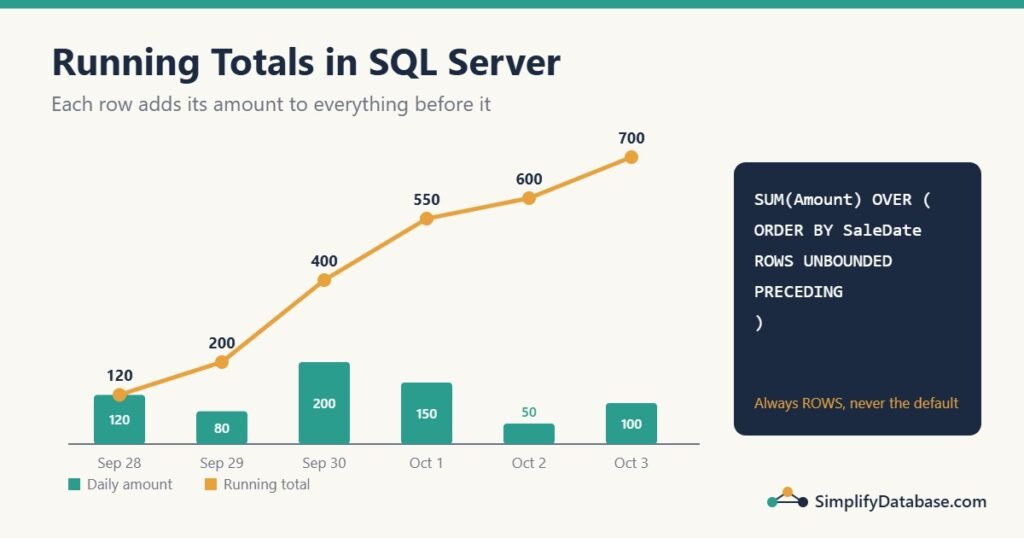
Table of Contents
The simple running total
Start with a DailySales table:
| SaleDate | Amount |
|---|---|
| 2026-09-28 | 120.00 |
| 2026-09-29 | 80.00 |
| 2026-09-30 | 200.00 |
| 2026-10-01 | 150.00 |
| 2026-10-02 | 50.00 |
| 2026-10-03 | 100.00 |
The running total is SUM used as a window function, with an ORDER BY inside OVER:
SELECT SaleDate,
       Amount,
       SUM(Amount) OVER (ORDER BY SaleDate
                         ROWS UNBOUNDED PRECEDING) AS RunningTotal
FROM DailySales;| SaleDate | Amount | RunningTotal |
|---|---|---|
| 2026-09-28 | 120.00 | 120.00 |
| 2026-09-29 | 80.00 | 200.00 |
| 2026-09-30 | 200.00 | 400.00 |
| 2026-10-01 | 150.00 | 550.00 |
| 2026-10-02 | 50.00 | 600.00 |
| 2026-10-03 | 100.00 | 700.00 |
Read the OVER part as: “sort the rows by date, and for each row add up everything from the first row (UNBOUNDED PRECEDING) to this row.” Unlike GROUP BY, every row stays in the result. If window functions are new to you, read SQL Window Functions Explained Simply first.
Reset the total every month: PARTITION BY
A month-to-date total should start again at zero on the 1st. Add PARTITION BY to split the rows into groups, and the running total restarts in each group:
SELECT SaleDate,
       Amount,
       SUM(Amount) OVER (PARTITION BY YEAR(SaleDate), MONTH(SaleDate)
                         ORDER BY SaleDate
                         ROWS UNBOUNDED PRECEDING) AS MonthToDate
FROM DailySales;| SaleDate | Amount | MonthToDate |
|---|---|---|
| 2026-09-28 | 120.00 | 120.00 |
| 2026-09-29 | 80.00 | 200.00 |
| 2026-09-30 | 200.00 | 400.00 |
| 2026-10-01 | 150.00 | 150.00 |
| 2026-10-02 | 50.00 | 200.00 |
| 2026-10-03 | 100.00 | 300.00 |
Use PARTITION BY YEAR(SaleDate) for year-to-date, or PARTITION BY CustomerID for a running total per customer.
A running balance per account
In accounting systems, transactions are stored as debits and credits, and the report needs the balance after each line. Here is an AccountTransactions table:
| TxnID | AccountID | TxnDate | Description | Debit | Credit |
|---|---|---|---|---|---|
| 1 | 101 | 2026-10-01 | Opening deposit | 1000.00 | 0.00 |
| 2 | 101 | 2026-10-03 | Supplier payment | 0.00 | 250.00 |
| 3 | 101 | 2026-10-03 | Bank fee | 0.00 | 5.00 |
| 4 | 101 | 2026-10-07 | Customer receipt | 400.00 | 0.00 |
| 5 | 102 | 2026-10-02 | Opening deposit | 500.00 | 0.00 |
| 6 | 102 | 2026-10-05 | Rent | 0.00 | 300.00 |
The balance is the running total of Debit - Credit, restarted for each account:
SELECT AccountID, TxnDate, Description, Debit, Credit,
       SUM(Debit - Credit) OVER (PARTITION BY AccountID
                                 ORDER BY TxnDate, TxnID
                                 ROWS UNBOUNDED PRECEDING) AS Balance
FROM AccountTransactions
ORDER BY AccountID, TxnDate, TxnID;| AccountID | TxnDate | Description | Balance |
|---|---|---|---|
| 101 | 2026-10-01 | Opening deposit | 1000.00 |
| 101 | 2026-10-03 | Supplier payment | 750.00 |
| 101 | 2026-10-03 | Bank fee | 745.00 |
| 101 | 2026-10-07 | Customer receipt | 1145.00 |
| 102 | 2026-10-02 | Opening deposit | 500.00 |
| 102 | 2026-10-05 | Rent | 200.00 |
Notice two details: the ORDER BY inside OVER uses TxnDate, TxnID, not just the date, and the frame says ROWS. Both matter, and the next section shows why.
Mistake 1: leaving out ROWS (the default frame)
If you write only SUM(...) OVER (ORDER BY TxnDate), SQL Server uses a default frame: RANGE BETWEEN UNBOUNDED PRECEDING AND CURRENT ROW. RANGE treats all rows with the same date as one block. Look at account 101 on October 3:
SELECT TxnID, TxnDate, Debit - Credit AS Net,
       SUM(Debit - Credit) OVER (ORDER BY TxnDate) AS RangeDefault
FROM AccountTransactions
WHERE AccountID = 101;| TxnID | TxnDate | Net | RangeDefault |
|---|---|---|---|
| 1 | 2026-10-01 | 1000.00 | 1000.00 |
| 2 | 2026-10-03 | -250.00 | 745.00 |
| 3 | 2026-10-03 | -5.00 | 745.00 |
| 4 | 2026-10-07 | 400.00 | 1145.00 |
Both October 3 rows show 745, as if the supplier payment and the bank fee happened at the same moment. On a bank statement or a customer ledger, that looks like a bug, and accountants will notice.
RANGE is also slower in SQL Server. It stores its working rows in a worktable in tempdb, while ROWS can keep them in memory. On large tables the difference can be big, especially before SQL Server 2019’s batch mode improvements. So the rule is simple: always write ROWS UNBOUNDED PRECEDING for running totals.
Mistake 2: sorting by a column that has ties
Even with ROWS, sorting only by TxnDate isn’t enough. The two October 3 rows have the same date, so SQL Server is free to process them in either order. In my test, the bank fee came first and the supplier payment showed a balance of 995 instead of 750. Run the same query next month on a bigger table and the order might change again.
Always add a column that makes the order unique, usually the ID: ORDER BY TxnDate, TxnID. Then the result is the same every time.
Start from an opening balance
Statements usually show a date range, not the whole history. The balance on the first line must include everything before the range. Calculate the opening balance first, then add the running total to it:
DECLARE @From date = '2026-10-03';

WITH Opening AS (
    SELECT AccountID, SUM(Debit - Credit) AS OpeningBalance
    FROM AccountTransactions
    WHERE TxnDate < @From
    GROUP BY AccountID
)
SELECT t.AccountID, t.TxnDate, t.Description,
       COALESCE(o.OpeningBalance, 0)
       + SUM(t.Debit - t.Credit) OVER (PARTITION BY t.AccountID
                                      ORDER BY t.TxnDate, t.TxnID
                                      ROWS UNBOUNDED PRECEDING) AS Balance
FROM AccountTransactions t
LEFT JOIN Opening o ON o.AccountID = t.AccountID
WHERE t.TxnDate >= @From
ORDER BY t.AccountID, t.TxnDate, t.TxnID;| AccountID | TxnDate | Description | Balance |
|---|---|---|---|
| 101 | 2026-10-03 | Supplier payment | 750.00 |
| 101 | 2026-10-03 | Bank fee | 745.00 |
| 101 | 2026-10-07 | Customer receipt | 1145.00 |
| 102 | 2026-10-05 | Rent | 200.00 |
The balances match the full-history version, even though the earlier rows are filtered out. COALESCE handles accounts with no earlier transactions. (The WHERE filter runs before the window function, which is exactly why the opening balance is needed.)
Two useful variations
Running percentage of the total, for “how much of the month’s sales did we have by day 10?”:
SELECT SaleDate, Amount,
       SUM(Amount) OVER (ORDER BY SaleDate ROWS UNBOUNDED PRECEDING) AS RunningTotal,
       CAST(100.0 * SUM(Amount) OVER (ORDER BY SaleDate ROWS UNBOUNDED PRECEDING)
            / SUM(Amount) OVER () AS decimal(5,1)) AS PctOfTotal
FROM DailySales;
-- the last row shows 100.0
Moving average (for example the last 3 days), which smooths out daily ups and downs. Only the frame changes:
SELECT SaleDate, Amount,
       AVG(Amount) OVER (ORDER BY SaleDate
                         ROWS BETWEEN 2 PRECEDING AND CURRENT ROW) AS Avg3Day
FROM DailySales;
The old way (SQL Server 2008 and earlier)
You’ll still see this in older systems. It works, but it’s slow:
SELECT a.SaleDate, a.Amount,
       (SELECT SUM(b.Amount)
        FROM DailySales b
        WHERE b.SaleDate <= a.SaleDate) AS RunningTotal
FROM DailySales a
ORDER BY a.SaleDate;
For each row, the subquery adds up all the earlier rows again. With 1,000 rows that’s about 500,000 row reads; with 100,000 rows it’s about 5 billion. The window function reads each row once. If you find this pattern in a slow report and the server is 2012 or newer, replacing it is one of the easiest speed-ups you’ll ever make.
Make it fast on big tables
A window function needs its rows sorted by the PARTITION BY and ORDER BY columns. If an index already has them in that order, SQL Server can skip the expensive Sort step in the execution plan:
CREATE INDEX IX_AccountTransactions_Balance
ON AccountTransactions (AccountID, TxnDate, TxnID)
INCLUDE (Debit, Credit);
The key columns follow the window (partition first, then order), and INCLUDE covers the summed columns so no lookups are needed. Only add it if this report is slow and runs often; every index has a cost on inserts. See Missing Indexes in SQL Server for how to decide.
Practice exercises
- Show each account’s running balance, but only for account 101.
- Show a running count of transactions per account (1, 2, 3, …).
- Show a year-to-date sales total from
DailySales.
Answers:
-- 1: only one account is left after WHERE, so PARTITION BY isn't needed
SELECT TxnDate, Description,
       SUM(Debit - Credit) OVER (ORDER BY TxnDate, TxnID ROWS UNBOUNDED PRECEDING) AS Balance
FROM AccountTransactions
WHERE AccountID = 101;

-- 2
SELECT AccountID, TxnID,
       COUNT(*) OVER (PARTITION BY AccountID ORDER BY TxnDate, TxnID
                      ROWS UNBOUNDED PRECEDING) AS TxnNumber
FROM AccountTransactions;

-- 3
SELECT SaleDate, Amount,
       SUM(Amount) OVER (PARTITION BY YEAR(SaleDate) ORDER BY SaleDate
                         ROWS UNBOUNDED PRECEDING) AS YearToDate
FROM DailySales;
Summary
- A running total is
SUM(x) OVER (ORDER BY ... ROWS UNBOUNDED PRECEDING). - Add
PARTITION BYto restart it per month, year, customer or account. - Always write
ROWS. The defaultRANGElumps tied rows together and is slower. - Make the
ORDER BYunique (add the ID), or tied rows can come out in any order. - For statements, add an opening balance calculated from the rows before the range.
Related articles
- SQL Window Functions Explained Simply:
ROW_NUMBER,RANK,LAGand howOVERworks. - SQL GROUP BY and Aggregate Functions Explained Simply: totals per group, when you don’t need every row.
- SQL Date Functions Explained Simply: build month and year boundaries for reports.
- How to Learn SQL: A Step-by-Step Roadmap: where running totals fit in your learning path.
- Top N per Group in SQL Server: the next article in this reporting series, the latest record or top 3 rows for each group.
- Aging Report in SQL Server: another finance report in this series, grouping unpaid invoices into 0-30, 31-60, 61-90 and 90+ day buckets.
- Funnel Analysis in SQL: another reporting technique that turns event data into step-by-step conversion rates.
- Cohort and Retention Analysis in SQL: another reporting technique that builds a monthly retention table from order data.
- PIVOT and UNPIVOT in SQL Server: turn monthly totals from rows into columns for a report layout.
- Month-over-Month and Year-over-Year Comparisons in SQL (With LAG): put monthly totals next to last month and last year to see growth, not just the running sum.