
In accounting, one rule is never broken: total debits must equal total credits. A journal entry for an electricity bill debits the expense account and credits the bank, both 120.500. If the program saves the debit line and then crashes before the credit line, the books no longer balance, and someone spends a day finding out why.
The tool that prevents this is a database transaction: a group of changes that are saved all together or not at all. This is part 6 of the Delphi for ERP series, and it shows how to save a journal entry safely with FireDAC.
If transactions are new to you, read SQL Transactions and ACID Explained Simply first. It takes five minutes.
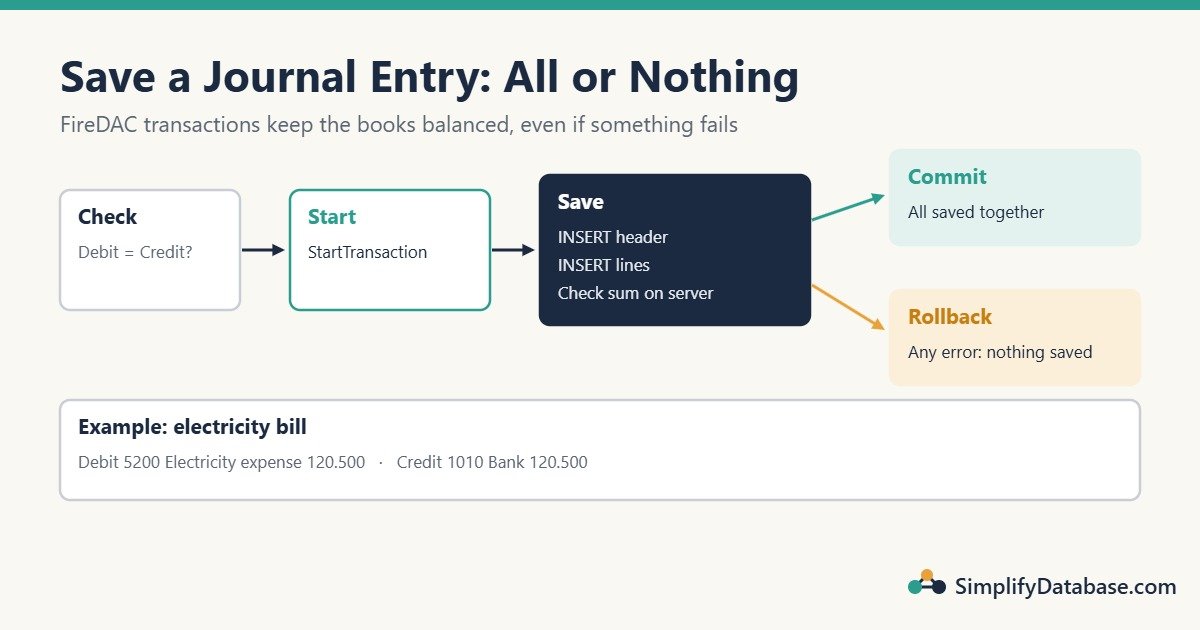
Table of Contents
The Tables
CREATE TABLE dbo.Accounts (
    AccountID   INT IDENTITY(1,1) NOT NULL PRIMARY KEY,
    AccountCode VARCHAR(20)   NOT NULL UNIQUE,
    AccountName NVARCHAR(100) NOT NULL,
    IsActive    BIT           NOT NULL DEFAULT 1
);

CREATE TABLE dbo.JournalEntries (
    JournalID   INT IDENTITY(1,1) NOT NULL PRIMARY KEY,
    JournalNo   VARCHAR(20)   NOT NULL UNIQUE,
    JournalDate DATE          NOT NULL,
    Description NVARCHAR(200) NOT NULL
);

CREATE TABLE dbo.JournalLines (
    LineID    INT IDENTITY(1,1) NOT NULL PRIMARY KEY,
    JournalID INT           NOT NULL REFERENCES dbo.JournalEntries (JournalID),
    AccountID INT           NOT NULL REFERENCES dbo.Accounts (AccountID),
    Debit     DECIMAL(14,3) NOT NULL DEFAULT 0,
    Credit    DECIMAL(14,3) NOT NULL DEFAULT 0,
    CONSTRAINT CK_JournalLines_Amounts CHECK (
        Debit >= 0 AND Credit >= 0
        AND (Debit = 0 OR Credit = 0)      -- not both on one line
        AND (Debit > 0 OR Credit > 0)      -- and not neither
    )
);

CREATE INDEX IX_JournalLines_JournalID ON dbo.JournalLines (JournalID);

INSERT INTO dbo.Accounts (AccountCode, AccountName)
VALUES ('1010', N'Bank - current account'),
       ('5200', N'Electricity expense'),
       ('2100', N'Accounts payable');
The CHECK constraint makes every single line valid. But “debits = credits” is a rule about the whole entry, so no single-row constraint can enforce it. That’s the transaction’s job.
Why Not Use the Master-Detail Screen From Part 5?
In part 5, the invoice header and each line were saved as the user went. For a journal, that would put half-finished, unbalanced entries in the database while the user is still typing.
So the journal screen works differently:
- The user types the lines into an in-memory table on the PC. Nothing goes to SQL Server yet.
- When they press Save, Delphi checks the entry.
- Then it writes the header and all lines inside one transaction.
Step 1: Lines in a TFDMemTable
On frmJournal, drop a TFDMemTable named mtLines. In its Fields Editor, add three fields with New field (type Data):
| Name | Type |
|---|---|
AccountID | Integer |
Debit | Currency |
Credit | Currency |
Add a lookup field AccountName (Key Fields AccountID, Dataset qryAccountList, Lookup Keys AccountID, Result Field AccountName), exactly as in part 4. Connect a TDataSource and a TDBGrid. For the header, use plain TEdit controls (edtJournalNo, edtDescription) and a TDateTimePicker (dtpDate).
procedure TfrmJournal.FormCreate(Sender: TObject);
begin
  qryAccountList.Open;   // SELECT AccountID, AccountCode, AccountName FROM dbo.Accounts WHERE IsActive = 1
  mtLines.CreateDataSet;   // builds the memory table from the fields you defined
end;
Step 2: Check the Entry Before Saving
procedure TfrmJournal.CheckBalanced;
var
  TotalDebit, TotalCredit: Currency;
  LineNo: Integer;
begin
  if mtLines.State in [dsEdit, dsInsert] then
    mtLines.Post;

  TotalDebit := 0;
  TotalCredit := 0;
  LineNo := 0;
  mtLines.DisableControls;
  try
    mtLines.First;
    while not mtLines.Eof do
    begin
      Inc(LineNo);
      if mtLines.FieldByName('AccountID').IsNull then
        raise Exception.CreateFmt('Line %d: choose an account.', [LineNo]);
      if (mtLines.FieldByName('Debit').AsCurrency < 0) or
         (mtLines.FieldByName('Credit').AsCurrency < 0) then
        raise Exception.CreateFmt('Line %d: amounts cannot be negative.', [LineNo]);
      if (mtLines.FieldByName('Debit').AsCurrency <> 0) =
         (mtLines.FieldByName('Credit').AsCurrency <> 0) then
        raise Exception.CreateFmt('Line %d: enter either a debit or a credit.', [LineNo]);

      TotalDebit := TotalDebit + mtLines.FieldByName('Debit').AsCurrency;
      TotalCredit := TotalCredit + mtLines.FieldByName('Credit').AsCurrency;
      mtLines.Next;
    end;
  finally
    mtLines.EnableControls;
  end;

  if LineNo < 2 then
    raise Exception.Create('A journal entry needs at least two lines.');
  if TotalDebit <> TotalCredit then
    raise Exception.CreateFmt('The entry is not balanced: debit %s, credit %s.',
      [FormatFloat('#,##0.000', TotalDebit), FormatFloat('#,##0.000', TotalCredit)]);
end;
Notice the Currency type. It stores money as an exact fixed-point number. With Double, 0.1 + 0.2 is not exactly 0.3, so a perfectly balanced entry could fail the check by 0.0000000001. With Currency, the comparison is exact. (We tested this with Free Pascal: Currency gives True, Double gives False.)
The line (Debit <> 0) = (Credit <> 0) is a compact way to say “both filled in, or both empty”. Both are wrong.
Step 3: Save Inside a Transaction
procedure TfrmJournal.SaveJournal;
var
  JournalID: Integer;
  Diff: Variant;
begin
  CheckBalanced;   // raises an exception if anything is wrong

  DM.Conn.StartTransaction;
  try
    // 1. The header. OUTPUT INSERTED returns the new identity value.
    JournalID := DM.Conn.ExecSQLScalar(
      'INSERT INTO dbo.JournalEntries (JournalNo, JournalDate, Description) ' +
      'OUTPUT INSERTED.JournalID ' +
      'VALUES (:JournalNo, :JournalDate, :Description)',
      [Trim(edtJournalNo.Text), DateOf(dtpDate.Date), Trim(edtDescription.Text)]);

    // 2. The lines.
    mtLines.DisableControls;
    try
      mtLines.First;
      while not mtLines.Eof do
      begin
        DM.Conn.ExecSQL(
          'INSERT INTO dbo.JournalLines (JournalID, AccountID, Debit, Credit) ' +
          'VALUES (:JournalID, :AccountID, :Debit, :Credit)',
          [JournalID,
           mtLines.FieldByName('AccountID').AsInteger,
           mtLines.FieldByName('Debit').AsCurrency,
           mtLines.FieldByName('Credit').AsCurrency]);
        mtLines.Next;
      end;
    finally
      mtLines.EnableControls;
    end;

    // 3. Double-check on the server, inside the same transaction.
    Diff := DM.Conn.ExecSQLScalar(
      'SELECT SUM(Debit) - SUM(Credit) FROM dbo.JournalLines WHERE JournalID = :ID',
      [JournalID]);
    if Diff <> 0 then
      raise Exception.Create('The saved entry is not balanced. Nothing was saved.');

    DM.Conn.Commit;
  except
    DM.Conn.Rollback;
    raise;   // show the original error to the user
  end;

  ShowMessage('Journal ' + Trim(edtJournalNo.Text) + ' saved.');
  mtLines.EmptyDataSet;
end;
Add System.DateUtils to the uses clause for DateOf, which drops the time part of the picker’s value.
How it works:
StartTransactionstarts the group. Every insert after it is pending: other users can’t see it yet.- If any step fails (a duplicate
JournalNo, a deleted account, a network error, or our own balance check), theexceptblock callsRollback. SQL Server undoes the header and every line already inserted. The database looks exactly as it did before. - Only when everything succeeds does
Commitmake the whole entry permanent, at once. raisere-raises the original exception, so the user sees the real reason.
All values go in as parameters, never joined into the SQL text. That keeps out SQL injection and handles dates and decimals correctly. (See Parameterised Queries in Delphi.)
With ADO, the same pattern uses ADOConnection.BeginTrans, CommitTrans and RollbackTrans, and TADOQuery (or TADOCommand) for the inserts.
Keep Transactions Short
While a transaction is open, SQL Server holds locks on the rows it changed, and other users who need those rows wait. So:
- Never show a message box or ask the user a question between
StartTransactionandCommit. If the user goes to lunch, everyone else is blocked. - Do all the checks you can before starting the transaction (that’s why
CheckBalancedruns first). - Make sure every path ends in
CommitorRollback. Thetry..exceptabove guarantees it.
Long or forgotten transactions are the classic cause of the “everything is frozen” call. If it happens, SQL Server Blocking: How to Find the Blocking Session shows how to find it.
Don’t Delete Posted Entries: Reverse Them
In real accounting systems, a posted journal entry is never edited or deleted. If it was wrong, you post a reversing entry (the same lines with debit and credit swapped) and then a correct one. This keeps a full audit trail. Exercise 3 below builds the reversal, in a transaction of course.
Common Mistakes
- Saving lines one by one without a transaction. A crash in the middle leaves an unbalanced entry.
- Using
Doublefor money. Rounding errors make balanced entries look unbalanced. UseCurrencyin Delphi andDECIMALin SQL Server. - Forgetting
Rollbackin the error path. The transaction stays open, keeps its locks, and blocks other users. - User interaction inside the transaction. Check first, then start the transaction, then save quickly.
- Trusting only the Delphi check. A second check inside the transaction (or in a stored procedure, as in part 7) protects you from bugs and other programs.
Practice Exercises
- Show a live “Difference: 0.000” label under the grid that turns red when the entry doesn’t balance.
- Generate the journal number automatically and safely when two users save at the same moment.
- Write
ReverseJournal(OldID)that creates a reversing entry for an existing journal.
Answers
1. Recalculate in the memory table’s AfterPost and AfterDelete events with a loop like the one in CheckBalanced (or a FireDAC aggregate SUM(Debit) - SUM(Credit)), then:
lblDiff.Caption := 'Difference: ' + FormatFloat('#,##0.000', TotalDebit - TotalCredit);
if TotalDebit = TotalCredit then
  lblDiff.Font.Color := clGreen
else
  lblDiff.Font.Color := clRed;
2. Let SQL Server hand out numbers with a sequence. Each call returns a different value, even under heavy load:
CREATE SEQUENCE dbo.JournalNoSeq START WITH 1 INCREMENT BY 1;// inside the transaction, before inserting the header
JournalNo := 'JV-' + VarToStr(DM.Conn.ExecSQLScalar(
'SELECT NEXT VALUE FOR dbo.JournalNoSeq')); // VarToStr is in System.VariantsSequences can leave gaps (for example after a rollback). If your auditors require gap-free numbers, use a counter table updated inside the same transaction instead.
3.
procedure TfrmJournal.ReverseJournal(const OldID: Integer);
var
  NewID: Integer;
begin
  DM.Conn.StartTransaction;
  try
    NewID := DM.Conn.ExecSQLScalar(
      'INSERT INTO dbo.JournalEntries (JournalNo, JournalDate, Description) ' +
      'OUTPUT INSERTED.JournalID ' +
      'SELECT ''R-'' + JournalNo, CAST(GETDATE() AS DATE), N''Reversal of '' + JournalNo ' +
      'FROM dbo.JournalEntries WHERE JournalID = :OldID',
      [OldID]);

    DM.Conn.ExecSQL(
      'INSERT INTO dbo.JournalLines (JournalID, AccountID, Debit, Credit) ' +
      'SELECT :NewID, AccountID, Credit, Debit ' +   // debit and credit swapped
      'FROM dbo.JournalLines WHERE JournalID = :OldID',
      [NewID, OldID]);

    DM.Conn.Commit;
  except
    DM.Conn.Rollback;
    raise;
  end;
end;
Summary
- A transaction saves a group of changes all or nothing:
StartTransaction, thenCommit, orRollbackon any error. - Enter journal lines in a
TFDMemTable, check them, then write everything in one short transaction. - Use
CurrencyandDECIMALfor money so debit = credit comparisons are exact. - Check the balance in Delphi before saving and again on the server inside the transaction.
- Keep transactions short, never wait for the user inside one, and reverse posted entries instead of deleting them.
Next in the series: calling SQL Server stored procedures from Delphi, so the posting rules live in the database.
Delphi for ERP series
All parts in order. New parts appear here as they go live.
-
Why Delphi Is Still a Great Choice for ERP and Business Apps in 2026
-
Delphi vs C# vs Web Apps for Business Software: Which Should You Use?
-
Build a Customer Screen in Delphi in 30 Minutes (SQL Server Step by Step)
-
Lookup Combo Boxes in Delphi: Choose a Customer or Item From a List
-
Master-Detail Forms in Delphi: Invoice Header and Invoice Lines (FireDAC)
-
Delphi Transactions with FireDAC: Save a Balanced Journal Entry (All or Nothing)
New to Delphi? Start with What Is Delphi? Build Your First App.
Related articles
- Master-Detail Forms in Delphi: Invoice Header and Lines: part 5 of this series.
- SQL Transactions and ACID Explained Simply: the theory behind this article.
- Delphi Exception Handling: try..except, try..finally and raise: the error handling used above.
- SQL Server Blocking: How to Find the Blocking Session: what happens when a transaction stays open.