
If you know SQL and you’ve started reading data engineering job ads, you’ve seen the word Spark everywhere. It sounds like something completely new, with clusters, Python and strange terms like “DataFrames” and “lazy evaluation”.
Here’s the reassuring part: for a SQL user, Spark is mostly SQL that runs on many computers at once. You can write SELECT ... GROUP BY in Spark and it works the way you’d expect. This guide explains what Spark is, why it exists, how it compares with SQL Server or MySQL, and shows a real Spark example next to the SQL you already know.
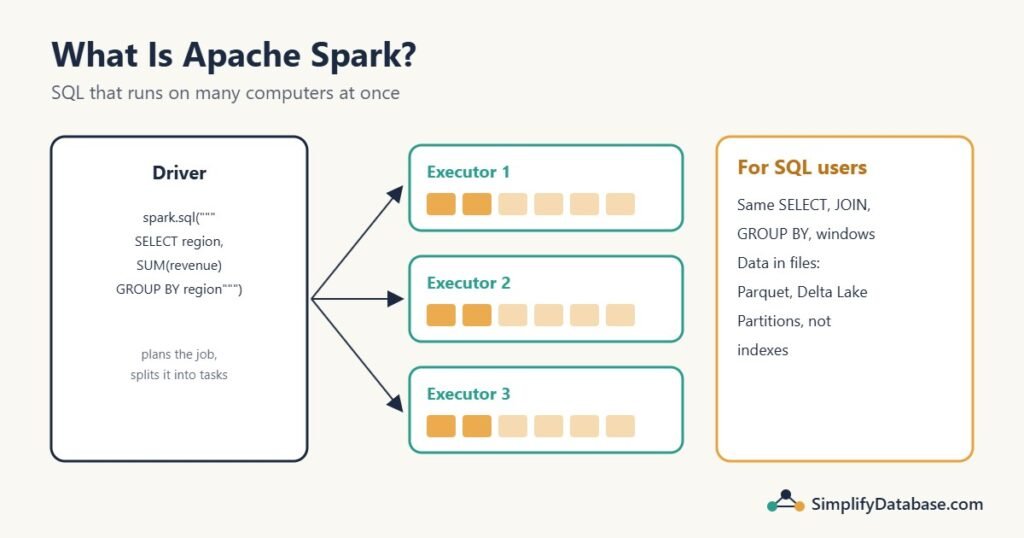
Table of Contents
What Apache Spark is, in one paragraph
Apache Spark is a free, open-source engine for processing large amounts of data across many computers (a cluster). You give it a question, written in SQL or in Python, Scala, Java or R, and it splits the data into pieces, sends the pieces to different machines, works on them in parallel, and combines the results. It was started at UC Berkeley in 2009 and became one of the most popular data tools in the world. Companies use it to clean, join and summarize data that’s far too big for one database server: billions of rows of clicks, transactions, sensor readings or logs.
Why Spark exists: the problem with one big server
A database like SQL Server or MySQL runs on one machine (or a primary plus some copies). That machine has a limit: so many CPU cores, so much memory, so much disk. For most business systems, that’s plenty, and a well-indexed database on a good server handles hundreds of millions of rows comfortably.
But some data keeps growing past what one machine can store or process in reasonable time: years of website events, every reading from thousands of machines, a retailer’s full transaction history across all stores. That’s where Big Data starts. Instead of buying an ever-bigger server (“scaling up”), you spread the data and the work across many ordinary machines (“scaling out”).
Hadoop first, then Spark
The first popular tool for this was Hadoop: a file system (HDFS) that spreads files across many machines, plus MapReduce, a way to process them in parallel. MapReduce worked, but it wrote intermediate results to disk after every step, so a job with many steps spent most of its time reading and writing disk. And writing MapReduce jobs meant a lot of Java code even for a simple GROUP BY.
Spark improved on both:
- It keeps intermediate data in memory where it can, which makes multi-step jobs much faster.
- It offers high-level APIs, including plain SQL, so a summary that took pages of MapReduce code is a few lines.
Today, Spark often reads data from the same kind of distributed storage Hadoop used, or from cloud storage like Amazon S3 or Azure Data Lake Storage, but MapReduce itself has largely been replaced by Spark.
How Spark works (just enough to get started)
You don’t need to understand the internals to use Spark, but four ideas help:
- Driver and executors. Your program runs on a driver. The driver splits the work into tasks and sends them to executors running on the cluster’s worker machines. On your laptop, the driver and executors all run in one process, which is perfect for learning.
- Partitions. Spark splits data into chunks called partitions. Each task works on one partition. More partitions on more machines means more work in parallel.
- DataFrames. The main way to work with data in Spark is a DataFrame: a table with named columns and types, like a SQL table or the result of a query. You can query a DataFrame with SQL or with Python methods; both turn into the same execution plan.
- Lazy evaluation. When you say “filter this, then group that”, Spark doesn’t do anything yet. It just records the steps. Only when you ask for a result (show it, count it, save it) does it plan the whole job and run it. That lets Spark’s optimizer, called Catalyst, rearrange the steps for efficiency, much like a SQL Server query optimizer turns your SQL into an execution plan.
A real example: the same report in SQL and in Spark
Take a small sales.csv file:
order_id,order_date,region,product,quantity,unit_price
1,2026-10-01,North,Keyboard,2,25.00
2,2026-10-01,South,Mouse,5,12.00
3,2026-10-02,North,Monitor,1,180.00
4,2026-10-02,East,Keyboard,3,25.00
5,2026-10-03,South,Monitor,2,175.00
6,2026-10-03,North,Mouse,4,12.00
7,2026-10-04,East,Headset,2,40.00
8,2026-10-04,South,Keyboard,1,25.00
In SQL Server, after importing it into a table, revenue per region is:
SELECT region, SUM(quantity * unit_price) AS revenue, COUNT(*) AS orders
FROM sales
GROUP BY region
ORDER BY revenue DESC;
In Spark, with Python (PySpark), you read the file and run the same SQL:
from pyspark.sql import SparkSession

spark = SparkSession.builder.appName("SalesReport").getOrCreate()

sales = spark.read.csv("sales.csv", header=True, inferSchema=True)
sales.createOrReplaceTempView("sales")      # make it queryable by name

spark.sql("""
    SELECT region, SUM(quantity * unit_price) AS revenue, COUNT(*) AS orders
    FROM sales
    GROUP BY region
    ORDER BY revenue DESC
""").show()
+------+-------+------+
|region|revenue|orders|
+------+-------+------+
| South| 435.0| 3|
| North| 278.0| 3|
| East| 155.0| 2|
+------+-------+------+That’s real output from running this code with PySpark 3.5 on a laptop. inferSchema=True made Spark look at the data and decide the types itself (integer, date, string, double), much like an import wizard.
The same query with the DataFrame API instead of SQL:
from pyspark.sql import functions as F

(sales
    .withColumn("line_total", F.col("quantity") * F.col("unit_price"))
    .groupBy("region")
    .agg(F.sum("line_total").alias("revenue"),
         F.count("*").alias("orders"))
    .orderBy(F.desc("revenue"))
    .show())
Same result. Read it from top to bottom and it maps one-to-one onto the SQL: a calculated column, GROUP BY, aggregates with aliases, ORDER BY. Many teams mix both styles: SQL for readable transformations, Python for the logic around them (loops over files, configuration, tests).
Even window functions work as you’d expect. The best-selling product per region:
spark.sql("""
    SELECT product, region, SUM(quantity) AS qty,
           RANK() OVER (PARTITION BY region ORDER BY SUM(quantity) DESC) AS rnk
    FROM sales
    GROUP BY product, region
""").filter("rnk = 1").show()
East: Keyboard (3), North: Mouse (4), South: Mouse (5).
SQL in Spark vs SQL in SQL Server
Spark SQL follows standard SQL closely, so most of what you know carries over: SELECT, WHERE, JOINs, GROUP BY, HAVING, CASE, CTEs, window functions, subqueries. The differences are mostly about what kind of system it is:
| SQL Server / MySQL | Spark | |
|---|---|---|
| Built for | Transactions and queries on one server | Large batch processing across a cluster |
| Data lives in | The database’s own files | Files: Parquet, CSV, JSON, Delta Lake tables |
| Typical data size | Up to hundreds of GB comfortably | Hundreds of GB to petabytes |
| Indexes | Yes, central to performance | No traditional indexes; partitioning and file layout instead |
| Small, fast lookups | Milliseconds | Seconds (there’s startup and planning overhead) |
UPDATE one row | Normal | Possible with table formats like Delta Lake, but not what it’s for |
| Transactions (ACID) | Yes | Only with table formats like Delta Lake or Iceberg |
| Languages | T-SQL / SQL | SQL, Python, Scala, Java, R |
So Spark doesn’t replace your SQL Server. A typical company has both: SQL Server or MySQL runs the applications (OLTP), and Spark processes the huge history behind the analytics, often as the transform step of an ETL or ELT pipeline that feeds a data warehouse or data lake.
Files instead of tables: Parquet and partitioning
Spark usually reads and writes files rather than database tables. CSV is fine for learning, but the standard format is Parquet: a compressed, column-based file format. Because it stores each column separately, a query that needs 3 columns out of 50 reads only those 3, which is a big part of why Spark is fast on wide tables.
Instead of indexes, Spark uses partitioning on disk:
sales.write.mode("overwrite").partitionBy("region").parquet("sales_parquet")This writes one folder per region (region=East, region=North, region=South). A later query with WHERE region = 'North' only reads the North folder and skips the rest. Choose partition columns you filter on often, typically a date. This is how a data lake stays fast even with years of data.
Delta Lake and Apache Iceberg add a layer on top of Parquet files that brings database features: UPDATE, DELETE, MERGE, transactions and “time travel” to older versions. That combination is what the industry calls a lakehouse.
Where Spark runs
- On your laptop, for learning:
pip install pyspark(you need Java installed). Everything in this article runs that way. - Databricks, a commercial platform from Spark’s original creators, available on AWS, Azure and Google Cloud. Probably the most common place to meet Spark at work. It has a free edition for learning.
- Cloud services: Amazon EMR and AWS Glue, Azure Synapse and Microsoft Fabric, Google Cloud Dataproc.
- Your own cluster, on Kubernetes or Hadoop YARN, for companies that run their own hardware.
When you need Spark (and when you don’t)
You probably need Spark, or something like it, when:
- the data doesn’t fit comfortably on one database server, or queries over it take hours;
- the data arrives as many files (logs, exports, events) in cloud storage, rather than in a database;
- you’re building pipelines that transform terabytes every day, or need to process streams of events (Spark has a streaming API too).
You probably don’t need it when:
- your data is a few GB, or even a few hundred GB, in a well-indexed SQL Server, MySQL or PostgreSQL. A single good database will be simpler, cheaper and faster;
- you need fast lookups and updates for an application;
- the real problem is a slow query that an index would fix.
Spark has real costs: cluster bills, more moving parts, slower start-up for small jobs. Don’t add it because it’s fashionable. Add it when one database is genuinely not enough.
How a SQL user should start learning Spark
- Install PySpark locally and run the examples above on a CSV file you already know.
- Write Spark SQL first. Use what you know, then learn the DataFrame API gradually by translating your queries.
- Learn Parquet and partitioning, since they replace indexes in your performance thinking.
- Try a free Databricks edition to see a real cluster environment and notebooks.
- Read one good book. Learning Spark (2nd edition) is in our Big Data books list.
Your SQL skills are the foundation. Joins, grouping, window functions and thinking in sets are exactly what Spark jobs are made of.
Common misconceptions
- “Spark is a database.” It’s a processing engine. The data lives in files or other systems; Spark reads, transforms and writes it.
- “Spark is always faster.” For small data, a normal database is faster. Spark’s advantage appears when the data is too big for one machine.
- “You must learn Scala.” Python (PySpark) and SQL are by far the most common ways to use Spark today.
- “Spark replaced Hadoop.” It replaced Hadoop’s MapReduce. Hadoop’s ideas (and sometimes its storage) live on underneath.
Practice exercises
Exercise 1. Using the sales view, write a Spark SQL query that returns the total quantity sold per product, highest first.
Exercise 2. A company has 40 GB of sales data in SQL Server, and its monthly report takes 3 minutes. Should it move to Spark?
Exercise 3. Why does Spark wait until you call .show(), .count() or .write before doing any work?
Answers
Answer 1.
SELECT product, SUM(quantity) AS total_qty
FROM sales
GROUP BY product
ORDER BY total_qty DESC;
Mouse 9, Keyboard 6, Monitor 3, Headset 2. It’s exactly the SQL you’d write in SQL Server, run through spark.sql(...).
Answer 2. Almost certainly not. 40 GB is well within what one SQL Server handles, and 3 minutes for a monthly report is acceptable. If it needs to be faster, look at the query plan, indexes or a summary table first. See OLTP vs OLAP for reporting options.
Answer 3. Lazy evaluation. Spark records the steps (transformations) and only runs them when an action needs a result. Seeing the whole chain first lets its optimizer combine and reorder steps, for example filtering early or reading only the needed columns, before doing any expensive work.
Summary
- Apache Spark processes large data across a cluster of machines, keeping data in memory where it can.
- For SQL users, it’s familiar: Spark SQL runs standard
SELECT,JOIN,GROUP BYand window functions, and DataFrames offer the same operations in Python. - It works on files (Parquet, Delta Lake) and uses partitioning instead of indexes.
- It complements SQL Server and MySQL rather than replacing them: databases run applications, Spark crunches the big history.
- Use it when one database genuinely isn’t enough; start learning with PySpark on your laptop.
Related articles
- What is Big Data? Explained Simply: the problem Spark was built to solve.
- Data Lakes vs Data Warehouses vs Data Lakehouses: where Spark usually reads and writes data.
- ETL vs ELT Explained Simply: the pipelines Spark often powers.
- 5 Best Big Data and Data Engineering Books for SQL Users: including Learning Spark.