
Things go wrong in every program. The user types letters into a number box, the network drops, SQL Server refuses a duplicate key. What matters is how your app reacts: a clear message and a clean recovery, or a crash and a corrupted half-saved record.
In Delphi, errors are handled with exceptions. This article explains try..except, try..finally, raise, custom exception classes and how to handle database errors, with small examples you can run.
It’s part 5 of the Learn Delphi series. You’ll get more out of it after Classes and Objects in Delphi.
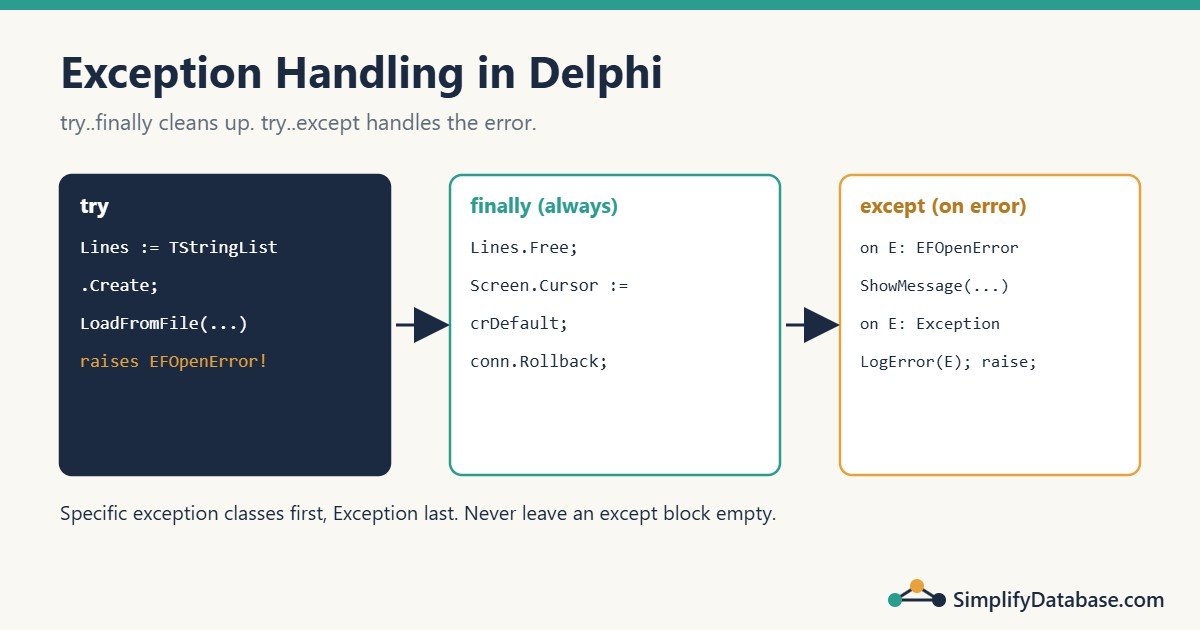
Table of Contents
What Is an Exception?
An exception is an object that Delphi creates when something goes wrong. When an exception is raised:
- The current code stops immediately.
- Delphi jumps back up through the calling routines, looking for a handler.
- If it finds a
try..exceptblock, that block runs. - If it finds none, the VCL shows the default error dialog and the app carries on waiting for the next click (in a console app, the program stops).
var
  N: Integer;
begin
  N := StrToInt('abc');   // raises EConvertError
  WriteLn('This line never runs');
end;
Every exception has a class (like EConvertError) and a message (like 'abc' is not a valid integer value). Exception class names start with E.
The Two Blocks: try..except and try..finally
They’re often confused, but they do different jobs:
| Block | Job | Runs when |
|---|---|---|
try..except | Handle an error: show a message, log it, use a fallback | Only when an exception happens |
try..finally | Clean up: free objects, close files, restore the cursor | Always, error or not |
try..except: Handle the Error
try
  Qty := StrToInt(edtQty.Text);
except
  on E: EConvertError do
  begin
    ShowMessage('Please enter a whole number for quantity.');
    edtQty.SetFocus;
    Exit;
  end;
end;
on E: EConvertError docatches only that exception class (and its children).Egives you the exception object, so you can readE.MessageorE.ClassName.- After the handler runs, the exception is finished. Code continues after the
endof thetryblock (here,Exitleaves the routine instead).
try..finally: Always Clean Up
Screen.Cursor := crHourGlass;
try
  LoadCustomers;
  LoadOrders;
finally
  Screen.Cursor := crDefault;
end;
If LoadOrders fails, the cursor is still restored, and then the exception keeps travelling up to whoever handles it. finally doesn’t catch the error; it just guarantees the clean-up.
You already know the most common use from the classes article:
List := TStringList.Create;
try
  List.LoadFromFile('customers.txt');
  // ... use the list
finally
  List.Free;
end;
Combining Both
Delphi doesn’t have a single try..except..finally block. You nest them. The usual shape is finally inside, except outside:
procedure TForm1.btnImportClick(Sender: TObject);
var
  Lines: TStringList;
begin
  try
    Lines := TStringList.Create;
    try
      Lines.LoadFromFile(edtFile.Text);
      ImportLines(Lines);
      ShowMessage(Format('%d lines imported.', [Lines.Count]));
    finally
      Lines.Free;            // always freed
    end;
  except
    on E: EFOpenError do
      ShowMessage('Could not open the file: ' + E.Message);
    on E: Exception do
      ShowMessage('Import failed: ' + E.Message);
  end;
end;
Catching Specific Exceptions
Order matters: Delphi uses the first on clause that matches, so put specific classes before general ones. Exception is the parent of all of them, so it goes last.
Common exception classes:
| Class | Raised when |
|---|---|
EConvertError | StrToInt, StrToDate and similar get invalid text |
EZeroDivide / EDivByZero | Division by zero (floating point / integer) |
ERangeError | An array index is out of range (with range checking on) |
EAccessViolation | Using a freed or nil object. Always a bug to fix, not to catch |
EFOpenError / EFCreateError | A file can’t be opened or created |
EDatabaseError | Base class for dataset errors |
EFDDBEngineException | FireDAC error from the database server, such as SQL Server |
Better than catching: for user input, use
TryStrToInt,TryStrToDateorStrToIntDefinstead oftry..except. Exceptions are for unexpected problems, not normal validation.
Don’t Swallow Exceptions
This is the worst exception handler you can write:
try
  SaveInvoice;
except
  // do nothing
end;
The save failed, nobody knows, and the user thinks the invoice is stored. At minimum, tell the user or log it. If you can’t do anything useful in a handler, don’t catch the exception there; let it travel up to someone who can.
Raising Your Own Exceptions
Use raise when your code finds a situation it can’t continue from:
procedure TInvoice.AddLine(Qty: Integer; Price: Currency);
begin
  if Qty <= 0 then
    raise Exception.Create('Quantity must be greater than zero');
  if Price < 0 then
    raise Exception.CreateFmt('Invalid price: %.2f', [Price]);
  // ... add the line
end;
Custom Exception Classes
For errors your app handles in a special way, create your own class:
type
  EBusinessRuleError = class(Exception);

  EStockError = class(EBusinessRuleError)
  public
    ProductCode: string;
    constructor Create(const ACode: string; Available, Requested: Integer);
  end;

constructor EStockError.Create(const ACode: string; Available, Requested: Integer);
begin
  inherited CreateFmt('Only %d of %s in stock, %d requested',
    [Available, ACode, Requested]);
  ProductCode := ACode;
end;
Now the screen can treat business rule errors as normal messages and everything else as a real problem:
try
  PlaceOrder;
except
  on E: EBusinessRuleError do
    ShowMessage(E.Message);                 // expected: a friendly message
  on E: Exception do
  begin
    LogError(E);                            // unexpected: log the details
    ShowMessage('Something went wrong. The error was logged.');
  end;
end;
Re-raising
Sometimes you want to log the error and let it continue to the caller. Use raise; with no argument:
try
  PostToLedger(Voucher);
except
  on E: Exception do
  begin
    LogError(E);
    raise;            // the same exception continues up
  end;
end;
Never write raise E; to re-raise. Plain raise; keeps the original exception and its details intact.
Handling Database Errors
FireDAC raises EFDDBEngineException for errors from SQL Server. Its Kind property tells you the type of problem without parsing message text:
uses
  FireDAC.Stan.Error;

try
  qryExec.SQL.Text := 'INSERT INTO dbo.Customers (Email, CustomerName) VALUES (:Email, :Name)';
  qryExec.ParamByName('Email').AsString := edtEmail.Text;
  qryExec.ParamByName('Name').AsString := edtName.Text;
  qryExec.ExecSQL;
except
  on E: EFDDBEngineException do
    case E.Kind of
      ekUKViolated:
        ShowMessage('A customer with this email already exists.');
      ekFKViolated:
        ShowMessage('This record is linked to data that does not exist or is still in use.');
      ekServerGone:
        ShowMessage('Lost the connection to the database server.');
    else
      raise;   // something else: let the general handler deal with it
    end;
end;
Kind | Typical SQL Server cause |
|---|---|
ekUKViolated | Duplicate value in a primary key or unique index (errors 2627, 2601) |
ekFKViolated | Foreign key conflict (error 547) |
ekRecordLocked | Lock timeout or blocking |
ekServerGone | Connection lost |
ekCmdAborted | Query cancelled, for example by a timeout |
E.Errors[0].ErrorCode gives the SQL Server error number when you need it.
Exceptions and Transactions
When several statements must succeed or fail together, roll back in the except block and re-raise:
conShop.StartTransaction;
try
  SaveInvoiceHeader;
  SaveInvoiceLines;
  UpdateStock;
  conShop.Commit;
except
  conShop.Rollback;
  raise;
end;
This is one of the few places where a bare except ... raise; is exactly right. SQL Transactions and ACID Explained Simply explains why.
A Global Safety Net
The VCL shows a default dialog for any exception nobody handled. You can replace it with your own handler that logs every error, using TApplicationEvents (drop it on the main form) or Application.OnException:
procedure TfrmMain.FormCreate(Sender: TObject);
begin
  Application.OnException := AppException;
end;

procedure TfrmMain.AppException(Sender: TObject; E: Exception);
begin
  LogError(E);
  Application.ShowException(E);
end;
A simple LogError that appends to a text file next to the .exe:
procedure LogError(E: Exception);
var
  F: TextFile;
  LogName: string;
begin
  LogName := ChangeFileExt(ParamStr(0), '.log');
  AssignFile(F, LogName);
  if FileExists(LogName) then
    Append(F)
  else
    Rewrite(F);
  try
    WriteLn(F, FormatDateTime('yyyy-mm-dd hh:nn:ss', Now), ' ',
      E.ClassName, ': ', E.Message);
  finally
    CloseFile(F);
  end;
end;
In production apps, many teams add a tool such as madExcept or EurekaLog, which also records the call stack. That makes “it crashed yesterday” reports much easier to fix.
The Debugger Stops on Every Exception
When you run from the IDE, Delphi pauses on every exception, even the ones you handle. That’s normal. Press F9 to continue and your handler runs. You can turn this off for specific classes in Tools > Options > Debugger > Language Exceptions, or tick “Ignore this exception type” in the dialog.
Common Mistakes
- Using
try..exceptwhere you needtry..finally. To free an object, you needfinally. - Empty
exceptblocks. They hide real failures. - Catching
Exceptionfirst. It matches everything, so the specific handlers below it never run. - Using exceptions for normal validation. Use
TryStrToIntand friends. raise E;instead ofraise;when re-raising.- Catching
EAccessViolation. It means a bug (a freed ornilobject). Fix the code instead.
Practice Exercises
Exercise 1. Write a function SafeAverage(const Values: TArray<Integer>): Double that returns 0 for an empty array, without using exceptions.
Exercise 2. Create an exception class EValidationError with a FieldName field, raise it when a customer name is empty, and in the handler put the focus on the right edit box.
Exercise 3. What does this print, and why?
try
  try
    WriteLn('A');
    raise Exception.Create('Oops');
    WriteLn('B');
  finally
    WriteLn('C');
  end;
except
  on E: Exception do
    WriteLn('D: ', E.Message);
end;
WriteLn('E');
Answers
Exercise 1:
function SafeAverage(const Values: TArray<Integer>): Double;
var
  V, Sum: Integer;
begin
  if Length(Values) = 0 then
    Exit(0);
  Sum := 0;
  for V in Values do
    Sum := Sum + V;
  Result := Sum / Length(Values);
end;
Exercise 2:
type
  EValidationError = class(Exception)
  public
    FieldName: string;
  end;

procedure ValidateCustomer(const Name: string);
var
  Err: EValidationError;
begin
  if Trim(Name) = '' then
  begin
    Err := EValidationError.Create('Customer name is required');
    Err.FieldName := 'Name';
    raise Err;
  end;
end;

// in the form:
try
  ValidateCustomer(edtName.Text);
except
  on E: EValidationError do
  begin
    ShowMessage(E.Message);
    if E.FieldName = 'Name' then
      edtName.SetFocus;
  end;
end;
You don’t free Err yourself: once an exception is raised, Delphi frees it after it’s handled.
Exercise 3: it prints A, C, D: Oops, E. B never runs because the exception stops the code. finally runs (C) while the exception travels up, then the except block handles it (D), and the program continues after the block (E).
Summary
- An exception stops the current code and travels up until a handler catches it.
try..excepthandles errors;try..finallyalways cleans up. Nest them when you need both.- Catch specific classes first and
Exceptionlast. Never leave anexceptblock empty. - Use
raisefor your own errors, custom exception classes for errors with special handling, andraise;to re-raise. - For FireDAC, check
EFDDBEngineException.Kind, and roll back transactions inexceptbefore re-raising.
Next in the series: showing SQL Server data in a DBGrid. All parts are in the Delphi category.
Learn Delphi series
All parts in order. New parts appear here as they go live.
-
What Is Delphi? Install Delphi Community Edition and Build Your First App
-
Delphi Basics: Variables, Data Types, If, Case and Loops Explained Simply
-
How to Connect Delphi to SQL Server with FireDAC (Step by Step)
-
Parameterised Queries in Delphi (FireDAC and ADO) Explained Simply
-
Delphi Exception Handling: try..except, try..finally and raise Explained Simply
Next step: the Delphi for ERP series builds a small business app with these skills.
Related articles
- Classes and Objects in Delphi: OOP for Beginners: part 4, where try..finally first appeared.
- Parameterised Queries in Delphi (FireDAC and ADO): the queries whose errors you’ll handle here.
- SQL Constraints Explained Simply: the unique and foreign key rules behind
ekUKViolatedandekFKViolated. - SQL Transactions and ACID Explained Simply: why the rollback pattern matters.