
Every form you’ve built in Delphi is already a class: TForm1 = class(TForm). Every button is an object. So you’ve been using object-oriented programming (OOP) from day one without writing your own classes.
This article shows you how to write them. You’ll build a small TBankAccount class step by step and learn fields, methods, properties, constructors, freeing memory correctly, inheritance and lists of objects.
It’s part 4 of the Learn Delphi series. You should be comfortable with procedures, functions and units first.
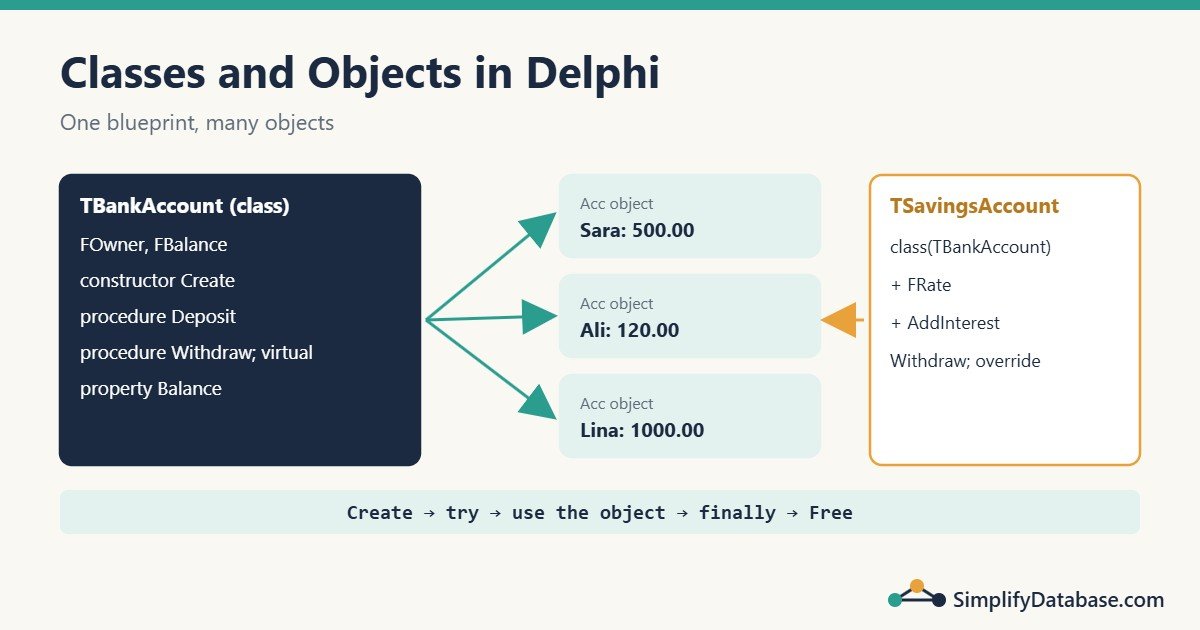
Table of Contents
Class vs Object
- A class is a blueprint. It describes what data something has and what it can do.
- An object (or instance) is one thing built from that blueprint.
TCustomer is a class. “Sara Ali, customer 1042” is an object. You can create as many objects from one class as you need.
By convention, Delphi class names start with T (for “type”): TCustomer, TInvoice, TBankAccount.
Your First Class
type
  TBankAccount = class
  private
    FOwner: string;
    FBalance: Currency;
  public
    procedure Deposit(Amount: Currency);
    function GetSummary: string;
  end;

procedure TBankAccount.Deposit(Amount: Currency);
begin
  FBalance := FBalance + Amount;
end;

function TBankAccount.GetSummary: string;
begin
  Result := Format('%s: %.2f', [FOwner, FBalance]);
end;
The parts:
| Part | Example | Meaning |
|---|---|---|
| Field | FBalance: Currency; | Data stored in each object. By convention fields start with F. |
| Method | procedure Deposit(...) | A procedure or function that belongs to the class. |
| Method body | procedure TBankAccount.Deposit(...) | Written separately, with the class name in front. |
private | Only code in this unit can use it. | |
public | Everyone can use it. |
Inside a method, you can use the fields directly (FBalance), because the method always works on one specific object.
Creating and Freeing Objects
Objects in Delphi live on the heap. You create them with a constructor and you must free them when you’re done:
var
  Acc: TBankAccount;
begin
  Acc := TBankAccount.Create;
  try
    Acc.Deposit(100);
    Acc.Deposit(50);
    WriteLn(Acc.GetSummary);
  finally
    Acc.Free;
  end;
end;
This Create / try / finally / Free pattern is the most important habit in Delphi:
Createis called beforetry. If creating fails, there’s nothing to free.- The
finallyblock always runs, even if an error happens in the middle. So the object is always freed and you don’t leak memory.
Why not just
Acc.Freeat the end? Because ifDepositraised an error, the code would jump out and never reach that line.try ... finallyguarantees it.
On Windows, Delphi doesn’t have a garbage collector for normal objects. If you create an object and never free it, the memory stays used until the program closes. That’s a memory leak. To find leaks during development, add this line at the start of your program:
ReportMemoryLeaksOnShutdown := True;When the app closes, Delphi shows a message listing any objects you forgot to free.
Objects Owned by the Form
Components you drop on a form are freed automatically, because the form is their owner. The same works in code:
Btn := TButton.Create(Self);   // Self = the form, which becomes the owner
Btn.Parent := Self;            // show it on the form
Btn.Caption := 'Click me';
Here you don’t call Free: the form frees the button when the form is destroyed. Your own classes like TBankAccount have no owner, so you free them yourself.
Constructors and Destructors
A constructor sets up a new object. Declare your own to pass in starting values:
type
  TBankAccount = class
  private
    FOwner: string;
    FBalance: Currency;
  public
    constructor Create(const AOwner: string; AOpening: Currency = 0);
    procedure Deposit(Amount: Currency);
    procedure Withdraw(Amount: Currency);
    function GetSummary: string;
  end;

constructor TBankAccount.Create(const AOwner: string; AOpening: Currency);
begin
  inherited Create;      // run the parent's constructor first
  FOwner := AOwner;
  FBalance := AOpening;
end;
Acc := TBankAccount.Create('Sara', 200);Notes:
- Fields of a new object start at zero, empty string,
Falseornil, so you only set what needs a different value. inherited Create;calls the constructor of the parent class. Always do this first.- Parameter names often start with
A(AOwner) so they don’t clash with fields or properties.
A destructor cleans up. You only need one when your object creates other objects:
destructor Destroy; override;     // in the class declaration

destructor TOrder.Destroy;
begin
  FLines.Free;          // free what this object created
  inherited;            // then let the parent clean up
end;
Always call Free, never Destroy directly. Free checks for nil first and then calls Destroy.
Properties
Making fields public is risky: anyone could set FBalance := -1000000. A property gives controlled access:
type
  TBankAccount = class
  private
    FOwner: string;
    FBalance: Currency;
    procedure SetOwner(const Value: string);
  public
    property Owner: string read FOwner write SetOwner;
    property Balance: Currency read FBalance;   // read-only
  end;

procedure TBankAccount.SetOwner(const Value: string);
begin
  if Trim(Value) = '' then
    raise Exception.Create('Owner name cannot be empty');
  FOwner := Trim(Value);
end;
read FOwnerreads the field directly.write SetOwnercalls a method, so you can validate the value.Balancehas nowrite, so outside code can read it but can only change it throughDepositandWithdraw.
This is encapsulation: the object protects its own data. It’s exactly how components work. When you set Button1.Caption in the Object Inspector, you’re setting a property, and a setter method repaints the button.
The Full Class
type
  TBankAccount = class
  private
    FOwner: string;
    FBalance: Currency;
  public
    constructor Create(const AOwner: string; AOpening: Currency = 0);
    procedure Deposit(Amount: Currency);
    procedure Withdraw(Amount: Currency); virtual;
    property Owner: string read FOwner;
    property Balance: Currency read FBalance;
  end;

constructor TBankAccount.Create(const AOwner: string; AOpening: Currency);
begin
  inherited Create;
  FOwner := AOwner;
  FBalance := AOpening;
end;

procedure TBankAccount.Deposit(Amount: Currency);
begin
  if Amount <= 0 then
    raise Exception.Create('Deposit must be positive');
  FBalance := FBalance + Amount;
end;

procedure TBankAccount.Withdraw(Amount: Currency);
begin
  if Amount > FBalance then
    raise Exception.CreateFmt('Not enough money in %s''s account', [FOwner]);
  FBalance := FBalance - Amount;
end;
raise Exception.Create(...) stops the method and reports an error to the caller. The exception handling article in this series covers it in detail.
Inheritance: Building on a Class
A new class can inherit everything from an existing one and add or change behaviour. Here a savings account adds interest and blocks overdrawing below a minimum:
type
  TSavingsAccount = class(TBankAccount)
  private
    FRate: Double;
  public
    constructor Create(const AOwner: string; AOpening: Currency; ARate: Double);
    procedure AddInterest;
    procedure Withdraw(Amount: Currency); override;
  end;

constructor TSavingsAccount.Create(const AOwner: string; AOpening: Currency;
  ARate: Double);
begin
  inherited Create(AOwner, AOpening);
  FRate := ARate;
end;

procedure TSavingsAccount.AddInterest;
begin
  Deposit(Balance * FRate);
end;

procedure TSavingsAccount.Withdraw(Amount: Currency);
begin
  if Balance - Amount < 100 then
    raise Exception.Create('Savings must keep at least 100');
  inherited Withdraw(Amount);
end;class(TBankAccount)means “TSavingsAccount is a TBankAccount, plus more”.Withdrawwas markedvirtualin the parent, so the child canoverrideit.inherited Withdraw(Amount)runs the parent’s version after the extra check.
Why virtual Matters: Polymorphism
Because Withdraw is virtual, Delphi calls the right version based on the real object, even through a parent-type variable:
var
  Acc: TBankAccount;
begin
  Acc := TSavingsAccount.Create('Omar', 150, 0.03);
  try
    Acc.Withdraw(80);        // calls TSavingsAccount.Withdraw -> error
  finally
    Acc.Free;
  end;
end;
Without virtual/override, the parent’s Withdraw would run and the savings rule would be skipped. This is called polymorphism: one call, different behaviour depending on the object.
You can check an object’s real class with is and convert it with as:
if Acc is TSavingsAccount then
  (Acc as TSavingsAccount).AddInterest;
Lists of Objects: TObjectList<T>
Real apps hold many objects. Use TObjectList<T> from System.Generics.Collections. It owns its objects and frees them when it’s freed:
uses
  System.SysUtils, System.Generics.Collections;

var
  Accounts: TObjectList<TBankAccount>;
  Acc: TBankAccount;
  Total: Currency;
begin
  Accounts := TObjectList<TBankAccount>.Create;   // OwnsObjects = True
  try
    Accounts.Add(TBankAccount.Create('Sara', 500));
    Accounts.Add(TBankAccount.Create('Ali', 120));
    Accounts.Add(TSavingsAccount.Create('Lina', 1000, 0.02));

    Total := 0;
    for Acc in Accounts do
    begin
      WriteLn(Format('%-6s %8.2f', [Acc.Owner, Acc.Balance]));
      Total := Total + Acc.Balance;
    end;
    WriteLn(Format('Total  %8.2f', [Total]));
  finally
    Accounts.Free;   // frees the list AND the three accounts
  end;
end;
Output:
Sara     500.00
Ali      120.00
Lina    1000.00
Total 1620.00| Collection | Use it for |
|---|---|
TList<T> | Simple values (Integer, records) or objects you free yourself |
TObjectList<T> | Objects the list should own and free |
TDictionary<K,V> | Fast lookup by key, such as customers by ID |
TStringList | Lists of strings, with sorting, CommaText and Values['Key'] |
How This Connects to Database Work
In a database app, a common design is one class per business entity:
type
  TCustomer = class
  public
    ID: Integer;
    Name: string;
    City: string;
  end;
A function in your data module reads rows with a parameterised query and returns a TObjectList<TCustomer>. The forms work with clean objects instead of raw query fields. You’ll see this style in many larger Delphi codebases. (Public fields like ID are fine for simple data holders; use properties when you need validation.)
Common Beginner Mistakes
- Forgetting to free objects. Use Create / try / finally / Free every time, and turn on
ReportMemoryLeaksOnShutdown. - Putting
Createinside thetry. IfCreatefails,finallycallsFreeon an unassigned variable and crashes. - Using an object after freeing it. If a variable lives on, use
FreeAndNil(Obj)so it becomesniland the bug shows up clearly. - Forgetting
override. Declaring the same method again withoutoverridehides the parent’s method instead of replacing it, and polymorphism stops working. The compiler warns: “Method hides virtual method of base type”. - Forgetting
inheritedin constructors and destructors. - Freeing components that have an owner. Their owner frees them. Freeing them yourself is allowed, but don’t do both by accident in a destructor.
Practice Exercises
Exercise 1. Add a read-only property TransactionCount to TBankAccount that counts deposits and withdrawals.
Exercise 2. Create a TCheckingAccount class that allows the balance to go down to -500 (an overdraft).
Exercise 3. Find the bug:
Acc := TBankAccount.Create('Sara');
Acc.Deposit(100);
Acc.Withdraw(500);
Acc.Free;
Answers
Exercise 1: add a field FCount: Integer;, the property property TransactionCount: Integer read FCount;, and Inc(FCount); at the end of Deposit and Withdraw.
Exercise 2:
type
  TCheckingAccount = class(TBankAccount)
  public
    procedure Withdraw(Amount: Currency); override;
  end;

procedure TCheckingAccount.Withdraw(Amount: Currency);
begin
  if Balance - Amount < -500 then
    raise Exception.Create('Overdraft limit is 500');
  // FBalance is private to TBankAccount's unit, so this only works
  // if both classes are in the same unit. Otherwise make FBalance
  // protected in TBankAccount.
  FBalance := FBalance - Amount;
end;
This is a good example of protected: a section visible to child classes in other units, but not to outside code.
Exercise 3: Withdraw(500) raises an error, so Acc.Free never runs and the object leaks. Wrap it:
Acc := TBankAccount.Create('Sara');
try
  Acc.Deposit(100);
  Acc.Withdraw(500);
finally
  Acc.Free;
end;
Summary
- A class is a blueprint; an object is one instance created with
Create. - Fields hold data, methods hold behaviour, and properties give controlled access to fields.
- Always use Create / try / finally / Free. Objects with an owner are freed by the owner.
- Use
virtualandoverrideto change behaviour in child classes, andinheritedto call the parent. TObjectList<T>holds and frees a list of objects.
Next in the series: exception handling with try..except, try..finally and raise. All parts are in the Delphi category.
Related articles
- Delphi Procedures, Functions and Units Explained Simply: part 3 of this series.
- Parameterised Queries in Delphi (FireDAC and ADO): load data from SQL Server into your objects safely.
- Primary Keys vs. Foreign Keys Explained for Beginners: how the tables behind your classes relate.