
You already write SQL. You don’t need another tutorial on what a JOIN is; you need the syntax you forgot, the MySQL vs SQL Server difference that broke your query, and a reminder of the trap you fell into last month. That’s what this Quick Reference is for.
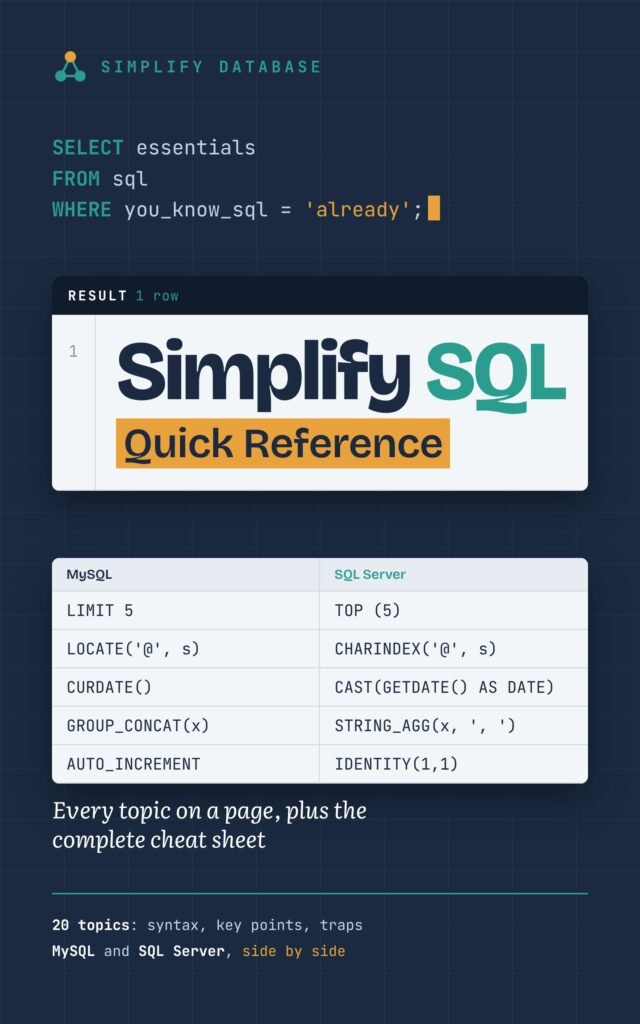
- Free PDF, A4, made to print
- 20 SQL topics, one page each: what it covers, the syntax, and the traps
- MySQL and SQL Server side by side on every page
- A complete 6-page cheat sheet and the 12 traps that cause wrong results
It’s the short version of my book, Simplify SQL for Absolute Beginners: one A4 page per topic, with the syntax in a table and the mistakes that cause wrong results. Print it, keep it next to your keyboard, and stop searching for the same five things every week.
Table of Contents
Download it free
Get the free Quick Reference (PDF)
Enter your email and the download button appears right here. You’ll also get one short email when a new tutorial goes live. No spam; unsubscribe any time.
Thank you! Your download:
Print it double-sided: every topic fits on one page. On US Letter paper, choose “Fit to page” in the print dialog. The examples use ShopDB, the free practice database.
We only use your email to send SimplifyDatabase updates. See our Privacy Policy.
Who it’s for
- Developers who move between MySQL and SQL Server and keep mixing up LIMIT and TOP, LOCATE and CHARINDEX, or the argument order of DATEDIFF.
- Analysts who write reports and want the window function, CTE and GROUP BY patterns on one page.
- Students revising for an exam or a first SQL interview.
- Beginners who finished a course and want a summary to revise from. (If you’re just starting, the free book is the better place to begin.)
What’s inside
20 topics, one page each. Every page has three parts: Covers (what the topic is about), Key points (the syntax you need, in a table) and Watch out (the mistakes I see most often, in real projects and from beginners alike). The topic numbers match the chapters of the full book:
- SELECT, WHERE, ORDER BY and LIMIT
- DISTINCT and aliases
- LIKE, IN and BETWEEN
- Working with NULL
- The CASE expression
- GROUP BY and aggregate functions
- HAVING vs WHERE
- Primary keys and foreign keys
- JOINs
- SELF JOIN
- UNION and UNION ALL
- Subqueries and CTEs
- Data types
- Constraints
- INSERT, UPDATE and DELETE
- Transactions
- Normalization (1NF, 2NF, 3NF)
- String functions
- Date functions
- Window functions
The cheat sheet (6 pages). Every task from the book with MySQL and SQL Server side by side: reading and filtering, NULL, CASE, grouping, joins, UNION, CTEs, window functions, text, dates, types and constraints, and changing data.
ShopDB at a glance. A one-page map of the six tables every example uses, so the examples make sense even if you’ve never seen the database.
A sample page: JOINs
Here’s one topic page exactly as it appears in the PDF (as text, so you can copy from it):
Chapter 11 · JOINs
Covers:
- Put matching rows from two tables side by side with INNER JOIN
- Keep every row from one table with LEFT JOIN, and find what’s missing
- Know what RIGHT JOIN and FULL JOIN do (and why you rarely need them)
- Join three or four tables in one query
- Combine JOIN with GROUP BY, and avoid the LEFT JOIN trap that catches everyone
Key points
| You want | Use |
|---|---|
| Only rows that match in both tables | INNER JOIN (or just JOIN) |
| Every row from the first table, matched or not | LEFT JOIN |
| Rows in A with no match in B | LEFT JOIN + WHERE b.key IS NULL |
| Every row from both tables | FULL JOIN (SQL Server; not in MySQL) |
| Data from three tables | One extra JOIN … ON per table |
| A filter on the right table that keeps all left rows | Put it in ON, not WHERE |
| A count that shows 0 for no matches | LEFT JOIN + COUNT(right_table.key) |
For most everyday work you’ll only need INNER JOIN and LEFT JOIN. Get comfortable with those two first.
Watch out
- A condition on the right table in WHERE turns a LEFT JOIN into an INNER JOIN. Put it in ON.
- Joining on the wrong column runs without error and returns nonsense. Join a foreign key to the key it points to.
- Two tables with the same column name: write
p.CategoryID, or you get “ambiguous column”. - Joining two lists (orders and payments) multiplies the rows, so totals are too big. Total each list first.
- DISTINCT hides duplicate rows from a bad join; fix the join instead.
The 12 SQL traps worth remembering
The last page of the cheat sheet lists the traps that produce wrong results without any error message. Here they are, with the chapter of the book that explains each one:
= NULLis never true. UseIS NULL. (6)NOT IN (... NULL ...)returns nothing. UseNOT EXISTS. (5, 14)- A condition on the right table in WHERE turns a LEFT JOIN into an INNER JOIN. Put it in ON. (11)
- Joining two lists multiplies the rows, and every SUM is wrong. Total each list first. (11, 14)
- UNION silently drops rows that look the same. Use UNION ALL for totals. (13)
- SQL Server: whole number ÷ whole number drops the decimals (
7 / 2 = 3). (8, 15) - MySQL:
CONCATwith one NULL gives NULL. UseCONCAT_WS. (20) BETWEENon a date-and-time column misses the last day. Use>= start AND < next day. (21)- A function on a column in WHERE stops the index being used. Compare the bare column. (20, 21)
- ROW_NUMBER and LIMIT with ties give a random order. Add a tie-breaker column. (3, 22)
- UPDATE or DELETE without WHERE changes every row. SELECT first; use a transaction. (17, 18)
- A failed statement doesn’t end the transaction. ROLLBACK, don’t COMMIT. (18)
Every one of these is explained in detail on this site too: start with NULL in SQL, SQL JOINs and UNION vs UNION ALL.
Frequently asked questions
Is it really free?
Yes. Enter your email and the download appears straight away. You’ll get the occasional email when a new tutorial or chapter is ready, and you can unsubscribe at any time.
Does it cover MySQL or SQL Server?
Both. Where the two databases agree, there’s one line; where they differ, both are shown side by side. Almost everything also works on MariaDB.
How is it different from the free book?
The free book teaches SQL from zero, with every query explained and practice questions. The Quick Reference is the summary for when you already know the ideas and just need the syntax and the traps. If you’ve signed up for one, the other’s download appears without signing up again.
Can I print it on US Letter paper?
Yes. It’s laid out on A4; choose “Fit to page” (or “Shrink to fit”) in the print dialog and it prints fine on Letter.
Related articles
- SQL Server vs MySQL vs PostgreSQL: Syntax Cheat Sheet: the same everyday tasks in three databases, with PostgreSQL too.
- Free SQL Book: Simplify SQL for Absolute Beginners: learn SQL step by step with a practice database.
- ShopDB: A Free Sample Database for Practising SQL: the database behind every example.
- 25 SQL Interview Questions for Beginners: test yourself after revising.