
Almost every important ERP document has the same shape: one header and many lines. A sales invoice has one customer and date, and many items. A purchase order, a goods receipt, a journal entry and a stock transfer all look the same.
In database terms this is a one-to-many relationship. In Delphi it’s called master-detail: when the user moves to another invoice (the master), the lines grid (the detail) shows that invoice’s lines automatically.
This is part 5 of the Delphi for ERP series. It builds on the tables and the item lookup from part 4.
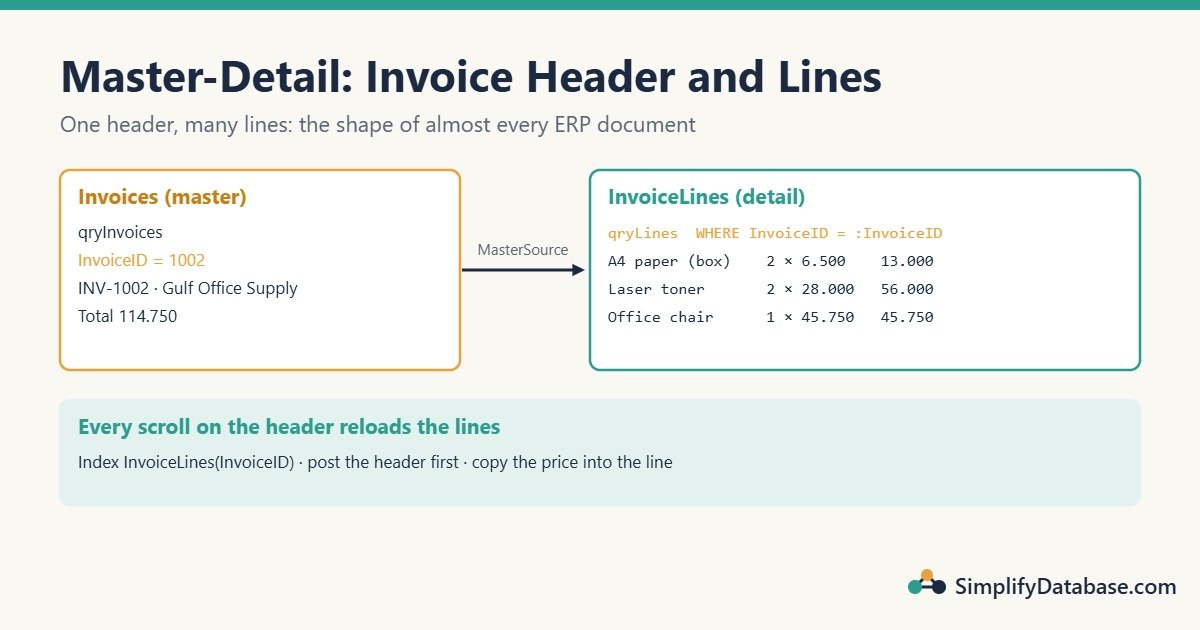
Table of Contents
Step 1: The Invoice Lines Table
You already have Customers, Items and Invoices. Add the lines:
CREATE TABLE dbo.InvoiceLines (
    LineID    INT IDENTITY(1,1) NOT NULL PRIMARY KEY,
    InvoiceID INT           NOT NULL REFERENCES dbo.Invoices (InvoiceID) ON DELETE CASCADE,
    ItemID    INT           NOT NULL REFERENCES dbo.Items (ItemID),
    Qty       DECIMAL(12,3) NOT NULL CHECK (Qty > 0),
    UnitPrice DECIMAL(12,3) NOT NULL CHECK (UnitPrice >= 0)
);

CREATE INDEX IX_InvoiceLines_InvoiceID ON dbo.InvoiceLines (InvoiceID);
Three things to notice:
ON DELETE CASCADE: deleting an invoice deletes its lines too.- The index on
InvoiceID: the lines grid reads lines by invoice every time the user moves, so this must be fast. (See SQL Indexes Explained Simply.) - No
LineTotalcolumn. It’s alwaysQty * UnitPrice, so we calculate it instead of storing it.
Step 2: The Master Dataset
On frmInvoice (from part 4) you have qryInvoices + dsInvoices and the customer lookup combo. Put the header fields in a top panel: InvoiceNo and Notes as TDBEdit, InvoiceDate as a TDBEdit (or a date picker), and the customer TDBLookupComboBox.
Also add a TDBNavigator for the header and a TDBGrid (or simply the navigator) for moving between invoices.
Step 3: The Detail Dataset, Linked to the Master
Drop a second query, qryLines, with a parameter named exactly like the master’s key field:
SELECT LineID, InvoiceID, ItemID, Qty, UnitPrice
FROM dbo.InvoiceLines
WHERE InvoiceID = :InvoiceID
ORDER BY LineID
Then set two properties:
| Property | Value |
|---|---|
MasterSource | dsInvoices |
MasterFields | InvoiceID |
That’s the whole link. FireDAC fills the :InvoiceID parameter from the current master row and re-runs the query every time the user moves to another invoice.
Add dsLines (DataSet = qryLines) and a TDBGrid for the lines with DataSource = dsLines. Open the master first, then the detail:
procedure TfrmInvoice.FormCreate(Sender: TObject);
begin
  qryCustomerList.Open;
  qryItemList.Open;
  qryInvoices.Open;
  qryLines.Open;
end;
With ADO: a TADOQuery supports the same DataSource + parameter link: set the detail query’s DataSource property to dsInvoices, and a parameter named InvoiceID is filled from the master field of the same name.
Step 4: An Item Dropdown in the Lines Grid
Users should pick an item by name, not type ItemID. Use a lookup field, as in part 4:
- Fields Editor on
qryLines→ Add all fields. - New field: Name
ItemName, TypeString, Size100, Field type Lookup. Key FieldsItemID, DatasetqryItemList, Lookup KeysItemID, Result FieldItemName. - Set
LineIDandInvoiceIDtoVisible = False.
The grid now has an ItemName column with a dropdown.
When the user picks an item, copy its current price into the line. Use the OnChange event of the ItemID field (select ItemID in the Fields Editor → Events):
procedure TfrmInvoice.qryLinesItemIDChange(Sender: TField);
var
  Price: Variant;
begin
  Price := qryItemList.Lookup('ItemID', Sender.AsInteger, 'UnitPrice');
  if not VarIsNull(Price) then
    qryLines.FieldByName('UnitPrice').AsCurrency := Price;
end;
The price is copied, not linked. That’s on purpose: if the item’s price changes next month, old invoices must keep the price they were sold at.
Step 5: Line Totals With a Calculated Field
In the Fields Editor, add another New field: Name LineTotal, Type Currency, Field type Calculated. Then fill it in OnCalcFields:
procedure TfrmInvoice.qryLinesCalcFields(DataSet: TDataSet);
begin
  DataSet.FieldByName('LineTotal').AsCurrency :=
    DataSet.FieldByName('Qty').AsCurrency * DataSet.FieldByName('UnitPrice').AsCurrency;
end;
Set DisplayFormat = #,##0.000 on LineTotal, UnitPrice and Qty. The grid now shows Item, Qty, Unit price and Line total, and the total updates as the user types.
Step 6: New Lines Need a Saved Header
There’s one trap. A new invoice gets its InvoiceID from SQL Server (it’s an identity column) only when it is saved. A line can’t point to an invoice that has no ID yet.
The simple fix: save the header automatically before the first line is added, and fill the line’s InvoiceID when it’s created.
procedure TfrmInvoice.qryLinesBeforeInsert(DataSet: TDataSet);
begin
  if qryInvoices.State in [dsInsert, dsEdit] then
    qryInvoices.Post;              // SQL Server assigns InvoiceID here
  if qryInvoices.IsEmpty then
    raise Exception.Create('Create the invoice header first.');
end;

procedure TfrmInvoice.qryLinesNewRecord(DataSet: TDataSet);
begin
  DataSet.FieldByName('InvoiceID').AsInteger :=
    qryInvoices.FieldByName('InvoiceID').AsInteger;
  DataSet.FieldByName('Qty').AsCurrency := 1;
end;
After Post, FireDAC reads the new identity value back into qryInvoices, so InvoiceID is ready for the line.
Step 7: Keep the Invoice Total Up to Date
The header has a TotalAmount column so lists and reports don’t have to add up lines every time. Recalculate it on the server whenever lines change. One UPDATE does it, with the parameter used only once:
procedure TfrmInvoice.UpdateInvoiceTotal;
begin
  DM.Conn.ExecSQL(
    'UPDATE i SET TotalAmount = COALESCE(t.Total, 0) ' +
    'FROM dbo.Invoices AS i ' +
    'OUTER APPLY (SELECT SUM(l.Qty * l.UnitPrice) AS Total ' +
    '             FROM dbo.InvoiceLines AS l WHERE l.InvoiceID = i.InvoiceID) AS t ' +
    'WHERE i.InvoiceID = :InvoiceID',
    [qryInvoices.FieldByName('InvoiceID').AsInteger]);
  qryInvoices.RefreshRecord;   // show the new total on screen
end;

procedure TfrmInvoice.qryLinesAfterPost(DataSet: TDataSet);
begin
  UpdateInvoiceTotal;
end;

procedure TfrmInvoice.qryLinesAfterDelete(DataSet: TDataSet);
begin
  UpdateInvoiceTotal;
end;
Add UpdateInvoiceTotal to the form’s private section. Show TotalAmount in a TDBText or read-only TDBEdit on the header.
Why calculate on the server and not by adding up the grid? Because the database is the source of truth. If two users edit lines, or a line is changed by another program, the server total is still correct.
A Note on Saving Everything at Once
In this design the header and each line are saved as the user goes. That’s simple and works well for most screens. Its weakness: if the user closes the screen halfway, you can have a header with only some of its lines.
For documents that must be all or nothing (like a journal entry, where debits must equal credits), you save the header and all lines inside one transaction. That’s exactly what part 6 builds.
Common Mistakes
- No index on the detail’s foreign key. Every scroll of the master re-reads the lines. Without the index, each one is a table scan.
- Linking the price to the item. Copy the price into the line when it’s chosen. History must not change when prices do.
- Storing line totals that can disagree with Qty × Price. Calculate them.
- Adding lines before the header has an ID. Post the header first (Step 6).
- Opening the detail before the master. Open the lists, then the master, then the detail.
Practice Exercises
- Add a discount percentage to each line and include it in the line total and the invoice total.
- Show the number of lines under the grid (“3 lines”).
- Stop the same item from being added twice to one invoice, with a friendly message.
Answers
1. Add the column, include it in qryLines‘ SQL, then update the calculation and the total query:
ALTER TABLE dbo.InvoiceLines
ADD DiscountPct DECIMAL(5,2) NOT NULL DEFAULT 0 CHECK (DiscountPct BETWEEN 0 AND 100);
// OnCalcFields
DataSet.FieldByName('LineTotal').AsCurrency :=
DataSet.FieldByName('Qty').AsCurrency * DataSet.FieldByName('UnitPrice').AsCurrency *
(100 - DataSet.FieldByName('DiscountPct').AsCurrency) / 100;In UpdateInvoiceTotal, change the sum to SUM(l.Qty * l.UnitPrice * (100 - l.DiscountPct) / 100).
2. In qryLines‘ AfterOpen, AfterPost and AfterDelete events, set lblLineCount.Caption := Format('%d lines', [qryLines.RecordCount]);. (Add System.SysUtils if Format isn’t found; VCL forms usually have it already.)
3. Add a unique constraint, then catch the error like in part 3:
ALTER TABLE dbo.InvoiceLines
ADD CONSTRAINT UQ_InvoiceLines_Item UNIQUE (InvoiceID, ItemID);
procedure TfrmInvoice.qryLinesPostError(DataSet: TDataSet;
E: EDatabaseError; var Action: TDataAction);
begin
if (E is EFDDBEngineException) and
(EFDDBEngineException(E).Kind = ekUKViolated) then
begin
ShowMessage('This item is already on the invoice. Change the quantity instead.');
Action := daAbort;
end;
end;Summary
- Header + lines is the most common ERP document shape: one-to-many, or master-detail in Delphi.
- Link the detail query with a
:InvoiceIDparameter,MasterSourceandMasterFields. - Use a lookup field for the item column and copy the price into the line.
- Calculate line totals with a calculated field; recalculate the invoice total on the server.
- Save the header before adding lines, and index the detail’s foreign key.
Next in the series: transactions with FireDAC, saving a journal entry where debits must equal credits, all or nothing.
Delphi for ERP series
All parts in order. New parts appear here as they go live.
-
Why Delphi Is Still a Great Choice for ERP and Business Apps in 2026
-
Delphi vs C# vs Web Apps for Business Software: Which Should You Use?
-
Build a Customer Screen in Delphi in 30 Minutes (SQL Server Step by Step)
-
Lookup Combo Boxes in Delphi: Choose a Customer or Item From a List
-
Master-Detail Forms in Delphi: Invoice Header and Invoice Lines (FireDAC)
New to Delphi? Start with What Is Delphi? Build Your First App.
Related articles
- Lookup Combo Boxes in Delphi: part 4 of this series.
- SQL JOINs Explained Simply: how header and lines come together in reports.
- SQL Indexes Explained Simply: why the InvoiceID index matters.
- How to Fix Query Timeout and Performance Issues in Delphi Apps: keep master-detail screens fast as data grows.