
At some point every SQL learner hits a question that one simple query can’t answer. Something like “show me customers who spent more than the average customer”. You need one result (the average) before you can get the other (the customers above it).
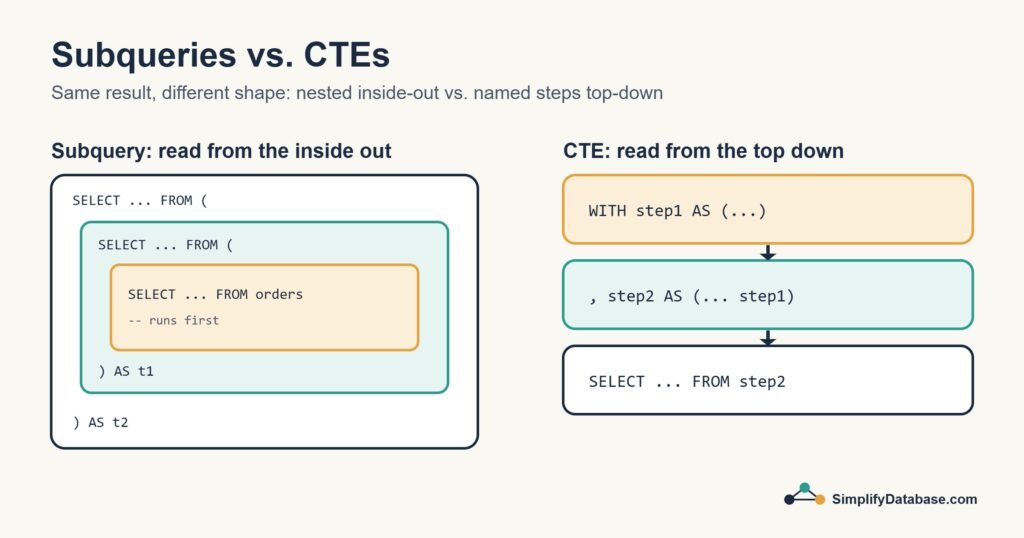
SQL gives you two main tools for this: subqueries and CTEs (Common Table Expressions). They often produce exactly the same result. The difference is mostly about how easy your query is to read, and that matters more than beginners expect.
The Sample Data
We’ll use one orders table for every example:
| order_id | customer | amount |
|---|---|---|
| 1 | Sara | 40 |
| 2 | Omar | 120 |
| 3 | Sara | 60 |
| 4 | Lina | 30 |
| 5 | Omar | 80 |
| 6 | Huda | 150 |
Total spent per customer: Sara 100, Omar 200, Lina 30, Huda 150. The average customer spend is 120.
What Is a Subquery?
A subquery is simply a query inside another query, wrapped in brackets. The inner one runs first and hands its result to the outer one.
1. Subquery in WHERE
“Which orders are bigger than the average order?”
SELECT order_id, customer, amount
FROM orders
WHERE amount > (SELECT AVG(amount) FROM orders);
The average order is 80, so this returns orders 2 (120) and 6 (150). The bracketed part returns a single number, and the outer query compares against it.
2. Subquery with IN
“Show every order from customers who have ever placed an order over 100.”
SELECT order_id, customer, amount
FROM orders
WHERE customer IN (
    SELECT customer FROM orders WHERE amount > 100
);
The inner query returns Omar and Huda, so you get orders 2, 5 and 6.
3. Subquery in FROM (a derived table)
Now back to our original question: customers who spent more than the average customer. First we need totals per customer, then the average of those totals:
SELECT customer, total
FROM (
    SELECT customer, SUM(amount) AS total
    FROM orders
    GROUP BY customer
) AS totals
WHERE total > (
    SELECT AVG(total)
    FROM (
        SELECT SUM(amount) AS total
        FROM orders
        GROUP BY customer
    ) AS t
);
It works. It returns Omar (200) and Huda (150). But be honest, how long did it take you to read that? The same GROUP BY logic is written twice, and you have to read from the innermost brackets outwards to follow it.
What Is a CTE?
A CTE lets you give a query a name with the WITH keyword, and then use that name like a table in the rest of your statement. Here’s the same question again:
WITH customer_totals AS (
    SELECT customer, SUM(amount) AS total
    FROM orders
    GROUP BY customer
)
SELECT customer, total
FROM customer_totals
WHERE total > (SELECT AVG(total) FROM customer_totals);
Same answer, Omar and Huda. But now it reads like a recipe: first work out each customer’s total, then keep the ones above the average. The grouping logic is written once and reused.
Chaining several CTEs
You can define more than one CTE, and each one can use the ones before it. Separate them with commas:
WITH customer_totals AS (
    SELECT customer, SUM(amount) AS total
    FROM orders
    GROUP BY customer
),
average_spend AS (
    SELECT AVG(total) AS avg_total
    FROM customer_totals
)
SELECT c.customer, c.total, a.avg_total
FROM customer_totals c
CROSS JOIN average_spend a
WHERE c.total > a.avg_total
ORDER BY c.total DESC;
Each step has a clear name, and you can test each one on its own by selecting from it directly. When I’m building a complicated report, this is how I work: one CTE at a time, checking the output as I go. (If GROUP BY is new to you, see GROUP BY & Aggregate Functions Explained Simply.)
Subqueries vs. CTEs: Side by Side
| Subquery | CTE | |
|---|---|---|
| Where it lives | Inside the main query, in brackets | At the top, before the main query, using WITH |
| Readability | Fine when short, hard when nested | Reads top to bottom, step by step |
| Reuse in the same query | No, you have to repeat it | Yes, refer to it by name as many times as you like |
| Recursion | Not possible | Possible with WITH RECURSIVE (or plain WITH in SQL Server) |
| Best for | Quick one-off checks in WHERE or IN | Multi-step logic, reports and anything you’ll revisit |
| Supported in | Every SQL database | All modern databases (MySQL from version 8.0) |
Is One Faster Than the Other?
Usually, no. In SQL Server and modern PostgreSQL, the database treats a simple CTE much like the equivalent subquery, so the execution plans come out the same. Performance depends far more on your filters, joins and indexes than on which syntax you chose.
A couple of details are worth knowing:
- A CTE is not a saved table. It only exists while that one statement runs.
- If you refer to a CTE several times, some databases run it each time. If that’s expensive, a temporary table can be a better choice.
- In PostgreSQL 11 and older, CTEs were always calculated separately, which could block some optimisations. From version 12 that’s no longer the case.
A Quick Look at Recursive CTEs
One thing only CTEs can do is call themselves. That’s useful for hierarchies, like an employee table where each person has a manager_id:
WITH RECURSIVE org_chart AS (
    SELECT employee_id, name, manager_id, 1 AS level
    FROM employees
    WHERE manager_id IS NULL          -- start at the top boss

    UNION ALL

    SELECT e.employee_id, e.name, e.manager_id, oc.level + 1
    FROM employees e
    JOIN org_chart oc ON e.manager_id = oc.employee_id
)
SELECT * FROM org_chart ORDER BY level;
In SQL Server you write WITH instead of WITH RECURSIVE, but the idea is identical. You won’t need this every day, but when you do, nothing else is as neat.
Which One Should You Use?
My rule of thumb:
- If the inner query is short and only used once, like
WHERE amount > (SELECT AVG(amount) FROM orders), a subquery is perfectly fine. - If you find yourself nesting brackets inside brackets, or writing the same logic twice, switch to a CTE.
- If someone else (or you, six months from now) will need to read the query, lean towards CTEs.
Conclusion
Subqueries and CTEs solve the same problem: using the result of one query inside another. Subqueries are quick and fit neatly inside a WHERE clause. CTEs give each step a name, so long queries stay readable and easy to test.
Try rewriting one of your own nested queries as a CTE and see how it reads. If you’d like to brush up on the basics first, start with WHERE, ORDER BY and LIMIT and SQL JOINs.
Related articles
- SQL Window Functions: ROW_NUMBER, RANK, LAG and running totals.
- SQL Views Explained Simply: save a query and use it like a table.
- UNION vs UNION ALL: stacking the results of two queries.
- HAVING vs WHERE in SQL: filtering rows versus filtering groups.
- Top N per Group in SQL Server: a real-world CTE pattern for the latest row per group.
- EXISTS vs IN vs JOIN in SQL: Which One Should You Use?: when a subquery with EXISTS or IN beats a JOIN, and when it does not.