
Two small keywords make a big difference to how your query results look. DISTINCT removes duplicate rows, so you see each value only once. Aliases give columns and tables short, readable names, so Salary * 12 shows up as AnnualSalary instead of “(No column name)”.
This guide explains both with simple examples, including the traps beginners hit most: what DISTINCT really applies to, how it treats NULL, and why you can use an alias in ORDER BY but not in WHERE. Everything works in SQL Server, MySQL and PostgreSQL, and the differences are pointed out.
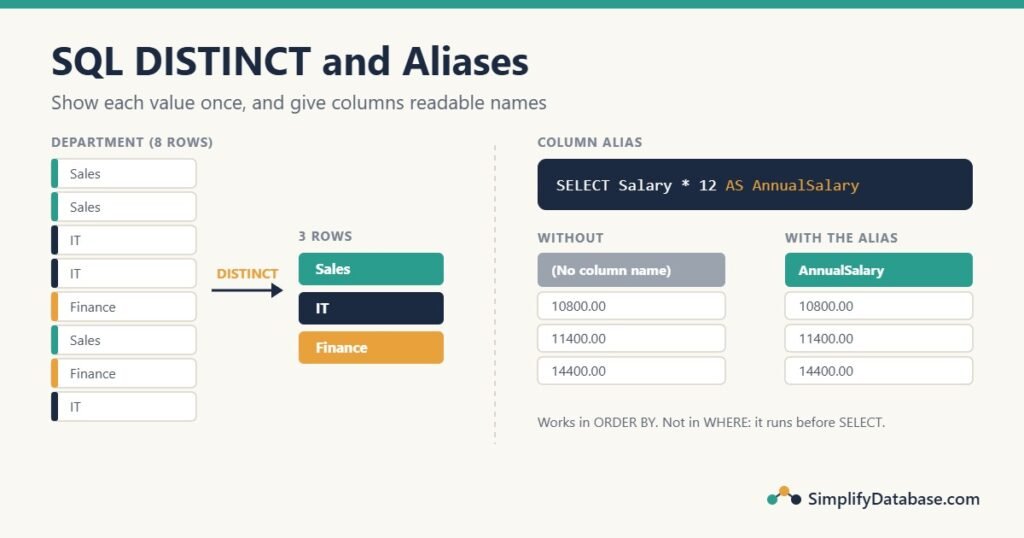
Table of Contents
The sample table
We’ll use a small Employees table. Two employees don’t have a city yet (NULL).
| EmployeeID | FirstName | LastName | Department | City | Salary |
|---|---|---|---|---|---|
| 1 | Ali | Hassan | Sales | Manama | 900 |
| 2 | Sara | Ahmed | Sales | Muharraq | 950 |
| 3 | Omar | Khalid | IT | Manama | 1200 |
| 4 | Lina | Saleh | IT | Manama | 1100 |
| 5 | Yousef | Ali | Finance | Riffa | 1000 |
| 6 | Mona | Fahad | Sales | Manama | 875 |
| 7 | Hassan | Omar | Finance | NULL | 1050 |
| 8 | Noor | Jasim | IT | NULL | 1300 |
DISTINCT: show each value once
Ask for the departments, and you get one row per employee:
SELECT Department
FROM Employees;
That returns 8 rows: Sales, Sales, IT, IT, Finance, Sales, Finance, IT. To answer “which departments do we have?”, add DISTINCT right after SELECT:
SELECT DISTINCT Department
FROM Employees;| Department |
|---|
| Sales |
| IT |
| Finance |
Three rows, each department once. The order isn’t guaranteed, so add ORDER BY Department if you want them sorted. (See SQL WHERE, ORDER BY and LIMIT Explained Simply if sorting is new to you.)
DISTINCT works on the whole row, not one column
This is the most common misunderstanding. DISTINCT is not a function of one column; it removes rows where all the selected columns are the same. With two columns, you get every unique combination:
SELECT DISTINCT Department, City
FROM Employees
ORDER BY Department, City;| Department | City |
|---|---|
| Finance | NULL |
| Finance | Riffa |
| IT | NULL |
| IT | Manama |
| Sales | Manama |
| Sales | Muharraq |
IT appears twice because it has two different cities, and Sales appears twice for the same reason. Three Sales employees in Manama and Muharraq became two rows, because Ali and Mona share the combination “Sales, Manama”.
So if you write SELECT DISTINCT Department, FirstName, you’ll get one row per employee again, because every name is different. Writing DISTINCT(Department), FirstName doesn’t help either: the brackets are ignored, and DISTINCT still applies to both columns. If you want one row per department with one of its employees (for example the highest paid), that’s a different problem, called “top N per group”: see Top N per Group in SQL Server.
DISTINCT and NULL
NULL normally means “unknown”, and NULL = NULL is not true in a WHERE clause. But DISTINCT treats all NULLs as the same value, so they collapse into one row:
SELECT DISTINCT City
FROM Employees
ORDER BY City;| City |
|---|
| NULL |
| Manama |
| Muharraq |
| Riffa |
Two employees have no city, and you get one NULL row. SQL Server and MySQL sort NULL first; PostgreSQL puts it last. To hide it, add WHERE City IS NOT NULL. NULL in SQL Explained Simply covers the other places NULL behaves differently.
COUNT(DISTINCT column)
To count unique values instead of listing them, put DISTINCT inside COUNT. Compare the three versions of COUNT:
SELECT COUNT(*)             AS AllRows,
       COUNT(City)          AS CityValues,
       COUNT(DISTINCT City) AS DistinctCities
FROM Employees;| AllRows | CityValues | DistinctCities |
|---|---|---|
| 8 | 6 | 3 |
COUNT(*)counts rows: 8 employees.COUNT(City)counts non-NULLvalues: 6.COUNT(DISTINCT City)counts different non-NULLvalues: Manama, Muharraq and Riffa, so 3. UnlikeSELECT DISTINCT, it does not countNULL.
This is a favourite interview question, and a common source of “why don’t my numbers match?” in reports.
DISTINCT vs GROUP BY
These two queries return the same three departments:
SELECT DISTINCT Department FROM Employees;

SELECT Department FROM Employees GROUP BY Department;
SQL Server usually builds the same plan for both, so neither is faster. The difference is what you can add. With GROUP BY you can calculate something for each group:
SELECT Department, COUNT(*) AS Employees
FROM Employees
GROUP BY Department;| Department | Employees |
|---|---|
| Finance | 2 |
| IT | 3 |
| Sales | 3 |
A simple rule: use DISTINCT to list unique values, and GROUP BY when you need a count, total or average per value. See SQL GROUP BY and Aggregate Functions Explained Simply.
Don’t use DISTINCT to hide a bad JOIN
When a query with a JOIN suddenly returns duplicate rows, it’s tempting to add DISTINCT and move on. Usually the real problem is the join: a missing condition, or joining to a table with several rows per key (for example, an employee with three phone numbers). DISTINCT hides the symptom, makes the server do extra work to sort or hash every row, and can still give wrong totals if you later add a SUM. Fix the join first; see SQL JOINs Explained Simply.
DISTINCT is the right tool when the question really is “which unique values exist?”. It’s the wrong tool when you don’t know why the duplicates are there.
Column aliases: rename what you see
A column alias gives a column a new name in the result. Write AS and the new name after the column:
SELECT FirstName  AS Name,
       Salary * 12 AS AnnualSalary
FROM Employees;
Without the alias, SQL Server shows the calculated column as “(No column name)” and MySQL shows it as Salary * 12. With it, the column is called AnnualSalary, which is also the name your application code (Delphi, PHP, C#) will use to read the value.
Aliases are most useful for:
- Calculated columns:
Salary * 12 AS AnnualSalary. - Functions:
COUNT(*) AS Employees,CONCAT(FirstName, ' ', LastName) AS FullName. - Unclear names:
cust_nm AS CustomerNamein an old database.
The AS keyword is optional (Salary * 12 AnnualSalary works too), but always write it. Without it, a missing comma silently turns a column into an alias: SELECT FirstName LastName returns one column, FirstName, renamed to “LastName”.
Aliases with spaces
If you want a space in the name, wrap it in quotes or brackets:
-- SQL Server
SELECT FirstName AS [First Name] FROM Employees;

-- SQL Server and PostgreSQL (standard SQL)
SELECT FirstName AS "First Name" FROM Employees;

-- MySQL
SELECT FirstName AS `First Name` FROM Employees;
Be careful with double quotes in MySQL: AS "First Name" works as an alias, but ORDER BY "First Name" is just a text value, so MySQL silently doesn’t sort at all. Avoid single quotes (AS 'First Name') too; SQL Server has marked that style as deprecated. The easiest rule: use names without spaces (FirstName, AnnualSalary) in queries, and add the spaces in your report or application.
Where you can (and can’t) use a column alias
This one catches everyone. You can sort by an alias:
SELECT FirstName, Salary * 12 AS AnnualSalary
FROM Employees
ORDER BY AnnualSalary DESC;
But you can’t filter by it:
SELECT FirstName, Salary * 12 AS AnnualSalary
FROM Employees
WHERE AnnualSalary > 13000;   -- Error: Invalid column name 'AnnualSalary'
The reason is the order in which SQL runs a query. It isn’t the order you write it:
| Order | Clause | Can it see the alias? |
|---|---|---|
| 1 | FROM / JOIN | No |
| 2 | WHERE | No |
| 3 | GROUP BY | No (MySQL: yes) |
| 4 | HAVING | No (MySQL: yes) |
| 5 | SELECT (aliases are created here) | — |
| 6 | ORDER BY | Yes |
WHERE runs before SELECT, so the alias doesn’t exist yet. Repeat the expression instead (WHERE Salary * 12 > 13000), or wrap the query in a CTE or subquery and filter outside it. MySQL is more relaxed and lets you use aliases in GROUP BY and HAVING, but SQL Server and PostgreSQL don’t, so don’t rely on it if you want portable SQL. HAVING vs WHERE in SQL explains steps 2 and 4 in more detail.
Table aliases: shorter queries
You can give a table an alias too. It’s written the same way, after the table name:
SELECT e.FirstName, e.Department
FROM Employees AS e
WHERE e.City = 'Manama';
With one table, that just saves typing. With joins, table aliases are essential, because two tables often have columns with the same name (ID, Name, CustomerID). The alias tells SQL which one you mean:
SELECT o.OrderID, c.CustomerName, o.Amount
FROM Orders AS o
JOIN Customers AS c ON c.CustomerID = o.CustomerID;
Two rules:
- Once you give a table an alias, use it everywhere in that query. In SQL Server, writing
Employees.CityafterFROM Employees AS egives the error “The multi-part identifier could not be bound”. - Pick short but meaningful aliases:
ofor Orders andcfor Customers is easy to read;a,b,cfor unrelated tables is not.
Table aliases are required when you join a table to itself (a SELF JOIN), for example to show each employee next to their manager. SQL SELF JOIN Explained Simply walks through that example step by step.
Cheat sheet
| You want to | Write |
|---|---|
| Each value once | SELECT DISTINCT Department FROM Employees |
| Each combination once | SELECT DISTINCT Department, City FROM Employees |
| How many different values | SELECT COUNT(DISTINCT City) FROM Employees |
| A count per value | SELECT Department, COUNT(*) FROM Employees GROUP BY Department |
| Rename a column | SELECT Salary * 12 AS AnnualSalary |
| Sort by the new name | ORDER BY AnnualSalary |
| Filter on a calculation | WHERE Salary * 12 > 13000 (not the alias) |
| Short table names | FROM Employees AS e then e.City |
Practice exercises
- List the different cities where the Sales department has employees.
- Count how many different departments the company has.
- Show each Finance employee’s first name as “Name” and their yearly salary as “YearlyPay”, highest first.
Answers:
-- 1: returns Manama and Muharraq
SELECT DISTINCT City
FROM Employees
WHERE Department = 'Sales';

-- 2: returns 3
SELECT COUNT(DISTINCT Department) AS Departments
FROM Employees;

-- 3: Hassan (12600), then Yousef (12000)
SELECT FirstName   AS Name,
       Salary * 12 AS YearlyPay
FROM Employees
WHERE Department = 'Finance'
ORDER BY YearlyPay DESC;
Summary
SELECT DISTINCTremoves duplicate rows. It applies to all the selected columns together, not just the first one.DISTINCTtreats allNULLs as one value;COUNT(DISTINCT col)ignoresNULL.- Use
DISTINCTto list unique values andGROUP BYto calculate per value. Don’t useDISTINCTto cover up a join that returns duplicates. - A column alias (
AS AnnualSalary) renames a result column. Always writeAS, and avoid spaces in alias names. - Aliases work in
ORDER BYbut not inWHERE, becauseWHEREruns beforeSELECT. - Table aliases (
FROM Employees AS e) keep joins short and clear; once you use one, use it everywhere in the query.
Related articles
- SQL WHERE, ORDER BY and LIMIT Explained Simply: filtering and sorting, the clauses aliases interact with most.
- SQL GROUP BY and Aggregate Functions Explained Simply: counts and totals per group.
- SQL JOINs Explained Simply: where table aliases really pay off.
- SQL String Functions Explained Simply: build columns like
FullNamewithCONCAT. - SQL SELF JOIN Explained Simply: join a table to itself, with employee and manager examples.