
You created an index. You run the query. You open the execution plan, and SQL Server is still doing an Index Scan (or a Clustered Index Scan) instead of an Index Seek. Why is it ignoring your index?
Almost always, it’s one of a few common reasons, and most of them are in how the query is written, not in the index. This article goes through each reason with a small example and the fix.
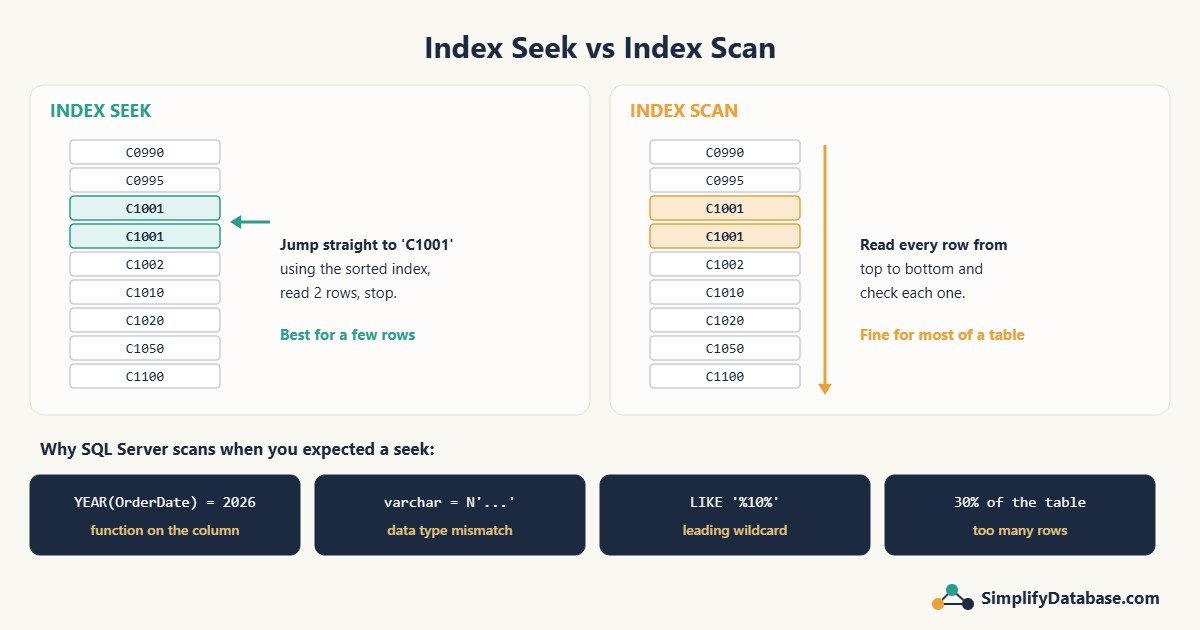
Seek vs scan in one minute
- An Index Seek uses the sorted order of the index to jump straight to the rows you want, like opening a phone book at the letter “N”.
- An Index Scan reads the index from start to end, like reading the phone book page by page.
A seek is usually better when you want a few rows. A scan is perfectly fine when you want most of the rows, or when the table is small. So a scan is not automatically bad. It’s bad when you want 20 rows from a table with 5 million.
For the examples below, imagine this table and index:
CREATE TABLE Orders (
    OrderID      int IDENTITY PRIMARY KEY,
    CustomerCode varchar(20),
    OrderDate    datetime,
    Status       char(1),
    Amount       decimal(12,2)
);

CREATE INDEX IX_Orders_Customer ON Orders (CustomerCode);
CREATE INDEX IX_Orders_Date     ON Orders (OrderDate);
Reason 1: there is no index that starts with your filter column
An index is sorted by its first column, then by the second, and so on. An index on (CustomerCode, OrderDate) helps a filter on CustomerCode, or on CustomerCode and OrderDate. It can’t seek on OrderDate alone, the same way a phone book sorted by last name can’t find everyone called “Ahmed”.
Fix: make sure the column in your WHERE (or join) is the first key column of some index.
I hit exactly this in a real query: SQL Server scanned a whole table because no index started with the two lookup columns, then built a temporary index to cope. You can read that story in Eager Index Spool in SQL Server.
Reason 2: a function is wrapped around the column
-- Scan: SQL Server must calculate YEAR() for every row
SELECT OrderID, Amount
FROM Orders
WHERE YEAR(OrderDate) = 2026;
The index is sorted by OrderDate, not by YEAR(OrderDate). To know which rows match, SQL Server has to apply the function to every row. The same happens with LEFT(), LTRIM(), ISNULL(), CONVERT() and maths such as Amount * 1.1 > 100.
Fix: leave the column alone and move the work to the other side:
-- Seek: a simple range on the bare column
SELECT OrderID, Amount
FROM Orders
WHERE OrderDate >= '2026-01-01'
  AND OrderDate <  '2027-01-01';
A filter that can use an index seek is called sargable (from “Search ARGument ABLE”).
Reason 3: the data types don’t match (implicit conversion)
-- CustomerCode is varchar, but N'C1001' is nvarchar
SELECT OrderID FROM Orders WHERE CustomerCode = N'C1001';

-- Or from an app that sends every string parameter as nvarchar
DECLARE @code nvarchar(20) = N'C1001';
SELECT OrderID FROM Orders WHERE CustomerCode = @code;
When two types differ, SQL Server converts the one with lower “data type precedence”. nvarchar beats varchar, so it may have to convert the column on every row. That is just like Reason 2: a hidden function on the column. Depending on the collation, you get a scan or a less efficient seek. The plan shows a yellow warning with CONVERT_IMPLICIT.
Numbers stored as text cause the same problem the other way around:
-- TransNo is varchar, compared to the number 419
WHERE TransNo = 419      -- every TransNo is converted to int: scan
WHERE TransNo = '419'    -- types match: seek
Fix: match the parameter or literal type to the column type. This is very common in Delphi, .NET and PHP apps, where string parameters are often sent as nvarchar by default. Set the parameter’s data type explicitly. See SQL Data Types Explained Simply for more.
Reason 4: LIKE with a leading wildcard
WHERE CustomerCode LIKE 'C10%'   -- seek: the start is known
WHERE CustomerCode LIKE '%10%'   -- scan: could be anywhere
A phone book helps you find names starting with “Nas”, but not names containing “as”. Fix: search on the beginning of the value when you can. For real “contains” searches on large text, look at full-text search.
Reason 5: you want too many rows (the tipping point)
If your query returns, say, 30% of the table, it’s often cheaper to read everything in order than to do hundreds of thousands of separate seeks and lookups. SQL Server knows this and chooses a scan on purpose.
Fix: usually none. The scan is the right choice. Ask whether the query really needs that many rows.
Reason 6: SELECT * and the Key Lookup cost
SELECT * FROM Orders WHERE CustomerCode = 'C1001';IX_Orders_Customer only contains CustomerCode (and the primary key). For every match, SQL Server must do a Key Lookup into the table to fetch the other columns. With a few matches, it does seek plus lookups. With many matches, those lookups get so expensive that it switches to scanning the whole table instead.
Fix: select only the columns you need, and add them to the index with INCLUDE:
CREATE INDEX IX_Orders_Customer2
ON Orders (CustomerCode)
INCLUDE (OrderDate, Amount);

SELECT OrderDate, Amount FROM Orders WHERE CustomerCode = 'C1001';
Reason 7: OR across different columns
WHERE CustomerCode = 'C1001' OR OrderDate >= '2026-10-01'One index can’t serve both sides of an OR on different columns. SQL Server sometimes combines two seeks, but often it just scans. Fix: if it scans, try splitting the query into two parts joined with UNION, so each part can seek on its own index. See UNION vs UNION ALL.
Reason 8: outdated statistics
SQL Server decides between seek and scan based on how many rows it expects. If the statistics are old (for example right after a big import or month-end job), it may expect 100,000 rows when there are really 50, and choose a scan. In the actual plan you’ll see a big gap between estimated and actual rows.
Fix: UPDATE STATISTICS Orders;, and make sure statistics maintenance runs regularly.
Summary table
| Cause | Example | Fix |
|---|---|---|
| No suitable index | Filter on 2nd column of index | Index starting with the filter column |
| Function on column | YEAR(OrderDate) = 2026 | Range on the bare column |
| Type mismatch | varchar column = nvarchar value | Match the types |
| Leading wildcard | LIKE '%10%' | Search the start, or full-text |
| Too many rows | 30% of the table | Usually fine as a scan |
| Key Lookups | SELECT * | Fewer columns + INCLUDE |
| OR on different columns | A = 1 OR B = 2 | Split with UNION |
| Old statistics | Estimates far from actual | UPDATE STATISTICS |
When a scan is fine
- The table is small (a few thousand rows or fewer).
- You need most of the rows anyway, like a full monthly report.
- The query runs rarely and is already fast enough.
Don’t add indexes just to turn every scan into a seek. Each index slows down inserts, updates and deletes.
Part of a series: this article is one step in my SQL Server Performance Troubleshooting: A Practical Step-by-Step Guide, which walks through the whole process of finding and fixing a slow query.
Related articles
- How to Read a SQL Server Execution Plan: how to spot seeks, scans and Key Lookups in the first place.
- SQL Indexes Explained Simply: how indexes are built and sorted.
- SQL Date Functions Explained Simply: how to filter dates without breaking your index.
- Missing Indexes in SQL Server: How to Find Them, and When Not to Add Them: which suggested indexes to create, widen or skip.