
Almost every real database has dates in it: order dates, invoice dates, due dates, login times. And almost every report asks a date question: this month’s sales, overdue invoices, customers who joined in the last 30 days.
This guide covers the date functions you’ll use most, in both SQL Server and MySQL, plus the two mistakes that cause wrong totals and slow queries.
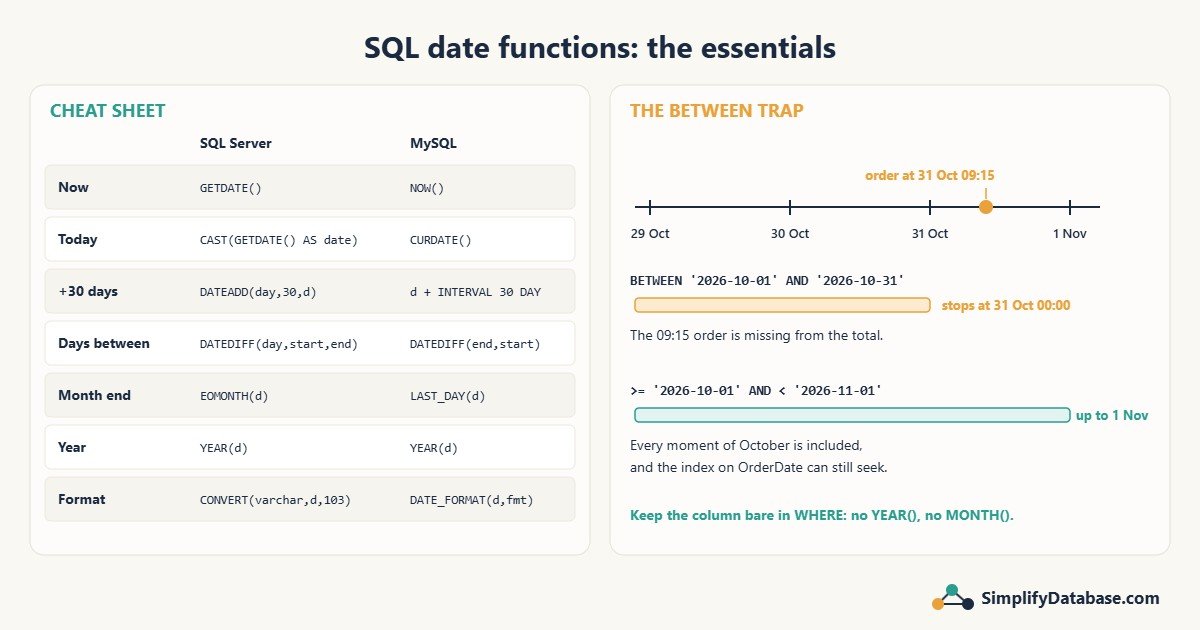
1. Get the current date and time
| You want | SQL Server | MySQL |
|---|---|---|
| Date and time now | GETDATE() or SYSDATETIME() | NOW() |
| Today’s date only | CAST(GETDATE() AS date) | CURDATE() |
-- SQL Server
SELECT GETDATE() AS RightNow, CAST(GETDATE() AS date) AS Today;

-- MySQL
SELECT NOW() AS RightNow, CURDATE() AS Today;
SYSDATETIME() is more precise than GETDATE() (it returns datetime2). Both use the server’s clock and time zone, which may not be your users’ time zone.
2. Add or subtract days, months and years
-- SQL Server: DATEADD(unit, number, date)
SELECT DATEADD(day,   30, '2026-10-07');   -- 2026-11-06
SELECT DATEADD(month, -1, '2026-10-07');   -- 2026-09-07
SELECT DATEADD(year,   1, '2026-10-07');   -- 2027-10-07

-- MySQL: DATE_ADD(date, INTERVAL number unit)
SELECT DATE_ADD('2026-10-07', INTERVAL 30 DAY);
SELECT DATE_SUB('2026-10-07', INTERVAL 1 MONTH);
Adding months to the end of a month is clamped to a valid date: adding 1 month to 31 January gives 28 February (or 29 in a leap year) in both databases.
3. Difference between two dates
-- SQL Server: DATEDIFF(unit, start, end) = end - start
SELECT DATEDIFF(day, '2026-10-01', '2026-10-07');   -- 6

-- MySQL: DATEDIFF(end, start) returns days only
SELECT DATEDIFF('2026-10-07', '2026-10-01');        -- 6
-- for other units, TIMESTAMPDIFF(unit, start, end)
SELECT TIMESTAMPDIFF(MONTH, '2026-01-15', '2026-10-07');   -- 8
Watch the argument order. SQL Server puts the start date first, while MySQL’s DATEDIFF puts the end date first. Swap them and you get negative numbers.
Another SQL Server surprise: DATEDIFF counts how many boundaries are crossed, not full periods:
SELECT DATEDIFF(year, '2025-12-31', '2026-01-01'); -- 1, after just one day!So don’t calculate someone’s age or an asset’s years in service with DATEDIFF(year, ...) alone. Compare the full dates, or count days or months and then divide.
4. Get part of a date
| You want | SQL Server | MySQL |
|---|---|---|
| Year, month, day | YEAR(d), MONTH(d), DAY(d) | YEAR(d), MONTH(d), DAY(d) |
| Any part | DATEPART(quarter, d) | QUARTER(d) or EXTRACT(QUARTER FROM d) |
| Month name | DATENAME(month, d) | MONTHNAME(d) |
| Weekday name | DATENAME(weekday, d) | DAYNAME(d) |
These are perfect for the SELECT list and for GROUP BY, for example monthly totals:
SELECT YEAR(OrderDate) AS Yr, MONTH(OrderDate) AS Mon, SUM(Amount) AS Total
FROM Orders
GROUP BY YEAR(OrderDate), MONTH(OrderDate)
ORDER BY Yr, Mon;
5. First and last day of a month
-- SQL Server (2012 and later)
SELECT EOMONTH('2026-10-07');                              -- 2026-10-31
SELECT DATEFROMPARTS(2026, 10, 1);                         -- 2026-10-01
SELECT DATEADD(day, 1, EOMONTH('2026-10-07', -1));         -- first day of this month

-- MySQL
SELECT LAST_DAY('2026-10-07');                             -- 2026-10-31
SELECT DATE_FORMAT('2026-10-07', '%Y-%m-01');              -- 2026-10-01
Month-end and period-close reports use these constantly.
6. Format a date as text
-- SQL Server
SELECT CONVERT(varchar(10), GETDATE(), 103);    -- 07/10/2026 (dd/mm/yyyy)
SELECT CONVERT(varchar(10), GETDATE(), 23);     -- 2026-10-07
SELECT FORMAT(GETDATE(), 'dd MMM yyyy');        -- 07 Oct 2026

-- MySQL
SELECT DATE_FORMAT(NOW(), '%d/%m/%Y');          -- 07/10/2026
SELECT DATE_FORMAT(NOW(), '%d %b %Y');          -- 07 Oct 2026
Two tips. First, formatting is usually better done in the application or report, not in SQL. Keep dates as dates for as long as possible. Second, in SQL Server, FORMAT() is convenient but noticeably slower than CONVERT() on large result sets.
Mistake 1: BETWEEN with date and time values
-- Looks right, but misses most of 31 October!
SELECT SUM(Amount) FROM Orders
WHERE OrderDate BETWEEN '2026-10-01' AND '2026-10-31';
If OrderDate stores a time, then '2026-10-31' means 31 October at 00:00:00. An order at 31 October 09:15 is after that, so it’s left out, and your monthly total is wrong.
Fix: use “greater than or equal to the start, and less than the day after the end”:
SELECT SUM(Amount) FROM Orders
WHERE OrderDate >= '2026-10-01'
  AND OrderDate <  '2026-11-01';
This works for date, datetime and datetime2 columns, and you never have to think about 23:59:59.997.
Mistake 2: functions on the column in WHERE
-- Slow on a big table: can't use the index on OrderDate
WHERE YEAR(OrderDate) = 2026 AND MONTH(OrderDate) = 10

-- Fast: a plain range the index can seek on
WHERE OrderDate >= '2026-10-01' AND OrderDate < '2026-11-01'
Both return the same rows. But when you wrap the column in a function, the database has to calculate that function for every row, so it can’t use an index seek. Functions are fine in SELECT and GROUP BY. In WHERE, keep the column bare. I explain why in Index Seek vs Index Scan: Why SQL Server Ignores Your Index.
Ready-to-use date filters
-- SQL Server
DECLARE @today date = CAST(GETDATE() AS date);

-- Today
WHERE OrderDate >= @today AND OrderDate < DATEADD(day, 1, @today)
-- Last 30 days
WHERE OrderDate >= DATEADD(day, -30, @today)
-- This month
WHERE OrderDate >= DATEADD(day, 1, EOMONTH(@today, -1))
  AND OrderDate <  DATEADD(day, 1, EOMONTH(@today))
-- Overdue invoices
WHERE DueDate < @today AND PaidDate IS NULL
-- MySQL
-- Today
WHERE OrderDate >= CURDATE() AND OrderDate < CURDATE() + INTERVAL 1 DAY
-- Last 30 days
WHERE OrderDate >= CURDATE() - INTERVAL 30 DAY
-- This month
WHERE OrderDate >= DATE_FORMAT(CURDATE(), '%Y-%m-01')
AND OrderDate < DATE_FORMAT(CURDATE(), '%Y-%m-01') + INTERVAL 1 MONTHWhich date type should a column use?
datewhen there’s no time: birth dates, invoice dates, due dates.datetime2(SQL Server) ordatetime(MySQL) when you need the time: created-at, login time.- Never store dates as text (
varchar).'07/10/2026'sorts wrongly, can’t be validated, and every comparison needs a conversion.
More in SQL Data Types Explained Simply.
Related articles
- SQL WHERE, ORDER BY & LIMIT Explained Simply: the basics of filtering rows.
- HAVING vs WHERE in SQL: filtering monthly totals after grouping.
- Index Seek vs Index Scan: why
YEAR(OrderDate) = 2026is slow.