
WHERE and HAVING both filter rows, so beginners often wonder why SQL needs two of them. The answer is simple once you know when each one runs:
WHEREfilters rows, before they are grouped.HAVINGfilters groups, afterGROUP BYhas built them.
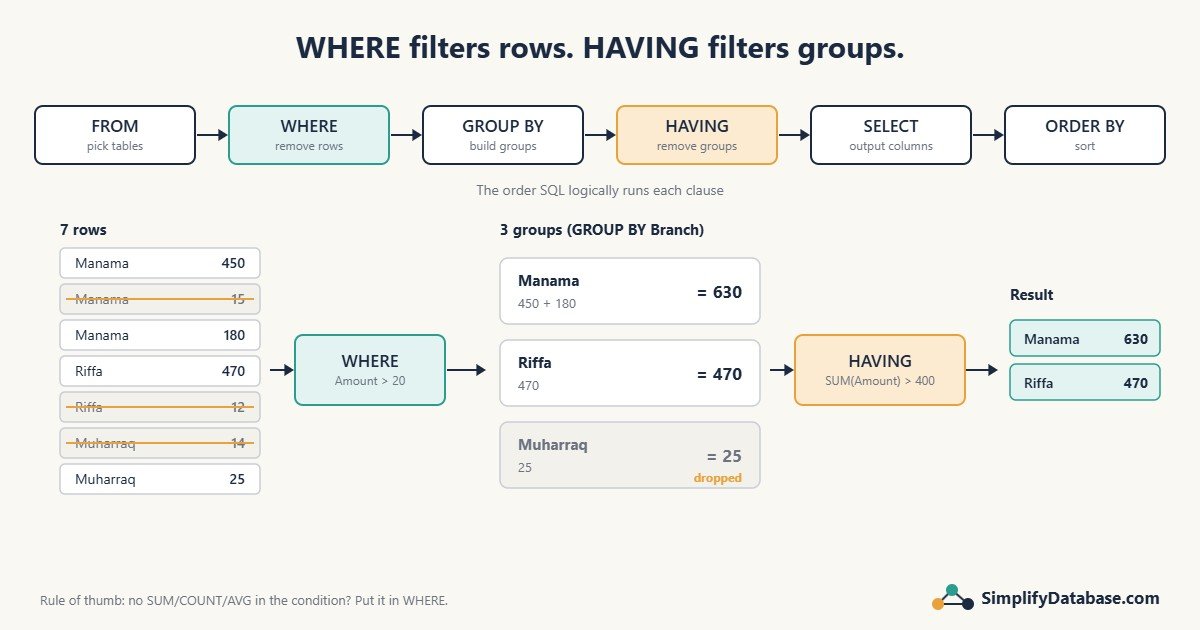
The example table
We’ll use a small Sales table:
| SaleID | Branch | Product | Amount |
|---|---|---|---|
| 1 | Manama | Laptop | 450 |
| 2 | Manama | Mouse | 15 |
| 3 | Manama | Monitor | 180 |
| 4 | Riffa | Laptop | 470 |
| 5 | Riffa | Mouse | 12 |
| 6 | Muharraq | Mouse | 14 |
| 7 | Muharraq | Keyboard | 25 |
WHERE: filter rows before grouping
“Total sales per branch, but only count sales over 20”:
SELECT Branch, SUM(Amount) AS Total
FROM Sales
WHERE Amount > 20
GROUP BY Branch;| Branch | Total |
|---|---|
| Manama | 630 |
| Riffa | 470 |
| Muharraq | 25 |
The mouse sales were removed first, so they were never added to any total.
HAVING: filter groups after grouping
“Show only the branches whose total sales are over 400”:
SELECT Branch, SUM(Amount) AS Total
FROM Sales
GROUP BY Branch
HAVING SUM(Amount) > 400;| Branch | Total |
|---|---|
| Manama | 645 |
| Riffa | 482 |
Muharraq’s total (39) was calculated, then the whole group was dropped because it failed the HAVING test.
Why you can’t use SUM() in WHERE
Try this:
SELECT Branch, SUM(Amount) AS Total
FROM Sales
WHERE SUM(Amount) > 400      -- error
GROUP BY Branch;
SQL Server answers: “An aggregate may not appear in the WHERE clause unless it is in a subquery contained in a HAVING clause or a select list…”. MySQL gives a similar “Invalid use of group function” error.
It makes sense once you know the order SQL processes a query in. When WHERE runs, the groups don’t exist yet, so there’s no SUM to check.
The logical order of a SELECT query
| Step | Clause | What happens |
|---|---|---|
| 1 | FROM / JOIN | Pick the tables and join them |
| 2 | WHERE | Remove rows |
| 3 | GROUP BY | Build groups |
| 4 | HAVING | Remove groups |
| 5 | SELECT | Calculate the output columns and aliases |
| 6 | ORDER BY | Sort the result |
| 7 | TOP / LIMIT | Keep the first N rows |
This order also explains why a column alias like Total can be used in ORDER BY but not in WHERE. The alias is created in step 5, after WHERE has already run. (MySQL bends the rule and lets you use an alias in HAVING. SQL Server does not, so repeat the expression: HAVING SUM(Amount) > 400.)
Using WHERE and HAVING together
“Branches whose laptop and monitor sales total more than 400”:
SELECT Branch, SUM(Amount) AS Total
FROM Sales
WHERE Product IN ('Laptop', 'Monitor')   -- rows first
GROUP BY Branch
HAVING SUM(Amount) > 400; -- then groups| Branch | Total |
|---|---|
| Manama | 630 |
| Riffa | 470 |
A common mistake: putting row filters in HAVING
-- Works, but wasteful
SELECT Branch, SUM(Amount) AS Total
FROM Sales
GROUP BY Branch
HAVING Branch <> 'Riffa';

-- Better
SELECT Branch, SUM(Amount) AS Total
FROM Sales
WHERE Branch <> 'Riffa'
GROUP BY Branch;
Both return the same result. The first one groups every row and then throws away a group. The second removes the rows early, and it can use an index on Branch. SQL Server’s optimizer is often smart enough to move simple filters like this for you, but don’t rely on it. Rule of thumb: if the condition doesn’t use an aggregate, put it in WHERE.
Other useful HAVING patterns
-- Customers with more than 5 orders
SELECT CustomerID, COUNT(*) AS Orders
FROM Orders
GROUP BY CustomerID
HAVING COUNT(*) > 5;

-- Find duplicate values
SELECT Email, COUNT(*) AS Copies
FROM Customers
GROUP BY Email
HAVING COUNT(*) > 1;

-- Accounts where debits and credits don't balance
SELECT AccountNo
FROM JournalLines
GROUP BY AccountNo
HAVING SUM(Debit) <> SUM(Credit);
The “find duplicates” query is one I use all the time before creating a unique index or rewriting a subquery as a join.
WHERE vs HAVING at a glance
| WHERE | HAVING | |
|---|---|---|
| Filters | Individual rows | Groups |
| Runs | Before GROUP BY | After GROUP BY |
Can use SUM, COUNT, AVG… | No | Yes |
Needs GROUP BY? | No | Usually (without it, the whole result is one group) |
| Can use an index | Yes | Not for the aggregate condition |
Related articles
- SQL GROUP BY and Aggregate Functions Explained Simply: how GROUP BY, SUM, COUNT and AVG work before you filter them with HAVING.
- SQL WHERE, ORDER BY & LIMIT Explained Simply: the basics of filtering and sorting.
- SQL Window Functions Explained Simply: totals per group without collapsing the rows.
- UNION vs UNION ALL Explained Simply: combining results from several queries.