
Imagine your manager asks: “Can we keep a history of every price change, who made it and when?” You could change every screen and every script that updates prices to also write a history row. Or you could tell the database: whenever a price changes, write the history row yourself.
That second option is a trigger. Triggers are powerful, a little bit hidden, and easy to misuse. Here’s how they work and when they’re a good idea.
What Is a Trigger?
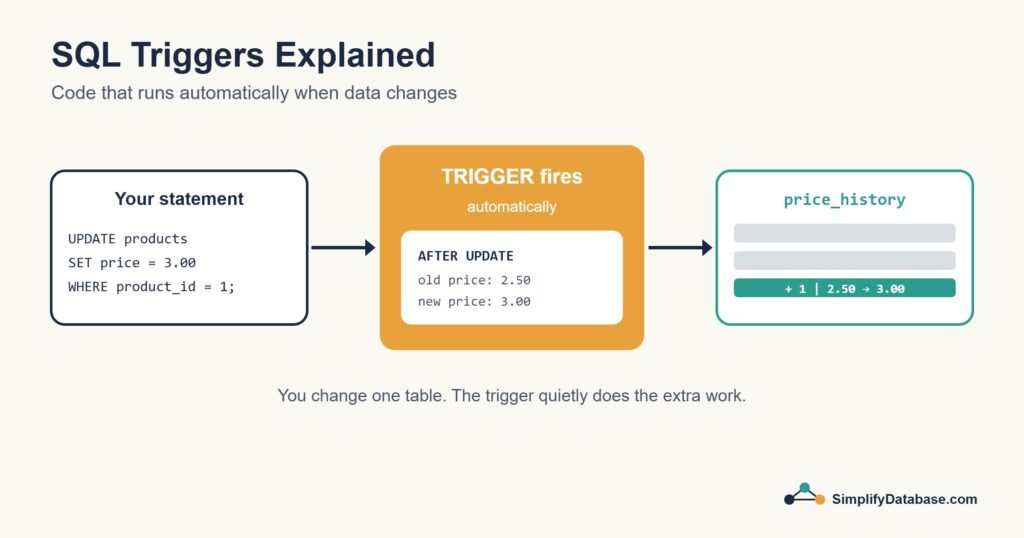
A trigger is a piece of SQL code attached to a table that runs automatically when a certain event happens on that table, usually an INSERT, UPDATE or DELETE. You never call a trigger directly. The database fires it for you.
| Part | Options |
|---|---|
| Event | INSERT, UPDATE, DELETE |
| Timing | BEFORE or AFTER the change (SQL Server also has INSTEAD OF) |
| Level | Once per row, or once per statement (depends on the database) |
The Example: A Price History Table
CREATE TABLE price_history (
    history_id INT PRIMARY KEY,   -- make this auto-numbering in your database
    product_id INT NOT NULL,
    old_price  DECIMAL(10,2),
    new_price  DECIMAL(10,2),
    changed_at DATETIME NOT NULL
);
We want a row added here every time a product’s price changes. The trigger looks different in each database, so here are all three.
SQL Server
CREATE TRIGGER trg_products_price_history
ON products
AFTER UPDATE
AS
BEGIN
    SET NOCOUNT ON;

    INSERT INTO price_history (product_id, old_price, new_price, changed_at)
    SELECT d.product_id, d.price, i.price, SYSDATETIME()
    FROM inserted i
    JOIN deleted  d ON d.product_id = i.product_id
    WHERE i.price <> d.price;
END;
SQL Server gives triggers two special tables: deleted holds the rows as they were before the change, and inserted holds them as they are after. Joining them lets you compare old and new values.
MySQL
DELIMITER //

CREATE TRIGGER trg_products_price_history
AFTER UPDATE ON products
FOR EACH ROW
BEGIN
    IF NEW.price <> OLD.price THEN
        INSERT INTO price_history (product_id, old_price, new_price, changed_at)
        VALUES (OLD.product_id, OLD.price, NEW.price, NOW());
    END IF;
END //

DELIMITER ;
MySQL triggers run once for each row, and you reach the values through OLD and NEW.
PostgreSQL
CREATE FUNCTION log_price_change()
RETURNS trigger
LANGUAGE plpgsql
AS $$
BEGIN
    IF NEW.price <> OLD.price THEN
        INSERT INTO price_history (product_id, old_price, new_price, changed_at)
        VALUES (OLD.product_id, OLD.price, NEW.price, now());
    END IF;
    RETURN NEW;
END;
$$;

CREATE TRIGGER trg_products_price_history
AFTER UPDATE ON products
FOR EACH ROW
EXECUTE FUNCTION log_price_change();
In PostgreSQL the logic lives in a trigger function, and the trigger itself just connects that function to the table.
Now any update, from any application, script or person, is logged:
UPDATE products SET price = 3.00 WHERE product_id = 1;
-- price_history gets a new row: product 1, 2.50 -> 3.00
The Classic SQL Server Mistake
In SQL Server, a trigger fires once per statement, not once per row. If someone updates 500 products in one statement, the trigger runs once and inserted contains 500 rows.
I’ve seen triggers written like this:
-- Wrong: only handles one row
DECLARE @id INT, @newPrice DECIMAL(10,2);
SELECT @id = product_id, @newPrice = price FROM inserted;
That quietly ignores all but one of the rows. Always write SQL Server triggers as set-based queries over inserted and deleted, like the example above.
BEFORE Triggers: Fixing Data on the Way In
In MySQL and PostgreSQL, BEFORE triggers can change the incoming row before it’s saved. For example, keeping emails in lower case:
-- MySQL
CREATE TRIGGER trg_customers_lower_email
BEFORE INSERT ON customers
FOR EACH ROW
SET NEW.email = LOWER(NEW.email);
SQL Server doesn’t have BEFORE triggers. It has INSTEAD OF triggers, which replace the original statement entirely and are mostly used on views.
Good Uses for Triggers
- Audit trails: recording who changed what and when, like our price history.
- Keeping a “last modified” column up to date automatically.
- Enforcing complex rules that a CHECK constraint can’t express, such as rules that look at other tables.
- Keeping summary values in sync in special cases, though this needs care.
Why You Should Use Them Sparingly
Triggers have a reputation, and it’s partly earned:
- They’re invisible. Someone reading the application code has no idea a trigger is doing extra work. When something odd happens, triggers are often the last place people look.
- They slow down writes. Every insert, update or delete on the table now does more work, and big batch updates feel it most.
- They can chain. A trigger that updates another table can fire that table’s triggers, and debugging a chain like that is no fun.
- They run inside the same transaction. If the trigger fails, the original change is rolled back too. That’s usually what you want, but it can be surprising. (More on this in Transactions and ACID.)
My own rule: use triggers for auditing and simple housekeeping, and keep business processes in stored procedures or application code where people can see them. And document every trigger you create.
Managing Triggers
| Task | SQL Server | MySQL | PostgreSQL |
|---|---|---|---|
| List triggers | SELECT * FROM sys.triggers; | SHOW TRIGGERS; | SELECT * FROM pg_trigger; |
| Disable | DISABLE TRIGGER name ON table; | Not supported (drop and recreate) | ALTER TABLE t DISABLE TRIGGER name; |
| Remove | DROP TRIGGER name; | DROP TRIGGER name; | DROP TRIGGER name ON table; |
Conclusion
A trigger is code the database runs automatically when data in a table changes. It’s ideal for audit logs and small automatic tasks, because it catches every change no matter where it comes from. Just keep triggers small, set-based and well documented, so they help your team instead of surprising it.