
SQL injection has been around for over twenty-five years, and it’s still one of the most common ways websites and business systems get breached. The frustrating part is that it’s almost entirely preventable. If you write any code that talks to a database, in PHP, Laravel, C#, Delphi, Python or anything else, this is one topic you can’t skip.
In this article I’ll explain what SQL injection is, why it happens, and the simple habit that protects you from it. This is about defending your own applications. Never test these ideas on a system you don’t own or have written permission to test.
What Is SQL Injection?
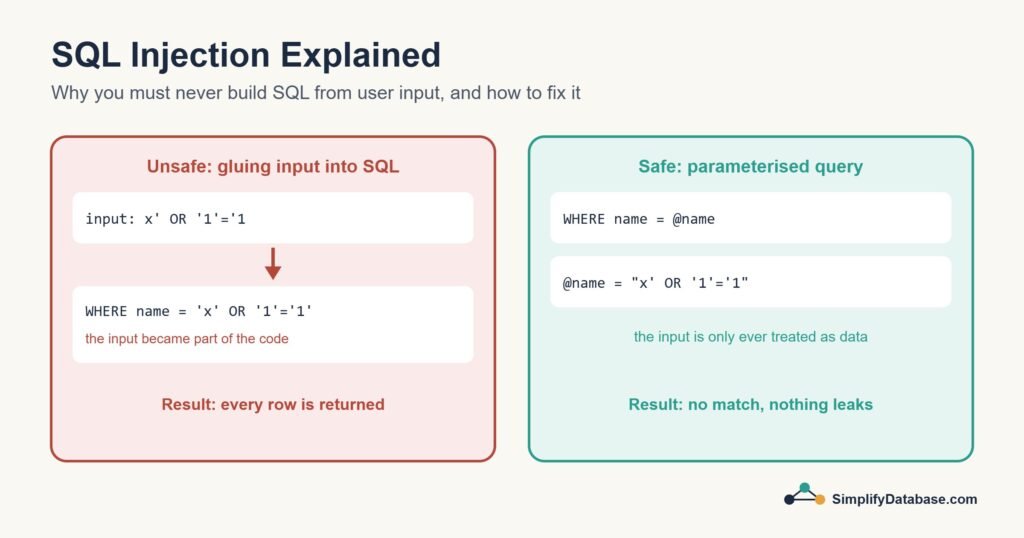
SQL injection happens when an application builds a SQL statement by gluing user input directly into the query text. If the input contains SQL syntax, the database can’t tell where your code ends and the user’s text begins. The input stops being data and starts being part of the command.
How the Problem Looks in Code
Here’s a typical vulnerable login check in PHP. The same pattern appears in every language:
// DON'T DO THIS
$username = $_POST['username'];
$password = $_POST['password'];

$sql = "SELECT * FROM users
        WHERE username = '" . $username . "'
        AND password_hash = '" . hash('sha256', $password) . "'";

$result = $db->query($sql);
With normal input like sara, the query is fine. But the application has no control over what the user types. The classic textbook example is someone typing x' OR '1'='1 in a search box. Glued into a query, it becomes:
SELECT * FROM products WHERE name = 'x' OR '1'='1'Since '1'='1' is always true, the condition matches every row. In a search box that leaks the whole table. In a login form, a variation of this can skip the password check. In the worst cases, attackers read other tables, change data or delete it.
What attackers can do with it
- Read data they shouldn’t see: customer details, emails, password hashes.
- Log in as another user, sometimes an administrator.
- Change or delete records.
- On badly configured servers, go even further than the database.
The Fix: Parameterised Queries
The solution is simple and reliable: never put user input into the SQL text. Pass it as a parameter instead. The SQL is sent with placeholders, and the values are sent separately. The database always treats parameter values as plain data, never as code, whatever characters they contain.
Here’s the safe version in the languages I use most.
PHP with PDO
$stmt = $pdo->prepare(
    'SELECT * FROM users WHERE username = :username'
);
$stmt->execute(['username' => $_POST['username']]);
$user = $stmt->fetch();
Laravel
// Query builder and Eloquent use parameters for you
$user = User::where('email', $request->email)->first();

// Raw SQL: use bindings, never string concatenation
$rows = DB::select('SELECT * FROM users WHERE email = ?', [$request->email]);

// Careful: whereRaw / DB::raw with concatenated input is still unsafe
// User::whereRaw("email = '$email'")   <-- don't
Delphi with FireDAC
FDQuery1.SQL.Text := 'SELECT * FROM users WHERE username = :username';
FDQuery1.ParamByName('username').AsString := EditUsername.Text;
FDQuery1.Open;
I still see Delphi code that builds queries with '... WHERE name = ''' + Edit1.Text + ''''. If you maintain an older system, searching the code for SQL.Text := lines that concatenate edit boxes is a quick win.
C# with ADO.NET
using var cmd = new SqlCommand(
    "SELECT * FROM users WHERE username = @username", connection);
cmd.Parameters.Add("@username", SqlDbType.NVarChar, 100).Value = username;
using var reader = cmd.ExecuteReader();
Parameters have a bonus: the database can reuse the execution plan, so they’re often faster too.
Things That Don’t Fully Protect You
| Approach | Why it isn’t enough |
|---|---|
| Escaping quotes by hand | Easy to get wrong, and different databases and character sets have different rules |
| Blocking “bad words” like DROP or OR | There are endless ways around a blocklist, and it breaks legitimate input |
| Hiding error messages | Good practice, but attackers can still exploit the hole without seeing errors |
| Stored procedures | Safe only if they use parameters. A stored procedure that builds dynamic SQL from its inputs is just as vulnerable |
| Using an ORM | Mostly safe, until someone uses a raw query with concatenated input |
When You Need Dynamic SQL
Sometimes part of a query can’t be a parameter, such as a column name for sorting chosen by the user. Parameters can only hold values, not names. In that case, check the input against a fixed list of allowed options:
// PHP example: only allow known columns
$allowed = ['name', 'price', 'created_at'];
$sort = in_array($_GET['sort'], $allowed, true) ? $_GET['sort'] : 'name';

$stmt = $pdo->prepare("SELECT * FROM products ORDER BY $sort");
$stmt->execute();
In SQL Server, when dynamic SQL is unavoidable, use sp_executesql with parameters for the values and QUOTENAME() for any object names.
Defence in Depth
Parameters fix the root cause. These extra layers limit the damage if something slips through:
- Least privilege: the account your application uses should only have the permissions it needs. A website that only reads products shouldn’t connect as
saorroot. - Validate input: if a field should be a number or a date, check that it is.
- Generic error messages: show users a friendly message and log the real database error privately.
- Hash passwords properly with a slow algorithm such as bcrypt or Argon2, so leaked hashes are hard to crack.
- Keep backups and keep software up to date.
- Review code for string-built SQL, especially in older parts of the system.
A Quick Checklist for Your Own Code
- Search your code for SQL strings joined with
+,.or string interpolation. - Replace each one with placeholders and parameters.
- Check any raw queries in your ORM.
- Make sure the database login used by the app has limited rights.
- Turn off detailed error messages on public sites.
Conclusion
SQL injection happens when user input is glued into SQL text and ends up being run as code. The cure is to always use parameterised queries, so input is treated as data and nothing else. Add least-privilege accounts, input validation and careful error handling, and this whole class of attack stops being a worry.
If you only take one thing from this article, let it be this: no string concatenation in SQL, ever.