
SQL Server keeps a list of indexes it wishes you had. Sometimes it even shows one in green at the top of your execution plan: “Missing Index (Impact 87.5): CREATE NONCLUSTERED INDEX…”. It’s tempting to copy that line, run it, and move on.
Sometimes that’s exactly right. But just as often, the suggestion duplicates an index you already have, includes half the table’s columns, or slows down every insert for a query that runs once a month. And sometimes SQL Server needs an index badly and doesn’t suggest anything at all.
This guide shows you where to find missing index suggestions, how to read them, and the checks to do before you create one.
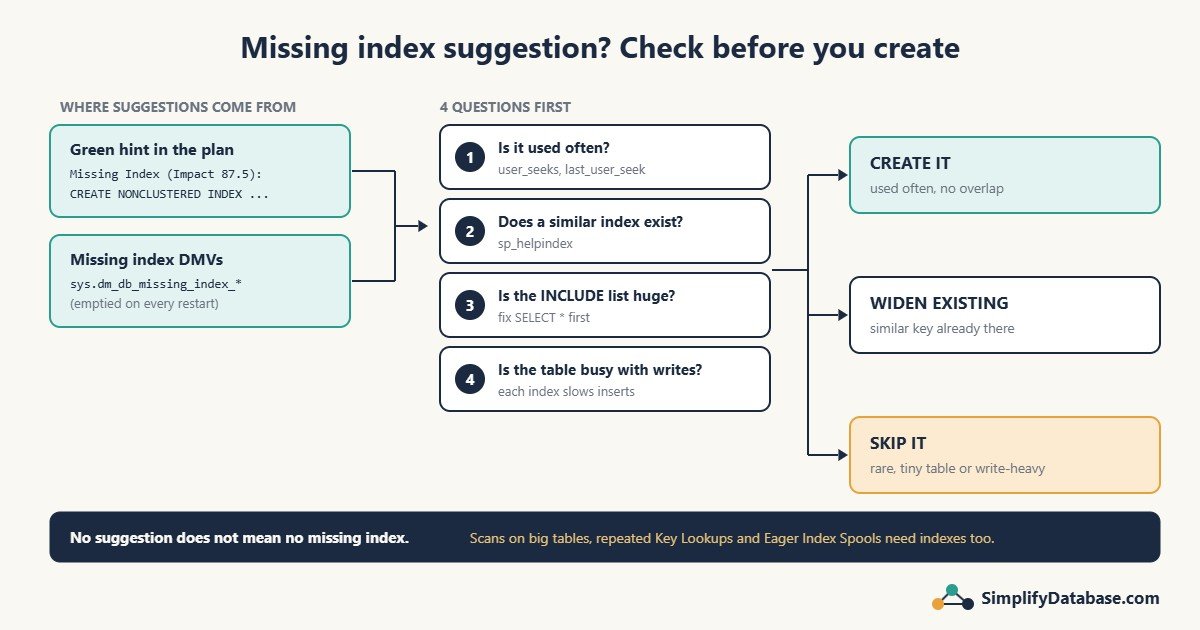
Where SQL Server tells you about missing indexes
1. The green hint in the execution plan
Run a query with the actual execution plan on (Ctrl+M). If the optimizer thinks an index would help, a green line appears above the plan:
Missing Index (Impact 87.5): CREATE NONCLUSTERED INDEX [<Name of Missing Index>]
ON [dbo].[Orders] ([CustomerCode]) INCLUDE ([OrderDate],[Amount])
Right-click the plan and choose Missing Index Details… to open the full CREATE INDEX script in a new window. Two things to know:
- Impact is SQL Server’s estimate of how much cheaper this one query would be, as a percentage. It’s a guess, not a measurement.
- SSMS shows only one suggestion in green, even when the plan contains several. To see all of them, right-click and choose Show Execution Plan XML, then search for
MissingIndex.
New to plans? Start with How to Read a SQL Server Execution Plan.
2. The missing index DMVs (the whole server’s wish list)
Every time the optimizer wishes it had an index, it records it in a set of system views. This query lists the suggestions for the current database, with a rough score so the most useful ones come first:
SELECT TOP (20)
    OBJECT_NAME(d.object_id, d.database_id)     AS TableName,
    d.equality_columns,
    d.inequality_columns,
    d.included_columns,
    s.user_seeks,
    s.user_scans,
    s.avg_user_impact                           AS AvgImpactPct,
    CAST(s.avg_total_user_cost * s.avg_user_impact
         * (s.user_seeks + s.user_scans) AS bigint) AS RoughScore,
    s.last_user_seek
FROM sys.dm_db_missing_index_details      AS d
JOIN sys.dm_db_missing_index_groups       AS g ON g.index_handle = d.index_handle
JOIN sys.dm_db_missing_index_group_stats  AS s ON s.group_handle = g.index_group_handle
WHERE d.database_id = DB_ID()
ORDER BY RoughScore DESC;
How to read the columns:
| Column | Meaning |
|---|---|
equality_columns | Columns used with =, for example WHERE CustomerCode = 'C1001'. These go first in the index key. |
inequality_columns | Columns used with >, <, BETWEEN, <>. These go after the equality columns. |
included_columns | Columns the query returns. They go in INCLUDE (...). |
user_seeks / user_scans | How many times queries would have used the index. Low numbers mean low value. |
avg_user_impact | Average estimated % improvement for those queries. |
last_user_seek | When it was last wanted. A suggestion last wanted months ago may be from a report nobody runs any more. |
Important: this list is emptied when SQL Server restarts (and for a table, when its indexes change). If the server restarted yesterday, the list only shows one day of work. Look at it after the system has run for a normal week or a month-end, not the morning after a reboot.
Why you shouldn’t just copy and run the suggestion
The missing index feature is a quick hint from the optimizer while it compiles a query. It does not look at the bigger picture:
- It ignores the indexes you already have. If you already have an index on
(CustomerCode), it will happily suggest a new one on(CustomerCode) INCLUDE (Amount)instead of telling you to widen the existing one. Copy every suggestion and you end up with five nearly identical indexes. - It ignores the cost of writes. Every index must be updated on every
INSERT,UPDATEandDELETE. The suggestion only counts the reads it would speed up. - The column order is mechanical. Equality columns first, then inequality columns, in no particular order inside each group. It doesn’t think about which column is most selective or what other queries need.
- The INCLUDE list can be huge. For a
SELECT *query it may suggest including 20 columns, which is almost a second copy of the table. - It suggests many small variations of the same index for slightly different queries. Several suggestions can often be merged into one index.
And sometimes there’s no suggestion at all
I learned this on a real query at work. It looked up journal lines and, for each line, a matching cash voucher by document number and type. The plan showed an Index Scan of the whole voucher table followed by an Index Spool (Eager Spool) taking 58% of the cost. SQL Server was building a temporary index on every run because the real one didn’t exist.
But there was no green missing index hint in the plan. The fix (an index on the two lookup columns) was obvious once I read the plan, but SQL Server never suggested it. The full story is in Eager Index Spool in SQL Server.
So the missing index list is a good place to start, but you also need to read plans yourself. Scans on big tables, Key Lookups repeated many times and Eager Index Spools all point to indexes that may be missing, suggested or not. See Index Seek vs Index Scan for the most common reasons.
A 5-step check before you create any suggested index
Step 1: Is it used often enough?
Look at user_seeks + user_scans and last_user_seek. A suggestion wanted 12 times in a month by a report nobody waits for is rarely worth an index. One wanted 40,000 times a day by the main screen of your application probably is.
Step 2: What indexes already exist on the table?
EXEC sp_helpindex 'dbo.Orders';

-- or, with included columns:
SELECT i.name AS IndexName, i.type_desc,
       c.name AS ColumnName, ic.key_ordinal, ic.is_included_column
FROM sys.indexes i
JOIN sys.index_columns ic ON ic.object_id = i.object_id AND ic.index_id = i.index_id
JOIN sys.columns c        ON c.object_id = ic.object_id AND c.column_id = ic.column_id
WHERE i.object_id = OBJECT_ID('dbo.Orders')
ORDER BY i.name, ic.is_included_column, ic.key_ordinal;
If an existing index already starts with the same key columns, widen it (add the missing columns to its INCLUDE) rather than creating a new one. One slightly bigger index is cheaper than two similar ones.
Step 3: Trim the INCLUDE list
If the suggestion includes lots of columns, ask whether the query really needs them. Often the query uses SELECT * and only displays four columns. Fix the query first, then include just what it needs.
Step 4: How busy is the table with writes?
This shows how often each existing index is read versus updated since the last restart:
SELECT i.name AS IndexName,
       s.user_seeks, s.user_scans, s.user_lookups,
       s.user_updates
FROM sys.indexes i
LEFT JOIN sys.dm_db_index_usage_stats s
       ON s.object_id = i.object_id AND s.index_id = i.index_id
      AND s.database_id = DB_ID()
WHERE i.object_id = OBJECT_ID('dbo.Orders');
If the table has heavy writes (a log or transaction table with thousands of inserts per minute), be more careful with every new index. While you’re here, look for indexes with high user_updates and zero seeks, scans and lookups. They cost you on every write and help nothing. They’re candidates to drop (after checking with whoever owns the system, and remembering these numbers also reset on restart).
Step 5: Create it, then measure
Give the index a meaningful name instead of <Name of Missing Index>, create it, and compare the query before and after:
CREATE NONCLUSTERED INDEX IX_Orders_CustomerCode
ON dbo.Orders (CustomerCode)
INCLUDE (OrderDate, Amount);

SET STATISTICS IO ON;
-- run the query again and compare logical reads on Orders
If logical reads didn’t drop much, the index isn’t helping. Drop it.
When NOT to add the suggested index
- A very similar index already exists. Widen that one instead.
- The suggestion was wanted only a handful of times, or not for months.
- The INCLUDE list is most of the table.
- The table is small. A scan of a few thousand rows is already fast.
- The table takes heavy writes and the query is not important.
- The table already has many indexes (10 or more is a warning sign on a busy table).
Quick checklist
- Find suggestions: the green hint in the plan, or the missing index DMV query above.
- Make sure the server has been running long enough for the list to mean something.
- Check how often each suggestion was wanted and when.
- Compare with existing indexes. Widen instead of duplicating.
- Trim the INCLUDE list and fix
SELECT *where you can. - Think about write cost on busy tables.
- Create with a proper name, measure logical reads, keep it only if it helps.
- Remember: no suggestion doesn’t mean no missing index. Read the plan.
Part of a series: this article is one step in my SQL Server Performance Troubleshooting: A Practical Step-by-Step Guide, which walks through the whole process of finding and fixing a slow query.
Related articles
- SQL Indexes Explained Simply: clustered vs nonclustered and how indexes are sorted.
- How to Read a SQL Server Execution Plan: where the green hint appears and what else to look for.
- Index Seek vs Index Scan: Why SQL Server Ignores Your Index: when the index exists but isn’t used.
- Eager Index Spool in SQL Server: a missing index that SQL Server never suggested.