
Open any reporting tool or data warehouse and you’ll find the same shape again and again: one big table full of numbers in the middle, surrounded by smaller tables that describe those numbers. That shape is called a star schema, and it’s the most important idea in data warehouse design.
This guide explains star schemas from zero: what fact and dimension tables are, how to query them with plain SQL, how the snowflake schema differs, and which one to choose. You only need to know basic SELECT, JOIN and GROUP BY.
Why reports need a different design
A shop’s day-to-day database is designed to record sales quickly and safely. It’s normalized into many small tables (customers, orders, order lines, products, categories, stores, cities…) so each fact is stored once. That’s perfect for saving one invoice, and painful for a question like “sales by category by month for the last three years”, which might need eight joins over millions of rows. (The difference between these two kinds of system is explained in OLTP vs OLAP Explained Simply.)
A star schema is designed for reading and summarizing. It trades some duplication for simple, fast queries.
Fact tables and dimension tables
A star schema has two kinds of table.
The fact table holds the measurements of a business event: one row per sale, per payment, per stock movement. It’s mostly numbers (quantity, amount, cost) plus keys pointing to the dimensions. It’s the biggest table by far.
Dimension tables describe the facts: when (date), what (product), where (store), who (customer). They hold the text you filter and group by: month names, product categories, city names. They’re small compared to the fact table.
Here’s a small sales star. The fact table:
| DateKey | ProductKey | StoreKey | Quantity | SalesAmount |
|---|---|---|---|---|
| 20260901 | 1 | 1 | 2 | 900.00 |
| 20260901 | 3 | 1 | 5 | 50.00 |
| 20260915 | 2 | 2 | 1 | 650.00 |
| 20260915 | 4 | 3 | 3 | 60.00 |
| 20261001 | 1 | 2 | 3 | 1350.00 |
| 20261001 | 3 | 3 | 10 | 100.00 |
| 20261010 | 2 | 1 | 2 | 1300.00 |
| 20261010 | 4 | 1 | 4 | 80.00 |
And two of its dimensions, DimProduct and DimStore:
| ProductKey | ProductName | Category | Brand |
|---|---|---|---|
| 1 | Laptop 14 | Computers | Nova |
| 2 | Laptop 16 | Computers | Nova |
| 3 | Mouse | Accessories | Clicky |
| 4 | Keyboard | Accessories | Clicky |
| StoreKey | StoreName | City |
|---|---|---|
| 1 | Seef Mall | Manama |
| 2 | City Centre | Manama |
| 3 | Arad | Muharraq |
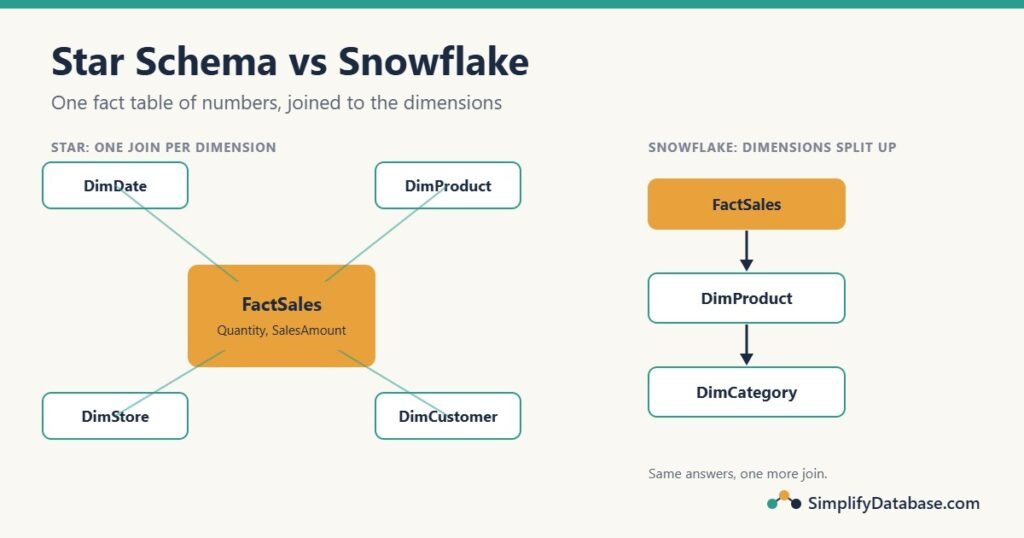
There’s also a DimDate table with one row per day: DateKey (like 20261001), the full date, the month name and number, and the year. Draw the fact table in the middle with a line to each dimension and you get the star that gives the design its name.
Querying a star schema
Every report question follows the same pattern: join the fact table to the dimensions you need, filter and group on dimension columns, and sum the fact columns. Sales by month and category:
SELECT d.Year, d.MonthName, p.Category,
       SUM(f.SalesAmount) AS Sales
FROM FactSales  AS f
JOIN DimDate    AS d ON d.DateKey    = f.DateKey
JOIN DimProduct AS p ON p.ProductKey = f.ProductKey
GROUP BY d.Year, d.MonthNumber, d.MonthName, p.Category
ORDER BY d.Year, d.MonthNumber, p.Category;| Year | MonthName | Category | Sales |
|---|---|---|---|
| 2026 | Sep | Accessories | 110.00 |
| 2026 | Sep | Computers | 1550.00 |
| 2026 | Oct | Accessories | 180.00 |
| 2026 | Oct | Computers | 2650.00 |
MonthNumber is in the GROUP BY so the months sort in calendar order instead of alphabetically. Units and sales by city:
SELECT s.City,
       SUM(f.Quantity)    AS Units,
       SUM(f.SalesAmount) AS Sales
FROM FactSales AS f
JOIN DimStore  AS s ON s.StoreKey = f.StoreKey
GROUP BY s.City
ORDER BY Sales DESC;| City | Units | Sales |
|---|---|---|
| Manama | 17 | 4330.00 |
| Muharraq | 13 | 160.00 |
Notice that each dimension is one join away from the fact table, whatever you ask. That’s what makes star schemas easy for people to query and for tools like Power BI to understand. If GROUP BY and joins need a refresh, see SQL GROUP BY Explained Simply and SQL JOINs Explained Simply.
The grain: decide it first
The grain is what one row of the fact table means. In our example it’s “one product sold in one store on one day”. Every design decision follows from it, and it’s the first thing to write down.
Two rules keep a fact table correct:
- Every row has the same grain. Don’t mix daily rows with monthly totals in one table, or every
SUMdouble-counts. - Choose the most detailed grain you can. You can always add daily rows up to months, but you can never split monthly totals back into days.
Why the dimensions are “denormalized” (and why that’s fine)
Look at DimProduct: the category name “Computers” is repeated for every computer product. In a day-to-day database you’d move categories to their own table to avoid that (see Database Normalization Explained Simply). In a star schema we don’t, on purpose:
- Dimensions are small, so the repeated text costs very little space.
- Each extra table is an extra join in every report.
- The warehouse is loaded by a controlled process (see ETL vs ELT Explained Simply), not by thousands of users typing, so the update problems normalization protects against mostly don’t apply.
Surrogate keys and the date dimension
Dimension tables use surrogate keys: simple integer keys (ProductKey = 1, 2, 3...) created by the warehouse, instead of the product codes from the source system. They keep joins fast, they survive when the source system changes its codes, and they let you keep history (an old and a new version of the same product, each with its own key).
The date dimension is in almost every star. It’s a table with one row per day for many years, with every way you might want to group a date already worked out: year, quarter, month name, week, day name, holiday flag, financial year. Its key is usually the date as a number, like 20261001, which is easy to read. You build it once with a script:
-- MySQL 8 / MariaDB: the first 5 days of 2026 (change the end date for more)
WITH RECURSIVE Dates AS (
    SELECT DATE('2026-01-01') AS d
    UNION ALL
    SELECT d + INTERVAL 1 DAY FROM Dates WHERE d < '2026-01-05'
)
SELECT CAST(DATE_FORMAT(d, '%Y%m%d') AS UNSIGNED) AS DateKey,
       d                     AS FullDate,
       YEAR(d)               AS Year,
       MONTH(d)              AS MonthNumber,
       DATE_FORMAT(d, '%b')  AS MonthName,
       DAYNAME(d)            AS DayName
FROM Dates;| DateKey | FullDate | Year | MonthNumber | MonthName | DayName |
|---|---|---|---|---|---|
| 20260101 | 2026-01-01 | 2026 | 1 | Jan | Thursday |
| 20260102 | 2026-01-02 | 2026 | 1 | Jan | Friday |
| 20260103 | 2026-01-03 | 2026 | 1 | Jan | Saturday |
In SQL Server, write WITH Dates AS (...) (no RECURSIVE), use DATEADD(DAY, 1, d), CONVERT(INT, FORMAT(d, 'yyyyMMdd')), DATENAME(MONTH, d) and DATENAME(WEEKDAY, d), and add OPTION (MAXRECURSION 0) when you generate more than 100 days. The date functions themselves are covered in SQL Date Functions Explained Simply.
The snowflake schema
A snowflake schema is a star schema whose dimensions are normalized into more tables. Instead of storing the category name in DimProduct, it stores a CategoryKey that points to a separate DimCategory table:
| ProductKey | ProductName | CategoryKey | Brand |
|---|---|---|---|
| 1 | Laptop 14 | 1 | Nova |
| 3 | Mouse | 2 | Clicky |
| CategoryKey | CategoryName |
|---|---|
| 1 | Computers |
| 2 | Accessories |
Drawn out, the dimensions branch into smaller tables like the arms of a snowflake. The same report now needs one more join:
SELECT d.Year, d.MonthName, c.CategoryName AS Category,
       SUM(f.SalesAmount) AS Sales
FROM FactSales    AS f
JOIN DimDate      AS d ON d.DateKey     = f.DateKey
JOIN DimProduct   AS p ON p.ProductKey  = f.ProductKey
JOIN DimCategory  AS c ON c.CategoryKey = p.CategoryKey
GROUP BY d.Year, d.MonthNumber, d.MonthName, c.CategoryName
ORDER BY d.Year, d.MonthNumber, c.CategoryName;
The result is exactly the same as the star version. Only the path to it is longer.
Star vs snowflake: which should you use?
| Star schema | Snowflake schema | |
|---|---|---|
| Dimensions | One flat table each | Split into several related tables |
| Joins per report | Fewer (one per dimension) | More (dimension to sub-dimension) |
| Storage | A little more repeated text | A little less |
| Easy to understand | Very | Less so |
| Reporting tools (Power BI etc.) | Work best with it | Work, but prefer star |
| Good for | Almost every warehouse | Very large dimensions, or a hierarchy shared by many dimensions |
The usual advice, and a good default: use a star schema, and only snowflake a dimension when there’s a clear reason, such as a huge customer dimension where the same geography table is shared by customers, stores and suppliers. Saving a few megabytes of repeated category names is not a good enough reason.
Common mistakes
- No clear grain, or rows of different grains in the same fact table. Totals come out wrong.
- Joining two fact tables directly (sales to stock, say). They have different grains, so the join multiplies rows. Summarize each fact to the same level first (for example, sales per product per month and stock per product per month), then join the two summaries.
- NULL foreign keys in the fact table. A sale with an unknown store disappears from every inner join. Add an “Unknown” row (often key
-1) to each dimension and point to it instead ofNULL. See NULL in SQL Explained Simply for whyNULLcauses this. - Using source system codes as keys. When the source renumbers products, the history breaks. Use surrogate keys.
- No date dimension, so every report repeats the same
YEAR(),MONTH()and financial-year logic, slightly differently each time. - Summing things that shouldn’t be summed. Quantities and amounts add up across any dimension. A bank balance or a stock level doesn’t add up across dates (Monday’s balance plus Tuesday’s balance isn’t meaningful), so report it for a single date or as an average.
Practice exercises
Using the tables above:
- Show total sales for each store and brand.
- Show the products sold in October 2026, with units sold, best seller first.
- In which city were the most units sold, and how many?
Answers:
-- 1: Arad/Clicky 160.00, City Centre/Nova 2000.00, Seef Mall/Clicky 130.00, Seef Mall/Nova 2200.00
SELECT s.StoreName, p.Brand, SUM(f.SalesAmount) AS Sales
FROM FactSales  AS f
JOIN DimStore   AS s ON s.StoreKey   = f.StoreKey
JOIN DimProduct AS p ON p.ProductKey = f.ProductKey
GROUP BY s.StoreName, p.Brand
ORDER BY s.StoreName, p.Brand;

-- 2: Mouse 10, Keyboard 4, Laptop 14 3, Laptop 16 2
SELECT p.ProductName, SUM(f.Quantity) AS Units
FROM FactSales  AS f
JOIN DimProduct AS p ON p.ProductKey = f.ProductKey
JOIN DimDate    AS d ON d.DateKey    = f.DateKey
WHERE d.Year = 2026 AND d.MonthNumber = 10
GROUP BY p.ProductName
ORDER BY Units DESC;

-- 3: Manama, 17 units (the "by city" query above, ordered by Units)
SELECT s.City, SUM(f.Quantity) AS Units
FROM FactSales AS f
JOIN DimStore  AS s ON s.StoreKey = f.StoreKey
GROUP BY s.City
ORDER BY Units DESC;
Summary
- A star schema has one fact table (numbers about events) joined to dimension tables (the when, what, where and who).
- Decide the grain of the fact table first, and keep it the same for every row.
- Dimensions are deliberately denormalized: fewer joins, simpler reports.
- Use surrogate keys and a date dimension.
- A snowflake schema normalizes the dimensions into sub-tables. It gives the same answers with more joins.
- Default to a star; snowflake only when you have a specific reason.
Related articles
- OLTP vs OLAP Explained Simply: why reporting databases are designed differently.
- ETL vs ELT Explained Simply: how data gets from the source system into the star.
- Data Lakes vs Data Warehouses vs Data Lakehouses: where the warehouse fits in the bigger picture.
- Database Normalization Explained Simply: the design rules a star schema relaxes.