
Every report, dashboard and data warehouse depends on a process most users never see: copying data out of the systems that run the business, cleaning it, and putting it somewhere it can be analyzed. That process is called ETL, or its newer cousin ELT.
The two names use the same three letters in a different order, and that order is the whole difference. This guide explains both in plain English, shows what each step looks like in real SQL, and helps you decide which one fits your project.
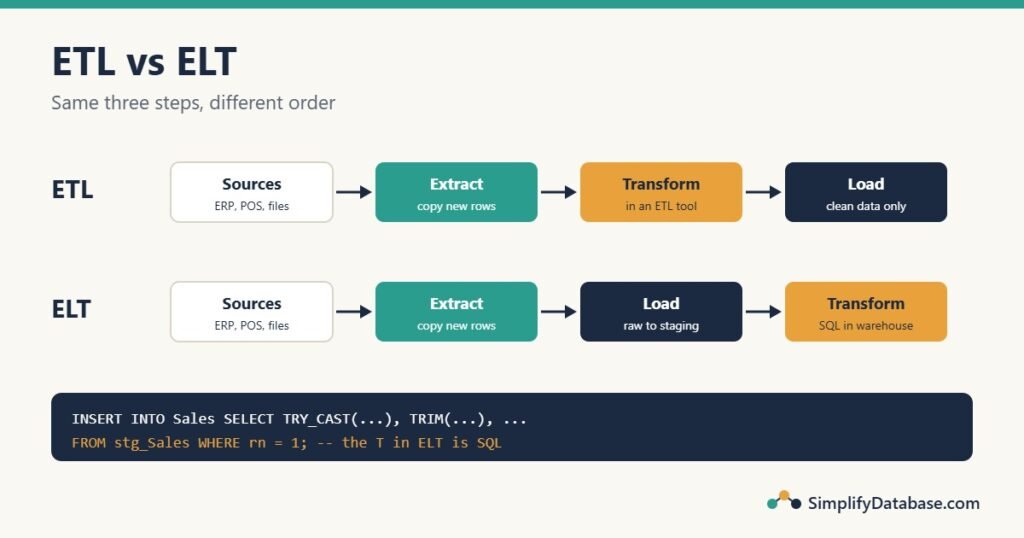
The three steps: Extract, Transform, Load
Imagine a shop that wants a nightly sales report that combines its point-of-sale system, its online store and its accounting system.
- Extract: copy the data out of each source system. Usually only what’s new or changed since the last run, as a database query, a CSV export or an API call.
- Transform: make it usable. Fix data types, trim spaces, remove duplicates, fill in or flag missing values, convert currencies, look up keys, and reshape it into the design the reports need (often a star schema, see Star Schema vs Snowflake Schema).
- Load: write the result into the destination, usually a data warehouse.
ETL and ELT both do all three steps. They differ in where and when the transform happens.
ETL: transform before loading
In ETL (Extract, Transform, Load), the data is cleaned and reshaped on the way, in a separate tool or server, and only the finished result is loaded into the warehouse.
Sources ──► Extract ──► Transform (ETL tool) ──► Load ──► WarehouseThis was the standard approach for decades, when warehouse storage and processing were expensive. Typical tools are SQL Server Integration Services (SSIS), Informatica and Talend, or a custom program (a Delphi or Python job that reads a file, cleans each row and inserts it).
Strengths: only clean data ever reaches the warehouse; sensitive columns can be removed or masked before they’re stored; the warehouse doesn’t need much processing power.
Weaknesses: the transform logic lives outside the database, often in a visual tool that’s harder to review and test; if you later need a column you didn’t load, you have to go back to the source; changes to the rules mean reloading everything.
ELT: load first, transform inside the warehouse
In ELT (Extract, Load, Transform), the raw data is loaded as it is into the warehouse or a data lake first, usually into staging tables. The transform then runs inside the warehouse, written in SQL.
Sources ──► Extract ──► Load (raw staging) ──► Transform (SQL in the warehouse) ──► Clean tablesELT became popular with cloud warehouses (Snowflake, Google BigQuery, Amazon Redshift, Azure Synapse, Microsoft Fabric) where storage is cheap and the warehouse can process huge amounts of data quickly. Tools like dbt manage the SQL transforms; tools like Azure Data Factory, Fivetran or Airflow move and schedule the data.
Strengths: the raw data is kept, so you can rebuild or add to the clean tables any time without going back to the source; the transforms are plain SQL that anyone on the team can read, test and version; the warehouse’s power is used for the heavy work.
Weaknesses: raw, messy (and possibly sensitive) data is stored in the warehouse, so access must be controlled; storage and processing costs grow; without discipline, the staging area turns into a dumping ground.
A transform in SQL, step by step
Here’s the core of an ELT job. Last night’s sales file was loaded, untouched, into a staging table where every column is text:
| OrderID | OrderDate | CustomerName | Amount |
|---|---|---|---|
| 1001 | 2026-10-01 | Ali Hassan | 250.00 |
| 1002 | 2026-10-01 | sara ahmed | 90 |
| 1002 | 2026-10-01 | sara ahmed | 90 |
| 1003 | 2026-10-02 | Omar Khalid | (empty) |
| 1004 | 2026-10-02 | Lina Saleh | 1,200.50 |
The problems are typical: extra spaces, a duplicated row, an empty amount, and a thousands separator. The transform fixes them in one INSERT ... SELECT (SQL Server syntax):
WITH Cleaned AS (
    SELECT TRY_CAST(OrderID AS INT)                           AS OrderID,
           TRY_CAST(OrderDate AS DATE)                        AS OrderDate,
           TRIM(CustomerName)                                 AS CustomerName,
           TRY_CAST(NULLIF(REPLACE(Amount, ',', ''), '')
                    AS DECIMAL(10,2))                         AS Amount,
           ROW_NUMBER() OVER (PARTITION BY OrderID
                              ORDER BY LoadedAt DESC)         AS rn
    FROM stg_Sales
)
INSERT INTO Sales (OrderID, OrderDate, CustomerName, Amount)
SELECT OrderID, OrderDate, CustomerName, Amount
FROM Cleaned
WHERE rn = 1;| OrderID | OrderDate | CustomerName | Amount |
|---|---|---|---|
| 1001 | 2026-10-01 | Ali Hassan | 250.00 |
| 1002 | 2026-10-01 | sara ahmed | 90.00 |
| 1003 | 2026-10-02 | Omar Khalid | NULL |
| 1004 | 2026-10-02 | Lina Saleh | 1200.50 |
What each part does:
TRIMremoves the extra spaces (SQL Server 2017 and later; older versions useLTRIM(RTRIM(...)); see SQL String Functions Explained Simply).REPLACE(Amount, ',', '')removes the thousands separator,NULLIF(..., '')turns the empty text intoNULL, andTRY_CASTconverts the text to a number, returningNULLinstead of failing on bad values. (TRY_CASTis SQL Server; in MySQL useCAST.)ROW_NUMBER() ... WHERE rn = 1keeps one copy of each order, the most recently loaded one. It’s the same pattern as Top N per Group in SQL Server.
Order 1003 now has a NULL amount, which is honest: the source didn’t send one. A good job also writes rows like this to an “errors” table or report so someone fixes them at the source, instead of silently loading a zero. NULL in SQL Explained Simply explains why NULL and zero must not be mixed up.
In a real ETL tool, the same cleaning happens in the tool before the insert. The logic is identical; only the place it runs changes.
Full loads vs incremental loads
A full load empties the target table and reloads everything each time. It’s simple and reliable for small tables (a few thousand products).
An incremental load only moves what’s new or changed since the last run, which is essential for big tables. The usual technique is a watermark: remember the highest ModifiedDate (or ID) loaded last time, and next time extract only rows above it.
SELECT *
FROM Orders
WHERE ModifiedDate > @LastLoadedModifiedDate;
Changed rows are then inserted or updated in the target, often with a MERGE (upsert) statement. Two things make this work: the source table needs a reliable “last modified” column (set by the application or a trigger, see SQL Triggers Explained Simply), and deleted rows need special handling, because a deleted row doesn’t show up as “changed”.
ETL vs ELT side by side
| ETL | ELT | |
|---|---|---|
| Order | Extract → Transform → Load | Extract → Load → Transform |
| Where the transform runs | In a separate tool or server | Inside the warehouse, in SQL |
| What the warehouse stores | Only clean data | Raw data plus clean data |
| Typical era and platform | On-premises warehouses, SQL Server + SSIS | Cloud warehouses and data lakes |
| Adding a new column later | Change the job, re-extract from source | Usually rebuild from the raw data already loaded |
| Sensitive data | Can be removed before storing | Stored raw, so needs access control |
| Typical tools | SSIS, Informatica, Talend, custom code | dbt, Data Factory, Fivetran, Airflow + SQL |
Which one should you use?
Choose ELT when you have a cloud warehouse or a data lake, data volumes are large or growing, and your team is comfortable with SQL. It’s the default for most new projects today.
Choose ETL when the destination is a traditional on-premises database with limited power, when sensitive data must be cleaned or masked before it’s stored anywhere, or when you already have reliable SSIS (or similar) packages that work.
Many real systems are a mix: a tool extracts and does a light clean-up, loads into staging tables, and SQL does the rest. The names matter less than the habits: keep a staging area, make every job safe to run twice, log what it did, and report bad rows instead of hiding them.
Common mistakes
- No staging step. Loading straight from the source into the final tables means one bad file can damage good data. Load into staging, check it, then transform.
- Jobs that can’t be re-run. If a job fails halfway and running it again creates duplicates, every failure needs manual cleanup. Design each step so running it twice gives the same result.
- Silent fixes. Turning bad values into zeros or blanks hides the problem. Keep
NULL, log the row, and fix it at the source. - No logging. Record when each job ran, how many rows it read and wrote, and whether it failed. “Is yesterday’s data in yet?” should take seconds to answer.
- Running heavy extracts on the live system during business hours. Big extract queries can slow down or block the people using the system (see OLTP vs OLAP Explained Simply).
- Ignoring time zones and dates. Decide whether dates are stored in local time or UTC, and stick to it across every source.
Summary
- ETL and ELT both Extract, Transform and Load data from source systems into an analytical store.
- ETL transforms before loading, in a separate tool. Only clean data reaches the warehouse.
- ELT loads raw data first and transforms it inside the warehouse with SQL. It’s the common choice for cloud warehouses and data lakes.
- The transform step is mostly SQL you already know:
CAST,TRIM,REPLACE,NULLIF,ROW_NUMBERandINSERT ... SELECT. - Use incremental loads for big tables, a staging area for safety, and logging for peace of mind.
Related articles
- OLTP vs OLAP Explained Simply: the two kinds of system ETL connects.
- Star Schema vs Snowflake Schema: the design most warehouses load into.
- Data Lakes vs Data Warehouses vs Data Lakehouses: where ELT usually loads the raw data.
- SQL INSERT, UPDATE and DELETE Explained Simply: the statements every load step is built on.