
Every data analysis project starts the same way. Someone sends you a CSV export or gives you access to a table, and before you can answer a single question you notice the problems: extra spaces, the same city spelled three ways, dates in two formats, numbers stored as text, and customers who appear twice.
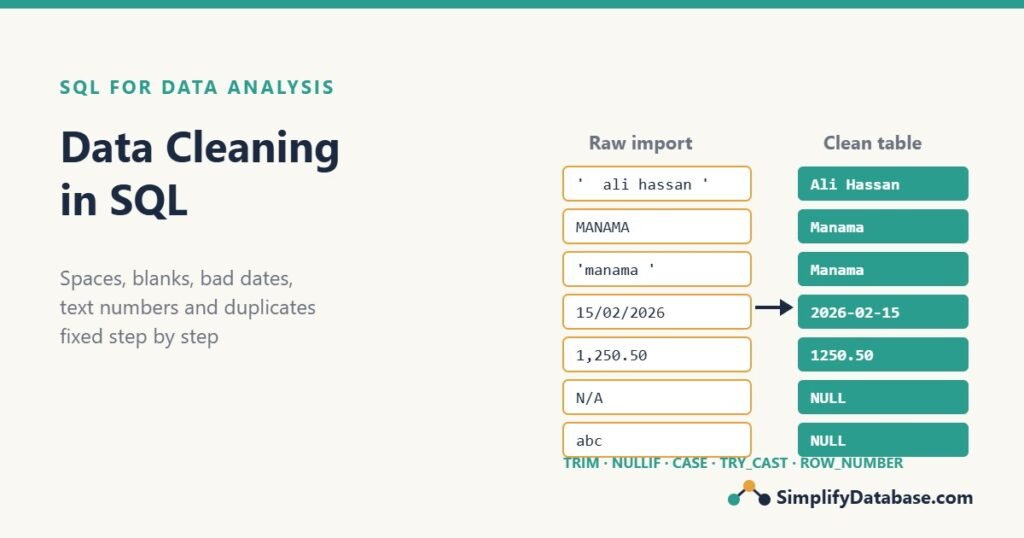
Analysts often say that cleaning takes most of the time on a project. The good news is that you can do almost all of it in SQL, with functions you may already know. This guide walks through a real cleaning job step by step, from a messy import table to a clean one you can trust.
The messy table
Imagine a small online shop exported its customer list from an old system and loaded it into a staging table. Every column was imported as text, because that’s the safest way to load a CSV without errors.
CREATE TABLE customers_raw (
    id           INT,
    full_name    VARCHAR(100),
    email        VARCHAR(100),
    city         VARCHAR(50),
    phone        VARCHAR(30),
    signup_date  VARCHAR(20),
    total_spent  VARCHAR(20)
);
Here is what’s inside:
| id | full_name | city | phone | signup_date | total_spent | |
|---|---|---|---|---|---|---|
| 1 | ' ali hassan ' | Ali@Example.com | Manama | +973 3300 1111 | 2026-01-15 | 1,250.50 |
| 2 | Sara Ahmed | 'sara@example.com ' | 'manama ' | 33002222 | 15/02/2026 | 980 |
| 3 | Ali Hassan | ali@example.com | MANAMA | +97333001111 | 2026-01-15 | 1250.5 |
| 4 | Omar Khalid | (blank) | Muharraq | N/A | 2026-03-01 | (blank) |
| 5 | Lina Saleh | lina@example | Riffa | NULL | 2026-13-01 | abc |
| 6 | Noor Ali | noor@example.com | ' Riffa' | 3300-4444 | NULL | 300.00 |
| 7 | Huda Isa | huda@example.com | Isa Town | +973-3300-5555 | 01/03/2026 | 75 |
Only 7 rows, but almost every common data problem is here. Let’s fix them one at a time.
Rule 1: never clean the raw table in place
Keep the raw import exactly as it arrived, and write the cleaned result into a new table (or a view). If you make a mistake, you can run the cleaning again. If you UPDATE the raw data and get it wrong, the original values are gone.
The pattern for this whole article is: raw table → cleaning query → clean table. The same idea is the “T” in ETL vs ELT.
Step 1: profile the data before you change anything
Before fixing anything, measure how bad it is. A quick profile query tells you how many values are missing, blank or duplicated:
SELECT COUNT(*)                                       AS total_rows,
       COUNT(NULLIF(TRIM(email), ''))                 AS has_email,
       COUNT(DISTINCT NULLIF(LOWER(TRIM(email)), '')) AS distinct_emails,
       SUM(CASE WHEN signup_date IS NULL THEN 1 ELSE 0 END) AS no_date
FROM customers_raw;| total_rows | has_email | distinct_emails | no_date |
|---|---|---|---|
| 7 | 6 | 5 | 1 |
Six customers have an email, but only five distinct emails exist. That already tells you there’s at least one duplicate customer. COUNT(column) skips NULLs, which is why it’s so useful here (see SQL DISTINCT and Column Aliases for COUNT(*) vs COUNT(col) vs COUNT(DISTINCT col)).
Next, look at the different spellings in a text column:
-- SQL Server: a case-sensitive collation shows every variant
SELECT city COLLATE Latin1_General_CS_AS AS city, COUNT(*) AS rows_count
FROM customers_raw
GROUP BY city COLLATE Latin1_General_CS_AS;

-- MySQL / MariaDB
SELECT city, COUNT(*) AS rows_count
FROM customers_raw
GROUP BY BINARY city;| city | rows_count |
|---|---|
' Riffa' | 1 |
| Isa Town | 1 |
'manama ' | 1 |
| Manama | 1 |
| MANAMA | 1 |
| Muharraq | 1 |
| Riffa | 1 |
Why the special collation? Most databases compare text case-insensitively by default and ignore trailing spaces, so a plain GROUP BY city would put Manama, MANAMA and 'manama ' in one group and hide the problem. They look equal to SQL, but they’ll still look different in a report, a CSV export or another tool.
Step 2: trim spaces and fix capitalization
Extra spaces are the most common problem in imported data. TRIM removes them from both ends (LTRIM and RTRIM remove them from one side):
SELECT TRIM(full_name)       AS full_name,
       LOWER(TRIM(email))    AS email,
       UPPER(TRIM(city))     AS city_upper
FROM customers_raw;
Emails should always be stored in lowercase, because Ali@Example.com and ali@example.com are the same mailbox. For names and cities, mixed case is fine, but it has to be consistent. All the text functions used here are covered in SQL String Functions Explained Simply.
Step 3: turn blanks and placeholders into NULL
An empty string '' is not the same as NULL. COUNT(email) counts blanks as real values, and WHERE email IS NULL doesn’t find them. The same goes for placeholders like N/A, - or none that someone typed into a form.
Convert them all to NULL so “missing” means one thing:
SELECT NULLIF(TRIM(email), '') AS email,
       CASE WHEN TRIM(phone) IN ('', 'N/A', '-', 'none') THEN NULL
            ELSE phone
       END AS phone
FROM customers_raw;
NULLIF(a, b) returns NULL when the two values are equal, otherwise it returns a. It’s the shortest way to turn a blank into a NULL. For more on how NULL behaves, see NULL in SQL Explained Simply.
Step 4: standardize inconsistent values
Once spaces and case are handled, map each variant to one official value. For a short list, a CASE expression is enough:
SELECT CASE UPPER(TRIM(city))
           WHEN 'MANAMA'   THEN 'Manama'
           WHEN 'MUHARRAQ' THEN 'Muharraq'
           WHEN 'RIFFA'    THEN 'Riffa'
           WHEN 'ISA TOWN' THEN 'Isa Town'
           ELSE TRIM(city)
       END AS city
FROM customers_raw;
Comparing on UPPER(TRIM(city)) means one line catches every spelling. The ELSE keeps any city you haven’t mapped yet instead of turning it into NULL.
When the list is long (countries, product categories, department codes), put the mapping in a small lookup table instead and join to it. It’s easier to maintain, and a business user can update it without touching your query. See The SQL CASE Expression Explained Simply for more patterns.
Step 5: convert numbers stored as text
total_spent contains 1,250.50, 980, a blank and abc. A plain CAST fails on the whole query as soon as it hits one bad value. In SQL Server, TRY_CAST returns NULL instead of an error:
-- SQL Server
SELECT id,
       total_spent,
       TRY_CAST(REPLACE(total_spent, ',', '') AS DECIMAL(10,2)) AS total_spent_clean
FROM customers_raw;
Remove the thousands separator first with REPLACE, then convert. Then find the values that didn’t convert, so you can decide what to do with them:
-- SQL Server: values that are not blank but still failed to convert
SELECT id, total_spent
FROM customers_raw
WHERE NULLIF(TRIM(total_spent), '') IS NOT NULL
AND TRY_CAST(REPLACE(total_spent, ',', '') AS DECIMAL(10,2)) IS NULL;| id | total_spent |
|---|---|
| 5 | abc |
MySQL has no TRY_CAST, so check the format with a regular expression before converting:
-- MySQL / MariaDB
SELECT id,
       CASE WHEN REPLACE(TRIM(total_spent), ',', '') REGEXP '^-?[0-9]+(\\.[0-9]+)?$'
            THEN CAST(REPLACE(TRIM(total_spent), ',', '') AS DECIMAL(10,2))
       END AS total_spent_clean
FROM customers_raw;
Watch out for countries that use a comma as the decimal separator (1.250,50). If your data mixes both styles, you have to know which source each row came from before you can convert it safely.
Step 6: fix dates in mixed formats
The signup_date column has 2026-01-15 (year-month-day), 15/02/2026 (day/month/year), an impossible 2026-13-01 and a NULL. In SQL Server, TRY_CONVERT with a style number reads a specific format and returns NULL when the text doesn’t fit:
-- SQL Server: style 23 = yyyy-mm-dd, style 103 = dd/mm/yyyy
SELECT id,
       signup_date,
       COALESCE(TRY_CONVERT(DATE, signup_date, 23),
                TRY_CONVERT(DATE, signup_date, 103)) AS signup_date_clean
FROM customers_raw;

-- MySQL / MariaDB
SELECT id,
       signup_date,
       COALESCE(STR_TO_DATE(signup_date, '%Y-%m-%d'),
                STR_TO_DATE(signup_date, '%d/%m/%Y')) AS signup_date_clean
FROM customers_raw;| id | signup_date | signup_date_clean |
|---|---|---|
| 1 | 2026-01-15 | 2026-01-15 |
| 2 | 15/02/2026 | 2026-02-15 |
| 3 | 2026-01-15 | 2026-01-15 |
| 4 | 2026-03-01 | 2026-03-01 |
| 5 | 2026-13-01 | NULL |
| 6 | NULL | NULL |
| 7 | 01/03/2026 | 2026-03-01 |
COALESCE tries the first format, and if that gives NULL it tries the second. Month 13 doesn’t exist, so row 5 stays NULL.
The real danger is row 7. Is 01/03/2026 the 1st of March or January 3rd? SQL can’t know. Ask where the data came from: a system used in Bahrain or the UK almost certainly means day/month, a US system means month/day. Never guess silently. Write the rule down and apply it to the whole source. For more date work, see SQL Date Functions Explained Simply.
Step 7: clean phone numbers
Phone numbers arrive with spaces, dashes, brackets and country codes. Strip the extra characters, then keep the part you need. Here every number is a Bahrain mobile, so the last 8 digits are the local number:
SELECT id,
       RIGHT(REPLACE(REPLACE(REPLACE(phone, ' ', ''), '-', ''), '+', ''), 8) AS phone_clean
FROM customers_raw
WHERE phone IS NOT NULL
AND TRIM(phone) NOT IN ('', 'N/A', '-');| id | phone_clean |
|---|---|
| 1 | 33001111 |
| 2 | 33002222 |
| 3 | 33001111 |
| 6 | 33004444 |
| 7 | 33005555 |
In SQL Server 2017 and later, TRANSLATE(phone, ' -+()', ' ') turns all those characters into spaces in one call, and a single REPLACE then removes the spaces. Rows 1 and 3 now have the same phone number, another sign they’re the same customer.
Step 8: find invalid values
Some values are present but clearly wrong. A simple LIKE pattern catches emails without an @ or a dot in the domain:
SELECT id, email
FROM customers_raw
WHERE NULLIF(TRIM(email), '') IS NOT NULL
AND TRIM(email) NOT LIKE '%_@_%._%';| id | |
|---|---|
| 5 | lina@example |
This isn’t full email validation, but it catches the typical typos. Don’t delete these rows. Keep them, and report them to whoever owns the source system so it gets fixed there. If you delete rows during cleaning, your totals will quietly stop matching the source. Pattern matching with LIKE is explained in SQL LIKE, IN and BETWEEN.
Step 9: remove duplicates
After cleaning, rows 1 and 3 are clearly the same person: same email, same phone, same signup date. To keep one row per customer, number the rows inside each email with ROW_NUMBER() and keep row 1:
WITH ranked AS (
    SELECT id,
           LOWER(TRIM(email)) AS email,
           ROW_NUMBER() OVER (PARTITION BY LOWER(TRIM(email))
                              ORDER BY id) AS rn
    FROM customers_raw
    WHERE NULLIF(TRIM(email), '') IS NOT NULL
)
SELECT * FROM ranked WHERE rn > 1;| id | rn | |
|---|---|---|
| 3 | ali@example.com | 2 |
Row 3 is the duplicate. The ORDER BY inside OVER decides which row survives. Here the oldest id wins, but you could keep the most recent update or the most complete row instead. Rows with no email can’t be compared this way, so don’t put them all into one “blank” group, or you’ll delete real customers. This is the same technique as Top N per Group in SQL Server.
Putting it all together
Now combine every step into one query that fills a clean table with proper data types:
CREATE TABLE customers_clean (
    customer_id  INT,
    full_name    VARCHAR(100),
    email        VARCHAR(100),
    city         VARCHAR(50),
    phone        CHAR(8),
    signup_date  DATE,
    total_spent  DECIMAL(10,2)
);

WITH cleaned AS (
    SELECT id,
           TRIM(full_name)                AS full_name,
           NULLIF(LOWER(TRIM(email)), '') AS email,
           CASE UPPER(TRIM(city))
                WHEN 'MANAMA'   THEN 'Manama'
                WHEN 'MUHARRAQ' THEN 'Muharraq'
                WHEN 'RIFFA'    THEN 'Riffa'
                WHEN 'ISA TOWN' THEN 'Isa Town'
                ELSE TRIM(city)
           END                            AS city,
           CASE WHEN phone IS NULL OR TRIM(phone) IN ('', 'N/A', '-') THEN NULL
                ELSE RIGHT(REPLACE(REPLACE(REPLACE(phone, ' ', ''), '-', ''), '+', ''), 8)
           END                            AS phone,
           COALESCE(TRY_CONVERT(DATE, signup_date, 23),
                    TRY_CONVERT(DATE, signup_date, 103)) AS signup_date,
           TRY_CAST(REPLACE(total_spent, ',', '') AS DECIMAL(10,2)) AS total_spent
    FROM customers_raw
),
ranked AS (
    SELECT c.*,
           ROW_NUMBER() OVER (PARTITION BY COALESCE(email, CONCAT('no-email-', id))
                              ORDER BY id) AS rn
    FROM cleaned AS c
)
INSERT INTO customers_clean
SELECT id, full_name, email, city, phone, signup_date, total_spent
FROM ranked
WHERE rn = 1;
The COALESCE(email, CONCAT('no-email-', id)) trick gives each customer without an email its own group, so they’re never treated as duplicates of each other. In MySQL, put the INSERT INTO line before WITH, and swap TRY_CONVERT/TRY_CAST for the MySQL versions from steps 5 and 6.
The result:
| customer_id | full_name | city | phone | signup_date | total_spent | |
|---|---|---|---|---|---|---|
| 1 | ali hassan | ali@example.com | Manama | 33001111 | 2026-01-15 | 1250.50 |
| 2 | Sara Ahmed | sara@example.com | Manama | 33002222 | 2026-02-15 | 980.00 |
| 4 | Omar Khalid | NULL | Muharraq | NULL | 2026-03-01 | NULL |
| 5 | Lina Saleh | lina@example | Riffa | NULL | NULL | NULL |
| 6 | Noor Ali | noor@example.com | Riffa | 33004444 | NULL | 300.00 |
| 7 | Huda Isa | huda@example.com | Isa Town | 33005555 | 2026-03-01 | 75.00 |
Six customers, one value per meaning, and real DATE and DECIMAL columns you can sort, sum and filter. Notice that Ali’s surviving row still has the lowercase name from row 1. If you’d rather keep the best-looking version, change the ORDER BY in the window, or fix names in a separate step.
Step 10: check the result
Finish with a quick check that compares before and after, so nobody has to take your word for it:
SELECT (SELECT COUNT(*) FROM customers_raw)   AS raw_rows,
       (SELECT COUNT(*) FROM customers_clean) AS clean_rows,
       (SELECT COUNT(*) FROM customers_clean
         WHERE signup_date IS NULL)           AS missing_dates,
       (SELECT COUNT(*) FROM customers_clean
         WHERE total_spent IS NULL)           AS missing_amounts;
7 raw rows, 6 clean rows (one duplicate removed), 2 missing dates and 2 missing amounts. Those numbers belong in a short note to whoever asked for the analysis: “Row counts went from 7 to 6 because one customer was duplicated. Two signup dates and two amounts were missing or invalid in the source.”
Common mistakes
- Cleaning the raw table with UPDATE. Keep the original and write to a new table or view.
- Using CAST instead of TRY_CAST. One bad value makes the whole query fail. Convert safely and then list the failures.
- Guessing date formats.
01/03/2026means different dates in different countries. Find out, then apply one rule per source. - Treating blanks and NULLs differently. Turn blanks and placeholders into NULL early, so every later query counts them the same way.
- Deleting “bad” rows. Flag them and report them. Silent deletes make your totals disagree with the source.
- Grouping all missing emails together when removing duplicates, which deletes real customers.
Practice exercises
Use the customers_raw table above.
1. Write a query that shows each city after cleaning (trimmed, standard spelling) and how many customers live there.
2. List the customers whose total_spent is blank, NULL or not a valid number.
3. Count how many raw rows have a phone number that becomes exactly 8 digits after cleaning.
Answers
1.
SELECT CASE UPPER(TRIM(city))
            WHEN 'MANAMA'   THEN 'Manama'
            WHEN 'MUHARRAQ' THEN 'Muharraq'
            WHEN 'RIFFA'    THEN 'Riffa'
            WHEN 'ISA TOWN' THEN 'Isa Town'
            ELSE TRIM(city)
       END AS city,
       COUNT(*) AS customers
FROM customers_raw
GROUP BY CASE UPPER(TRIM(city))
            WHEN 'MANAMA'   THEN 'Manama'
            WHEN 'MUHARRAQ' THEN 'Muharraq'
            WHEN 'RIFFA'    THEN 'Riffa'
            WHEN 'ISA TOWN' THEN 'Isa Town'
            ELSE TRIM(city)
         END;
Manama 3, Riffa 2, Muharraq 1, Isa Town 1 (before removing the duplicate).
2.
-- SQL Server
SELECT id, full_name, total_spent
FROM customers_raw
WHERE TRY_CAST(REPLACE(total_spent, ',', '') AS DECIMAL(10,2)) IS NULL;
Rows 4 (blank) and 5 (abc). TRY_CAST of a blank string to DECIMAL returns NULL, so both are caught.
3.
SELECT COUNT(*) AS valid_phones
FROM customers_raw
WHERE LEN(RIGHT(REPLACE(REPLACE(REPLACE(phone, ' ', ''), '-', ''), '+', ''), 8)) = 8
  AND phone NOT IN ('N/A', '-');
The answer is 5. In MySQL, use CHAR_LENGTH instead of LEN.
Summary
- Keep the raw data, and write cleaned data to a new table or view.
- Profile first with
COUNT,COUNT(DISTINCT)andGROUP BY, using a case-sensitive comparison to see every spelling. TRIM,LOWER/UPPER,NULLIFandCASEfix most text problems.TRY_CASTandTRY_CONVERT(orREGEXPandSTR_TO_DATEin MySQL) convert text to numbers and dates without crashing.ROW_NUMBER()removes duplicates once the matching columns are clean.- Finish with a before-and-after check, and report what you couldn’t fix.
This is the first article in our SQL for Data Analysis series. Next, we’ll use clean data to calculate averages, medians and percentiles in SQL.
Related articles
- ETL vs ELT Explained Simply: where data cleaning fits in a data pipeline.
- SQL String Functions Explained Simply: TRIM, REPLACE, SUBSTRING and friends in more detail.
- Top N per Group in SQL Server: the ROW_NUMBER pattern used to remove duplicates.
- A Beginner’s Guide to the Data Science Lifecycle: where cleaning sits in a full analysis project.