
Imagine you transfer 100 dinars from your account to a friend’s. Behind the scenes, the bank’s database has to do two things: take 100 out of your account and add 100 to your friend’s. Now imagine the server crashes after the first step but before the second. Your money has left, and it never arrived anywhere.
That nightmare is exactly what transactions prevent. They’re one of the most important ideas in relational databases, and once you understand them, a lot of database behaviour suddenly makes sense.
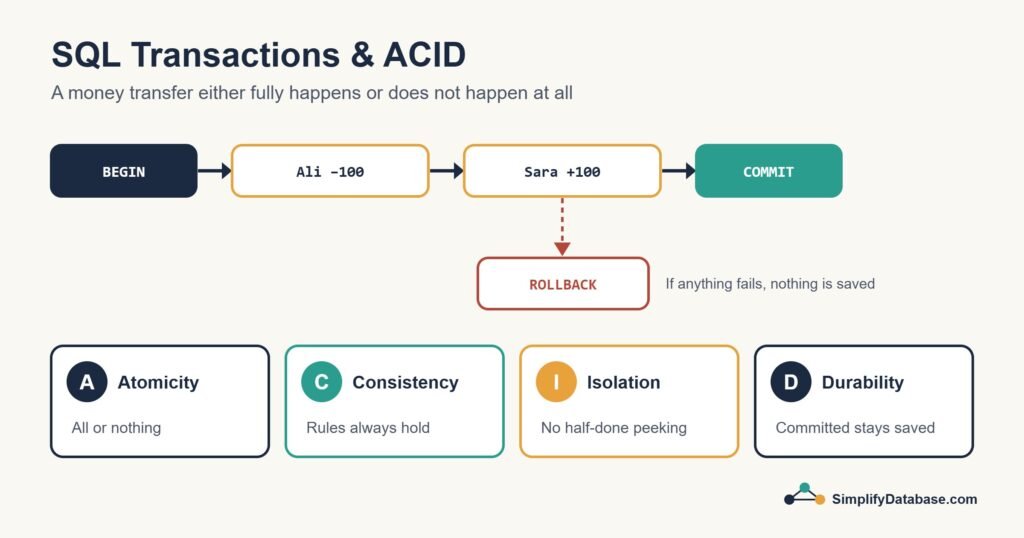
What Is a Transaction?
A transaction is a group of SQL statements that the database treats as one single unit of work. Either all of them succeed and are saved together, or none of them are. There’s no in-between.
Here’s the bank transfer written as a transaction:
BEGIN TRANSACTION;

UPDATE accounts SET balance = balance - 100 WHERE account_id = 1;  -- Ali
UPDATE accounts SET balance = balance + 100 WHERE account_id = 2;  -- Sara

COMMIT;
Until COMMIT runs, the changes aren’t permanent. If something goes wrong in the middle, you (or the database) can undo everything with ROLLBACK.
The Three Commands You Need
| Command | What it does |
|---|---|
BEGIN TRANSACTION (or START TRANSACTION, BEGIN) | Starts a new transaction |
COMMIT | Saves every change made since the transaction started |
ROLLBACK | Throws away every change made since the transaction started |
The exact keyword for starting one varies a little. SQL Server uses BEGIN TRANSACTION (or BEGIN TRAN), MySQL uses START TRANSACTION, and PostgreSQL accepts BEGIN.
A rollback in action
BEGIN TRANSACTION;

DELETE FROM orders WHERE order_date < '2020-01-01';
-- Message: 48,210 rows affected  (you expected about 200!)

ROLLBACK;   -- phew, nothing was deleted
This is the habit I mentioned in INSERT, UPDATE and DELETE Explained. Wrap risky changes in a transaction, check the “rows affected” count, and only commit when you’re happy.
ACID: The Four Promises of a Transaction
Database people describe what transactions guarantee with the word ACID. Each letter is one promise.
A for Atomicity: all or nothing
The transaction is “atomic”, meaning it can’t be split. In our example, the money can’t leave Ali’s account without arriving in Sara’s. If the second update fails, the transaction is rolled back and the first update is undone too. One catch: in some databases (SQL Server included) a failed statement doesn’t always cancel the whole transaction by itself, which is why you add error handling, as shown further down.
C for Consistency: the rules always hold
A transaction moves the database from one valid state to another. Every rule you’ve defined, like primary keys, foreign keys, NOT NULL and CHECK constraints, must be true at the end. If our table had CHECK (balance >= 0) and Ali only had 50, the update would be rejected, and with proper error handling the whole transfer rolls back instead of leaving him with a negative balance.
I for Isolation: no peeking at half-done work
When many people use the database at the same time, isolation keeps their transactions from stepping on each other. Someone running a report shouldn’t see Ali’s balance already reduced but Sara’s not yet increased. To other users, the transfer appears to happen in one instant.
D for Durability: committed means saved
Once the database says “committed”, the change survives power cuts, crashes and restarts. Databases do this by writing changes to a log on disk before confirming the commit.
| Letter | Property | Plain English | Bank example |
|---|---|---|---|
| A | Atomicity | All steps or none | Money can’t vanish halfway |
| C | Consistency | Rules are never broken | Balance can’t go below zero |
| I | Isolation | Transactions don’t interfere | Reports never see a half-finished transfer |
| D | Durability | Committed data survives crashes | The transfer is still there after a reboot |
Autocommit: Why You Didn’t Notice Transactions Before
If you’ve run UPDATE statements without ever typing BEGIN, you might wonder where the transactions were. Most databases run in autocommit mode by default: every single statement is its own little transaction that commits automatically when it finishes.
That’s convenient, but it means a mistaken UPDATE is saved the instant it runs. You need an explicit BEGIN to group statements or to get the chance to roll back.
Handling Errors Properly
In real code you want the database to roll back automatically when something fails. In SQL Server, a common pattern looks like this:
BEGIN TRY
    BEGIN TRANSACTION;

    UPDATE accounts SET balance = balance - 100 WHERE account_id = 1;
    UPDATE accounts SET balance = balance + 100 WHERE account_id = 2;

    COMMIT;
END TRY
BEGIN CATCH
    IF @@TRANCOUNT > 0 ROLLBACK;
    THROW;   -- pass the error back to the application
END CATCH;
Application code works the same way. In Delphi with FireDAC, Laravel, Python or anything else, you start a transaction, run your statements, commit if everything worked and roll back in the error handler.
Isolation Levels (A Short Introduction)
Full isolation is expensive, so databases let you choose how strict to be. These are the standard levels, from least to most strict:
| Level | What it allows | Typical use |
|---|---|---|
| Read Uncommitted | Can see other people’s uncommitted changes (“dirty reads”) | Rough reports where speed matters more than accuracy |
| Read Committed | Only sees committed data | The default in SQL Server and PostgreSQL |
| Repeatable Read | Rows you’ve read won’t change under you | The default in MySQL (InnoDB) |
| Serializable | Behaves as if transactions ran one after another | Critical financial logic |
As a beginner, the default is almost always fine. Just know that the setting exists, because it explains a lot of locking and “why did my query wait?” questions later on.
Tips for Using Transactions Well
- Keep them short. A transaction holds locks, and other users may have to wait until it finishes. Never leave one open while waiting for a user to click something.
- Always end them. Every
BEGINneeds aCOMMITorROLLBACK. A forgotten open transaction can block a whole system. - Group only what belongs together. The two sides of a transfer belong together. A transfer and an unrelated report don’t.
- Watch long transactions in older apps. In my experience with Delphi and SQL Server systems, a transaction left open during a long loop is a common cause of timeouts. I wrote about this in fixing query timeouts in Delphi applications.
Conclusion
A transaction bundles several changes into one all-or-nothing unit. BEGIN starts it, COMMIT saves it and ROLLBACK undoes it. ACID describes the promises behind it: atomic, consistent, isolated and durable.
Next time you’re about to run an important UPDATE or DELETE, type BEGIN TRANSACTION first. Future you will be grateful.