
Your application probably checks the data people type in. The email field must not be empty, the age must be a positive number, the username must not already be taken. That’s good. But what happens when someone imports a spreadsheet directly, a second app writes to the same table, or a developer runs a quick fix by hand? Application checks don’t help then.
Constraints are rules you put on the table itself. The database checks them on every insert and update, no matter where the data comes from. They’re your last line of defence for clean data, and they cost almost nothing to add.
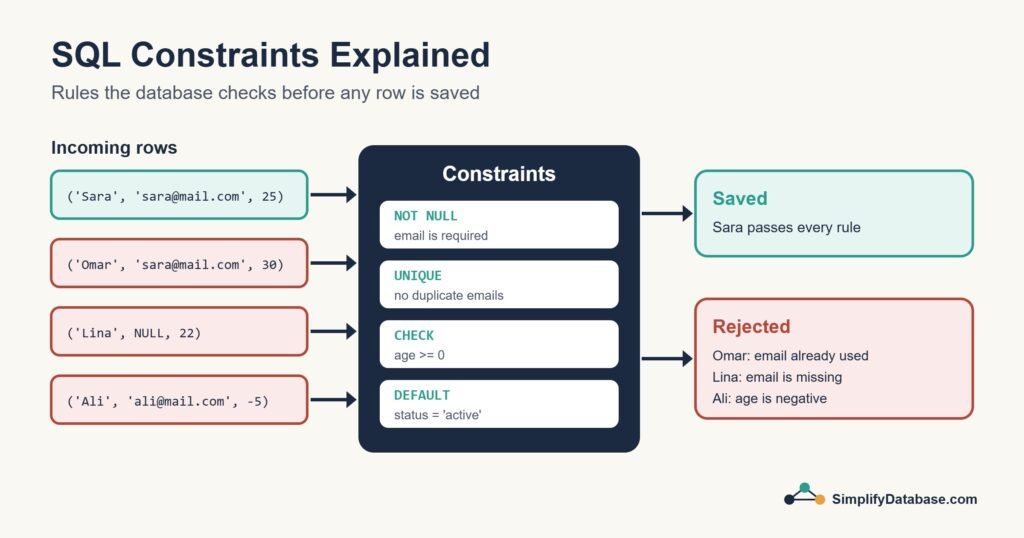
The Main Types of Constraint
| Constraint | What it guarantees | Example |
|---|---|---|
NOT NULL | The column always has a value | Every customer must have an email |
UNIQUE | No two rows share the same value | Two customers can’t use the same email |
CHECK | A value meets a condition you define | Age must be 0 or more |
DEFAULT | A value is filled in when none is given | New accounts start as ‘active’ |
PRIMARY KEY | Unique and not null, identifies each row | customer_id |
FOREIGN KEY | A value must exist in another table | An order’s customer_id must be a real customer |
Primary and foreign keys have their own article (Primary Keys vs. Foreign Keys), so here I’ll focus on the other four.
A Table With Constraints
CREATE TABLE customers (
    customer_id INT PRIMARY KEY,
    name        VARCHAR(100) NOT NULL,
    email       VARCHAR(150) NOT NULL UNIQUE,
    age         INT CHECK (age >= 0 AND age <= 120),
    status      VARCHAR(10) NOT NULL DEFAULT 'active',
    created_at  DATE NOT NULL DEFAULT CURRENT_DATE
);
This works as written in PostgreSQL. In MySQL (8.0.13 and later) wrap the default in brackets: DEFAULT (CURRENT_DATE). In SQL Server use DEFAULT CAST(GETDATE() AS DATE).
Every rule about this table is now written right next to the column it protects. Let’s look at each one.
NOT NULL: This Value Is Required
By default, columns accept NULL (no value). NOT NULL turns that off:
INSERT INTO customers (customer_id, name, email)
VALUES (1, 'Lina', NULL);
-- Error: column "email" cannot be NULL
My advice: make columns NOT NULL unless you have a real reason to allow missing values. Fewer nulls means fewer surprises in your queries. (Nulls behave strangely, which I explain in NULL in SQL Explained.)
UNIQUE: No Duplicates Allowed
UNIQUE stops two rows from having the same value in a column:
INSERT INTO customers (customer_id, name, email) VALUES (1, 'Sara', 'sara@mail.com');
INSERT INTO customers (customer_id, name, email) VALUES (2, 'Omar', 'sara@mail.com');
-- Error: duplicate value violates unique constraint
UNIQUE vs. PRIMARY KEY
| PRIMARY KEY | UNIQUE | |
|---|---|---|
| How many per table | One | As many as you need |
| Allows NULL? | Never | Yes (how many nulls depends on the database) |
| Purpose | Identify the row | Prevent duplicate business values like emails or codes |
On nulls: PostgreSQL and MySQL allow many NULL values in a unique column, while SQL Server allows only one. If you need “unique when filled in” in SQL Server, use a filtered unique index.
Unique across several columns
Sometimes the combination must be unique, not each column on its own. A student can enrol in many courses, but not the same course twice:
CREATE TABLE enrollments (
    student_id INT NOT NULL,
    course_id  INT NOT NULL,
    CONSTRAINT uq_student_course UNIQUE (student_id, course_id)
);
Behind the scenes, a unique constraint is enforced with an index, so it also speeds up searches on those columns.
CHECK: Your Own Business Rules
CHECK lets you write any condition that must be true for every row:
ALTER TABLE products
ADD CONSTRAINT chk_price_positive CHECK (price > 0);

ALTER TABLE products
ADD CONSTRAINT chk_discount_range CHECK (discount BETWEEN 0 AND 50);

ALTER TABLE bookings
ADD CONSTRAINT chk_dates CHECK (check_out > check_in);
The last one compares two columns in the same row, which is perfect for date ranges. One thing to remember: a CHECK passes when the result is unknown, so CHECK (age >= 0) still accepts NULL. Add NOT NULL if the value is required.
Also note that MySQL only started enforcing CHECK constraints in version 8.0.16. Older versions accepted the syntax and silently ignored it.
DEFAULT: Sensible Starting Values
DEFAULT fills in a value when an insert doesn’t provide one:
INSERT INTO customers (customer_id, name, email)
VALUES (3, 'Huda', 'huda@mail.com');

-- status is 'active' and created_at is today's date, automatically
Defaults are great for status flags, creation dates and counters that start at zero. Strictly speaking, DEFAULT isn’t a rule that rejects data, but it’s defined in the same place and it keeps inserts short and consistent.
Name Your Constraints
If you don’t name a constraint, the database invents a name like CK__customers__age__3B75D760. That’s painful when it shows up in an error message or when you need to drop it. Give each one a clear name:
CREATE TABLE customers (
    customer_id INT,
    email       VARCHAR(150) NOT NULL,
    age         INT,
    CONSTRAINT pk_customers       PRIMARY KEY (customer_id),
    CONSTRAINT uq_customers_email UNIQUE (email),
    CONSTRAINT chk_customers_age  CHECK (age >= 0)
);

-- Removing one later
ALTER TABLE customers DROP CONSTRAINT chk_customers_age;
Adding Constraints to an Existing Table
You can add constraints later with ALTER TABLE, but the existing data has to pass the rule first. If there are already duplicate emails, adding UNIQUE fails. Find the problem rows before you try:
-- Which emails are duplicated?
SELECT email, COUNT(*)
FROM customers
GROUP BY email
HAVING COUNT(*) > 1;
Fix or merge those rows, then add the constraint.
Constraints vs. Application Checks
People sometimes ask whether they need both. I always say yes:
- Application checks give users friendly messages straight away (“Please enter a valid email”).
- Database constraints guarantee the rule holds for every single row, from every source, forever.
Years of working with business systems have taught me that any rule only enforced in the application will be broken eventually by an import, a script or a second app.
Conclusion
Constraints are rules the database enforces for you: NOT NULL for required values, UNIQUE for no duplicates, CHECK for your own conditions and DEFAULT for sensible starting values. Add them when you create a table, give them clear names, and you’ll spend much less time cleaning up bad data later.
If you’re designing a new database, pair this with our guides to data types and normalization.