
Before you build a chart or a dashboard, you need a feel for your numbers. What does a typical order look like? How spread out are the values? Is one strange row pulling everything up?
You don’t need Python or Excel for this. SQL can calculate averages, medians, percentiles and standard deviation directly in the database, on millions of rows, in a single query. This guide shows each one with a small example, explains when to use which, and points out the traps that give wrong answers without any error message.
The sample data
A small shop has 12 orders. One of them is a bulk order from a company, and one hasn’t been priced yet:
CREATE TABLE orders (
    order_id  INT,
    city      VARCHAR(20),
    amount    DECIMAL(10,2),
    items     INT
);

INSERT INTO orders VALUES
(1, 'Manama',   20, 1), (2, 'Manama',   25, 2), (3, 'Manama',  25, 1),
(4, 'Manama',   30, 2), (5, 'Manama',   35, 3), (6, 'Riffa',   15, 1),
(7, 'Riffa',    40, 2), (8, 'Riffa',    45, 2), (9, 'Muharraq', 20, 1),
(10, 'Muharraq', 25, 2), (11, 'Muharraq', 950, 40), (12, 'Riffa', NULL, 1);
Sorted, the 11 known amounts are: 15, 20, 20, 25, 25, 25, 30, 35, 40, 45 and 950.
Count, sum, min, max and average
Start with the basic aggregate functions:
SELECT COUNT(*)                  AS orders,
       COUNT(amount)             AS priced_orders,
       SUM(amount)               AS total,
       AVG(amount)               AS average,
       MIN(amount)               AS smallest,
       MAX(amount)               AS largest,
       MAX(amount) - MIN(amount) AS value_range
FROM orders;| orders | priced_orders | total | average | smallest | largest | value_range |
|---|---|---|---|---|---|---|
| 12 | 11 | 1230.00 | 111.82 | 15.00 | 950.00 | 935.00 |
Two things to notice:
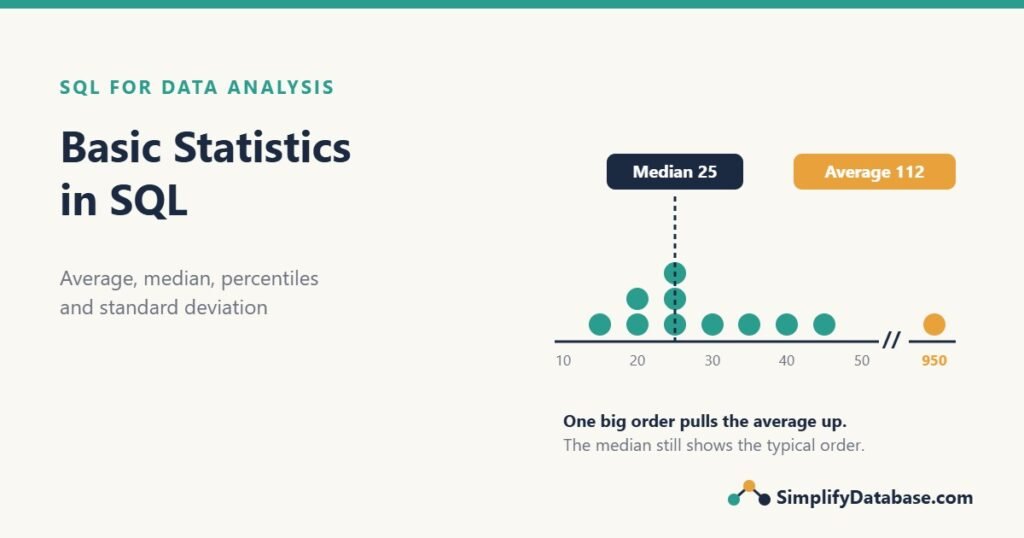
COUNT(*)counts rows (12), butCOUNT(amount)skips the NULL (11).- The average is 111.82, but 10 of the 11 orders are under 50. One bulk order of 950 pulls the average far above what a typical customer spends.
If these functions are new to you, start with SQL GROUP BY and Aggregate Functions Explained Simply.
Trap 1: AVG ignores NULLs
AVG(amount) divides by 11, not 12, because the unpriced order is skipped. Usually that’s what you want: an unknown value shouldn’t count as zero.
If a NULL really means zero (for example, a day with no sales), say so explicitly:
SELECT AVG(COALESCE(amount, 0)) AS average_with_zero
FROM orders;
That gives 102.50 (1230 / 12). Neither answer is wrong, but they answer different questions, so decide which one you mean. See NULL in SQL Explained Simply for more NULL behavior.
Trap 2: the average of integers in SQL Server
The items column is an INT. In SQL Server, the average of integers is also an integer, so the decimals are cut off:
-- SQL Server
SELECT AVG(items)           AS avg_int,      -- 4
       AVG(items * 1.0)     AS avg_decimal,  -- 4.833333
       AVG(CAST(items AS DECIMAL(10,2))) AS avg_cast  -- 4.833333
FROM orders;
The real average is 58 / 12 = 4.83, but AVG(items) returns 4, with no warning. Multiply by 1.0 or CAST to a decimal first. MySQL and PostgreSQL return decimals for AVG on integers, so this trap is specific to SQL Server (see SQL Data Types Explained Simply).
The median: the middle value
The median is the value in the middle when you sort the numbers. Half the orders are below it and half are above. Our sorted amounts have 11 values, so the median is the 6th one: 25.
Compare that with the average of 111.82. The median describes the typical order much better, because one extreme value can’t drag it around. That’s why house prices and salaries are usually reported as medians.
Median in SQL Server
SQL Server calculates the median with PERCENTILE_CONT(0.5). It’s a window function, so it needs OVER(), and it returns the value on every row. Add DISTINCT (or TOP (1)) to get one row:
-- SQL Server (also PostgreSQL without OVER, and MariaDB)
SELECT DISTINCT
       PERCENTILE_CONT(0.5) WITHIN GROUP (ORDER BY amount) OVER () AS median
FROM orders;
Result: 25. NULLs are ignored, just like AVG.
To get the median for each city, put the city in PARTITION BY:
SELECT DISTINCT city,
       PERCENTILE_CONT(0.5) WITHIN GROUP (ORDER BY amount)
           OVER (PARTITION BY city) AS median_amount
FROM orders;| city | median_amount |
|---|---|
| Manama | 25 |
| Muharraq | 25 |
| Riffa | 40 |
Muharraq’s average is 331.67 because of the bulk order, but its median is 25, the same as Manama. The median tells you customers in both cities spend about the same. PARTITION BY is explained in SQL Window Functions Explained Simply.
Median in MySQL
MySQL 8 has no PERCENTILE_CONT. Instead, number the rows with ROW_NUMBER() and take the middle one (or the average of the two middle ones when the count is even):
-- MySQL 8 (works in SQL Server too)
WITH ranked AS (
    SELECT amount,
           ROW_NUMBER() OVER (ORDER BY amount) AS rn,
           COUNT(*) OVER ()                    AS n
    FROM orders
    WHERE amount IS NOT NULL
)
SELECT AVG(amount) AS median
FROM ranked
WHERE rn IN (FLOOR((n + 1) / 2), FLOOR((n + 2) / 2));
With 11 rows, both formulas give row 6, so the result is 25. With 10 rows, they give rows 5 and 6, and AVG returns the value halfway between them. Filtering out NULLs first matters, otherwise they’d be counted in n.
Percentiles and quartiles
A percentile is the value below which a given percentage of the data falls. The median is the 50th percentile. Two others you’ll see in every report:
- Quartiles: the 25th percentile (Q1) and 75th percentile (Q3). The middle half of your data sits between them.
- P90 or P95: “90% of orders are below this value”. Often used for response times and delivery times, where the slow tail matters most.
-- SQL Server
SELECT DISTINCT
       PERCENTILE_CONT(0.25) WITHIN GROUP (ORDER BY amount) OVER () AS q1,
       PERCENTILE_CONT(0.50) WITHIN GROUP (ORDER BY amount) OVER () AS median,
       PERCENTILE_CONT(0.75) WITHIN GROUP (ORDER BY amount) OVER () AS q3,
       PERCENTILE_CONT(0.90) WITHIN GROUP (ORDER BY amount) OVER () AS p90
FROM orders;| q1 | median | q3 | p90 |
|---|---|---|---|
| 22.5 | 25 | 37.5 | 45 |
So half of all orders are between 22.50 and 37.50, and 90% are 45 or less.
PERCENTILE_CONT vs PERCENTILE_DISC
PERCENTILE_CONT(continuous) can return a value between two real values. Q1 = 22.5 doesn’t exist in the table; it’s halfway between 20 and 25.PERCENTILE_DISC(discrete) always returns a real value from the table, the first one that reaches the percentile.
Use CONT for amounts and times, DISC when the answer must be an actual value (like a real product price or a whole number of items).
Mode: the most common value
The mode is the value that appears most often. SQL has no MODE() function in SQL Server or MySQL, but GROUP BY does the job:
-- SQL Server
SELECT TOP (1) WITH TIES amount, COUNT(*) AS times
FROM orders
WHERE amount IS NOT NULL
GROUP BY amount
ORDER BY COUNT(*) DESC;

-- MySQL: use LIMIT 1 instead of TOP (1)| amount | times |
|---|---|
| 25.00 | 3 |
WITH TIES returns every value that shares first place, so you’ll see when there’s more than one mode. The mode is most useful for categories (“most popular product”) rather than amounts.
Standard deviation and variance
The average and median tell you the center. Standard deviation tells you how spread out the values are around the average. A small standard deviation means most values are close to the average; a large one means they’re scattered.
-- SQL Server
SELECT AVG(amount)   AS average,
       STDEV(amount) AS std_dev_sample,
       STDEVP(amount) AS std_dev_population,
       VAR(amount)   AS variance_sample
FROM orders;

-- MySQL / MariaDB / PostgreSQL
SELECT AVG(amount)          AS average,
       STDDEV_SAMP(amount)  AS std_dev_sample,
       STDDEV_POP(amount)   AS std_dev_population,
       VAR_SAMP(amount)     AS variance_sample
FROM orders;| average | std_dev_sample | std_dev_population |
|---|---|---|
| 111.82 | 278.14 | 265.20 |
A standard deviation of 278 on orders that are mostly 15-45 is a loud signal that something unusual is in the data. Remove the bulk order and run it again: the average drops to 28.00 and the standard deviation to just 9.49.
Sample or population? Use the sample version (STDEV, STDDEV_SAMP) when your rows are a sample of something bigger, which is the usual case in analysis. Use the population version when your table holds every value there is. Watch out in MySQL: plain STDDEV() and STD() are the population versions, while in SQL Server plain STDEV() is the sample version.
Finding outliers
An outlier is a value far away from the rest. There are two common ways to find them in SQL.
Method 1: z-score
A z-score says how many standard deviations a value is from the average. Values above 3 (or below -3) are usually treated as outliers:
WITH stats AS (
    SELECT AVG(amount) AS avg_amount, STDEV(amount) AS sd   -- STDDEV_SAMP in MySQL
    FROM orders
)
SELECT o.order_id, o.amount,
       ROUND((o.amount - s.avg_amount) / s.sd, 2) AS z_score
FROM orders AS o
CROSS JOIN stats AS s
WHERE o.amount IS NOT NULL
ORDER BY z_score DESC;| order_id | amount | z_score |
|---|---|---|
| 11 | 950.00 | 3.01 |
| 8 | 45.00 | -0.24 |
| 7 | 40.00 | -0.26 |
| … | … | … |
The z-score has a weakness: the outlier itself inflates the average and the standard deviation, which makes it look less extreme. On small tables, an obvious outlier can stay below 3.
Method 2: the IQR rule
The IQR (interquartile range) method uses quartiles, which outliers can’t distort. The IQR is Q3 – Q1. Anything above Q3 + 1.5 × IQR or below Q1 – 1.5 × IQR is an outlier:
-- SQL Server
WITH q AS (
    SELECT DISTINCT
           PERCENTILE_CONT(0.25) WITHIN GROUP (ORDER BY amount) OVER () AS q1,
           PERCENTILE_CONT(0.75) WITHIN GROUP (ORDER BY amount) OVER () AS q3
    FROM orders
)
SELECT o.order_id, o.city, o.amount
FROM orders AS o
CROSS JOIN q
WHERE o.amount > q.q3 + 1.5 * (q.q3 - q.q1)
   OR o.amount < q.q1 - 1.5 * (q.q3 - q.q1);
Here Q1 = 22.5, Q3 = 37.5, so the IQR is 15 and the upper limit is 37.5 + 22.5 = 60. Order 11 (950) is the only outlier.
Finding an outlier doesn’t mean deleting it. The bulk order is real revenue. Report it separately, or show the median next to the average, so readers aren’t misled.
A simple histogram
A histogram groups values into ranges and counts each range. It shows the shape of your data at a glance. Build one with CASE:
SELECT CASE WHEN amount < 20 THEN '0-19'
            WHEN amount < 30 THEN '20-29'
            WHEN amount < 40 THEN '30-39'
            WHEN amount < 50 THEN '40-49'
            ELSE '50+'
       END AS amount_range,
       COUNT(*) AS orders
FROM orders
WHERE amount IS NOT NULL
GROUP BY CASE WHEN amount < 20 THEN '0-19'
              WHEN amount < 30 THEN '20-29'
              WHEN amount < 40 THEN '30-39'
              WHEN amount < 50 THEN '40-49'
              ELSE '50+'
         END
ORDER BY MIN(amount);| amount_range | orders |
|---|---|
| 0-19 | 1 |
| 20-29 | 5 |
| 30-39 | 2 |
| 40-49 | 2 |
| 50+ | 1 |
Most orders fall in the 20-29 range, and one sits alone far to the right. Paste this result into Excel or any chart tool and you have a histogram. For fixed-width buckets, FLOOR(amount / 10) * 10 gives the start of each 10-wide range without writing out every CASE.
Putting it together: a summary per city
A good first look at any dataset is one row per group with all the key numbers:
-- SQL Server
WITH med AS (
    SELECT DISTINCT city,
           PERCENTILE_CONT(0.5) WITHIN GROUP (ORDER BY amount)
               OVER (PARTITION BY city) AS median_amount
    FROM orders
)
SELECT o.city,
       COUNT(o.amount)          AS orders,
       AVG(o.amount)            AS average,
       MAX(m.median_amount)     AS median,
       MIN(o.amount)            AS smallest,
       MAX(o.amount)            AS largest
FROM orders AS o
JOIN med AS m ON m.city = o.city
GROUP BY o.city
ORDER BY o.city;| city | orders | average | median | smallest | largest |
|---|---|---|---|---|---|
| Manama | 5 | 27.00 | 25 | 20.00 | 35.00 |
| Muharraq | 3 | 331.67 | 25 | 20.00 | 950.00 |
| Riffa | 3 | 33.33 | 40 | 15.00 | 45.00 |
When average and median are close (Manama), the data is balanced. When the average is far above the median (Muharraq), a few large values are pulling it up.
Which number should you report?
| Question | Use |
|---|---|
| What does a typical value look like? | Median |
| What’s the total, or the value per order for budgeting? | Average (and sum) |
| How spread out are the values? | Standard deviation or IQR |
| What’s the worst case for most customers? | P90 or P95 |
| What’s the most common choice? | Mode |
| Are there strange values? | IQR rule or z-score |
When in doubt, show both the average and the median. If they’re far apart, that’s a story worth telling.
Practice exercises
Use the orders table above.
1. Calculate the average number of items per order correctly in SQL Server (with decimals).
2. Find the median amount for orders with 2 or more items.
3. Show each order with the difference between its amount and the overall median.
Answers
1.
SELECT AVG(items * 1.0) AS avg_items
FROM orders;
Result: 4.83. Without * 1.0, SQL Server returns 4.
2.
SELECT DISTINCT
       PERCENTILE_CONT(0.5) WITHIN GROUP (ORDER BY amount) OVER () AS median
FROM orders
WHERE items >= 2;
The amounts are 25, 25, 30, 35, 40, 45 and 950, so the median is 35.
3.
SELECT order_id, amount,
       amount - PERCENTILE_CONT(0.5) WITHIN GROUP (ORDER BY amount) OVER () AS diff_from_median
FROM orders
WHERE amount IS NOT NULL
ORDER BY diff_from_median DESC;
Order 11 is 925 above the median; order 6 is 10 below it. Because PERCENTILE_CONT is a window function, you can use it next to normal columns without GROUP BY.
Summary
COUNT,SUM,AVG,MINandMAXgive the basic picture.AVGignores NULLs.- In SQL Server,
AVGon integers drops the decimals. Multiply by1.0first. - The median (
PERCENTILE_CONT(0.5)) is the better “typical value” when a few large values exist. MySQL needs theROW_NUMBERmethod. - Quartiles and P90 show where most of your data sits.
- Standard deviation measures spread. Know whether your function is the sample or population version.
- Find outliers with the IQR rule or z-scores, and report them instead of deleting them.
This is part 2 of our SQL for Data Analysis series. Part 1 covered data cleaning in SQL, which you should always do before calculating statistics. Next up: funnel analysis, to find where users drop off.
Related articles
- Data Cleaning in SQL: fix blanks, text numbers and duplicates before you calculate anything.
- SQL Window Functions Explained Simply: OVER, PARTITION BY and ROW_NUMBER, used for medians above.
- SQL GROUP BY and Aggregate Functions Explained Simply: the basics behind every summary query.
- Running Totals in SQL Server: moving averages and cumulative sums with window functions.