
Normalization is one of those words that makes database design sound harder than it is. Strip away the jargon and it’s a simple habit: store each fact in one place only.
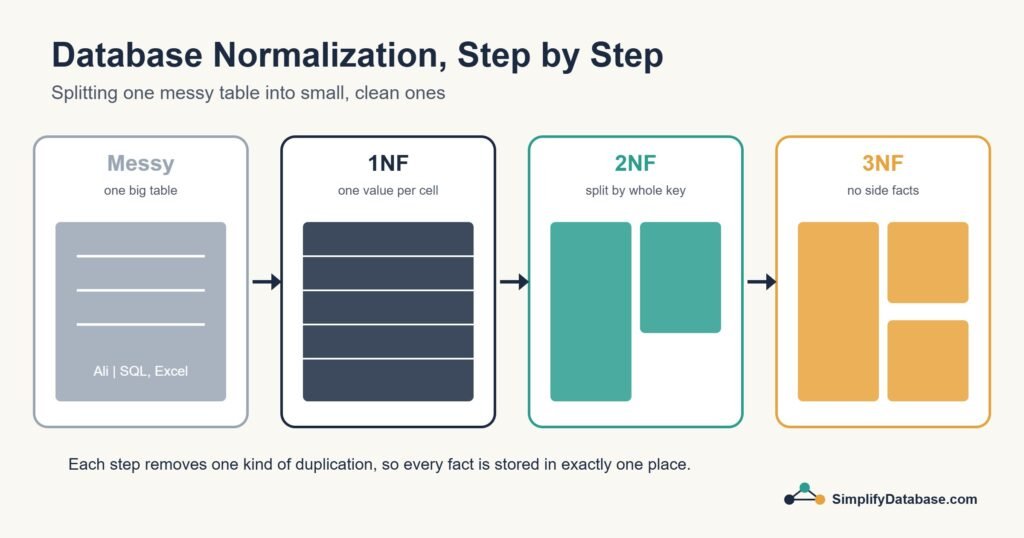
In this guide we’ll take one badly designed table and fix it step by step, through first, second and third normal form (1NF, 2NF and 3NF). You don’t need to memorise formal definitions. If you can follow the example, you understand normalization.
Why Duplicated Data Causes Problems
Imagine a small training centre that tracks course enrolments in a spreadsheet, and someone imports it straight into a database:
| student_id | student_name | student_phone | courses | teacher | teacher_phone |
|---|---|---|---|---|---|
| 1 | Ali | 3300 1111 | SQL Basics, Excel | Mona, Karim | 3911 2222, 3922 3333 |
| 2 | Noor | 3300 4444 | SQL Basics | Mona | 3911 2222 |
| 3 | Hassan | 3300 5555 | Excel, Python | Karim, Rami | 3922 3333, 3933 6666 |
It looks fine at first. Then real life happens:
- Update problem: Mona changes her phone number. You have to find and fix it in every row she appears in. Miss one and your data now disagrees with itself.
- Insert problem: You hire a new teacher who has no students yet. There’s nowhere to put her, because every row needs a student.
- Delete problem: Noor leaves and you delete her row. If she was the only student in a course, you’ve just lost the record that the course existed.
Normalization exists to remove these three problems, which are usually called update, insert and delete anomalies.
First Normal Form (1NF): One Value per Cell
The rule for 1NF is that every cell holds a single value, and there are no repeating groups of columns like course1, course2, course3.
Our table breaks this rule. The courses cell for Ali holds two courses. You can’t easily ask “who is taking Excel?” without messy text searches.
The fix is to give each student-course pair its own row:
| student_id | student_name | student_phone | course | teacher | teacher_phone |
|---|---|---|---|---|---|
| 1 | Ali | 3300 1111 | SQL Basics | Mona | 3911 2222 |
| 1 | Ali | 3300 1111 | Excel | Karim | 3922 3333 |
| 2 | Noor | 3300 4444 | SQL Basics | Mona | 3911 2222 |
| 3 | Hassan | 3300 5555 | Excel | Karim | 3922 3333 |
| 3 | Hassan | 3300 5555 | Python | Rami | 3933 6666 |
Now every cell is simple and searchable. The primary key for this table is the combination of student_id and course. But look how much is repeated. Ali’s phone appears twice and Mona’s appears twice. We’ve fixed one problem and made the duplication worse. That’s normal. The next steps deal with it.
Second Normal Form (2NF): Depend on the Whole Key
A table is in 2NF when it’s in 1NF and every non-key column depends on the whole primary key, not just part of it.
Our key is (student_id, course). Ask yourself about each column:
- Does
student_namedepend on the student and the course? No, only on the student. - Does
teacherdepend on both? No, only on the course (in this centre, each course has one teacher).
When a column only depends on part of the key, it belongs in its own table. So we split:
students
| student_id | student_name | student_phone |
|---|---|---|
| 1 | Ali | 3300 1111 |
| 2 | Noor | 3300 4444 |
| 3 | Hassan | 3300 5555 |
courses
| course | teacher | teacher_phone |
|---|---|---|
| SQL Basics | Mona | 3911 2222 |
| Excel | Karim | 3922 3333 |
| Python | Rami | 3933 6666 |
enrollments
| student_id | course |
|---|---|
| 1 | SQL Basics |
| 1 | Excel |
| 2 | SQL Basics |
| 3 | Excel |
| 3 | Python |
Each student’s phone is now stored once. Each course is stored once. The enrollments table just links the two together.
Third Normal Form (3NF): No Facts About Other Facts
A table is in 3NF when it’s in 2NF and no non-key column depends on another non-key column. People sometimes call this removing transitive dependencies.
Look at the courses table. teacher_phone isn’t really a fact about the course. It’s a fact about the teacher. If Karim taught three courses, his phone would be repeated three times, and we’re back to the update problem.
So teachers get their own table:
teachers
| teacher_id | teacher_name | teacher_phone |
|---|---|---|
| 10 | Mona | 3911 2222 |
| 11 | Karim | 3922 3333 |
| 12 | Rami | 3933 6666 |
courses
| course_id | course_name | teacher_id |
|---|---|---|
| 100 | SQL Basics | 10 |
| 101 | Excel | 11 |
| 102 | Python | 12 |
We also swapped the course name for a proper course_id. Names change and ids don’t. The teacher_id in courses is a foreign key. If that idea is new to you, read Primary Keys vs. Foreign Keys Explained first.
Our final design has four small tables: students, teachers, courses and enrollments. When Mona changes her number, you update one row. When a new teacher joins, you add her to teachers without needing a student. When Noor leaves, the course still exists.
A Simple Way to Remember It
There’s an old line database people like to quote: every column should depend on “the key, the whole key, and nothing but the key.”
| Normal form | The rule in plain English | What it fixes |
|---|---|---|
| 1NF | One value per cell, no repeating columns | Lists stuffed into cells |
| 2NF | Columns depend on the whole key | Data that only belongs to part of a composite key |
| 3NF | Columns depend on nothing but the key | Facts about other columns (like a teacher’s phone in a course table) |
There are higher normal forms too (BCNF, 4NF, 5NF), but for most business applications, getting to 3NF is the sensible target.
Getting the Data Back Together
A fair question at this point: if the data is split into four tables, how do I see it all at once? With a JOIN:
SELECT s.student_name, c.course_name, t.teacher_name, t.teacher_phone
FROM enrollments e
JOIN students s ON s.student_id = e.student_id
JOIN courses  c ON c.course_id  = e.course_id
JOIN teachers t ON t.teacher_id = c.teacher_id
ORDER BY s.student_name;
This rebuilds the original wide view whenever you need it, but the data underneath is stored cleanly. See SQL JOINs Explained Simply if joins are still new to you.
When Not to Normalize (Too Much)
Normalization is the right default for systems where data is entered and changed all the time, like accounting, stock control or HR. But it isn’t a religion.
- Reporting and analytics databases are often deliberately denormalized so reports need fewer joins and run faster.
- Historical snapshots are sometimes meant to be copies. An invoice should keep the price the customer paid, even if the product price changes later.
- Splitting too far (a separate table for every tiny attribute) makes queries painful without any real benefit.
The rule I follow: normalize first, then denormalize on purpose only when you have a specific, measured reason.
Conclusion
Normalization comes down to one idea: every fact should live in exactly one place. 1NF makes each cell hold a single value, 2NF moves columns that only depend on part of the key, and 3NF moves facts that really belong to something else.
Next time you design a table, look for anything you’d have to update in more than one row. That’s usually a sign it belongs in its own table.