
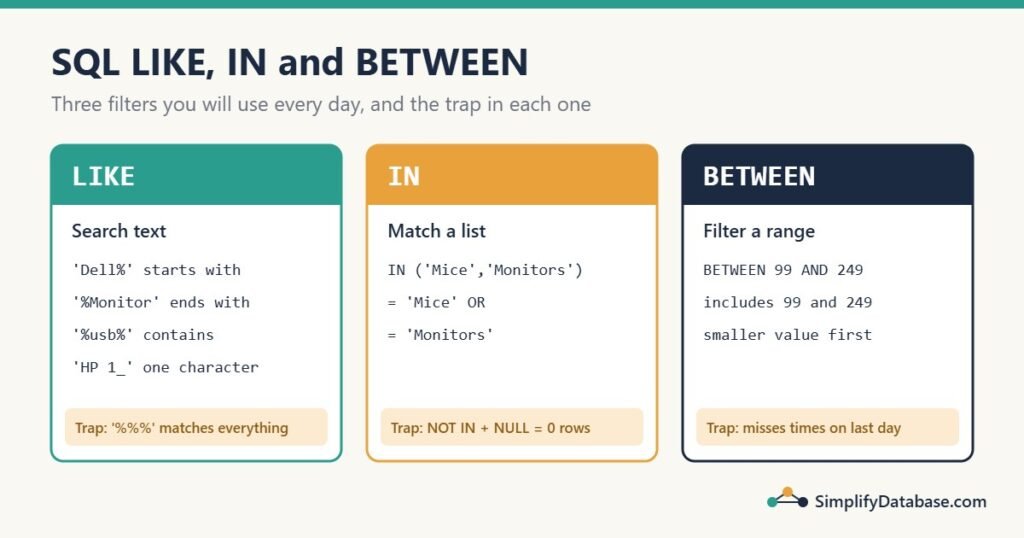
Once you know WHERE with =, > and <, you’ll quickly want more: names that start with “Dell”, products in these three categories, orders between two dates. SQL has three short operators for exactly these jobs: LIKE, IN and BETWEEN.
They look simple, and they are. But each one has a trap that quietly returns the wrong rows. This guide covers the normal use and the trap for each, in SQL Server and MySQL.
All examples use this small Products table:
| ProductID | ProductName | Category | Price | AddedOn |
|---|---|---|---|---|
| 1 | Dell XPS 13 | Laptops | 1299.00 | 2026-03-02 09:15 |
| 2 | Dell Inspiron 15 | Laptops | 649.00 | 2026-03-15 14:30 |
| 3 | HP Pavilion 14 | Laptops | 579.00 | 2026-03-31 16:45 |
| 4 | Logitech MX Master 3S | Mice | 99.00 | 2026-04-01 00:00 |
| 5 | Dell 24″ Monitor | Monitors | 189.00 | 2026-04-10 11:00 |
| 6 | Samsung 27″ Monitor | Monitors | 249.00 | NULL |
| 7 | USB-C Hub 7-in-1 | Accessories | 39.00 | 2026-02-20 10:00 |
| 8 | Laptop Stand 100% Aluminium | Accessories | 45.00 | 2026-03-31 08:00 |
1. LIKE: search inside text
LIKE compares text against a pattern. The pattern uses two wildcards:
| Wildcard | Means | Example | Matches |
|---|---|---|---|
% | Any number of characters (even zero) | 'Dell%' | Dell XPS 13, Dell 24″ Monitor |
_ | Exactly one character | 'HP Pavilion 1_' | HP Pavilion 14 (but not HP Pavilion 140) |
Starts with, ends with, contains
-- Starts with "Dell"
SELECT ProductName FROM Products WHERE ProductName LIKE 'Dell%';
-- Dell XPS 13, Dell Inspiron 15, Dell 24" Monitor

-- Ends with "Monitor"
SELECT ProductName FROM Products WHERE ProductName LIKE '%Monitor';

-- Contains "monitor" anywhere
SELECT ProductName FROM Products WHERE ProductName LIKE '%monitor%';
-- Dell 24" Monitor, Samsung 27" Monitor
Notice the last query found “Monitor” with a capital M even though the pattern used lower case. That’s because the default settings in both SQL Server and MySQL are case-insensitive. This depends on the column’s collation, so a case-sensitive database will behave differently. (PostgreSQL is case-sensitive and uses ILIKE for case-insensitive searches.)
NOT LIKE
SELECT ProductName FROM Products WHERE ProductName NOT LIKE 'Dell%';This returns every product whose name does not start with “Dell”. Rows where ProductName is NULL are not returned by either LIKE or NOT LIKE, because comparing with NULL gives “unknown”. (More on that in NULL in SQL Explained Simply.)
Trap: searching for a real % or _
What if you want the products whose name contains a real percent sign? This looks right, but it isn’t:
-- WRONG: '%%%' means "anything, anything, anything" and matches every row
SELECT ProductName FROM Products WHERE ProductName LIKE '%%%';
You must escape the wildcard so SQL treats it as a normal character. The ESCAPE clause works in both SQL Server and MySQL:
-- Pick any character as the escape character; here it's !
SELECT ProductName FROM Products WHERE ProductName LIKE '%100!%%' ESCAPE '!';
-- Laptop Stand 100% Aluminium

-- SQL Server also lets you put the wildcard in square brackets
SELECT ProductName FROM Products WHERE ProductName LIKE '%100[%]%';
The underscore has the same problem. LIKE '%_%' matches every non-empty value, so a column of codes like INV_001 needs LIKE '%!_%' ESCAPE '!'.
Trap: a leading % is slow on big tables
LIKE 'Dell%' can use an index on ProductName, because the database knows where names starting with “Dell” begin, just like finding a word in a dictionary. LIKE '%Dell%' can’t: the text could be anywhere, so the database reads every row. On 8 rows you won’t notice. On 5 million rows you will. See Index Seek vs Index Scan for why.
2. IN: match any value in a list
IN is a short way to write several OR conditions on the same column:
-- Long way
SELECT ProductName, Category FROM Products
WHERE Category = 'Mice' OR Category = 'Monitors';

-- Same result, shorter and easier to read
SELECT ProductName, Category FROM Products
WHERE Category IN ('Mice', 'Monitors');
-- Logitech MX Master 3S, Dell 24" Monitor, Samsung 27" Monitor
NOT IN does the opposite:
SELECT ProductName FROM Products
WHERE Category NOT IN ('Laptops', 'Accessories');
IN with a subquery
The list can also come from another query. For example, all products that appear in a Discontinued table:
SELECT ProductName FROM Products
WHERE ProductID IN (SELECT ProductID FROM Discontinued);
Trap: NOT IN with a NULL returns nothing
This is one of the most famous SQL bugs. Suppose Discontinued contains two rows: 7 and NULL. You want the products that are still active:
SELECT COUNT(*) FROM Products
WHERE ProductID NOT IN (SELECT ProductID FROM Discontinued);
-- 0  (!)
Zero rows, not seven. Here’s why. NOT IN (7, NULL) means ProductID <> 7 AND ProductID <> NULL. Any comparison with NULL is “unknown”, so the whole condition is never true, and no rows come back.
The safe fix is NOT EXISTS, which handles NULL correctly:
SELECT COUNT(*) FROM Products p
WHERE NOT EXISTS (SELECT 1 FROM Discontinued d WHERE d.ProductID = p.ProductID);
-- 7
Rule of thumb: use IN freely, but when the list comes from a subquery, prefer NOT EXISTS over NOT IN. Or add WHERE ProductID IS NOT NULL inside the subquery.
3. BETWEEN: filter a range
BETWEEN keeps the values inside a range, and it includes both ends:
SELECT ProductName, Price FROM Products
WHERE Price BETWEEN 99 AND 249;
-- Logitech MX Master 3S  99.00
-- Dell 24" Monitor      189.00
-- Samsung 27" Monitor   249.00
BETWEEN 99 AND 249 is exactly the same as Price >= 99 AND Price <= 249. Both 99 and 249 are included.
Trap: the order matters
The smaller value must come first. BETWEEN 249 AND 99 doesn’t give an error. It just quietly returns 0 rows, because no price is both 249 or more and 99 or less.
Trap: BETWEEN with dates and times
This is the mistake that hides real data in reports. You want everything added in March:
-- Looks right, but misses rows
SELECT ProductName, AddedOn FROM Products
WHERE AddedOn BETWEEN '2026-03-01' AND '2026-03-31';
-- Dell XPS 13, Dell Inspiron 15  (only 2 rows)
Two products added on March 31 are missing. '2026-03-31' means March 31 at midnight (00:00:00), so anything later that day, like 08:00 or 16:45, is outside the range.
The safe pattern works for every date and time type: greater than or equal to the first day, and less than the day after the last day.
SELECT ProductName, AddedOn FROM Products
WHERE AddedOn >= '2026-03-01' AND AddedOn < '2026-04-01';
-- 4 rows, including both March 31 products
You never need to know whether March has 30 or 31 days, or how precise the time column is. More date patterns are in SQL Date Functions Explained Simply.
BETWEEN with text
BETWEEN works on text too, in alphabetical order. But it’s rarely what you want:
SELECT ProductName FROM Products WHERE ProductName BETWEEN 'D' AND 'H';
-- Dell XPS 13, Dell Inspiron 15, Dell 24" Monitor
“HP Pavilion” is not included, because “HP Pavilion” comes after the single letter “H” in alphabetical order. If you mean “names starting with D to H”, use LIKE or LEFT(ProductName, 1) BETWEEN 'D' AND 'H'.
Putting them together
The three operators combine naturally with AND, OR and ORDER BY:
-- Dell laptops and monitors between 100 and 1,000, most expensive first
SELECT ProductName, Price
FROM Products
WHERE Category IN ('Laptops', 'Monitors')
  AND ProductName LIKE 'Dell%'
  AND Price BETWEEN 100 AND 1000
ORDER BY Price DESC;
-- Dell Inspiron 15   649.00
-- Dell 24" Monitor   189.00
Cheat sheet
| You want | Write | Watch out for |
|---|---|---|
| Text starts with X | LIKE 'X%' | Case sensitivity depends on collation |
| Text contains X | LIKE '%X%' | Can’t use an index: slow on big tables |
| A real % or _ | LIKE '%!%%' ESCAPE '!' | Without escaping, it matches everything |
| One of several values | IN ('a', 'b', 'c') | |
| Not in a subquery’s results | NOT EXISTS (...) | NOT IN returns nothing if the list has a NULL |
| A number range | BETWEEN 10 AND 20 | Both ends included; smaller value first |
| A date range | >= '2026-03-01' AND < '2026-04-01' | BETWEEN misses times on the last day |
Practice exercises
Try these on the Products table before you look at the answers.
- Find all products whose name contains a double quote (
"). - Find all products in the Laptops or Mice categories that cost less than 600.
- Find all products added in the first quarter of 2026 (January to March).
Answers:
-- 1
SELECT ProductName FROM Products WHERE ProductName LIKE '%"%';

-- 2
SELECT ProductName FROM Products
WHERE Category IN ('Laptops', 'Mice') AND Price < 600;

-- 3
SELECT ProductName FROM Products
WHERE AddedOn >= '2026-01-01' AND AddedOn < '2026-04-01';
Summary
LIKEsearches text with%(any characters) and_(one character). Escape them to search for the real characters.INreplaces a chain ofORconditions. PreferNOT EXISTSoverNOT INwith subqueries, because of NULL.BETWEENincludes both ends. For dates with times, use>=and<instead.
Related articles
- SQL WHERE, ORDER BY and LIMIT Explained Simply: the basics these operators build on.
- SQL String Functions Explained Simply: clean and split text before you search it.
- SQL Subqueries vs CTEs Explained Simply: more on queries inside
INandEXISTS. - How to Learn SQL: A Step-by-Step Roadmap: where this topic fits in the bigger picture.