
Have you ever written the same long query with three JOINs for the fifth time in a week and thought “there must be a better way”? There is. You can save that query in the database, give it a name, and from then on use it as if it were a table. That’s a view.
Views are one of those features beginners often skip, but they make databases much easier to work with, especially when several people or applications use the same data.
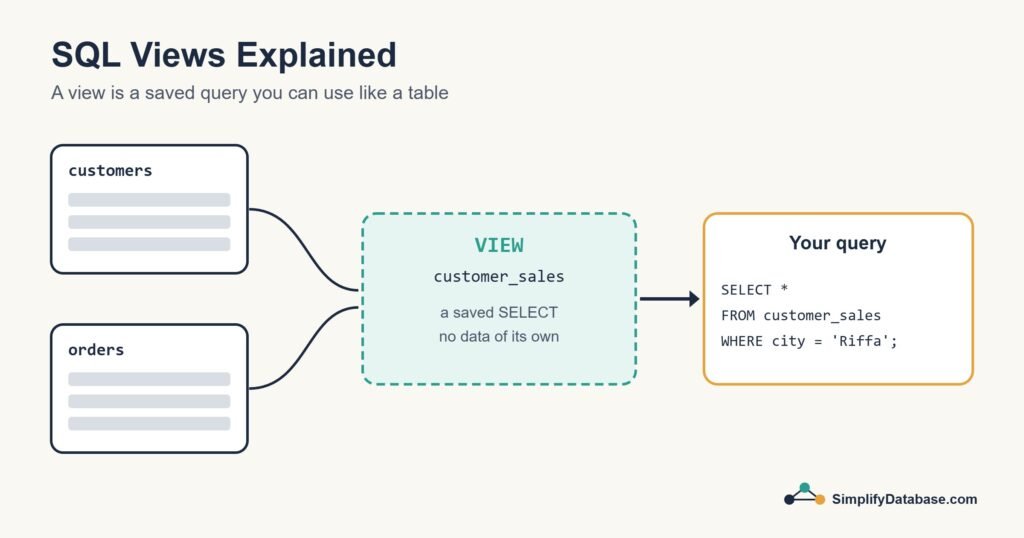
What Is a View?
A view is a stored SELECT statement with a name. It looks and behaves like a table when you query it, but it usually holds no data of its own. Every time you select from a view, the database runs the query behind it and returns fresh results from the real tables.
A good way to picture it is a window. The view doesn’t hold the furniture. It just shows you a particular part of the room.
Creating Your First View
Say you keep writing this query to see each customer’s total sales:
SELECT c.customer_id, c.name, c.city,
       COUNT(o.order_id)  AS order_count,
       SUM(o.amount)      AS total_spent
FROM customers c
JOIN orders o ON o.customer_id = c.customer_id
GROUP BY c.customer_id, c.name, c.city;
Turn it into a view by putting CREATE VIEW ... AS in front:
CREATE VIEW customer_sales AS
SELECT c.customer_id, c.name, c.city,
       COUNT(o.order_id)  AS order_count,
       SUM(o.amount)      AS total_spent
FROM customers c
JOIN orders o ON o.customer_id = c.customer_id
GROUP BY c.customer_id, c.name, c.city;
Now anyone can get the same result with a short, readable query, and add their own filters and sorting on top:
SELECT name, total_spent
FROM customer_sales
WHERE city = 'Riffa'
ORDER BY total_spent DESC;
If you’re new to grouping, the COUNT and SUM parts are explained in GROUP BY & Aggregate Functions.
Why Use Views?
1. Simpler queries
Complex joins and calculations are written once, inside the view. Everyone else just selects from it. This is especially useful for report writers and analysts who don’t need to know how the tables are linked.
2. One place to change the logic
If the definition of “total spent” changes, for example to exclude cancelled orders, you update the view once. Every report that uses it picks up the change straight away.
3. Security
You can give someone permission to read a view without giving them access to the underlying tables. For example, an employee_directory view could show names and phone numbers but leave out salaries.
CREATE VIEW employee_directory AS
SELECT employee_id, full_name, department, phone
FROM employees;

-- Give the reception team access to the view only
GRANT SELECT ON employee_directory TO reception_role;
4. A stable layer for applications
Applications and reports can point at views instead of tables. If you later split or rename tables, you can adjust the view so the application never notices. I use this a lot in reporting systems: a layer of views sits between the raw accounting tables and the reports, so the reports stay simple and stable.
Changing and Removing Views
| Task | SQL Server | MySQL | PostgreSQL |
|---|---|---|---|
| Change a view | CREATE OR ALTER VIEW or ALTER VIEW | CREATE OR REPLACE VIEW | CREATE OR REPLACE VIEW |
| Remove a view | DROP VIEW name | DROP VIEW name | DROP VIEW name |
Dropping a view only removes the saved query. The data in the underlying tables is untouched.
Can You Update Data Through a View?
Sometimes. If a view is a simple SELECT from a single table, with no grouping, DISTINCT or calculated columns, most databases let you run INSERT, UPDATE and DELETE through it, and the change goes to the real table.
Our customer_sales view uses GROUP BY and SUM, so it’s read-only. That makes sense: there’s no single row to change when you edit a total. In practice, I treat views as read-only and make changes directly on the tables.
Views and Performance
A common misunderstanding is that views make queries faster. A normal view doesn’t store results, so it runs at the same speed as the query inside it. A slow query stays slow when you wrap it in a view.
If you need stored results, look at materialized views (PostgreSQL and Oracle) or indexed views (SQL Server). They save the result on disk and are much faster to read, but they take up space and need refreshing or maintaining when the data changes. For ordinary views, good indexes on the underlying tables are what make the difference.
| Regular view | Materialized / indexed view | |
|---|---|---|
| Stores data? | No, just the query | Yes, the results are saved |
| Always up to date? | Yes | Needs a refresh or extra maintenance |
| Speed | Same as the underlying query | Fast to read |
| Good for | Simplifying and securing access | Heavy reports and dashboards |
Tips for Working With Views
- Give views clear names. Some teams use a prefix like
vw_so they’re easy to tell apart from tables. - Avoid
SELECT *inside a view. List the columns, so adding a column to the table doesn’t unexpectedly change the view. - Don’t stack views too deeply. A view built on a view built on another view gets hard to understand and hard for the database to optimise.
- Document what each view is for, especially in shared databases.
Conclusion
A view is a saved query with a name. It keeps complex logic in one place, makes everyday queries shorter, and lets you control exactly what people can see. It doesn’t store data or speed things up by itself, but it makes a database far easier to live with.
Try it: take a query you’ve written more than twice and turn it into a view. Once that feels natural, the next step is stored procedures, which save whole blocks of logic rather than just a single query.